Block 1 - Telegram Trigger
- Type / Role
- n8n-nodes-base.telegramTrigger - telegramTrigger
- Config choices
- Version 1.2


 Early Deal
This workflow is provided as-is. Please review and test before using in production.
This workflow contains community nodes that are only compatible with the self hosted version of n8n. Seedance Video Marketing AI Agent Description: This AI powered marketing automation workflow ...
n8n-nodes-base.telegramtrigger, n8n-nodes-base.perplexity, @n8n/n8n-nodes-langchain.openai, n8n-nodes-base.httprequest, n8n-nodes-base.telegram, n8n-nodes-base.if, n8n-nodes-base.stickynote, n8n-nodes-base.wait
This workflow is cataloged by N8N Workflows and links back to its original n8n.io source page by Automate With Marc.
Original n8n.io sourceThis workflow contains community nodes that are only compatible with the self-hosted version of n8n.
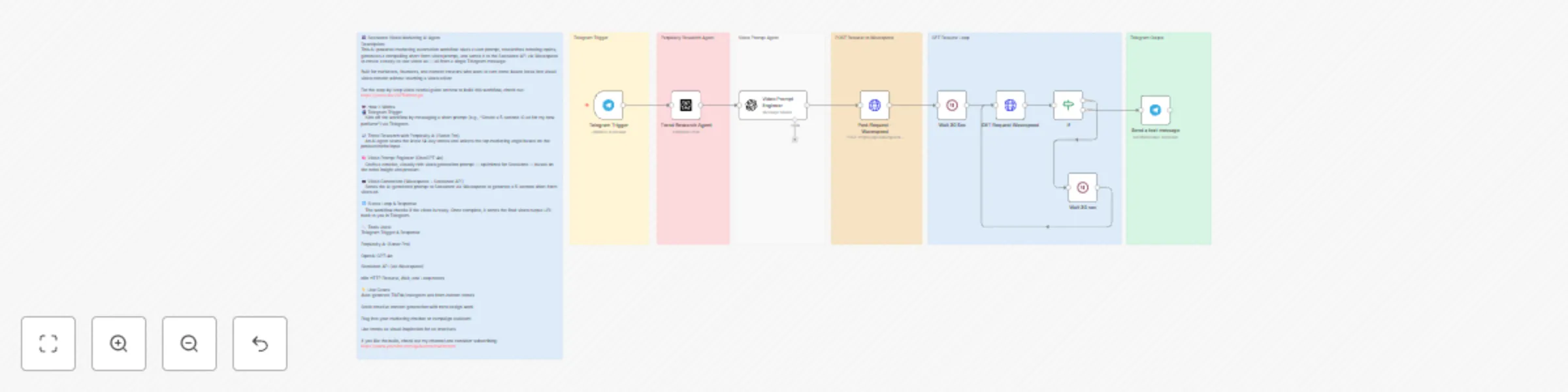
🎬 Seedance Video Marketing AI Agent Description: This AI-powered marketing automation workflow takes a user prompt, researches trending topics, generates a compelling short-form video prompt, and sends it to the Seedance API via Wavespeed to create a ready-to-use video ad — all from a single Telegram message.
Built for marketers, founders, and content creators who want to turn trend-based ideas into visual video content without touching a video editor.
For the step-by-step video tutorial guide on how to build this workflow, check out: https://youtu.be/2oZ5NhosKgo
🤖 How It Works: 📲 Telegram Trigger Kick off the workflow by messaging a short prompt (e.g., “Create a 5-second IG ad for my new perfume”) via Telegram.
📈 Trend Research with Perplexity AI (Sonar Pro) An AI agent scans the latest 14-day trends and selects the top marketing angle based on the product/niche input.
🧠 Video Prompt Engineer (ChatGPT) Crafts a concise, visually rich video generation prompt — optimized for Seedance — based on the trend insight and product.
🎥 Video Generation (Wavespeed + Seedance API) Sends the AI-generated prompt to Seedance via Wavespeed to generate a 5-second short-form video ad.
🔁 Status Loop & Response The workflow checks if the video is ready. Once complete, it sends the final video output URL back to you in Telegram.
🔧 Tools Used: Telegram Trigger & Response
Perplexity AI (Sonar Pro)
OpenAI
Seedance API (via Wavespeed)
n8n HTTP Request, Wait, and Loop nodes
💡 Use Cases: Auto-generate TikTok/Instagram ads from current trends
Scale creative content generation with zero design work
Plug into your marketing chatbot or campaign assistant
Use trends as visual inspiration for ad creatives
If you like the build, check out my channel and consider subscribing: https://www.youtube.com/@Automatewithmarc
This catalog entry is organized from the workflow JSON. The node-level section below shows the executable blocks available for review before importing the template.
| Workflow | Generate trend-based marketing videos with Seedance AI, Perplexity, and GPT |
|---|---|
| Complexity | advanced |
| Nodes | 16 |
| Categories | Content Creation, Multimodal AI |
| Author | Automate With Marc |
| Published | 04 Jul 2025 |
Use the JSON export at /data/workflows/5674/5674.json as the source template for this automation.
Open n8n, import the downloaded JSON, and review each node before activating the workflow.
Replace placeholder credentials, API keys, webhook URLs, account IDs, and environment-specific values with your own settings.
Run the workflow manually or in a staging workspace, inspect node output, and confirm downstream systems receive the expected data.
Enable the workflow only after testing, then monitor executions, errors, and rate limits during the first production runs.
Review imported nodes carefully before activation. This catalog entry is intended to help you inspect the workflow structure, understand required services, and find related templates faster.
Node names, credentials, schedules, webhook paths, and external service limits may need adjustment for your workspace.
This workflow contains community nodes that are only compatible with the self hosted version of n8n. Seedance Video Marketing AI Agent Description: This AI powered marketing automation workflow ...
Review the workflow JSON, configure any required credentials in n8n, and test the automation in a safe workspace before using it in production.
Yes. Use the block-by-block analysis and the downloadable JSON to inspect each node, then adjust credentials, prompts, schedules, filters, or destinations for your Content Creation, Multimodal AI use case.