Generate Sora v2 ASMR clips with GPT-5.1, stitch via Cloudinary, and post to Twitter/X

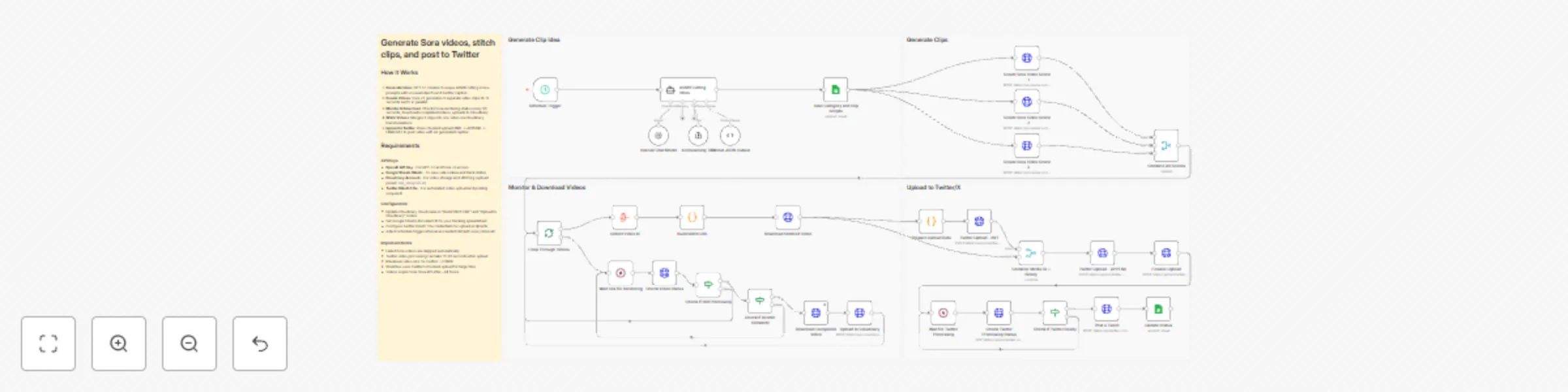
Workflow preview

Workflow preview
100%
Generate Sora v2 ASMR clips with GPT-5.1, stitch via Cloudinary, and post to Twitter/X preview
Open on n8n.io

Important notice

This workflow is provided as-is. Please review and test before using in production.

1. Workflow Overview

Generate Sora videos, stitch clips, and post to Twitter Generate creative ASMR cutting video concepts with GPT 5.1, create high quality video clips using Sora v2, stitch them together with Cloudina...

Best for

  • Content Creation automation workflows
  • Multimodal AI automation workflows
  • advanced n8n builders looking for reusable templates

Tools used

n8n-nodes-base.scheduletrigger, @n8n/n8n-nodes-langchain.lmchatopenai, n8n-nodes-base.httprequest, n8n-nodes-base.wait, @n8n/n8n-nodes-langchain.agent, n8n-nodes-base.stickynote, n8n-nodes-base.googlesheets, n8n-nodes-base.aggregate

Source and attribution

This workflow is cataloged by N8N Workflows and links back to its original n8n.io source page by Sona Labs.

Original n8n.io source

1.1 Workflow description

Title
Generate Sora v2 ASMR clips with GPT-5.1, stitch via Cloudinary, and post to Twitter/X
Workflow name
Generate Sora v2 ASMR clips with GPT-5.1, stitch via Cloudinary, and post to Twitter/X

Generate Sora videos, stitch clips, and post to Twitter

Generate creative ASMR cutting video concepts with GPT-5.1, create high-quality video clips using Sora v2, stitch them together with Cloudinary, and automatically post to Twitter/X—transforming ideas into viral content without manual video editing.

How it works

Step 1: Generate Video Concepts

  • Schedule Trigger activates the workflow automatically
  • GPT-5.1 AI agent generates 3 unique ASMR cutting scene prompts with unusual objects
  • Creates structured video prompts optimized for Sora v2 (frontal camera angle, cutting actions)
  • Generates Twitter-ready captions with relevant hashtags
  • Saves all concepts and scripts to Google Sheets for tracking

Step 2: Create Video Clips with Sora v2

  • Generates 3 separate Sora v2 video clips in parallel (8-12 seconds each)
  • Each clip uses unique prompts from GPT-5.1 output
  • Videos render at 720x1280 resolution (vertical format for social media)
  • System waits 30 seconds for rendering to complete

Step 3: Monitor & Download Videos

  • Loops through all 3 video generation requests
  • Checks Sora API status every 30 seconds until rendering completes
  • Automatically skips failed renders (continues workflow with successful videos)
  • Downloads completed videos from Sora API
  • Uploads each clip to Cloudinary for storage and processing

Step 4: Stitch Videos Together

  • Collects all uploaded Cloudinary video IDs
  • Builds Cloudinary transformation URL to stitch 3 clips into one seamless video
  • Applies Twitter-compatible encoding (H.264 baseline, AAC audio, MP4 format)
  • Downloads the final stitched video

Step 5: Upload to Twitter/X

  • Prepares video file data and calculates total file size
  • Uses Twitter's chunked upload API (INIT → APPEND → FINALIZE)
  • Waits for Twitter's video processing to complete
  • Checks processing status until video is ready
  • Posts tweet with AI-generated caption and attached video
  • Updates Google Sheets status to "Posted"

What you'll get

  • AI-Generated Concepts: Creative ASMR cutting ideas with unusual objects (glass avocados, lava rocks, rainbow soap)
  • Professional Video Clips: Three 8-12 second Sora v2 videos per concept with 720x1280 resolution
  • Seamless Stitching: Single combined video optimized for Twitter/X specifications
  • Engaging Captions: GPT-5.1 generated tweets with hashtags designed for virality
  • Automated Posting: Direct upload to Twitter/X without manual intervention
  • Cloud Backup: All videos stored in Cloudinary with metadata
  • Progress Tracking: Google Sheets integration shows workflow status (In Progress → Posted)
  • Error Handling: Failed Sora renders are automatically skipped

Why use this

  • Save 4+ hours per video: Eliminate scripting, shooting, editing, and posting time
  • Consistent posting schedule: Set it and forget it with the Schedule Trigger
  • Scale content creation: Generate multiple video variations in 20-30 minutes
  • Professional quality: Leverage Sora v2's AI video generation for realistic cutting scenes
  • Optimize for virality: GPT-5.1 creates concepts and captions designed for engagement
  • Reduce creative burnout: AI handles ideation, execution, and distribution
  • No video editing skills needed: Complete automation from concept to post
  • Test multiple concepts: Generate 3 variations per run to see what resonates

Setup instructions

Required accounts and credentials:

  1. OpenAI API Key (GPT-5.1 and Sora v2 access required)

    • Sign up at https://platform.openai.com
    • Ensure your account has Sora v2 API access enabled
    • Generate API key from API Keys section
    • Note: Sora v2 is currently in limited beta
  2. Google Sheets OAuth (for tracking video ideas and status)

    • Free Google account required
    • Create a spreadsheet with columns: Category, Scene 1, Scene 2, Scene 3, Status
    • n8n will request OAuth permissions during setup
  3. Cloudinary Account (for video storage and stitching)

    • Sign up at https://cloudinary.com (free tier available)
    • Note your cloud name from the dashboard
    • Create an upload preset named n8n_integration
    • Enable unsigned uploads for the preset
  4. Twitter OAuth 1.0a Credentials (for automated posting)

    • Apply for Twitter Developer access at https://developer.twitter.com
    • Create a new app in the Developer Portal
    • Generate: API Key, API Secret, Access Token, Access Token Secret
    • Enable "Read and Write" permissions (not just Read)
    • OAuth 1.0a is required for media uploads (OAuth 2.0 won't work)

Configuration steps:

  1. Update OpenAI API Key:

    • Add your OpenAI API key to these nodes:
      • "OpenAI Chat Model" credentials
      • "Create Sora Video Scene - 1" (Authorization header)
      • "Create Sora Video Scene - 2" (Authorization header)
      • "Create Sora Video Scene - 3" (Authorization header)
      • "Check Video Status" (Authorization header)
      • "Download Completed Video" (Authorization header)
    • Replace Bearer API KEY with Bearer YOUR_ACTUAL_API_KEY
  2. Configure Google Sheets:

    • Open "Save Category and Clip Scripts" and "Update Status" nodes
    • Authenticate with your Google account (OAuth 2.0)
    • Select your spreadsheet and sheet name
    • Ensure columns match: Category, Scene 1, Scene 2, Scene 3, Status
    • The workflow will update Status from "In Progress" to "Posted"
  3. Update Cloudinary Settings:

    • In "Upload to Cloudinary" node:
      • Replace {Cloud name here} in the URL with your Cloudinary cloud name
      • Verify upload preset is set to n8n_integration
    • In "Build Stitch URL" node:
      • Open the Code node
      • Replace dph9n4uei on line 1 with your cloud name
      • This builds the video stitching transformation URL
  4. Add Twitter OAuth 1.0a Credentials:

    • Configure OAuth 1.0a in these nodes:
      • "Twitter Upload - INIT"
      • "Twitter Upload - APPEND"
      • "Finalize Upload"
      • "Check Twitter Processing Status"
      • "Post a Tweet"
    • Use the same OAuth 1.0a credential for all nodes
    • Ensure your Twitter app has "Read and Write" permissions
  5. Adjust Schedule Trigger (optional):

    • Default: Runs on every interval
    • Modify in "Schedule Trigger" node to set specific times
    • Recommended: Once per day or every few hours to avoid rate limits
  6. Test the workflow:

    • Click "Execute Workflow" to test manually first
    • Verify GPT-5.1 generates 3 video concepts
    • Check that Sora v2 creates all 3 videos
    • Confirm Cloudinary stitches videos correctly
    • Ensure Twitter post appears with video and caption

Important notes:

  • Sora API Rate Limits: Sora v2 may have rendering quotas. Monitor your usage
  • Video Rendering Time: Each Sora clip takes 2-5 minutes. Total workflow: 15-25 minutes
  • Failed Videos: The workflow automatically skips failed renders and continues
  • Twitter Video Limits: Maximum 512MB per video, MP4 format required
  • Cloudinary Free Tier: 25 credits/month includes video transformations
  • Cost Estimate: ~$1-3 per run (Sora API pricing varies)

Troubleshooting:

  • "Sora API access required": Contact OpenAI to enable Sora v2 API on your account
  • Twitter upload fails: Verify OAuth 1.0a credentials have "Read and Write" permissions
  • Cloudinary upload fails: Check cloud name and ensure upload preset exists
  • Videos don't stitch: Verify all 3 videos uploaded successfully to Cloudinary
  • Google Sheets not updating: Confirm OAuth permissions and sheet column names match

Next steps:

  1. Enable the Schedule Trigger to automate daily/weekly posts
  2. Monitor Google Sheets to track posted content
  3. Adjust GPT-5.1 prompts in "ASMR Cutting Ideas" for different content themes
  4. Experiment with different video durations (8 vs 12 seconds)
  5. Add error notifications using Email or Slack nodes

1.2 Logical Blocks

This catalog entry is organized from the workflow JSON. The node-level section below shows the executable blocks available for review before importing the template.

2. Block-by-Block Analysis

Block 1 - Schedule Trigger

Type / Role
n8n-nodes-base.scheduleTrigger - scheduleTrigger
Config choices
Version 1.2

Block 2 - OpenAI Chat Model

Type / Role
@n8n/n8n-nodes-langchain.lmChatOpenAi - lmChatOpenAi
Config choices
Version 1.2

Block 3 - Check Video Status

Type / Role
n8n-nodes-base.httpRequest - httpRequest
Config choices
Version 4.2

Block 4 - Download Completed Video

Type / Role
n8n-nodes-base.httpRequest - httpRequest
Config choices
Version 4.2

Block 5 - Create Sora Video Scene - 1

Type / Role
n8n-nodes-base.httpRequest - httpRequest
Config choices
Version 4.2

Block 6 - Create Sora Video Scene - 2

Type / Role
n8n-nodes-base.httpRequest - httpRequest
Config choices
Version 4.2

Block 7 - Create Sora Video Scene - 3

Type / Role
n8n-nodes-base.httpRequest - httpRequest
Config choices
Version 4.2

Block 8 - Upload to Cloudinary

Type / Role
n8n-nodes-base.httpRequest - httpRequest
Config choices
Version 4.2

Block 9 - Wait 30s for Rendering

Type / Role
n8n-nodes-base.wait - wait
Config choices
Version 1.1

Block 10 - ASMR Cutting Ideas

Type / Role
@n8n/n8n-nodes-langchain.agent - agent
Config choices
Version 2.1

Block 11 - Sticky Note

Type / Role
n8n-nodes-base.stickyNote - stickyNote
Config choices
Version 1

Block 12 - Save Category and Clip Scripts

Type / Role
n8n-nodes-base.googleSheets - googleSheets
Config choices
Version 4.6

Block 13 - Sticky Note1

Type / Role
n8n-nodes-base.stickyNote - stickyNote
Config choices
Version 1

Block 14 - Collect Video Id

Type / Role
n8n-nodes-base.aggregate - aggregate
Config choices
Version 1

Block 15 - Sticky Note3

Type / Role
n8n-nodes-base.stickyNote - stickyNote
Config choices
Version 1

Block 16 - Sticky Note2

Type / Role
n8n-nodes-base.stickyNote - stickyNote
Config choices
Version 1

Block 17 - Download Stitched Video

Type / Role
n8n-nodes-base.httpRequest - httpRequest
Config choices
Version 4.2

Block 18 - Finalize Upload

Type / Role
n8n-nodes-base.httpRequest - httpRequest
Config choices
Version 4.2

Block 19 - Prepare Upload Data

Type / Role
n8n-nodes-base.code - code
Config choices
Version 2

Block 20 - Twitter Upload - INIT

Type / Role
n8n-nodes-base.httpRequest - httpRequest
Config choices
Version 4.2

Block 21 - Twitter Upload - APPEND

Type / Role
n8n-nodes-base.httpRequest - httpRequest
Config choices
Version 4.2

Block 22 - Post a Tweet

Type / Role
n8n-nodes-base.httpRequest - httpRequest
Config choices
Version 4.2

Block 23 - Format JSON Output

Type / Role
@n8n/n8n-nodes-langchain.outputParserStructured - outputParserStructured
Config choices
Version 1.3

Block 24 - AI Reasoning Tool

Type / Role
@n8n/n8n-nodes-langchain.toolThink - toolThink
Config choices
Version 1

Showing the first 24 of 35 workflow blocks. Download the JSON for the full node graph.

3. Summary Table

Workflow Generate Sora v2 ASMR clips with GPT-5.1, stitch via Cloudinary, and post to Twitter/X
Complexity advanced
Nodes 35
Categories Content Creation, Multimodal AI
Author Sona Labs
Published 08 Jan 2026

4. Reproducing the Workflow from Scratch

  1. 1. Download the workflow JSON

    Use the JSON export at /data/workflows/12590/12590.json as the source template for this automation.

  2. 2. Import the template into n8n

    Open n8n, import the downloaded JSON, and review each node before activating the workflow.

  3. 3. Configure credentials and variables

    Replace placeholder credentials, API keys, webhook URLs, account IDs, and environment-specific values with your own settings.

  4. 4. Test with sample data

    Run the workflow manually or in a staging workspace, inspect node output, and confirm downstream systems receive the expected data.

  5. 5. Activate and monitor

    Enable the workflow only after testing, then monitor executions, errors, and rate limits during the first production runs.

5. General Notes & Resources

Review imported nodes carefully before activation. This catalog entry is intended to help you inspect the workflow structure, understand required services, and find related templates faster.

Node names, credentials, schedules, webhook paths, and external service limits may need adjustment for your workspace.

Frequently asked questions

What does Generate Sora v2 ASMR clips with GPT-5.1, stitch via Cloudinary, and post to Twitter/X do?

Generate Sora videos, stitch clips, and post to Twitter Generate creative ASMR cutting video concepts with GPT 5.1, create high quality video clips using Sora v2, stitch them together with Cloudina...

What do I need before importing this workflow?

Review the workflow JSON, configure any required credentials in n8n, and test the automation in a safe workspace before using it in production.

Can I customize this workflow?

Yes. Use the block-by-block analysis and the downloadable JSON to inspect each node, then adjust credentials, prompts, schedules, filters, or destinations for your Content Creation, Multimodal AI use case.