Generate song lyrics and music from text prompts using OpenAI and Fal.ai Minimax

Workflow preview

Workflow preview
100%
Generate song lyrics and music from text prompts using OpenAI and Fal.ai Minimax preview
Open on n8n.io

Important notice

This workflow is provided as-is. Please review and test before using in production.

1. Workflow Overview

Spark your creativity instantly in any chat—turn a simple prompt like "heartbreak ballad" into original, full length lyrics and a professional AI generated music track, all without leaving your con...

Best for

  • Content Creation automation workflows
  • Multimodal AI automation workflows
  • advanced n8n builders looking for reusable templates

Tools used

@n8n/n8n-nodes-langchain.chattrigger, @n8n/n8n-nodes-langchain.agent, n8n-nodes-base.set, n8n-nodes-base.httprequest, n8n-nodes-base.wait, n8n-nodes-base.switch, @n8n/n8n-nodes-langchain.lmchatopenai, n8n-nodes-base.stickynote

Source and attribution

This workflow is cataloged by N8N Workflows and links back to its original n8n.io source page by Daniel Nkencho.

Original n8n.io source

1.1 Workflow description

Title
Generate song lyrics and music from text prompts using OpenAI and Fal.ai Minimax
Workflow name
Generate song lyrics and music from text prompts using OpenAI and Fal.ai Minimax

Spark your creativity instantly in any chat—turn a simple prompt like "heartbreak ballad" into original, full-length lyrics and a professional AI-generated music track, all without leaving your conversation.

📋 What This Template Does

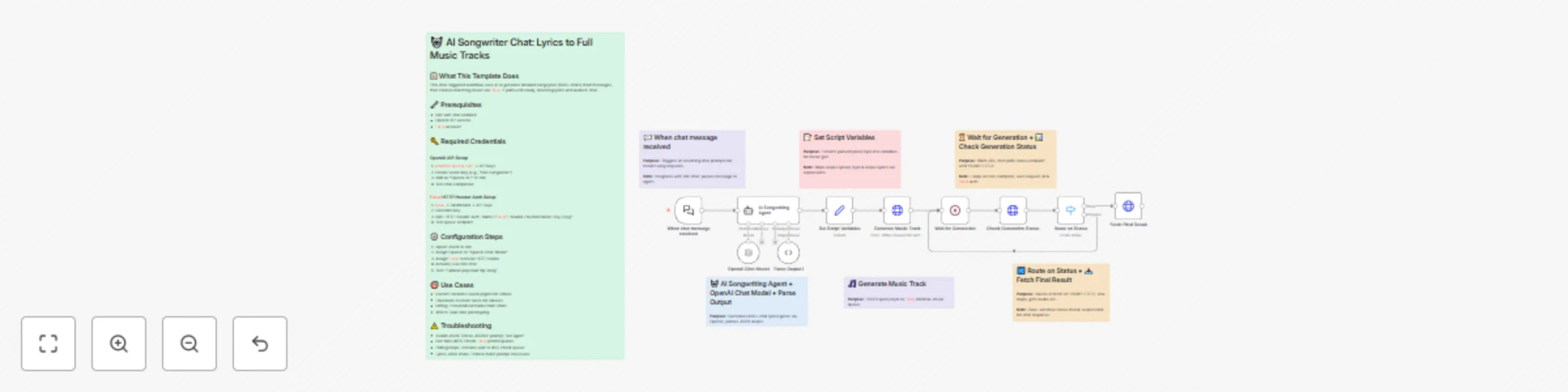
This chat-triggered workflow harnesses AI to generate detailed, genre-matched song lyrics (at least 600 characters) from user messages, then queues them for music synthesis via Fal.ai's minimax-music model. It polls asynchronously until the track is ready, delivering lyrics and audio URL back in chat.

  • Crafts original, structured lyrics with verses, choruses, and bridges using OpenAI
  • Submits to Fal.ai for melody, instrumentation, and vocals aligned to the style
  • Handles long-running generations with smart looping and status checks
  • Returns complete song package (lyrics + audio link) for seamless sharing

🔧 Prerequisites

  • n8n account (self-hosted or cloud with chat integration enabled)
  • OpenAI account with API access for GPT models
  • Fal.ai account for AI music generation

🔑 Required Credentials

OpenAI API Setup

  1. Go to platform.openai.com → API keys (sidebar)
  2. Click "Create new secret key" → Name it (e.g., "n8n Songwriter")
  3. Copy the key and add to n8n as "OpenAI API" credential type
  4. Test by sending a simple chat completion request

Fal.ai HTTP Header Auth Setup

  1. Sign up at fal.ai → Dashboard → API Keys
  2. Generate a new API key → Copy it
  3. In n8n, create "HTTP Header Auth" credential: Name="Fal.ai", Header Name="Authorization", Header Value="Key [Your API Key]"
  4. Test with a simple GET to their queue endpoint (e.g., /status)

⚙️ Configuration Steps

  1. Import the workflow JSON into your n8n instance
  2. Assign OpenAI API credentials to the "OpenAI Chat Model" node
  3. Assign Fal.ai HTTP Header Auth to the "Generate Music Track", "Check Generation Status", and "Fetch Final Result" nodes
  4. Activate the workflow—chat trigger will appear in your n8n chat interface
  5. Test by messaging: "Create an upbeat pop song about road trips"

🎯 Use Cases

  • Content Creators: YouTubers generating custom jingles for videos on the fly, streamlining production from idea to audio export
  • Educators: Music teachers using chat prompts to create era-specific folk tunes for classroom discussions, fostering interactive learning
  • Gift Personalization: Friends crafting anniversary R&B tracks from shared memories via quick chats, delivering emotional audio surprises
  • Artist Brainstorming: Songwriters prototyping hip-hop beats in real-time during sessions, accelerating collaboration and iteration

⚠️ Troubleshooting

  • Invalid JSON from AI Agent: Ensure the system prompt stresses valid JSON; test the agent standalone with a sample query
  • Music Generation Fails (401/403): Verify Fal.ai API key has minimax-music access; check usage quotas in dashboard
  • Status Polling Loops Indefinitely: Bump wait time to 45-60s for complex tracks; inspect fal.ai queue logs for bottlenecks
  • Lyrics Under 600 Characters: Tweak agent prompt to enforce fuller structures like [V1][C][V2][B][C]; verify output length in executions

1.2 Logical Blocks

This catalog entry is organized from the workflow JSON. The node-level section below shows the executable blocks available for review before importing the template.

2. Block-by-Block Analysis

Block 1 - When chat message received

Type / Role
@n8n/n8n-nodes-langchain.chatTrigger - chatTrigger
Config choices
Version 1.3

Block 2 - AI Songwriting Agent

Type / Role
@n8n/n8n-nodes-langchain.agent - agent
Config choices
Version 2.2

Block 3 - Set Script Variables

Type / Role
n8n-nodes-base.set - set
Config choices
Version 3.4

Block 4 - Generate Music Track

Type / Role
n8n-nodes-base.httpRequest - httpRequest
Config choices
Version 4.2

Block 5 - Wait for Generation

Type / Role
n8n-nodes-base.wait - wait
Config choices
Version 1.1

Block 6 - Check Generation Status

Type / Role
n8n-nodes-base.httpRequest - httpRequest
Config choices
Version 4.2

Block 7 - Route on Status

Type / Role
n8n-nodes-base.switch - switch
Config choices
Version 3.2

Block 8 - Fetch Final Result

Type / Role
n8n-nodes-base.httpRequest - httpRequest
Config choices
Version 4.2

Block 9 - OpenAI Chat Model

Type / Role
@n8n/n8n-nodes-langchain.lmChatOpenAi - lmChatOpenAi
Config choices
Version 1.2

Block 10 - Note: Chat Trigger

Type / Role
n8n-nodes-base.stickyNote - stickyNote
Config choices
Version 1

Block 11 - Note: Songwriting Core

Type / Role
n8n-nodes-base.stickyNote - stickyNote
Config choices
Version 1

Block 12 - Note: Variable Setup

Type / Role
n8n-nodes-base.stickyNote - stickyNote
Config choices
Version 1

Block 13 - Note: Music Queue

Type / Role
n8n-nodes-base.stickyNote - stickyNote
Config choices
Version 1

Block 14 - Note: Polling Loop

Type / Role
n8n-nodes-base.stickyNote - stickyNote
Config choices
Version 1

Block 15 - Note: Completion Handler

Type / Role
n8n-nodes-base.stickyNote - stickyNote
Config choices
Version 1

Block 16 - Parse Output1

Type / Role
@n8n/n8n-nodes-langchain.outputParserStructured - outputParserStructured
Config choices
Version 1.3

Block 17 - Overview Note6

Type / Role
n8n-nodes-base.stickyNote - stickyNote
Config choices
Version 1

3. Summary Table

Workflow Generate song lyrics and music from text prompts using OpenAI and Fal.ai Minimax
Complexity advanced
Nodes 17
Categories Content Creation, Multimodal AI
Author Daniel Nkencho
Published 22 Oct 2025

4. Reproducing the Workflow from Scratch

  1. 1. Download the workflow JSON

    Use the JSON export at /data/workflows/10005/10005.json as the source template for this automation.

  2. 2. Import the template into n8n

    Open n8n, import the downloaded JSON, and review each node before activating the workflow.

  3. 3. Configure credentials and variables

    Replace placeholder credentials, API keys, webhook URLs, account IDs, and environment-specific values with your own settings.

  4. 4. Test with sample data

    Run the workflow manually or in a staging workspace, inspect node output, and confirm downstream systems receive the expected data.

  5. 5. Activate and monitor

    Enable the workflow only after testing, then monitor executions, errors, and rate limits during the first production runs.

5. General Notes & Resources

Review imported nodes carefully before activation. This catalog entry is intended to help you inspect the workflow structure, understand required services, and find related templates faster.

Node names, credentials, schedules, webhook paths, and external service limits may need adjustment for your workspace.

Frequently asked questions

What does Generate song lyrics and music from text prompts using OpenAI and Fal.ai Minimax do?

Spark your creativity instantly in any chat—turn a simple prompt like "heartbreak ballad" into original, full length lyrics and a professional AI generated music track, all without leaving your con...

What do I need before importing this workflow?

Review the workflow JSON, configure any required credentials in n8n, and test the automation in a safe workspace before using it in production.

Can I customize this workflow?

Yes. Use the block-by-block analysis and the downloadable JSON to inspect each node, then adjust credentials, prompts, schedules, filters, or destinations for your Content Creation, Multimodal AI use case.