Block 1 - 📋 WORKFLOW OVERVIEW
- Type / Role
- n8n-nodes-base.stickyNote - stickyNote
- Config choices
- Version 1


 Early Deal
This workflow is provided as-is. Please review and test before using in production.
This n8n template implements a Calendly Booking Link Generator that creates single use, personalized booking links, logs them to Google Sheets, and optionally notifies a Slack channel Who's it for ...
n8n-nodes-base.stickynote, n8n-nodes-base.webhook, n8n-nodes-base.set, n8n-nodes-base.httprequest, n8n-nodes-base.googlesheets, n8n-nodes-base.slack, n8n-nodes-base.respondtowebhook
This workflow is cataloged by N8N Workflows and links back to its original n8n.io source page by Omer Fayyaz.
Original n8n.io sourceThis template is designed for teams and businesses that send Calendly links proactively and want to generate trackable, single-use booking links on demand. It’s perfect for:
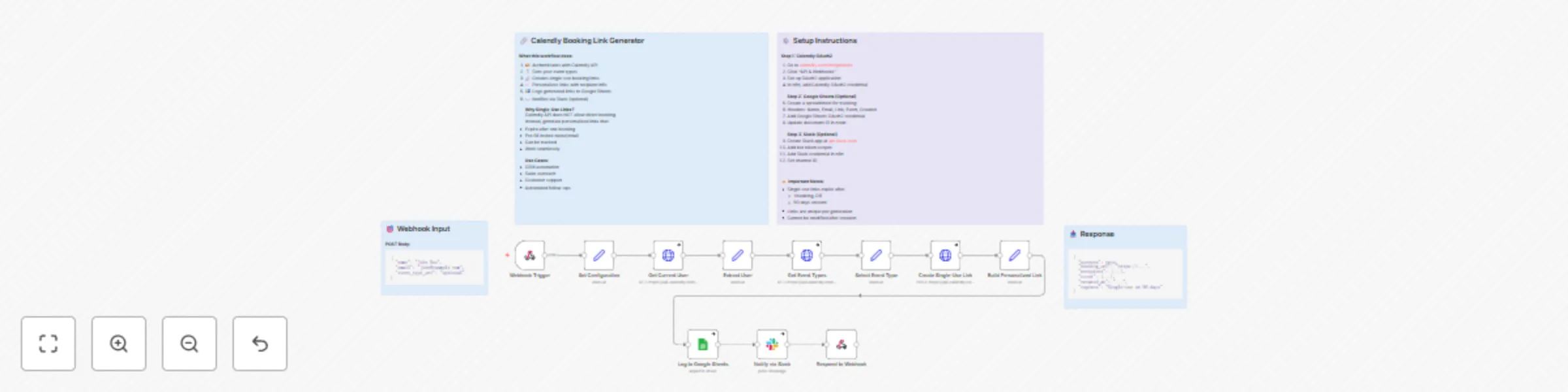
This workflow turns a simple HTTP request into a fully configured single-use Calendly booking link:
POST)name, email, optional event_type_uri, optional utm_sourceSet Configuration extracts and normalizes:recipient_name, recipient_emailrequested_event_type (can be empty)utm_source (defaults to "n8n" if not provided)Get Current User calls GET /users/me using Calendly OAuth2 to get the current user URIExtract User stores user_uri and user_nameGet Event Types calls GET /event_types?user={user_uri}&active=true to fetch active event typesSelect Event Type:requested_event_type if provided, otherwise selects the first active event typeCreate Single-Use Link calls POST /scheduling_links with:owner: selected event type URIowner_type: "EventType"max_event_count: 1 (single use)Build Personalized Link:booking_url from Calendlyname (encoded)email (encoded)utm_sourcebase_booking_urlpersonalized_booking_urlrecipient_name, recipient_emailevent_type_name, event_durationlink_created_at (ISO timestamp)Log to Google Sheets (optional but preconfigured):Notify via Slack (optional):Respond to Webhook returns a structured JSON response:successbooking_url (personalized)base_urlrecipient objectevent object (name + duration)created_atexpires explanation ("Single-use or 90 days")The result is an API-style service you can call from any system to generate trackable, single-use Calendly links.
calendly.com/integrations or developer.calendly.comWebhook Trigger nodePOSTgenerate-calendly-linkResponse Node (points to Respond to Webhook)Expected request body:
{
  "name": "John Doe",
  "email": "[email protected]",
  "event_type_uri": "optional",
  "utm_source": "optional"
}
If event_type_uri is not provided, the workflow automatically uses the first active event type for the current Calendly user.
Recipient Name, Recipient Email, Event Type, Duration (min), Booking URL, Created At, StatusLog to Google Sheets nodedocumentId → your spreadsheet IDsheetName → your tab name (e.g. “Generated Links”)api.slack.comchat:writechannels:read (or groups:read if posting to private channels)Notify via Slack nodeselect: channelchannelId: your desired channel (e.g. #sales or #booking-links)POST to the webhook URL, e.g.:{
"name": "Test User",
"email": "[email protected]"
}
booking_urlSet Configuration node to:email is missing)utm_campaign, utm_medium, language)IF node after the Webhook Trigger for stricter validation and custom error responsesSelect Event Type:event_key) to specific event type URIsBuild Personalized Link:utm_campaign, source, segment)Log to Google Sheets mapping to include:utm_source or other marketing attributesNotify via Slack:utm_source or other metadata for debugging and trackingcontinueRegularOutput to avoid hard workflow failuresname and email.name, email, and a dedicated event_type_uri for “Follow-up Call”.utm_source (e.g. q1-outbound).utm_source to the link and logs it in Google Sheets.This template gives you a reliable, reusable Calendly link generation service that plugs into any part of your stack, while keeping tracking, logging, and team visibility fully automated.
This catalog entry is organized from the workflow JSON. The node-level section below shows the executable blocks available for review before importing the template.
| Workflow | Generate single-use personalized Calendly links with Google Sheets tracking & Slack alerts |
|---|---|
| Complexity | advanced |
| Nodes | 15 |
| Categories | CRM |
| Author | Omer Fayyaz |
| Published | 26 Nov 2025 |
Use the JSON export at /data/workflows/11253/11253.json as the source template for this automation.
Open n8n, import the downloaded JSON, and review each node before activating the workflow.
Replace placeholder credentials, API keys, webhook URLs, account IDs, and environment-specific values with your own settings.
Run the workflow manually or in a staging workspace, inspect node output, and confirm downstream systems receive the expected data.
Enable the workflow only after testing, then monitor executions, errors, and rate limits during the first production runs.
Review imported nodes carefully before activation. This catalog entry is intended to help you inspect the workflow structure, understand required services, and find related templates faster.
Node names, credentials, schedules, webhook paths, and external service limits may need adjustment for your workspace.
This n8n template implements a Calendly Booking Link Generator that creates single use, personalized booking links, logs them to Google Sheets, and optionally notifies a Slack channel Who's it for ...
Review the workflow JSON, configure any required credentials in n8n, and test the automation in a safe workspace before using it in production.
Yes. Use the block-by-block analysis and the downloadable JSON to inspect each node, then adjust credentials, prompts, schedules, filters, or destinations for your CRM use case.