Block 1 - Merge
- Type / Role
- n8n-nodes-base.merge - merge
- Config choices
- Version 3.1


 Early Deal
This workflow is provided as-is. Please review and test before using in production.
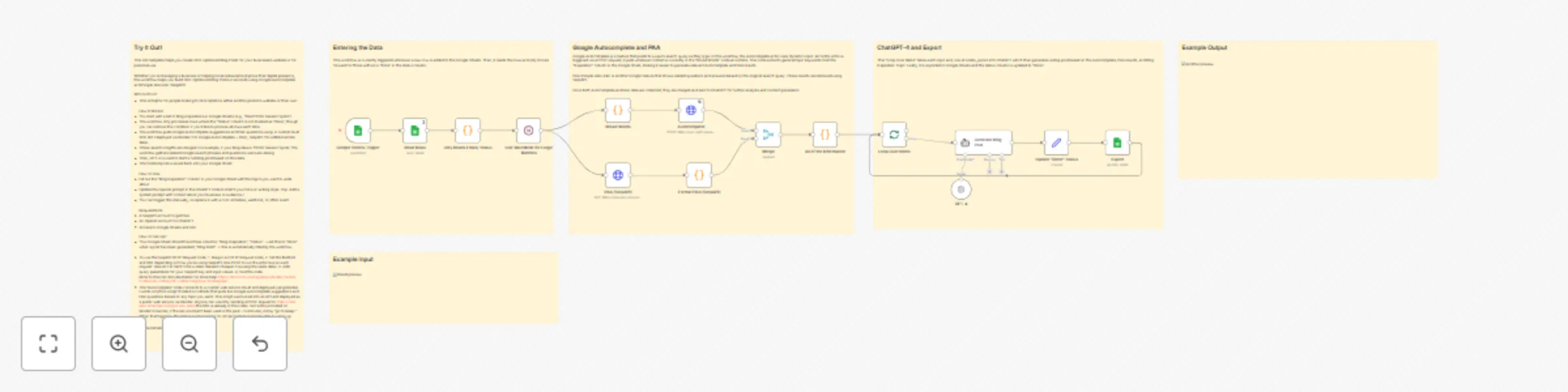
Try It Out! This n8n template helps you create SEO optimized Blog Posts for your businesses website or for personal use. Whether you're managing a business or helping local restaurants improve thei...
n8n-nodes-base.merge, n8n-nodes-base.splitinbatches, n8n-nodes-base.googlesheetstrigger, n8n-nodes-base.stickynote, n8n-nodes-base.code, n8n-nodes-base.googlesheets, n8n-nodes-base.httprequest, @n8n/n8n-nodes-langchain.agent
This workflow is cataloged by N8N Workflows and links back to its original n8n.io source page by keisha kalra.
Original n8n.io sourceThis n8n template helps you create SEO-optimized Blog Posts for your businesses website or for personal use.
Whether you're managing a business or helping local restaurants improve their digital presence, this workflow helps you build SEO-Optimized Blog Posts in seconds using Google Autocomplete and People Also Ask (SerpAPI).
Who Is It For?
How It Works?
How To Use
Requirements
How To Set-Up?
Your Google Sheet should have three columns: "Blog Inspiration", "Status" → set this to “done” when a post has been generated, "Blog Draft" → this is automatically filled by the workflow.
To use the SerpAPI HTTP Request node: 1. Drag in an HTTP Request node, 2. Set the Method and URL depending on how you're using SerpAPI: Use POST to run the actor live on each request. Use GET to fetch from a static dataset (cheaper if reusing the same data). 3. Add query parameters for your SerpAPI key and input values. 4. Test the node. Refer to this n8n documentation for more help! https://docs.n8n.io/integrations/builtin/cluster-nodes/sub-nodes/n8n-nodes-langchain.toolserpapi/.
The “Autocomplete” node connects to a custom web service I built and deployed using Render. I wrote a Python script (hosted on GitHub) that pulls live Google Autocomplete suggestions and PAA questions based on any topic you send. This script was turned into an API and deployed as a public web service via Render. Anyone can use it by sending a POST request to: https://seo-api2.onrender.com/get-seo-data (the URL is already in the node). Since this is hosted on Render’s free tier, if the service hasn’t been used in the past ~15 minutes, it may “go to sleep.” When that happens, the first request can take 10–30 seconds to respond while it wakes up.
Happy Automating!
This catalog entry is organized from the workflow JSON. The node-level section below shows the executable blocks available for review before importing the template.
| Workflow | Generate SEO-optimized blog posts with Google Autocomplete & GPT-4 |
|---|---|
| Complexity | advanced |
| Nodes | 21 |
| Categories | Content Creation, Multimodal AI |
| Author | keisha kalra |
| Published | 22 Jul 2025 |
Use the JSON export at /data/workflows/6283/6283.json as the source template for this automation.
Open n8n, import the downloaded JSON, and review each node before activating the workflow.
Replace placeholder credentials, API keys, webhook URLs, account IDs, and environment-specific values with your own settings.
Run the workflow manually or in a staging workspace, inspect node output, and confirm downstream systems receive the expected data.
Enable the workflow only after testing, then monitor executions, errors, and rate limits during the first production runs.
Review imported nodes carefully before activation. This catalog entry is intended to help you inspect the workflow structure, understand required services, and find related templates faster.
Node names, credentials, schedules, webhook paths, and external service limits may need adjustment for your workspace.
Try It Out! This n8n template helps you create SEO optimized Blog Posts for your businesses website or for personal use. Whether you're managing a business or helping local restaurants improve thei...
Review the workflow JSON, configure any required credentials in n8n, and test the automation in a safe workspace before using it in production.
Yes. Use the block-by-block analysis and the downloadable JSON to inspect each node, then adjust credentials, prompts, schedules, filters, or destinations for your Content Creation, Multimodal AI use case.