Block 1 - Manual Trigger
- Type / Role
- n8n-nodes-base.manualTrigger - manualTrigger
- Config choices
- Version 1


 Early Deal
This workflow is provided as-is. Please review and test before using in production.
How it works This advanced workflow transforms your long form audio content (like podcast episodes or webinar recordings) into digestible, ready to use marketing assets. It's designed for podcaster...
n8n-nodes-base.manualtrigger, n8n-nodes-base.set, n8n-nodes-base.openai, n8n-nodes-base.gmail
This workflow is cataloged by N8N Workflows and links back to its original n8n.io source page by Piotr Sobolewski.
Original n8n.io sourceHow it works
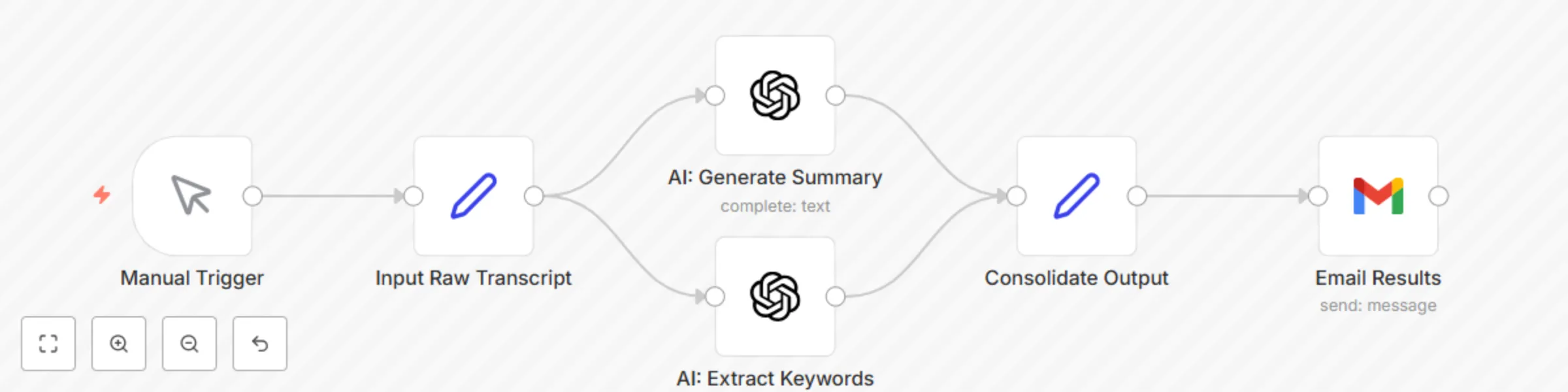
This advanced workflow transforms your long-form audio content (like podcast episodes or webinar recordings) into digestible, ready-to-use marketing assets. It's designed for podcasters, content creators, and marketers who want to maximize their content's reach. It automatically:
Takes a full transcript of your audio/video content as input.
Generates a concise, comprehensive summary of the episode using advanced AI.
Extracts a list of key topics and keywords from the transcript, perfect for SEO, tagging, and content categorization.
Delivers the summary and keywords directly to your inbox or a connected tool for easy access.
Streamline your content repurposing pipeline and unlock new value from your audio and video assets with intelligent automation!
Set up steps
Setting up this powerful workflow typically takes around 20-30 minutes, as it involves multiple AI steps. You'll need to:
Obtain API keys for your preferred AI service (e.g., OpenAI, Google AI).
Have access to a method for generating transcripts from your audio/video (e.g., manually pasting, or using a separate transcription service like AssemblyAI, Whisper, etc.).
Connect your preferred email service (e.g., Gmail) to receive the output.
All detailed setup instructions and specific configuration guidance are provided within the workflow itself using sticky notes.
This catalog entry is organized from the workflow JSON. The node-level section below shows the executable blocks available for review before importing the template.
| Workflow | Generate Podcast Transcript Summaries & Keywords with OpenAI and Gmail |
|---|---|
| Complexity | intermediate |
| Nodes | 6 |
| Categories | Content Creation, AI Summarization |
| Author | Piotr Sobolewski |
| Published | 29 Jul 2025 |
Use the JSON export at /data/workflows/6661/6661.json as the source template for this automation.
Open n8n, import the downloaded JSON, and review each node before activating the workflow.
Replace placeholder credentials, API keys, webhook URLs, account IDs, and environment-specific values with your own settings.
Run the workflow manually or in a staging workspace, inspect node output, and confirm downstream systems receive the expected data.
Enable the workflow only after testing, then monitor executions, errors, and rate limits during the first production runs.
Review imported nodes carefully before activation. This catalog entry is intended to help you inspect the workflow structure, understand required services, and find related templates faster.
Node names, credentials, schedules, webhook paths, and external service limits may need adjustment for your workspace.
How it works This advanced workflow transforms your long form audio content (like podcast episodes or webinar recordings) into digestible, ready to use marketing assets. It's designed for podcaster...
Review the workflow JSON, configure any required credentials in n8n, and test the automation in a safe workspace before using it in production.
Yes. Use the block-by-block analysis and the downloadable JSON to inspect each node, then adjust credentials, prompts, schedules, filters, or destinations for your Content Creation, AI Summarization use case.