P

Piotr Sobolewski

10
Workflows

Workflows by Piotr Sobolewski

Workflow preview: Daily company online presence monitor with AI sentiment analysis & multi-platform tracking
Free advanced

Daily company online presence monitor with AI sentiment analysis & multi-platform tracking

How it works This workflow provides a comprehensive daily overview of your chosen company's online presence. It automatically: - Scans diverse online sources including Google News, Reddit, and YouTube for mentions of your specified company and keywords. - Leverages Artificial Intelligence to analyze the sentiment (positive, negative, neutral) and provide concise summaries for each new mention. - Intelligently tracks and deduplicates content using a persistent local database, ensuring you only receive alerts for genuinely new discussions or articles, preventing redundant notifications. - Compiles a structured, categorized daily report detailing new mentions by source and sentiment. - Delivers this insightful report directly to your email inbox. Gain unparalleled visibility into your company's online reputation and public perception across various digital channels! **Set up steps** Setting up this comprehensive workflow is more involved, typically taking around 25-50 minutes, due to multiple data sources, AI integration, and database management. You'll need to: - Define your company's name and a comprehensive list of search keywords. - Authenticate your preferred email service (e.g., Gmail). - Obtain an API key for your chosen AI service (e.g., OpenAI). - Authenticate your Reddit account. - Authenticate your Google (YouTube) account (for YouTube API access). - Understand the nuances of general internet monitoring, acknowledging that capturing "all" content is practically impossible without highly specialized (and expensive) enterprise tools. All detailed setup instructions and specific configuration guidance are provided within the workflow itself using sticky notes.

P
Piotr Sobolewski
Market Research
30 Jul 2025
498
0
Workflow preview: Daily positive news digest with OpenAI and Gmail
Free intermediate

Daily positive news digest with OpenAI and Gmail

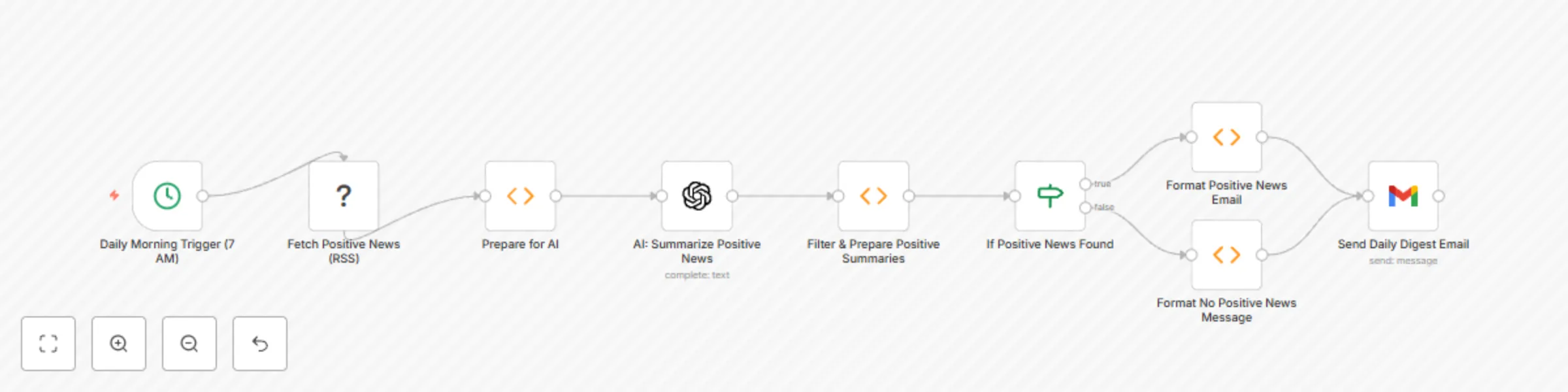
**How it works** Start every morning on a positive note! This workflow automates delivering a curated summary of positive news directly to your mailbox. It automatically: - Fetches the latest articles from a dedicated "good news" source (like Good News Network) every morning. - Uses Artificial Intelligence to summarize each positive article concisely. - Compiles these summaries into a clear and uplifting daily digest. - Sends the daily digest to your specified email address. Say goodbye to doomscrolling and hello to your dose of daily inspiration! **Set up steps** Setting up this workflow is straightforward, typically taking around 10-15 minutes. You'll need to: - Authenticate your preferred email service (e.g., Gmail). - Obtain an API key for your chosen AI service (e.g., OpenAI). All detailed setup instructions and specific configuration guidance are provided within the workflow itself using sticky notes.

P
Piotr Sobolewski
Personal Productivity
30 Jul 2025
755
0
Workflow preview: Automated Multi-Platform Game Deals Tracker with Deku Deals & Gmail Alerts
Free intermediate

Automated Multi-Platform Game Deals Tracker with Deku Deals & Gmail Alerts

**How it works** This advanced workflow keeps you informed about the hottest game deals across multiple platforms (Nintendo Switch, PlayStation, Xbox, PC, etc.), aggregated by Deku Deals. No more manual checking for price drops – it automatically: - Scans Deku Deals daily for popular game deals. - Extracts key information like game title, platforms, current price, original price, discount, and direct links. - Intelligently tracks previously seen deals using a local database, guaranteeing you only get notified about genuinely new price drops or added games. - Delivers a clear and concise notification to your email (or preferred service) summarizing the best new deals. Stay ahead of the sales, save money, and never miss a great game deal again! **Set up steps** Setting up this workflow involves web scraping, local database management, and understanding some web element selectors. It typically takes around 20-35 minutes. You'll need to: - Authenticate your preferred notification service (e.g., Gmail, Telegram). - Understand how to use your browser's developer tools to find CSS Selectors (detailed instructions provided within the workflow). - No external database setup required, as it uses n8n's built-in SQLite database. All detailed setup instructions and specific configuration guidance are provided within the workflow itself using sticky notes.

P
Piotr Sobolewski
Personal Productivity
30 Jul 2025
132
0
Workflow preview: Generate AI Tweets Mimicking Any Twitter User's Style with OpenAI
Free intermediate

Generate AI Tweets Mimicking Any Twitter User's Style with OpenAI

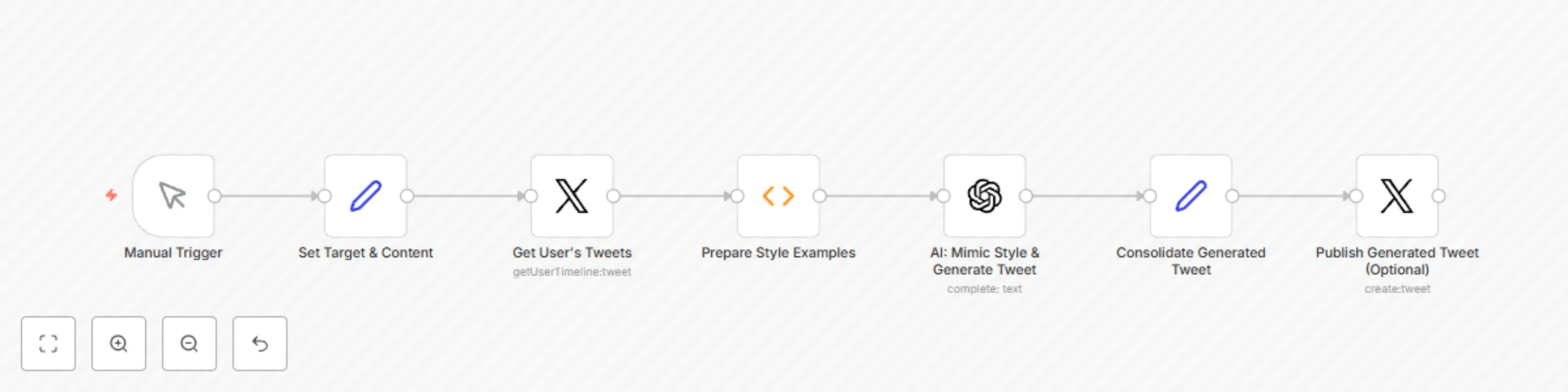
**How it works** This intelligent workflow allows you to generate new tweets that closely mimic the unique style of any public Twitter user. It's perfect for content creators, marketers, or anyone wanting to create engaging content with a specific brand voice or personal flair. It automatically: - Fetches recent tweets from a specified Twitter handle to understand their distinctive writing style. - Analyzes the stylistic patterns (tone, vocabulary, common phrases, emoji use, brevity, etc.) of these tweets using advanced AI. - Generates new tweet content on your desired topic, reapplying the learned style. - Provides the AI-generated tweet for your review, ready to be copied or directly published. Unleash your content's potential by speaking in a voice that resonates, even if it's not your own! **Set up steps** Setting up this sophisticated workflow takes around 20-30 minutes, as it involves Twitter API integration and advanced AI prompting. You'll need to: - Authenticate your Twitter account (required to fetch tweets). - Obtain API keys for your preferred AI service (e.g., OpenAI, Google AI). - Provide the Twitter handle of the user whose style you want to copy. - Input the new content/topic you want to generate a tweet about. All detailed setup instructions and specific configuration guidance are provided within the workflow itself using sticky notes.

P
Piotr Sobolewski
Content Creation
30 Jul 2025
631
0
Workflow preview: AI-Powered Product Research & Price Comparison with Google Search and OpenAI
Free intermediate

AI-Powered Product Research & Price Comparison with Google Search and OpenAI

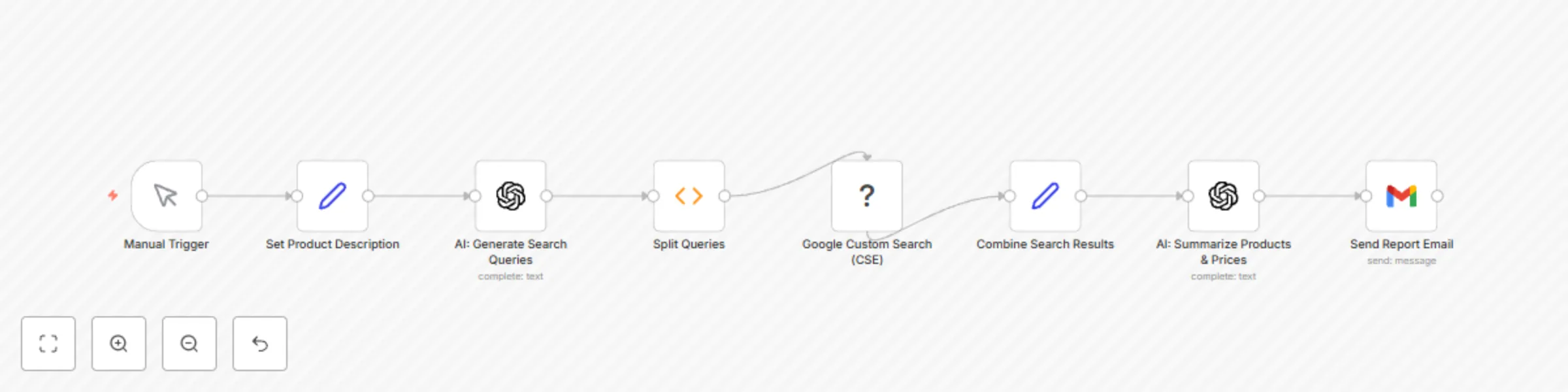
**How it works ** This intelligent workflow acts as your personal shopping assistant, helping you quickly research products and find potential purchasing options based on your detailed descriptions. It automatically: - Takes your natural language product description (e.g., "a durable, lightweight hiking backpack for multi-day trips with good ventilation"). - Uses AI to generate optimized search queries to find relevant products online. - Executes these searches across Google's index. - Analyzes the top search results (titles and snippets) using AI to identify common product types, features, and potential retailers. - Compiles a concise summary report with key insights and direct links to relevant product pages. - Delivers the full report to your inbox, guiding you to the next steps for purchasing. Save time on product research and get smarter recommendations for your next purchase! **Set up steps** Setting up this workflow is more advanced than previous ones due to integrating with a specialized search API, typically taking around 30-60 minutes. You'll need to: - Set up a Google Custom Search Engine (CSE): This involves creating a CSE in your Google Cloud Platform and obtaining an API Key and Search Engine ID. Detailed instructions are provided within the workflow. - Obtain API keys for your preferred AI service (e.g., OpenAI, Google AI). - Connect your preferred email service (e.g., Gmail) to receive the report. - Provide a clear and detailed description of the product you're looking for. All detailed setup instructions and specific configuration guidance, including the CSE setup, are provided within the workflow itself using sticky notes.

P
Piotr Sobolewski
Market Research
30 Jul 2025
1554
0
Workflow preview: Automated Web Scraper: Niche Job/Product Monitor With Telegram Alert
Free intermediate

Automated Web Scraper: Niche Job/Product Monitor With Telegram Alert

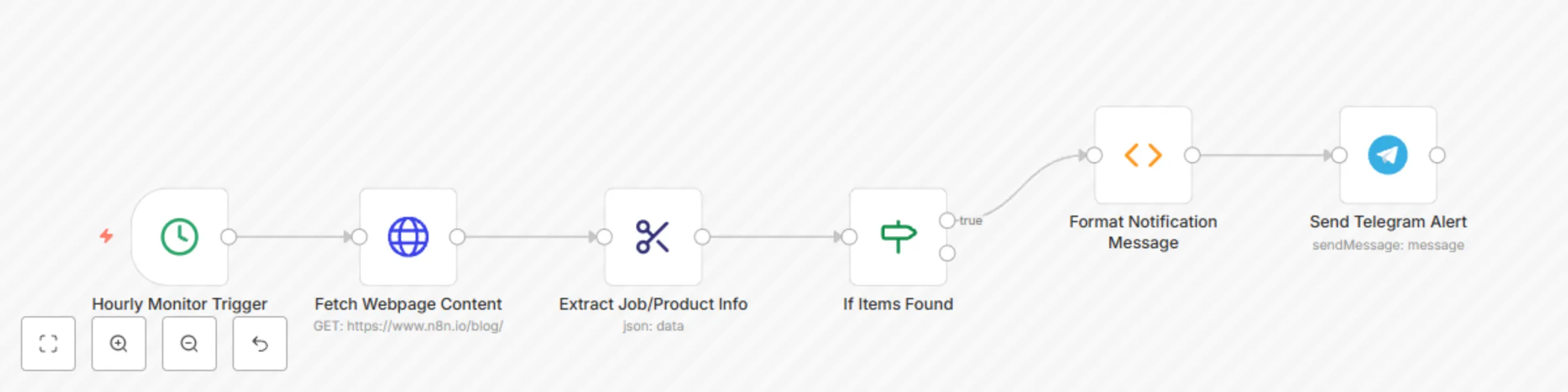
**How it works** This workflow is your personal digital assistant for tracking specific information on websites that lack APIs or RSS feeds. It's perfect for keeping an eye on: - Niche job postings on specialized forums or company career pages. - Product availability or price changes on smaller e-commerce sites. - Any specific text or data appearing on a public webpage. It automatically: - Visits a specified webpage on a schedule (e.g., hourly, daily). - Intelligently extracts specific data points (like job titles, links, product names, or stock status) from the page's HTML using advanced selectors. - Notifies you via Telegram when new relevant information is found or if a change occurs. Stop manually refreshing pages and let automation bring the critical updates directly to you! **Set up steps** Setting up this workflow is more involved than basic automations due to the web scraping aspect, typically taking around 20-40 minutes. You'll need to: - Identify the exact URL of the webpage you want to monitor. - Learn how to find CSS Selectors or XPath for the specific data elements you want to extract from the webpage (a browser's developer tools are essential here). - Authenticate your Telegram account to receive notifications. - Optionally, set up an AI service (like OpenAI) if you want to summarize extracted content. All detailed setup instructions and specific configuration guidance, including how to find CSS selectors, are provided within the workflow itself using sticky notes.

P
Piotr Sobolewski
Market Research
30 Jul 2025
1985
0
Workflow preview: Automate Daily Email Digest with Gmail and GPT Summary Sent Every Afternoon
Free intermediate

Automate Daily Email Digest with Gmail and GPT Summary Sent Every Afternoon

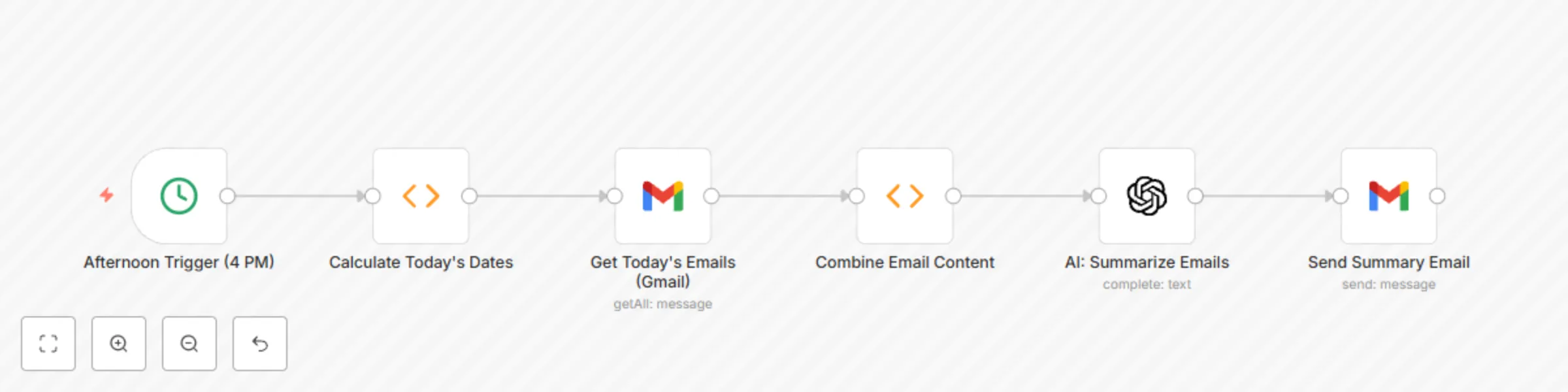
**How it works** This workflow helps you stay on top of your inbox without constant interruptions. Every afternoon, it automatically: - Fetches all emails received in your inbox throughout the current day. - Intelligently summarizes the key content of these emails using AI, providing a concise overview. - Compiles these summaries into a single, organized digest. - Sends you a single email containing the aggregated summary of your day's correspondence. Efficiently review your daily communications and focus on what truly matters, all in one convenient digest! **Set up steps** Setting up this workflow is straightforward and typically takes around 10-15 minutes. You'll need to: - Authenticate your preferred email service (e.g., Gmail). - Obtain API keys for your preferred AI service (e.g., OpenAI, Google AI). - Specify the email address where you want to receive the digest. All detailed setup instructions and specific configuration guidance are provided within the workflow itself using sticky notes.

P
Piotr Sobolewski
Personal Productivity
30 Jul 2025
1244
0
Workflow preview: Generate Podcast Transcript Summaries & Keywords with OpenAI and Gmail
Free intermediate

Generate Podcast Transcript Summaries & Keywords with OpenAI and Gmail

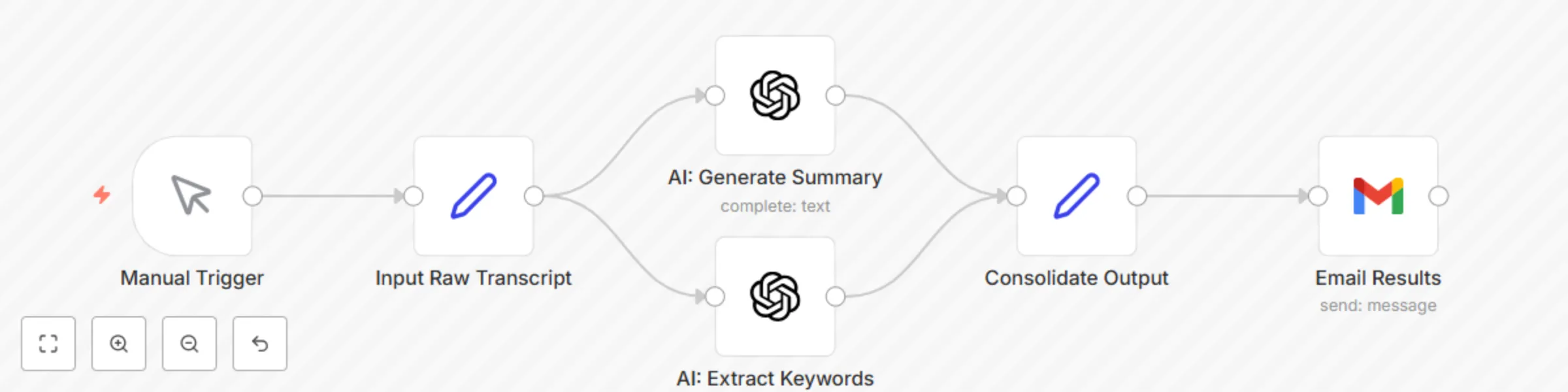
**How it works** This advanced workflow transforms your long-form audio content (like podcast episodes or webinar recordings) into digestible, ready-to-use marketing assets. It's designed for podcasters, content creators, and marketers who want to maximize their content's reach. It automatically: - Takes a full transcript of your audio/video content as input. - Generates a concise, comprehensive summary of the episode using advanced AI. - Extracts a list of key topics and keywords from the transcript, perfect for SEO, tagging, and content categorization. - Delivers the summary and keywords directly to your inbox or a connected tool for easy access. Streamline your content repurposing pipeline and unlock new value from your audio and video assets with intelligent automation! **Set up steps** Setting up this powerful workflow typically takes around 20-30 minutes, as it involves multiple AI steps. You'll need to: - Obtain API keys for your preferred AI service (e.g., OpenAI, Google AI). - Have access to a method for generating transcripts from your audio/video (e.g., manually pasting, or using a separate transcription service like AssemblyAI, Whisper, etc.). - Connect your preferred email service (e.g., Gmail) to receive the output. All detailed setup instructions and specific configuration guidance are provided within the workflow itself using sticky notes.

P
Piotr Sobolewski
Content Creation
30 Jul 2025
707
0
Workflow preview: Send Weekly Meeting Schedule Preview from Google Calendar to Gmail
Free intermediate

Send Weekly Meeting Schedule Preview from Google Calendar to Gmail

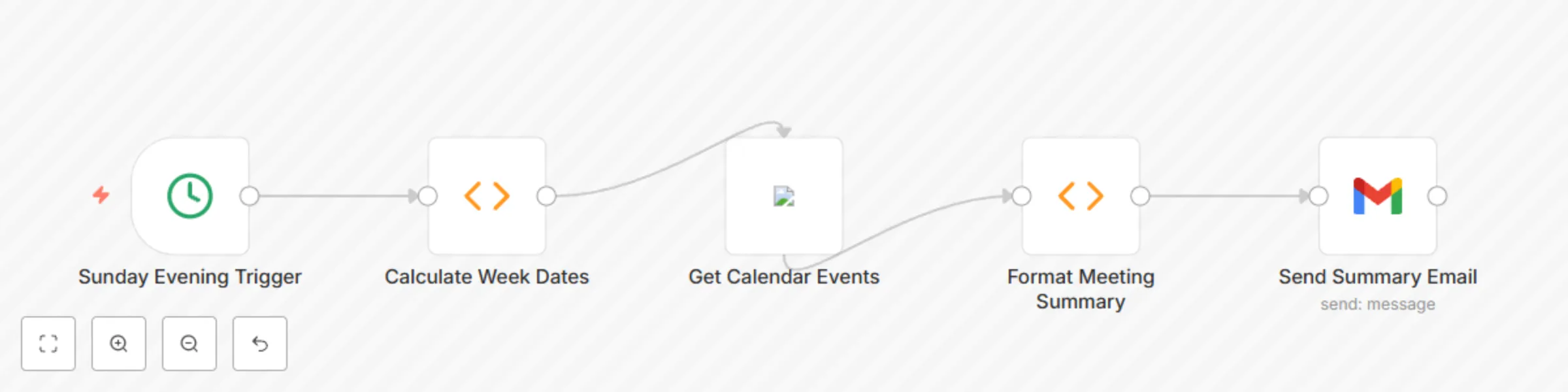
*This workflow contains community nodes that are only compatible with the self-hosted version of n8n.* **How it works** This workflow keeps you perfectly informed about your upcoming week's schedule. Every Sunday evening, it automatically: - Fetches all your scheduled meetings for the upcoming week (Monday to Sunday) from your connected calendar. - Compiles a concise summary of these meetings, including dates, times, and event titles. - Sends you a single, organized email so you can quickly review your agenda and prepare for the week ahead. Stay ahead of your schedule with this proactive meeting notification system. **Set up steps** Setting up this workflow is quick and easy, typically taking less than 10 minutes. You'll primarily need to: - Authenticate your preferred calendar service (e.g., Google Calendar). - Connect your email sending service (e.g., Gmail). - Specify the email address where you want to receive the summary. All detailed setup instructions and specific configuration guidance are provided within the workflow itself using sticky notes.

P
Piotr Sobolewski
Personal Productivity
30 Jul 2025
291
0
Workflow preview: Automate Blog Content Generation & Publishing with OpenAI and WordPress
Free intermediate

Automate Blog Content Generation & Publishing with OpenAI and WordPress

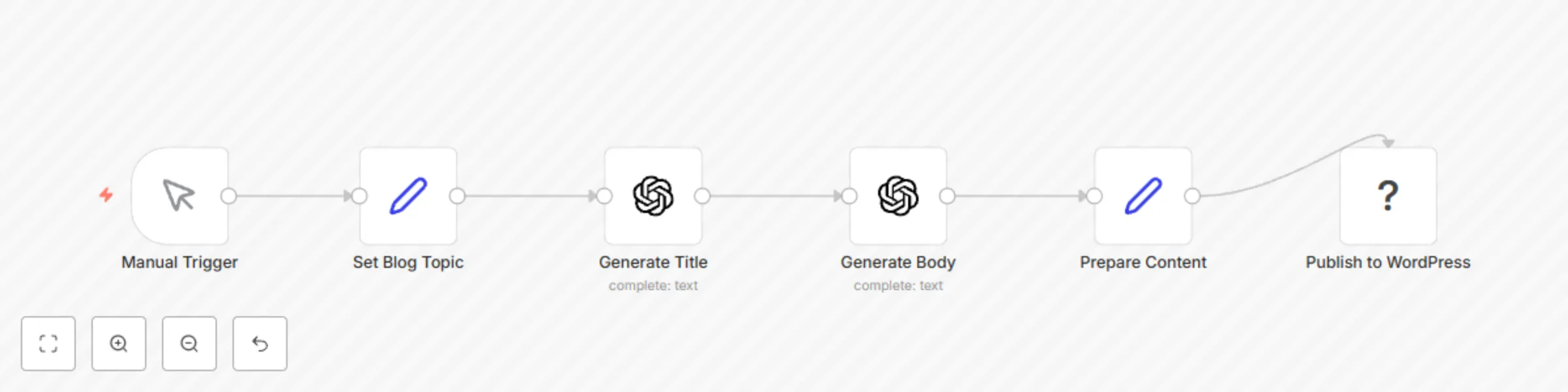
**How it works** This workflow automates the entire process of drafting and publishing blog posts to your WordPress site using advanced AI. It streamlines your content creation by: - Generating engaging blog post titles based on your chosen topic. - Crafting comprehensive blog post bodies (introduction, main points, conclusion) with professional formatting. - Automatically publishing the generated content as a new post on your WordPress website. Save hours of manual writing and accelerate your content strategy with this intelligent automation. **Set up steps** Getting this workflow ready is straightforward and typically takes around 15-20 minutes. You'll need to: - Obtain API keys for your preferred AI service (e.g., OpenAI, Google AI). - Provide your WordPress website's URL and login credentials. - Optionally, customize the AI prompts to match your specific content style or requirements. All detailed setup instructions and specific configuration guidance are provided within the workflow itself using sticky notes.

P
Piotr Sobolewski
Content Creation
30 Jul 2025
1351
0