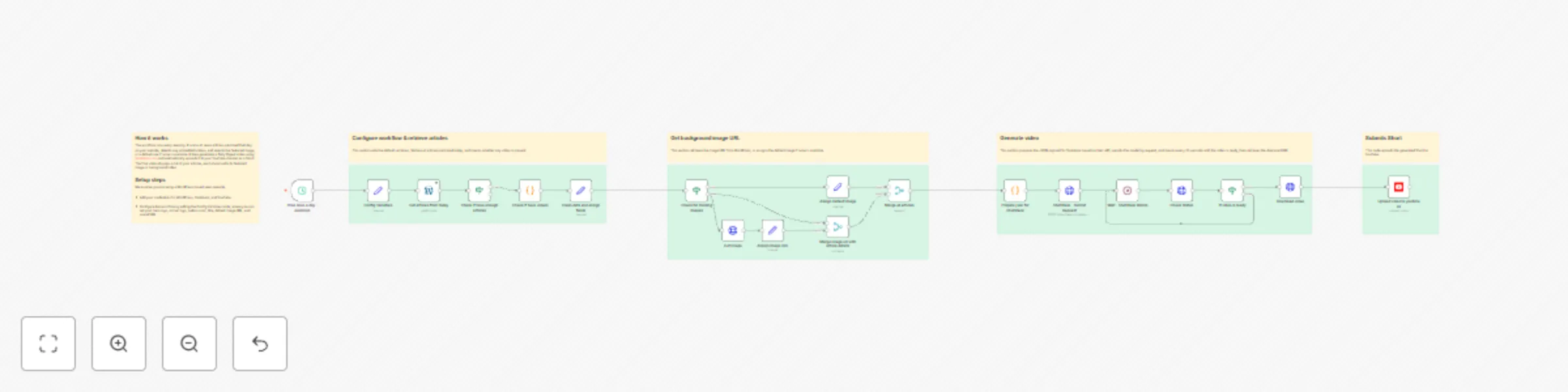
Generate news digest videos from WordPress to YouTube with Shotstack

Workflow preview

Workflow preview
100%
Generate news digest videos from WordPress to YouTube with Shotstack preview
Open on n8n.io

Important notice

This workflow is provided as-is. Please review and test before using in production.

1. Workflow Overview

Daily News Digest Video Generator for YouTube Shorts Instalations Instructions Youtube Instalation Instructions Overview This workflow automatically creates and publ...

Best for

  • Content Creation automation workflows
  • Multimodal AI automation workflows
  • advanced n8n builders looking for reusable templates

Tools used

n8n-nodes-base.wordpress, n8n-nodes-base.if, n8n-nodes-base.code, n8n-nodes-base.httprequest, n8n-nodes-base.wait, n8n-nodes-base.set, n8n-nodes-base.scheduletrigger, n8n-nodes-base.merge

Source and attribution

This workflow is cataloged by N8N Workflows and links back to its original n8n.io source page by Alexandru Burca.

Original n8n.io source

1.1 Workflow description

Title
Generate news digest videos from WordPress to YouTube with Shotstack
Workflow name
Generate news digest videos from WordPress to YouTube with Shotstack

Daily News Digest Video Generator for YouTube Shorts

Instalations Instructions

Youtube Instalation Instructions

Overview

This workflow automatically creates and publishes daily news digest videos from WordPress articles to YouTube. It runs every evening at 7 PM, compiling the day's top stories from a news portal into a professionally formatted vertical video (1080x1920px) optimized for social media platforms like YouTube Shorts.


What It Does

1. πŸ• Scheduled Trigger

  • Runs automatically every day at 19:00 (7 PM)

2. πŸ“° Fetches Today's Articles

  • Retrieves all published WordPress posts from the current day

3. βœ… Validates Content

  • Ensures there are at least 3 articles before proceeding

4. 🎬 Video Detection

  • Scans article content HTML for embedded videos
  • Extracts MP4 URLs from WordPress video players
  • Parses wp-playlist-script JSON data
  • Falls back to <video> and &lt;source&gt; tag detection

5. 🧹 Data Processing

  • Extracts article titles, links, and featured media IDs
  • Decodes HTML entities: Converts &#8211; to –, &quot; to ", etc.
  • Fetches featured images from WordPress Media API
  • Assigns default images for articles without featured media
  • Calculates reading time per article (3-7 seconds based on word count)
  • Cleans text: Removes HTML tags and normalizes whitespace

6. πŸŽ₯ Video Generation (via Shotstack API)

Intro Slide (3 seconds)
  • Black background
  • Large logo (centered)
  • Title on center
  • Current date in DD-MM-YYYY format
News Slides (3-7 seconds each)

Each article is displayed with:

  • Background: Video (if available) or featured image, cropped to fit
  • Dark overlay: 40% opacity black layer for text readability
  • Article headline: Large white text at top
  • Small logo: Top-right corner
  • Pagination counter: Bottom-right white badge (e.g., "1 / 22")
  • CTA button: Centered CTA
  • Background music: Subtle looped audio track
  • Transitions: Smooth fade in/out between slides
Outro Slide (3 seconds)
  • Identical to intro slide
  • Provides clean ending to the video

7. ⏳ Processing Wait

  • Waits 30 seconds for Shotstack to render the video
  • Polls Shotstack API to verify video completion

8. πŸ“₯ Download Video

  • Retrieves the finished MP4 file from Shotstack
  • Downloads video data for YouTube upload

9. πŸ“€ YouTube Upload

Automatically uploads to YouTube with:

  • Title: "Daily Digest - [Day] [Weekday], [Year]"
  • Description: Same as title
  • Category: News & Politics
  • Made for kids: Yes
  • Tags: dailydigest

✨ Key Features

Intelligent Content Handling

  • βœ… Automatic video/image detection and intelligent media selection
  • βœ… Dynamic reading time calculation for optimal viewer engagement
  • βœ… HTML entity cleaning for proper text display (WordPress compatibility)
  • βœ… Fallback default images for articles without media
  • βœ… Video background support with automatic muting

Professional Video Production

  • βœ… Vertical format optimized for mobile viewing (1080x1920px)
  • βœ… Professional branding with logos and consistent styling
  • βœ… Smooth fade transitions between slides
  • βœ… Background music with looping support
  • βœ… Dynamic pagination counters
  • βœ… Call-to-action buttons for engagement

Customization

  • βœ… Centralized variables for easy branding updates
  • βœ… Configurable logos, colors, and text
  • βœ… Adjustable reading time calculation
  • βœ… Flexible date formatting
  • βœ… Customizable audio track

🎯 Use Cases

Perfect for:

  • πŸ“° News websites wanting to repurpose daily articles
  • πŸ“± Media outlets creating social media content
  • πŸŽ₯ Content creators automating video production
  • πŸ”„ Publishers maximizing content distribution
  • πŸ“Š Marketing teams driving traffic from social platforms

πŸ”§ Customization Options

Easy Changes

  • Update logos by changing logo_big and logo_small URLs
  • Modify branding colors via button_bg_color variable
  • Adjust button text with button_text variable
  • Change video title with daily_digest_text variable
  • Update background music by replacing audio URL

Advanced Customization

  • Adjust reading time formula in calculateReadingTime() function
  • Modify date format in getRomanianDate() function
  • Change video dimensions (currently 1080x1920)
  • Update font family and sizes
  • Adjust overlay opacity and colors
  • Modify transition effects

πŸ“‹ Prerequisites

Required Credentials

  1. WordPress API - Access your WordPress site
  2. Shotstack API - API key for video rendering (Stage environment)
  3. YouTube OAuth2 - Authenticated YouTube account for uploads

1.2 Logical Blocks

This catalog entry is organized from the workflow JSON. The node-level section below shows the executable blocks available for review before importing the template.

2. Block-by-Block Analysis

Block 1 - Get articles from today

Type / Role
n8n-nodes-base.wordpress - wordpress
Config choices
Version 1

Block 2 - Check if have enough articles

Type / Role
n8n-nodes-base.if - if
Config choices
Version 2.2

Block 3 - Prepare json for Shotstack

Type / Role
n8n-nodes-base.code - code
Config choices
Version 2

Block 4 - Shotstack - Submit Request

Type / Role
n8n-nodes-base.httpRequest - httpRequest
Config choices
Version 4.3

Block 5 - Wait - Shotstack Works

Type / Role
n8n-nodes-base.wait - wait
Config choices
Version 1.1

Block 6 - Assign Default Image

Type / Role
n8n-nodes-base.set - set
Config choices
Version 3.4

Block 7 - Check for missing images

Type / Role
n8n-nodes-base.if - if
Config choices
Version 2.2

Block 8 - Get Image

Type / Role
n8n-nodes-base.httpRequest - httpRequest
Config choices
Version 4.3

Block 9 - Trice once a day - evenings

Type / Role
n8n-nodes-base.scheduleTrigger - scheduleTrigger
Config choices
Version 1.3

Block 10 - Check if have videos

Type / Role
n8n-nodes-base.code - code
Config choices
Version 2

Block 11 - Clean data and assign fields

Type / Role
n8n-nodes-base.set - set
Config choices
Version 3.4

Block 12 - Assign image URL

Type / Role
n8n-nodes-base.set - set
Config choices
Version 3.4

Block 13 - Merge image url with article details

Type / Role
n8n-nodes-base.merge - merge
Config choices
Version 3.2

Block 14 - Merge all articles

Type / Role
n8n-nodes-base.merge - merge
Config choices
Version 3.2

Block 15 - Check Status

Type / Role
n8n-nodes-base.httpRequest - httpRequest
Config choices
Version 4.3

Block 16 - If video is ready

Type / Role
n8n-nodes-base.if - if
Config choices
Version 2.2

Block 17 - Upload video to youtube as

Type / Role
n8n-nodes-base.youTube - youTube
Config choices
Version 1

Block 18 - Config Variables

Type / Role
n8n-nodes-base.set - set
Config choices
Version 3.4

Block 19 - Sticky Note6

Type / Role
n8n-nodes-base.stickyNote - stickyNote
Config choices
Version 1

Block 20 - Sticky Note

Type / Role
n8n-nodes-base.stickyNote - stickyNote
Config choices
Version 1

Block 21 - Sticky Note1

Type / Role
n8n-nodes-base.stickyNote - stickyNote
Config choices
Version 1

Block 22 - Sticky Note2

Type / Role
n8n-nodes-base.stickyNote - stickyNote
Config choices
Version 1

Block 23 - Sticky Note3

Type / Role
n8n-nodes-base.stickyNote - stickyNote
Config choices
Version 1

Block 24 - Sticky Note4

Type / Role
n8n-nodes-base.stickyNote - stickyNote
Config choices
Version 1

Showing the first 24 of 28 workflow blocks. Download the JSON for the full node graph.

3. Summary Table

Workflow Generate news digest videos from WordPress to YouTube with Shotstack
Complexity advanced
Nodes 28
Categories Content Creation, Multimodal AI
Author Alexandru Burca
Published 11 Dec 2025

4. Reproducing the Workflow from Scratch

  1. 1. Download the workflow JSON

    Use the JSON export at /data/workflows/11724/11724.json as the source template for this automation.

  2. 2. Import the template into n8n

    Open n8n, import the downloaded JSON, and review each node before activating the workflow.

  3. 3. Configure credentials and variables

    Replace placeholder credentials, API keys, webhook URLs, account IDs, and environment-specific values with your own settings.

  4. 4. Test with sample data

    Run the workflow manually or in a staging workspace, inspect node output, and confirm downstream systems receive the expected data.

  5. 5. Activate and monitor

    Enable the workflow only after testing, then monitor executions, errors, and rate limits during the first production runs.

5. General Notes & Resources

Review imported nodes carefully before activation. This catalog entry is intended to help you inspect the workflow structure, understand required services, and find related templates faster.

Node names, credentials, schedules, webhook paths, and external service limits may need adjustment for your workspace.

Frequently asked questions

What does Generate news digest videos from WordPress to YouTube with Shotstack do?

Daily News Digest Video Generator for YouTube Shorts Instalations Instructions Youtube Instalation Instructions Overview This workflow automatically creates and publ...

What do I need before importing this workflow?

Review the workflow JSON, configure any required credentials in n8n, and test the automation in a safe workspace before using it in production.

Can I customize this workflow?

Yes. Use the block-by-block analysis and the downloadable JSON to inspect each node, then adjust credentials, prompts, schedules, filters, or destinations for your Content Creation, Multimodal AI use case.