Block 1 - Validate Incoming ClickUp Task Event
- Type / Role
- n8n-nodes-base.if - if
- Config choices
- Version 2.2


 Early Deal
This workflow is provided as-is. Please review and test before using in production.
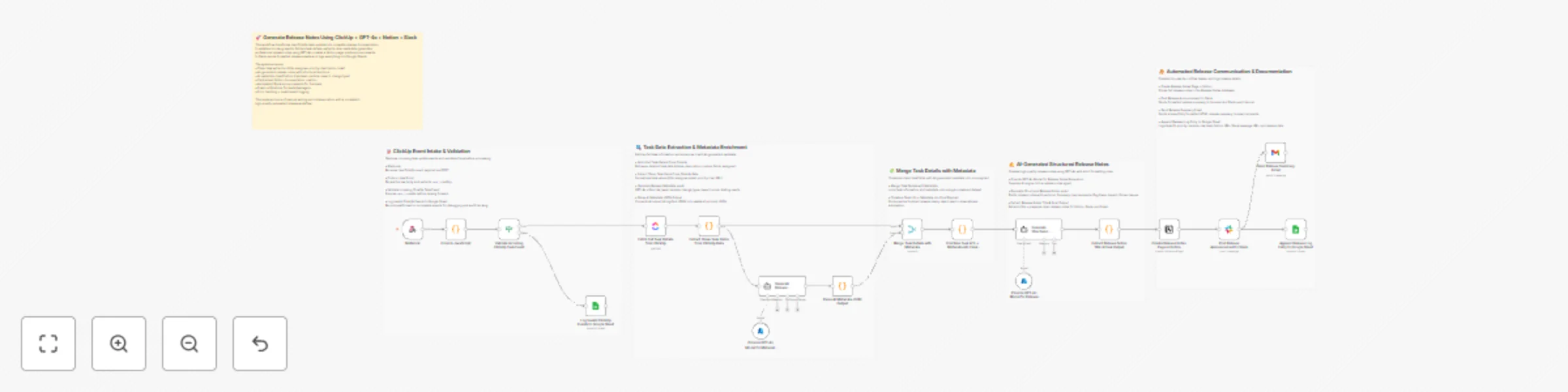
This workflow converts raw ClickUp task updates—received directly through a webhook—into fully automated release documentation. It validates incoming payloads, fetches and cleans task details, enri...
n8n-nodes-base.if, n8n-nodes-base.googlesheets, n8n-nodes-base.clickup, n8n-nodes-base.code, @n8n/n8n-nodes-langchain.lmchatazureopenai, @n8n/n8n-nodes-langchain.agent, n8n-nodes-base.notion, n8n-nodes-base.slack
This workflow is cataloged by N8N Workflows and links back to its original n8n.io source page by Rahul Joshi.
Original n8n.io sourceThis workflow converts raw ClickUp task updates—received directly through a webhook—into fully automated release documentation. It validates incoming payloads, fetches and cleans task details, enriches them with AI-generated metadata, produces structured release notes using GPT-4o, publishes them to Notion, notifies stakeholders on Slack, emails a formatted summary, and logs the release into Google Sheets. The system handles malformed events gracefully by logging invalid payloads and continues only when a valid task_id is present. It extracts structured fields (title, description, links, priority, assignee), then augments them with AI-driven classifications such as risk level, change type, module, and impact score. GPT-4o generates polished release notes following a strict template. Finally, the workflow distributes the release across multiple channels while maintaining an auditable, centralized history.
🟢 Webhook — Receive ClickUp Task Update Captures incoming events from ClickUp via POST and forwards the raw body for parsing.
🧹 Code in JavaScript — Extract task_id Parses the raw webhook body and safely extracts task_id. Invalid JSON → forwarded to error logging.
🔍 Validate Incoming ClickUp Task Event Checks if task_id exists. Valid → continue workflow Invalid → log error to Google Sheets
📄 Fetch Full Task Details from ClickUp Retrieves full task metadata: title, description, status, priority, links, assignee details, and due date.
🧩 Extract Clean Task Fields from ClickUp Data Normalizes and structures the task fields into a clean, usable JSON object.
🧠 Provide GPT-4o Model for Metadata Extraction Loads the language model for metadata generation.
🔍 Generate Release Metadata via AI AI generates structured metadata including: • risk_level • change_type • module • impact_score • requires_testing
🧹 Parse AI Metadata JSON Output Parses stringified JSON from the AI node into valid structured JSON. Malformed metadata → returned as an error object.
🔀 Merge Task Details with Metadata Combines clean task fields with AI-generated metadata into a complete release-ready object.
🧠 Provide GPT-4o Model for Release Notes Supplies the language model needed to generate formal release notes.
✍️ Generate Structured Release Notes via AI Produces uniform release notes containing: • Summary • Improvements & Features • Bug Fixes • Impact Analysis • Known Issues
📝 Extract Release Notes Title & Final Output Extracts title from markdown and prepares final content for publishing.
📘 Create Release Notes Page in Notion Saves the release notes as a new page in the Notion Release Notes database.
💬 Post Release Announcement to Slack Sends formatted release notes + Notion link to the specified Slack user/channel.
📧 Send Release Summary Email Sends a structured HTML email with the release summary, full notes, and Notion link.
📊 Append Release Log Entry to Google Sheet Writes a complete release log entry including: • task ID • title • priority • module • risk level • Notion URL • Slack message URL • release date
🛑 Log Invalid ClickUp Events to Google Sheet Stores any invalid or incomplete webhook payload for debugging and auditing.
• ClickUp API token • Public webhook endpoint in n8n • Azure OpenAI GPT-4o credentials • Notion API integration • Slack API token • Google Sheets OAuth • Gmail OAuth
✔ Converts ClickUp updates directly into finished release documentation ✔ AI-powered metadata ensures consistent classification ✔ Instant multi-channel dissemination: Slack + Email + Notion ✔ Automatic logging for audit, QA, and release governance ✔ Eliminates manual writing, formatting, and cross-platform updates
This catalog entry is organized from the workflow JSON. The node-level section below shows the executable blocks available for review before importing the template.
| Workflow | Generate multi-channel release notes from ClickUp tasks with GPT-4o, Notion & Slack |
|---|---|
| Complexity | advanced |
| Nodes | 24 |
| Categories | Document Extraction, AI Summarization |
| Author | Rahul Joshi |
| Published | 12 Dec 2025 |
Use the JSON export at /data/workflows/11743/11743.json as the source template for this automation.
Open n8n, import the downloaded JSON, and review each node before activating the workflow.
Replace placeholder credentials, API keys, webhook URLs, account IDs, and environment-specific values with your own settings.
Run the workflow manually or in a staging workspace, inspect node output, and confirm downstream systems receive the expected data.
Enable the workflow only after testing, then monitor executions, errors, and rate limits during the first production runs.
Review imported nodes carefully before activation. This catalog entry is intended to help you inspect the workflow structure, understand required services, and find related templates faster.
Node names, credentials, schedules, webhook paths, and external service limits may need adjustment for your workspace.
This workflow converts raw ClickUp task updates—received directly through a webhook—into fully automated release documentation. It validates incoming payloads, fetches and cleans task details, enri...
Review the workflow JSON, configure any required credentials in n8n, and test the automation in a safe workspace before using it in production.
Yes. Use the block-by-block analysis and the downloadable JSON to inspect each node, then adjust credentials, prompts, schedules, filters, or destinations for your Document Extraction, AI Summarization use case.