Block 1 - Create Perplexity Content
- Type / Role
- n8n-nodes-base.httpRequest - httpRequest
- Config choices
- Version 4.2


 Early Deal
This workflow is provided as-is. Please review and test before using in production.
Workflow: Auto Knowledge Base Article Generator About the Creators This workflow was created by Varritech Technologies, an innovative agency that leverages AI to engineer...
n8n-nodes-base.httprequest, @n8n/n8n-nodes-langchain.agent, @n8n/n8n-nodes-langchain.lmchatopenai, @n8n/n8n-nodes-langchain.toolworkflow, @n8n/n8n-nodes-langchain.chattrigger, n8n-nodes-base.code, n8n-nodes-base.merge, n8n-nodes-base.set
This workflow is cataloged by N8N Workflows and links back to its original n8n.io source page by Varritech.
Original n8n.io sourceThis workflow was created by Varritech Technologies, an innovative agency that leverages AI to engineer, design, and deliver software development projects 500% faster than traditional agencies. Based in New York City, we specialize in custom software development, web applications, and digital transformation solutions. If you need assistance implementing this workflow or have questions about content management solutions, please reach out to our team.
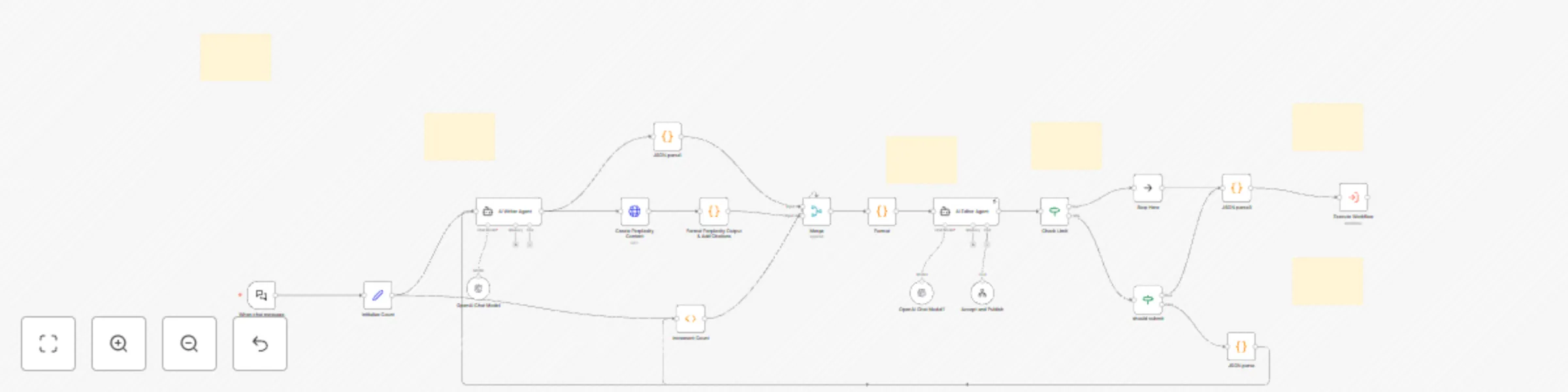
This workflow automates the end-to-end creation of a structured knowledge-base article from a simple chat prompt:
flowchart LR
  A[Webhook: Chat Trigger] --> B[AI Writer Agent]
  B --> C[HTTP Request: Perplexity Content]
  C --> D[Function: Format Output & Citations]
  D --> E[Loop Start: Initialize Count]
  E --> F[AI Editor Agent]
  F --> G{action == "rewrite"?}
  G -- yes --> H[Function: Merge Improvements]
  H --> I[Increment Count] --> F
  G -- no --> J[Stop Loop]
  J --> K[HTTP Request: Publish to Contentful]
Type: HTTP Webhook (POST /webhook/knowledge-article)
Payload:
{
	"chatInput": "What topics should I write about?"
}
Purpose: Kicks off the workflow on that chat prompt.
Inputs: chatInput or existing article JSON
Outputs:
{
  "title": "...",
  "slug": "...",
  "category.id": "...",
  "description": "...",
  "keywords": [...],
  "content": "...",
  "metaTitle": "...",
  "metaDescription": "...",
  "readingTime": 5,
  "difficulty": "intermediate"
}
Purpose: Generates the article skeleton (metadata + initial content).
Method: POST
URL: https://api.perplexity.ai/research
Body:
{
  "model": "sonar-deep-research",
  "query": "{{ $json.title }}",
  "length": 1000
}
Purpose: Retrieves a long-form, deeply researched draft for the article body.
Logic:
action: "rewrite" + improvements: [...]action: "submit"Method: PUT
URL: https://cdn.contentful.com/spaces/{space}/environments/master/entries/{entryId}
Headers:
Body: Maps JSON → Contentful entry fields
Outcome: Publishes the finalized article live.
Writer vs. Editor agents isolate creative drafting from quality review.
Counter + action flags prevent infinite retries.
Swap in different research APIs or CMS targets with minimal changes.
Ensures predictable input/output for each node.
This catalog entry is organized from the workflow JSON. The node-level section below shows the executable blocks available for review before importing the template.
Showing the first 24 of 25 workflow blocks. Download the JSON for the full node graph.
| Workflow | Generate knowledge base articles with GPT & Perplexity AI for Contentful CMS |
|---|---|
| Complexity | advanced |
| Nodes | 25 |
| Categories | Content Creation, Multimodal AI |
| Author | Varritech |
| Published | 13 May 2025 |
Use the JSON export at /data/workflows/4012/4012.json as the source template for this automation.
Open n8n, import the downloaded JSON, and review each node before activating the workflow.
Replace placeholder credentials, API keys, webhook URLs, account IDs, and environment-specific values with your own settings.
Run the workflow manually or in a staging workspace, inspect node output, and confirm downstream systems receive the expected data.
Enable the workflow only after testing, then monitor executions, errors, and rate limits during the first production runs.
Review imported nodes carefully before activation. This catalog entry is intended to help you inspect the workflow structure, understand required services, and find related templates faster.
Node names, credentials, schedules, webhook paths, and external service limits may need adjustment for your workspace.
Workflow: Auto Knowledge Base Article Generator About the Creators This workflow was created by Varritech Technologies, an innovative agency that leverages AI to engineer...
Review the workflow JSON, configure any required credentials in n8n, and test the automation in a safe workspace before using it in production.
Yes. Use the block-by-block analysis and the downloadable JSON to inspect each node, then adjust credentials, prompts, schedules, filters, or destinations for your Content Creation, Multimodal AI use case.