Varritech
Workflows by Varritech
Build & deploy MVPs from text prompts with AI, GitHub & Vercel
# ⚡ Instant MVP Builder ### *Idea, Build, and Deploy — in Minutes, with AI* **by Varritech Technologies** --- ## 🏗️ What Is It? **Instant MVP Builder** is a plug-and-play n8n workflow that takes a plain-English app idea and turns it into a **fully deployed web application** — without writing a single line of code. Designed for founders, solopreneurs, and agencies, this system uses **AI agents**, **GitHub**, and **Vercel** to automatically: - Analyze and structure the app idea - Generate source code with GPT - Deploy a live frontend to the web --- ## 🧠 How It Works 1. **Webhook Trigger** Accepts a chat message or form input with a basic app idea. 2. **AI Prompt Agent (Langchain)** Turns the message into structured specs (name, features, stack, etc). 3. **Code Generator Agent (OpenAI)** Writes frontend code (React) tailored to the app spec. 4. **GitHub Integration** Creates a new repo from a starter template and pushes the code. 5. **Vercel Deployment** Deploys the app and returns a public URL — all automatically. --- ## 🔧 Built With - **n8n** – Automation engine for flow orchestration - **Langchain + OpenAI** – For AI-powered prompt and code creation - **GitHub API** – To manage repositories - **Vercel API** – For instant frontend deployment - **JavaScript** – For logic and parsing --- ## 🎯 Use Cases - 🚀 Startup MVP generation - 🧪 Hackathon-ready app builds - 🎨 Client landing page creation - 📦 Internal tool prototypes - 💡 “Idea-to-product” workflows --- ## 🟨 What Makes It Special? - 🧠 **AI-generated code**, not templates - ⚙️ **Fully automated** from input to deploy - 🌍 **Public app URL in minutes** - 🧩 **Easily customizable**: edit prompts, swap repo, or deploy elsewhere - 🧱 Includes **built-in sticky notes + Notion setup guide** --- ## 🛠️ What’s Included - ✅ Cleaned, import-ready `.json` file for n8n - ✅ [Notion setup guide](https://varritech.notion.site/AI-Appointment-Setter-Setup-Guide-23584cf74b7a8049a4c9f0d7ed6a5cf0) - ✅ In-flow sticky notes describing every node - ✅ No hardcoded secrets — ready for your credentials - ✅ Lifetime access & updates for personal use --- ## 📄 License This workflow is licensed for **single-business or internal use**. Need something more? We offer: - 🤝 Resell licenses for agencies - 🌟 White-label customization - 🔧 Prompt tuning or backend extensions --- ## 👋 About Varritech **Varritech Technologies** is an AI-first development agency helping businesses go from idea to production 5× faster. We specialize in building autonomous engineering workflows, onboarding systems, sales funnels, and internal tools — all powered by modern AI. 📬 [email protected] 🌐 [varritech.com](https://varritech.com) --- ✅ *Build smarter. Launch faster. Automate everything.* With **Instant MVP Builder**, your next app idea doesn’t need a dev — just a trigger. ```
Multi-channel AI appointment confirmation with GPT-4, ElevenLabs & Twilio
# 📆 Workflow: AI Appointment Booking Assistant ## ⚡ About the Creators This workflow was created by **Varritech Technologies**, a cutting-edge software agency that helps founders and operators go from idea to production 5× faster using AI. Based in New York City, we specialize in automating client-facing workflows like appointment setting, lead engagement, and support follow-ups. Need help adapting this flow for your business? Reach out at [varritech.com](https://varritech.com). --- ## 🧠 What This Workflow Does This flow connects to [varritech.com/booking](https://varritech.com/booking) and uses AI agents to intelligently manage the **first stage of appointment scheduling** — collecting user intent, formatting the data, confirming via calendar + email + SMS, and boosting follow-through with personalized voice messages. --- ## 🏗️ Architecture Overview The workflow is designed to maximize **conversion and show-up rate** by combining structured automation with human-style messaging: - 🔗 **Webhook Trigger** — Receives booking form submissions - 🧠 **AI Agents** — Format phone numbers & craft natural confirmation messages - 📅 **Google Calendar** — Schedules the meeting with auto-generated Meet link - 📧 **Emails** — Send branded confirmation to client + internal team - 🎙️ **ElevenLabs TTS** — Turns a personalized message into audio - ☁️ **Cloudinary Upload** — Hosts the voice clip for SMS sharing - 📲 **Twilio SMS** — Sends a text with the appointment time + audio --- ## 📦 Node-by-Node Breakdown flowchart LR A[Webhook: Booking Submission] --> B[Function: Extract + Format Data] B --> C[Langchain Agent: Format Phone] C --> D[Postgres: Store Appointment] B --> E[Google Calendar: Create Event] B --> F[Gmail: Notify Internal Team] B --> G[Gmail: Confirm to Client] B --> H[Langchain Agent: Voice Message Script] H --> I[Function: Escape for JSON] I --> J[HTTP: ElevenLabs TTS] J --> K[Function: Rename to MP3] K --> L[HTTP: Cloudinary Upload] L --> M[Merge Data for Twilio] M --> N[Twilio: Send Confirmation Text] --- ## 🔍 Design Rationale & Best Practices **AI Personalization Boosts Follow-Through** Personalized messages and human-sounding voice notes significantly increase user engagement and trust. **Multi-Channel Confirmation** Email + calendar + SMS ensures the user receives the booking details via their preferred method. **AI Agents for Edge Cases** Agents are used for formatting and natural-language generation to make the system flexible and future-proof. **Minimal Manual Input Required** Clients simply fill out a form — the rest is handled with high-quality automation. **Fully Extensible** Swap in different voice APIs, CRMs, or calendar providers with minimal changes to the core logic.
Auto-ticket maker: Convert Slack conversations into structured project tickets
# Workflow: Auto-Ticket Maker ## ⚡ About the Creators This workflow was created by [Varritech Technologies](https://varritech.com), an innovative agency that leverages AI to engineer, design, and deliver software development projects 500% faster than traditional agencies. Based in New York City, we specialize in custom software development, web applications, and digital transformation solutions. If you need assistance implementing this workflow or have questions about content management solutions, please reach out to our team. ## 🏗️ Architecture Overview This workflow transforms your Slack conversations into complete project tickets, effectively replacing the need for a dedicated PM for task creation: Slack Webhook → Captures team conversation Code Transformation → Parses Slack message structure AI PM Agent → Analyzes requirements and creates complete tickets Memory Buffer → Maintains conversation context Slack Output → Returns formatted tickets to your channel Say goodbye to endless PM meetings just to create tickets! Simply describe what you need in Slack, and our AI PM handles the rest, breaking down complex projects into structured epics and tasks with all the necessary details. ## 📦 Node-by-Node Breakdown flowchart LR A[Webhook: Slack Trigger] --> B[Code: Parse Message] B --> C[AI PM Agent] C --> D[Slack: Post Tickets] E[Memory Buffer] --> C F[OpenAI Model] --> C ### Webhook: Slack Trigger Type: HTTP Webhook (POST /slack-ticket-maker) Purpose: Captures messages from your designated Slack channel. ### Code Transformation Function: Parses complex Slack payload structure Extracts: User ID, channel, message text, timestamp, thread information ### AI PM Agent Inputs: Parsed Slack message Process: - Evaluates project complexity - Requests project name if needed - Asks clarifying questions (up to 2 rounds) - Breaks down into epics and tasks - Formats with comprehensive structure Ticket Structure: - Title - Description - Objectives/Goals - Definition of Done - Requirements/Acceptance Criteria - Implementation Details - Risks & Challenges - Testing & Validation - Timeline & Milestones - Related Notes & References - Open Questions ### Memory Buffer Type: Window Buffer Memory Purpose: Maintains context across conversation ### Slack Output Posts fully-formatted tickets back to your channel Uses markdown for clean, structured presentation ## 🔍 Design Rationale & Best Practices **Replace Your PM's Ticket Creation Time** Let your PM focus on strategy while AI handles the documentation. Cut ticket creation time by 90%. **Standardized Quality** Every ticket follows best practices with consistent structure, detail level, and formatting. **No Training Required** Describe your needs conversationally - the AI adapts to your communication style. **Seamless Integration** Works within your existing Slack workflow - no new tools to learn. ```
Convert Markdown content to Contentful rich text with AI formatting
# Workflow: Publish to Contentful with Rich Text Formatting ## ⚡ About the Creators This workflow was created by **Varritech** Technologies, an innovative agency that leverages AI to engineer, design, and deliver software development projects 500% faster than traditional agencies. Based in New York City, we specialize in custom software development, web applications, and digital transformation solutions. If you need assistance implementing this workflow or have questions about content management solutions, please reach out to our team. ## 🏗️ Architecture Overview This workflow takes a JSON article payload, splits its markdown content into logical chunks, converts each chunk into Contentful Rich Text JSON via an AI agent, merges the resulting rich text nodes back into a single document, formats the entire entry according to Contentful's field schema, and finally publishes it to Contentful. 1. **Trigger** → Executes when called by another workflow 2. **Split by Headings** → Breaks markdown into `##`-delimited chunks 3. **Markdown → Rich Text** → AI agent converts each chunk to Contentful Rich Text JSON 4. **Combine Rich Text Objects** → Aggregates all chunk outputs into one document 5. **Format Entry** → Wraps metadata and rich-text content into Contentful schema 6. **Publish Entry** → HTTP POST to Contentful API --- ## 📦 Node-by-Node Breakdown ```mermaid flowchart LR A[When Executed by Another Workflow] --> B[Split by Headings] B --> C[Markdown to Contentful format] C --> D[Combine Rich Text Objects] D --> E[Merge1] E --> F[Format1] F --> G[Create newly formatted Contentful Entry] ``` ### 1. When Executed by Another Workflow **Type:** Execute Workflow Trigger **Input Example:** - title, slug, category.id, description, keywords, content, metaTitle, metaDescription, readingTime, difficulty **Purpose:** Receives the JSON payload from the upstream workflow. ### 2. Split by Headings **Type:** Code **Logic:** - Splits input.content into an array of markdown chunks at each second-level heading (##). - Emits one item per chunk with index, slug, title, and contentChunk. ### 3. Markdown to Contentful format **Type:** LangChain Agent (+ OpenAI Chat model) **System Prompt:** - Defines rules for generating valid Contentful Rich Text JSON (must include nodeType, data:{}, content:[], etc.). - Provides examples for paragraphs, headings, lists, links, and images. **User Prompt:** Here is the markdown content to convert: ```{{ $json.contentChunk }}``` **Purpose:** Converts each markdown chunk into an array of rich-text nodes. ### 4. Combine Rich Text Objects **Type:** Code **Logic:** - Parses and merges all content arrays returned by the AI agent into one combined content array under a document root. ### 5. Merge1 **Type:** Merge **Purpose:** Joins the original item (with metadata) and the combined rich-text document into a single data stream. ### 6. Format1 **Type:** Code **Logic:** - Maps workflow data into the Contentful entry schema by setting each field (title, slug, category link, description, keywords, rich-text content, metaTitle, metaDescription, readingTime, difficulty) under the appropriate locale and structure required by Contentful. ### 7. Create newly formatted Contentful Entry **Type:** HTTP Request **Method:** POST **URL:** https://api.contentful.com/spaces **Headers:** - Authorization: Bearer token for Contentful Management API - Content-Type: application/vnd.contentful.management.v1+json - X-Contentful-Version: entry version number - X-Contentful-Content-Type: content type ID **Body:** The formatted fields object produced by the previous node **Purpose:** Publishes the new entry with rich-text content to Contentful. ## 🔍 Design Rationale & Best Practices ### Chunked Conversion Splitting by headings prevents AI context limits and keeps conversions modular. ### Strict Rich Text Schema Enforcing nodeType, data, and content structure avoids validation errors on Contentful. ### Two-Phase Merge Separating "combine AI outputs" and "format entry" keeps transformations clear and testable. ### Idempotent Publish Uses explicit versioning and content type headers to ensure correct entry creation.
Automatic jest test generation for GitHub PRs with dual AI review
# Workflow: Automatic Unit Test Creator from GitHub ## 🏗️ Architecture Overview This workflow listens for GitHub pull-request events, analyzes changed React/TypeScript files, auto-generates Jest tests via AI, has them reviewed by a second AI pass, and posts suggestions back as PR comments: 1. GitHub Webhook → PR opened or updated 2. Fetch & Diff → Retrieve raw diff of changed files 3. Filter & Split → Isolate .tsx files & their diffs 4. Fetch File Contents → Provide full context for tests 5. Test Maker Agent → Generate Jest tests for diff hunks 6. Code Reviewer Agent → Refine tests for style & edge-cases 7. Post PR Comment → Sends suggested tests back to GitHub ## 📦 Node-by-Node Breakdown ```mermaid flowchart LR A[Webhook: /github/pr-events] --> B[GitHub: Get PR] B --> C[Function: Parse diff_url + owner/repo] C --> D[HTTP Request: GET diff_url] D --> E[Function: Split on "diff --git"] E --> F[Filter: /\.tsx$/] F --> G[GitHub: Get File Contents] G --> H[Test Maker Agent] H --> I[Code Reviewer Agent] I --> J[Function: Build Comment Payload] J --> K[HTTP Request: POST to PR Comments] ``` ### Webhook: GitHub PR Events - Type: HTTP Webhook (`/webhook/github/pr-events`) - Subscribed Events: `pull_request.opened`, `pull_request.synchronize` ### GitHub: Get PR - Node: GitHub - Action: "Get Pull Request" - Inputs: owner, repo, pull_number ### Function: Parse diff_url + owner/repo - Extracts: - diff_url (e.g. …/pulls/123.diff) - owner, repo, merge_commit_sha ### HTTP Request: GET diff_url - Fetches unified-diff text for the PR. ### Function: Split on "diff --git" - Splits the diff into file-specific segments. ### Filter: /.tsx$/ - Keeps only segments where the file path ends with .tsx. ### GitHub: Get File Contents - For each .tsx file, fetches the latest blob via GitHub API. ### Test Maker Agent - Prompt: - "Generate Jest unit tests covering only the behaviors changed in these diff hunks." - Output: Raw Jest test code. ### Code Reviewer Agent - Reads file + generated tests - Prompt: - "Review and improve these tests for readability, edge-cases, and naming conventions." - Output: Polished test suite. ### Function: Build Comment Payload - Wraps tests in TypeScript fences: ```ts // generated tests… ``` - Constructs JSON: ```json { "body": "<tests>" } ``` ### HTTP Request: POST to PR Comments - URL: `https://api.github.com/repos/{owner}/{repo}/issues/{pull_number}/comments` - Body: Contains the suggested tests. ## 🔍 Design Rationale & Best Practices ### Focused Diff Analysis - Targets only .tsx files to cover UI logic. ### Two-Stage AI - Separate "generate" + "review" steps mimic TDD + code review. ### Stateless Functions - Pure JS for parsing & transformation, easy to test. ### Non-Blocking PR Comments - Asynchronous suggestions—developers aren't blocked. ### Scoped Permissions - GitHub token limited to reading PRs & posting comments.
Generate knowledge base articles with GPT & Perplexity AI for Contentful CMS
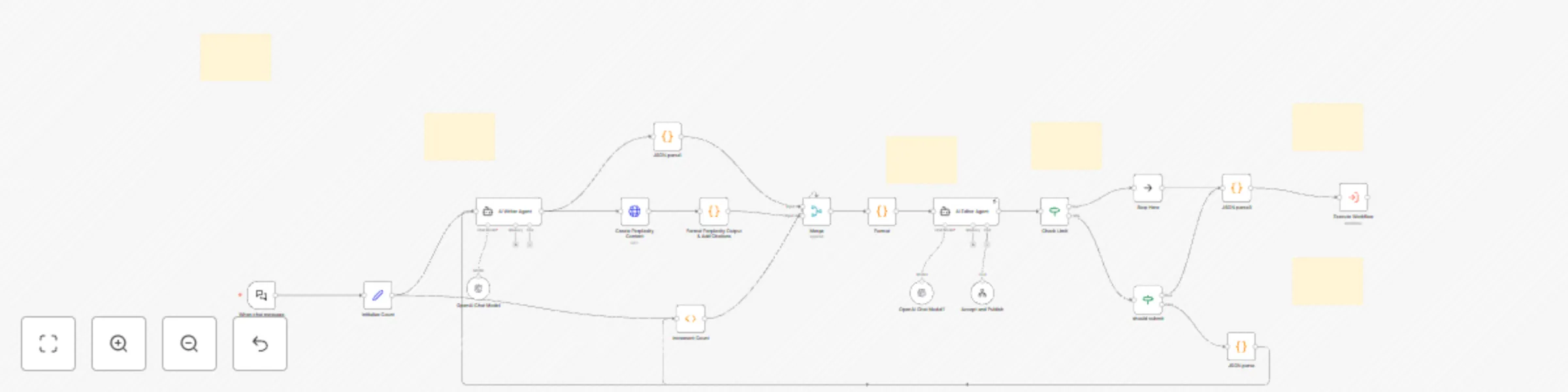
## Workflow: Auto Knowledge Base Article Generator ### ⚡ About the Creators This workflow was created by [Varritech Technologies](https://varritech.com), an innovative agency that leverages AI to engineer, design, and deliver software development projects 500% faster than traditional agencies. Based in New York City, we specialize in custom software development, web applications, and digital transformation solutions. If you need assistance implementing this workflow or have questions about content management solutions, please reach out to our team. ### 🏗️ Architecture Overview This workflow automates the end-to-end creation of a structured knowledge-base article from a simple chat prompt: 1. **Chat Trigger** → Receives user request 2. **AI Drafting Loop** → Generates & refines JSON article via AI agents 3. **Perplexity Research Call** → Deep-dive content generation 4. **Editorial Loop** → Up to 3 AI-driven revisions 5. **Contentful Publish** → Pushes final JSON into CMS --- ### 📦 Node-by-Node Breakdown ```mermaid flowchart LR A[Webhook: Chat Trigger] --> B[AI Writer Agent] B --> C[HTTP Request: Perplexity Content] C --> D[Function: Format Output & Citations] D --> E[Loop Start: Initialize Count] E --> F[AI Editor Agent] F --> G{action == "rewrite"?} G -- yes --> H[Function: Merge Improvements] H --> I[Increment Count] --> F G -- no --> J[Stop Loop] J --> K[HTTP Request: Publish to Contentful] ``` ### Webhook: Chat Trigger **Type**: HTTP Webhook (POST /webhook/knowledge-article) **Payload**: ``` { "chatInput": "What topics should I write about?" } ``` **Purpose**: Kicks off the workflow on that chat prompt. ### AI Writer Agent **Inputs**: chatInput or existing article JSON **Outputs**: ``` { "title": "...", "slug": "...", "category.id": "...", "description": "...", "keywords": [...], "content": "...", "metaTitle": "...", "metaDescription": "...", "readingTime": 5, "difficulty": "intermediate" } ``` **Purpose**: Generates the article skeleton (metadata + initial content). # HTTP Request: Perplexity Content **Method:** POST **URL:** https://api.perplexity.ai/research **Body:** ```json { "model": "sonar-deep-research", "query": "{{ $json.title }}", "length": 1000 } ``` **Purpose:** Retrieves a long-form, deeply researched draft for the article body. ## Function: Format Output & Citations **Logic:** - Parse raw Perplexity response - Extract source URIs - Append them under a sources markdown list ## Editorial Loop 1. Initialize Counter to 0 2. AI Editor Agent - Reads draft JSON - Returns either: - `action: "rewrite" + improvements: [...]` - or `action: "submit"` 3. Merge Improvements (if rewriting) - Applies suggested updates to JSON fields 4. Limit Check - Stops after 3 iterations or on "submit" ## HTTP Request: Publish to Contentful **Method:** PUT **URL:** https://cdn.contentful.com/spaces/{space}/environments/master/entries/{entryId} **Headers:** - Authorization: Bearer <token> - Content-Type: application/vnd.contentful.management.v1+json **Body:** Maps JSON → Contentful entry fields **Outcome:** Publishes the finalized article live. ## 🔍 Design Rationale & Best Practices ### Separation of Concerns Writer vs. Editor agents isolate creative drafting from quality review. ### Idempotent Loop Counter + action flags prevent infinite retries. ### Extensibility Swap in different research APIs or CMS targets with minimal changes. ### Structured JSON Ensures predictable input/output for each node.