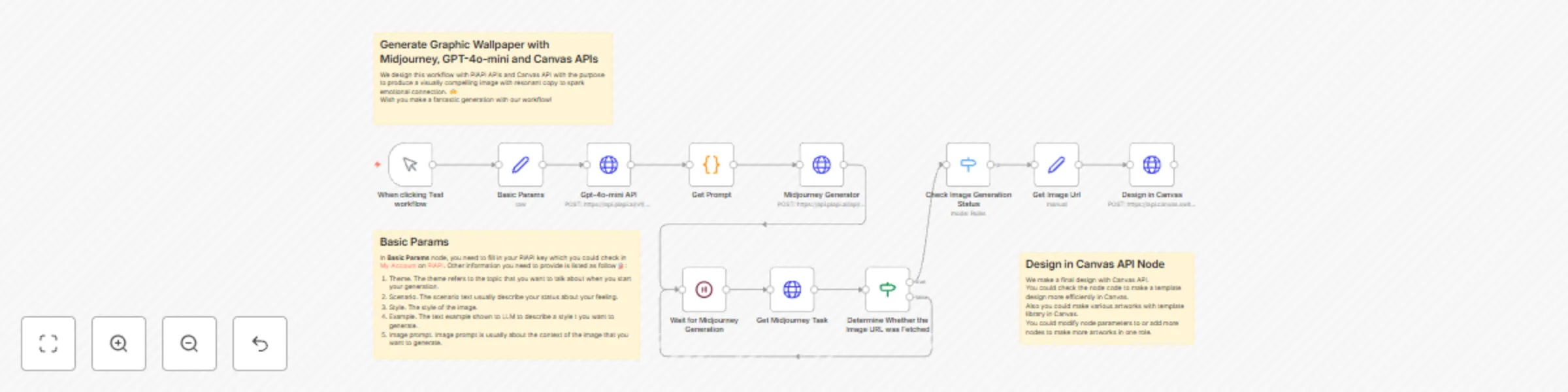
Generate graphic wallpaper with Midjourney, GPT-4o-mini and Canvas APIs

Workflow preview

Workflow preview
100%
Generate graphic wallpaper with Midjourney, GPT-4o-mini and Canvas APIs preview
Open on n8n.io

Important notice

This workflow is provided as-is. Please review and test before using in production.

1. Workflow Overview

Who is the template for? This workflow is specifically designed for content creators and social media professionals , enabling Instagram and X (Twitter) influencers to produce highly artistic visua...

Best for

  • Content Creation automation workflows
  • Multimodal AI automation workflows
  • intermediate n8n builders looking for reusable templates

Tools used

n8n-nodes-base.stickynote, n8n-nodes-base.httprequest, n8n-nodes-base.manualtrigger, n8n-nodes-base.code, n8n-nodes-base.wait, n8n-nodes-base.if, n8n-nodes-base.switch, n8n-nodes-base.set

Source and attribution

This workflow is cataloged by N8N Workflows and links back to its original n8n.io source page by PiAPI.

Original n8n.io source

1.1 Workflow description

Title
Generate graphic wallpaper with Midjourney, GPT-4o-mini and Canvas APIs
Workflow name
Generate graphic wallpaper with Midjourney, GPT-4o-mini and Canvas APIs

Who is the template for?

This workflow is specifically designed for content creators and social media professionals, enabling Instagram and X (Twitter) influencers to produce highly artistic visual posts, empowering marketing teams to quickly generate event promotional graphics, assisting blog authors in creating featured images and illustrations, and helping knowledge-based creators transform key insights into easily shareable card visuals.

Set up Instructions

  1. Fill in your API key from PiAPI.
  2. Fill in Basic Params Node following the sticky note guidelines.
  3. Set up a design template in Canvas Switchboard.
  4. Make a simple template in Switchboard.
  5. Click Crul and get the API code to fill in JSON of Design in Canvas.
  6. Click Test Workflow and get a url result.

Use Case

Here we will provide some setting examples to help users find a proper way to use this workflow. User could change these settings based on specific purposes.

Basic Params Setting:

  1. theme: Hope
  2. scenario: Don't know about the future, confused and feel lost with tech-development.
  3. style: Cinematic Grandeur, Sci-Tech Aesthetic, 3D style
  4. example: 1. March. Because of your faith, it will happen. 2. Something in me will save me. 3. To everyone carrying a heavy heart in silence. You are going to be okay. 4. Tomorrow will be better.
  5. image prompt: A cinematic sci-fi metropolis where Deep Neural Nets control a hyper-connected society. Holographic interfaces glow in the air as robotic agents move among humans, symbolizing Industry 4.0. The scene contrasts organic human emotion with cold machine precision, rendered in a hyper-realistic 3D style with futuristic lighting. Epic wide shots showcase the grandeur of this civilization’s industrial evolution.

Output Image:

More Example Results for Reference

1.2 Logical Blocks

This catalog entry is organized from the workflow JSON. The node-level section below shows the executable blocks available for review before importing the template.

2. Block-by-Block Analysis

Block 1 - Sticky Note

Type / Role
n8n-nodes-base.stickyNote - stickyNote
Config choices
Version 1

Block 2 - Midjourney Generator

Type / Role
n8n-nodes-base.httpRequest - httpRequest
Config choices
Version 4.2

Block 3 - When clicking Test workflow

Type / Role
n8n-nodes-base.manualTrigger - manualTrigger
Config choices
Version 1

Block 4 - Get Prompt

Type / Role
n8n-nodes-base.code - code
Config choices
Version 2

Block 5 - Get Midjourney Task

Type / Role
n8n-nodes-base.httpRequest - httpRequest
Config choices
Version 4.2

Block 6 - Wait for Midjourney Generation

Type / Role
n8n-nodes-base.wait - wait
Config choices
Version 1.1

Block 7 - Determine Whether the Image URL was Fetched

Type / Role
n8n-nodes-base.if - if
Config choices
Version 2.2

Block 8 - Check Image Generation Status

Type / Role
n8n-nodes-base.switch - switch
Config choices
Version 3.2

Block 9 - Design in Canvas

Type / Role
n8n-nodes-base.httpRequest - httpRequest
Config choices
Version 4.2

Block 10 - Get Image Url

Type / Role
n8n-nodes-base.set - set
Config choices
Version 3.4

Block 11 - Sticky Note1

Type / Role
n8n-nodes-base.stickyNote - stickyNote
Config choices
Version 1

Block 12 - Gpt-4o-mini API

Type / Role
n8n-nodes-base.httpRequest - httpRequest
Config choices
Version 4.2

Block 13 - Basic Params

Type / Role
n8n-nodes-base.set - set
Config choices
Version 3.4

Block 14 - Sticky Note2

Type / Role
n8n-nodes-base.stickyNote - stickyNote
Config choices
Version 1

3. Summary Table

Workflow Generate graphic wallpaper with Midjourney, GPT-4o-mini and Canvas APIs
Complexity intermediate
Nodes 14
Categories Content Creation, Multimodal AI
Author PiAPI
Published 21 Apr 2025

4. Reproducing the Workflow from Scratch

  1. 1. Download the workflow JSON

    Use the JSON export at /data/workflows/3627/3627.json as the source template for this automation.

  2. 2. Import the template into n8n

    Open n8n, import the downloaded JSON, and review each node before activating the workflow.

  3. 3. Configure credentials and variables

    Replace placeholder credentials, API keys, webhook URLs, account IDs, and environment-specific values with your own settings.

  4. 4. Test with sample data

    Run the workflow manually or in a staging workspace, inspect node output, and confirm downstream systems receive the expected data.

  5. 5. Activate and monitor

    Enable the workflow only after testing, then monitor executions, errors, and rate limits during the first production runs.

5. General Notes & Resources

Review imported nodes carefully before activation. This catalog entry is intended to help you inspect the workflow structure, understand required services, and find related templates faster.

Node names, credentials, schedules, webhook paths, and external service limits may need adjustment for your workspace.

Frequently asked questions

What does Generate graphic wallpaper with Midjourney, GPT-4o-mini and Canvas APIs do?

Who is the template for? This workflow is specifically designed for content creators and social media professionals , enabling Instagram and X (Twitter) influencers to produce highly artistic visua...

What do I need before importing this workflow?

Review the workflow JSON, configure any required credentials in n8n, and test the automation in a safe workspace before using it in production.

Can I customize this workflow?

Yes. Use the block-by-block analysis and the downloadable JSON to inspect each node, then adjust credentials, prompts, schedules, filters, or destinations for your Content Creation, Multimodal AI use case.