Block 1 - Get Product Feed
- Type / Role
- n8n-nodes-base.httpRequest - httpRequest
- Config choices
- Version 4.2


 Early Deal
This workflow is provided as-is. Please review and test before using in production.
Channable + Google Ads + Relevance AI: Scalable AI Workflow for Automated Ad Copy Generation & Publishing Overview This workflow automates the entire ad creation process for Google Ads by int...
n8n-nodes-base.httprequest, n8n-nodes-base.set, n8n-nodes-base.slack, n8n-nodes-base.aggregate, n8n-nodes-base.googlesheets, n8n-nodes-base.scheduletrigger, n8n-nodes-base.splitinbatches, n8n-nodes-base.code
This workflow is cataloged by N8N Workflows and links back to its original n8n.io source page by Nikan Noorafkan.
Original n8n.io sourceThis workflow automates the entire ad creation process for Google Ads by integrating product data, AI-generated copy, compliance checks, and publication into your marketing pipeline.
It connects n8n, Relevance AI, Google Sheets, and optionally Channable to:
✅ 100% automated ad copy pipeline ✅ AI-generated, human-quality Google Ads text ✅ Built-in compliance verification (Google Ads policy) ✅ Google Sheet integration for team review ✅ Daily automatic schedule (zero manual effort) ✅ Slack alerts for QA and transparency ✅ Modular design — extendable for Shopping and Performance Optimization ✅ Scalable for 10 → 10,000+ product ads
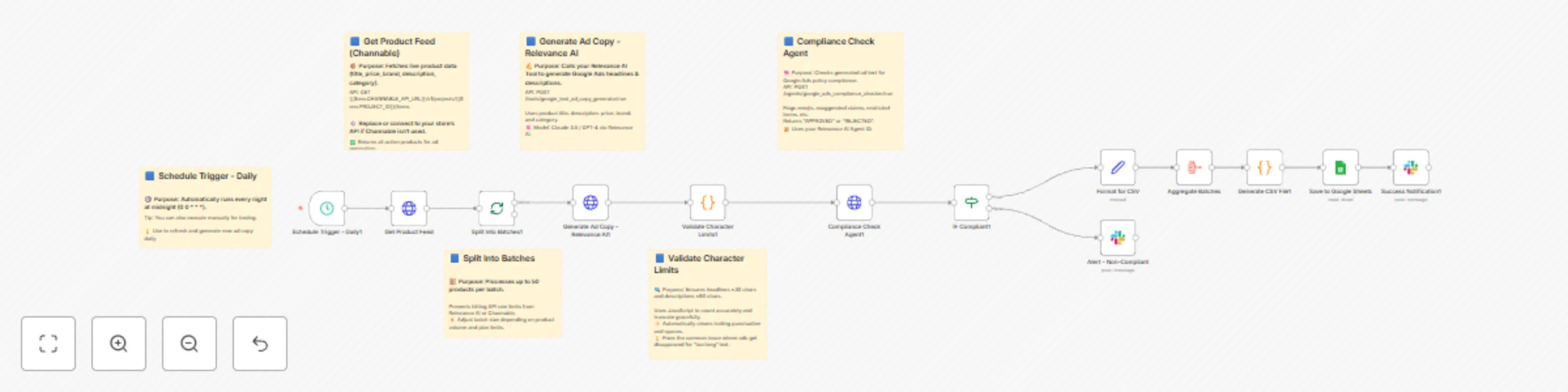
Daily Trigger (00:00)
   ⬇️
1️⃣ Get Product Feed (Channable or custom API)
   ⬇️
2️⃣ Split Into Batches (50 products each)
   ⬇️
3️⃣ Generate Ad Copy (Relevance AI tool → Claude 3.5 prompt)
   ⬇️
4️⃣ Validate Character Limits (JS node: max 30 headline / 90 description)
   ⬇️
5️⃣ Compliance Check (Relevance AI agent → Google Ads policies)
   ⬇️
6️⃣ IF Compliant → CSV / Google Sheets
    ↳ ❌ Non-Compliant → Slack Alert
   ⬇️
7️⃣ Aggregate Batches + Generate CSV
   ⬇️
8️⃣ Save to Google Sheets (“Generated Ads” tab)
   ⬇️
9️⃣ Slack Notification → Summary Report
Set these in n8n → Settings → Variables → Add Variable
Copy-paste from your ENVIRONMENT_VARIABLES_CORRECTED.txt.
Includes:
RELEVANCE_AI_API_URL=https://api-f1db6c.stack.tryrelevance.com/latest
RELEVANCE_TOOL_AD_COPY_ID=bueQG8io04dw
RELEVANCE_AGENT_COMPLIANCE_ID=xT29mQ4QKsl
GOOGLE_SHEET_ID=1q2w3e4r5t6y7u8i9o0p
SLACK_CHANNEL=#google-ads-automation
| Node | Description | Endpoint / Logic |
|---|---|---|
| 🕓 Schedule Trigger | Runs daily at 00:00 | Cron 0 0 * * * |
| 📦 Get Product Feed | Pulls product data from Channable or custom API | GET {{$env.CHANNABLE_API_URL}}/v1/projects/{{$env.PROJECT_ID}}/items |
| 🧮 Split Into Batches | Processes 50 products at a time | Avoids rate limits |
| ✍️ Generate Ad Copy (Relevance AI) | Calls AI tool for each product | POST {{$env.RELEVANCE_AI_API_URL}}/tools/google_text_ad_copy_generator/run |
| 🔍 Validate Character Limits | JS validation (≤30 headline / ≤90 description) | Truncates smartly |
| 🧠 Compliance Check Agent | Verifies Google Ads compliance | POST {{$env.RELEVANCE_AI_API_URL}}/agents/google_ads_compliance_checker/run |
| ⚖️ IF Compliant | Routes APPROVED vs REJECTED | "contains 'APPROVED'" |
| 💾 Format for CSV | Formats compliant ads for export | Maps ID, headline, desc, URLs |
| 📊 Aggregate Batches | Combines all results | Merges datasets |
| 🧱 Generate CSV File | Converts JSON → CSV | Escaped string-safe format |
| 📑 Save to Google Sheets | Saves reviewed ads | Sheet: Generated Ads |
| 📢 Slack Notification (Success) | Posts completion summary | Shows ad count, timestamp |
| 🚨 Slack Alert (Non-Compliant) | Notifies team for review | Includes issues, category |
Create “HTTP Header Auth” credential
Header Name: Authorization
Header Value: Bearer {{$env.RELEVANCE_AI_API_KEY}}
Credential type: “Google OAuth2 API”
Scopes:
https://www.googleapis.com/auth/spreadsheets
https://www.googleapis.com/auth/drive.file
chat:writeHeader Auth:
Bearer {{$env.CHANNABLE_API_TOKEN}}
Sheet name: Generated Ads
Columns:
| product_id | headline | description | final_url | display_url | generated_at |
Optional: Add compliance_status or notes columns for QA.
Manual Trigger: Disable the schedule → click “Execute Workflow”.
Batch Size: Start small (3 products).
Expected Output:
Check logs in Executions for errors. Re-enable the cron trigger after successful validation.
| product_id | headline | description | final_url | display_url | generated_at |
|---|---|---|---|---|---|
| 12243 | “Eco Bamboo Socks” | “Soft, breathable comfort for everyday wear.” | https://shop.com/socks | shop.com | 2025-10-22T00:00:00Z |
✅ Success Notification
✅ *Google Ads Generation Complete*

📊 *Summary:*
• Total Ads Generated: 50
• Saved to Google Sheets: Generated Ads
• Timestamp: 2025-10-22T00:00:00Z
⚠️ Non-Compliant Alert
⚠️ Non-Compliant Ad Flagged

Product: Bamboo Socks
Issues:
- Contains “Free Shipping”
- Headline too long

Timestamp: 2025-10-22T00:00:00Z
| Frequency | Task |
|---|---|
| Daily | Check Slack alerts for rejects |
| Weekly | Review ad performance metrics |
| Monthly | Update Relevance AI prompts |
| Quarterly | Refresh API tokens and variables |
You now have a production-ready, scalable AI-powered ad generation system integrating Channable, Google Ads, and Relevance AI — built entirely on n8n.
This delivers:
> Start small → validate → scale to 10,000+ ads per day. > Within weeks, you’ll have a self-learning, always-on ad pipeline driving consistent performance.
This catalog entry is organized from the workflow JSON. The node-level section below shows the executable blocks available for review before importing the template.
| Workflow | Generate Google ad copy automatically with Claude 3.5, Channable & Relevance AI |
|---|---|
| Complexity | advanced |
| Nodes | 19 |
| Categories | Content Creation, Multimodal AI |
| Author | Nikan Noorafkan |
| Published | 22 Oct 2025 |
Use the JSON export at /data/workflows/10057/10057.json as the source template for this automation.
Open n8n, import the downloaded JSON, and review each node before activating the workflow.
Replace placeholder credentials, API keys, webhook URLs, account IDs, and environment-specific values with your own settings.
Run the workflow manually or in a staging workspace, inspect node output, and confirm downstream systems receive the expected data.
Enable the workflow only after testing, then monitor executions, errors, and rate limits during the first production runs.
Review imported nodes carefully before activation. This catalog entry is intended to help you inspect the workflow structure, understand required services, and find related templates faster.
Node names, credentials, schedules, webhook paths, and external service limits may need adjustment for your workspace.
Channable + Google Ads + Relevance AI: Scalable AI Workflow for Automated Ad Copy Generation & Publishing Overview This workflow automates the entire ad creation process for Google Ads by int...
Review the workflow JSON, configure any required credentials in n8n, and test the automation in a safe workspace before using it in production.
Yes. Use the block-by-block analysis and the downloadable JSON to inspect each node, then adjust credentials, prompts, schedules, filters, or destinations for your Content Creation, Multimodal AI use case.