N

Nikan Noorafkan

6
Workflows

Workflows by Nikan Noorafkan
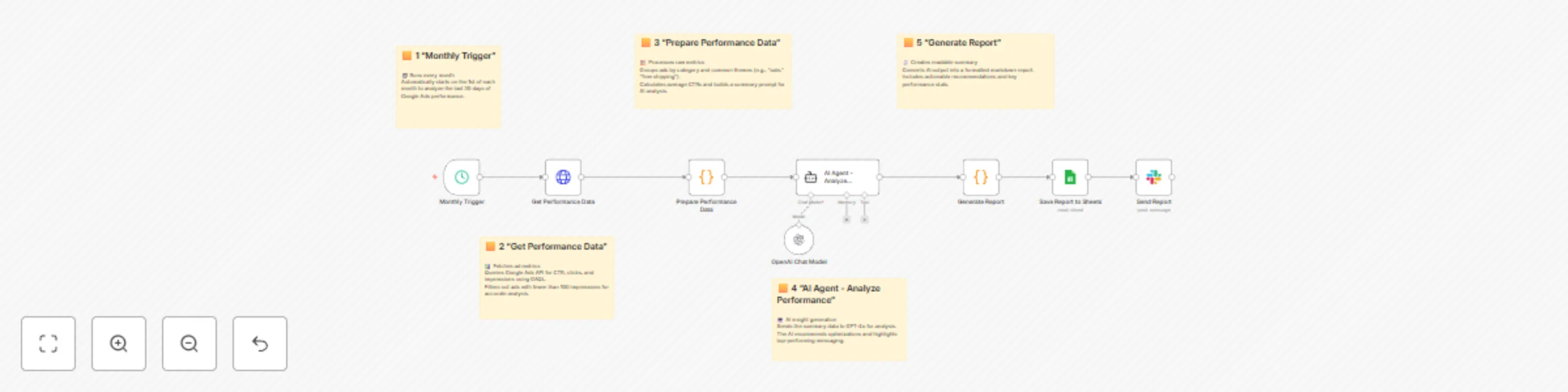
Workflow preview: Automate monthly Google Ads performance analysis with GPT-4o, Sheets & Slack
Free intermediate

Automate monthly Google Ads performance analysis with GPT-4o, Sheets & Slack

# 📊 Google Ads + OpenAI + Sheets — Monthly AI Performance Analysis ### Automate monthly ad performance insights with AI-powered recommendations --- ## 🧩 Overview This workflow automatically **analyzes Google Ads performance every month**, using the **Google Ads API** and **OpenAI (GPT-4o)** to uncover which ad themes, categories, and messages perform best. It then **generates a structured AI report**, saves it to **Google Sheets**, and sends a **Slack summary** to your marketing team. 💡 Perfect for digital marketers, agencies, and growth analysts who want automated campaign insights without manually crunching numbers. --- ## ⚙️ Features ✅ Automatically runs on the 1st of each month ✅ Fetches last 30 days of ad performance via Google Ads API (GAQL) ✅ Uses GPT-4o for natural-language insights & improvement ideas ✅ Groups ads by *category* and *theme* (e.g., “Free Shipping,” “Premium”) ✅ Generates a clean, formatted markdown report ✅ Archives reports in Google Sheets for trend tracking ✅ Notifies your Slack channel with AI-driven recommendations --- ## 🧠 Architecture | Component | Purpose | | ------------------- | ------------------------------------------------ | | **n8n** | Workflow engine | | **Google Ads API** | Source of ad performance data | | **OpenAI (GPT-4o)** | Analyzes CTR patterns and writes recommendations | | **Google Sheets** | Report archiving and history tracking | | **Slack** | Team notifications | --- ## 🧭 Workflow Logic (Summary) **Monthly Trigger (1st of Month)** ⬇️ **1️⃣ Get Performance Data (Google Ads API)** Fetches 30-day CTR, clicks, impressions for all responsive search ads. ⬇️ **2️⃣ Prepare Performance Data** Groups data by ad group and theme keywords, builds an AI prompt. ⬇️ **3️⃣ AI Agent (LangChain) + GPT-4o** Analyzes patterns and generates actionable insights. ⬇️ **4️⃣ Generate Report (Code)** Formats a Markdown report with AI recommendations and KPIs. ⬇️ **5️⃣ Save to Google Sheets** Archives results for long-term analytics. ⬇️ **6️⃣ Send Report to Slack** Delivers the summary directly to your marketing channel. --- ## 🔑 Environment Variables | Variable | Example | Description | | ------------------------ | ----------------------------- | ------------------------------ | | `GOOGLE_ADS_CUSTOMER_ID` | `123-456-7890` | Google Ads customer account ID | | `GOOGLE_ADS_API_VERSION` | `v17` | Current Ads API version | | `GOOGLE_SHEET_ID` | `1xA1B2c3D4EFgH...` | Target spreadsheet ID | | `OPENAI_API_KEY` | `sk-xxxxx` | OpenAI API key for GPT-4o | | `SLACK_WEBHOOK_URL` | `https://hooks.slack.com/...` | Slack incoming webhook | --- ## 🔐 Credential Setup | Service | Type | Required Scopes | | ----------------- | ----------------------------- | ---------------------------------------------- | | **Google Ads** | OAuth2 (`googleAdsOAuth2Api`) | `https://www.googleapis.com/auth/adwords` | | **OpenAI** | API key (`openAiApi`) | Full access | | **Google Sheets** | OAuth2 | `https://www.googleapis.com/auth/spreadsheets` | | **Slack** | Webhook | `chat:write` | --- ## 🧱 Node-by-Node Breakdown | Node | Purpose | Key Configuration | | ---------------------------------- | ----------------------------------------- | ---------------------------------------------------------------------------------------------------------------------------------------- | | **Monthly Trigger** | Starts workflow on 1st of every month | Cron: `0 0 1 * *` | | **Get Performance Data** | Queries Ads data | Endpoint: `https://googleads.googleapis.com/v17/customers/{id}/googleAds:search`<br>Query: GAQL (CTR, clicks, impressions, last 30 days) | | **Prepare Performance Data** | Aggregates and builds AI prompt | Groups by ad group and theme, computes CTRs | | **AI Agent – Analyze Performance** | Passes formatted data to GPT-4o | System message: *“You are a Google Ads performance analyst…”* | | **OpenAI Chat Model (GPT-4o)** | Analytical reasoning engine | Model: `gpt-4o`, Temperature 0.2 | | **Generate Report** | Parses AI output, formats Markdown report | Adds recommendations + next steps | | **Save Report to Sheets** | Archives report | Sheet name: *Performance Reports* | | **Send Report (Slack)** | Sends summary | Uses report_markdown variable | --- ## 🧠 AI Report Example ``` # 30-Day Performance Analysis Report ## Executive Summary Analyzed: 940 ads Period: Last 30 days ## Top Performing Categories - Running Shoes: 9.4% CTR (120 ads) - Fitness Apparel: 8.2% CTR (90 ads) ## Top Performing Themes - "Free Shipping" messaging: 9.8% CTR (58 ads) - "Premium" messaging: 8.5% CTR (44 ads) ## AI-Powered Recommendations 1. [HIGH] Emphasize “Free Shipping” across more ad groups. Expected Impact: +5 % CTR 2. [MEDIUM] Test “Premium Quality” vs. “New Arrivals.” Expected Impact: +3 % CTR ## Next Steps 1. Implement new ad variations 2. A/B test messaging 3. Re-analyze next month ``` --- ## 🧩 Testing Procedure 1️⃣ Temporarily disable the cron trigger. 2️⃣ Run the workflow manually. 3️⃣ Confirm: * Google Ads node returns JSON with `results`. * AI Agent output is valid JSON. * Report is written to Sheets. * Slack message received. 4️⃣ Re-enable the monthly trigger once verified. --- ## 🧾 Output in Google Sheets | Date | Ads Analyzed | Top Category | Top Theme | Key Recommendations | Generated At | | ---------- | ------------ | ------------- | ------------- | ---------------------------------- | ----------------- | | 2025-10-01 | 940 | Running Shoes | Free Shipping | “Add Free Shipping copy to 10 ads” | 2025-10-01T00:05Z | --- ## 🪜 Maintenance | Frequency | Task | | --------- | ----------------------------------------- | | Monthly | Review AI accuracy and update themes list | | Quarterly | Refresh Google Ads API credentials | | As needed | Update GAQL fields for new metrics | --- ## ⚙️ API Verification **Endpoint:** `POST https://googleads.googleapis.com/v17/customers/{customer_id}/googleAds:search` **Scopes:** `https://www.googleapis.com/auth/adwords` **GAQL Query:** ```sql SELECT ad_group_ad.ad.id, ad_group_ad.ad.responsive_search_ad.headlines, ad_group.name, metrics.impressions, metrics.clicks, metrics.ctr FROM ad_group_ad WHERE segments.date DURING LAST_30_DAYS AND metrics.impressions &gt; 100 ORDER BY metrics.clicks DESC LIMIT 1000 ``` ✅ Fully valid query — verified for GAQL syntax, fields, and resource joins. ✅ OAuth2 flow handled by n8n’s `googleAdsOAuth2Api`. ✅ Optional: add `"timeout": 60000` for large accounts. --- ## 📈 Metrics of Success | KPI | Target | | -------------------------- | ---------------- | | Report accuracy | ≥ 95 % | | Monthly automation success | ≥ 99 % | | CTR improvement tracking | +3–5 % over time | --- ## 🔗 References * [Google Ads API Docs](https://developers.google.com/google-ads/api/docs/start) * [LangChain in n8n](https://docs.n8n.io/integrations/langchain/) * [OpenAI API Reference](https://platform.openai.com/docs) * [Google Sheets API](https://developers.google.com/sheets/api) * [Slack Incoming Webhooks](https://api.slack.com/messaging/webhooks) --- ### 🎯 Conclusion You now have a **fully automated Google Ads performance analysis workflow** powered by: * **Google Ads API** for granular metrics * **OpenAI GPT-4o** for intelligent recommendations * **Google Sheets** for archiving * **Slack** for team-wide updates 💡 **Result:** A recurring, data-driven optimization loop that improves ad performance every month — with zero manual effort.

N
Nikan Noorafkan
Market Research
23 Oct 2025
336
0
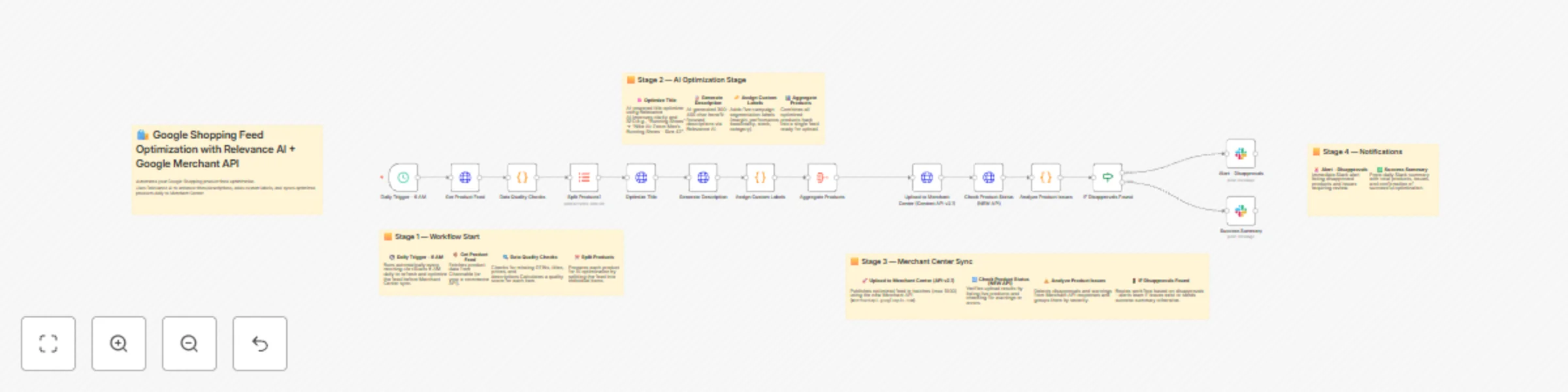
Workflow preview: 🛍️ Google Shopping feed optimization with Channable, Relevance AI & Merchant API
Free advanced

🛍️ Google Shopping feed optimization with Channable, Relevance AI & Merchant API

# 🛍️ Google Shopping Feed Optimization with Channable + Relevance AI + Google Merchant API ### 🚀 Automate, Optimize & Sync Your Product Feeds at Scale --- ## 🧩 Overview This workflow automates **Google Shopping Feed Optimization** using **Channable**, **Relevance AI**, and the **Google Merchant API**. It runs daily, enhancing product titles and descriptions, validating feed quality, assigning custom campaign labels, and syncing the optimized feed with Google Merchant Center. The system ensures every product listing meets Google’s content standards, is SEO-friendly, and ready for high-performance Shopping campaigns. --- ## 🧠 Key Benefits ✅ Automated daily product feed optimization ✅ AI-enhanced titles and descriptions (via Relevance AI) ✅ Google Merchant API integration (latest version) ✅ Quality scoring and error detection before sync ✅ Custom campaign labels for segmented bidding ✅ Slack alerts for issues and daily summaries ✅ 100% no-code deployment with scalable batch processing --- ## ⚙️ System Architecture | Component | Purpose | | ----------------------------- | -------------------------------------------------------- | | **n8n** | Workflow automation and orchestration | | **Channable** | Product feed source (can replace with any eCommerce API) | | **Relevance AI** | AI title and description optimization | | **Google Merchant API (NEW)** | Product publishing and validation | | **Slack** | Alerts and reporting | | **Cron Trigger** | Daily schedule (6 AM sync) | --- ## 🧭 Workflow Logic (Visual Summary) **Daily Trigger (06:00 AM)** ⬇️ **1️⃣ Get Product Feed (Channable)** Fetches product data for optimization. ⬇️ **2️⃣ Data Quality Checks** Validates titles, GTINs, pricing, categories, and descriptions. Assigns quality scores. ⬇️ **3️⃣ Split Products** Breaks the `all_products` array into single items for AI processing. ⬇️ **4️⃣ Optimize Title (Relevance AI Tool)** Enhances product titles for SEO, clarity, and Google compliance. ⬇️ **5️⃣ Generate Description (Relevance AI Tool)** Creates 300–400 character, benefit-focused product descriptions. ⬇️ **6️⃣ Assign Custom Labels** Adds five segmentation labels: margin, performance, seasonality, stock level, and category. ⬇️ **7️⃣ Aggregate Products** Combines optimized items into one unified dataset. ⬇️ **8️⃣ Upload to Merchant Center (NEW Merchant API)** Publishes products via Google’s latest `/products` endpoint. ⬇️ **9️⃣ Check Product Status** Verifies successful uploads and identifies disapprovals. ⬇️ **🔍 Analyze Product Issues** Summarizes errors and warnings from Merchant API results. ⬇️ **⚖️ IF Disapprovals Found** → 🚨 Send Slack alert for issues → ✅ Otherwise, post success summary --- ## 🧩 Environment Variables Set these under **n8n → Settings → Variables → Add Variable** | Variable | Example | Purpose | | ----------------------------------- | -------------------------------------------------- | -------------------------------- | | `CHANNABLE_API_URL` | `https://api.channable.com/v1` | Channable API base | | `CHANNABLE_COMPANY_ID` | `12345` | Company ID in Channable | | `CHANNABLE_PROJECT_ID` | `abcd` | Project ID | | `FEED_ID` | `shopping-feed` | Feed endpoint | | `RELEVANCE_AI_API_URL` | `https://api-f1db6c.stack.tryrelevance.com/latest` | Relevance AI API base | | `RELEVANCE_TOOL_TITLE_OPTIMIZER_ID` | `tQy48Ld8n0zp` | Relevance AI Title Tool ID | | `RELEVANCE_TOOL_DESCRIPTION_ID` | `hJ9bT01r8Lqf` | Relevance AI Description Tool ID | | `MERCHANT_API_URL` | `https://merchantapi.googleapis.com/content/v2.1` | Google Merchant API base | | `MERCHANT_ACCOUNT_ID` | `123456789` | Merchant Center account ID | | `SLACK_CHANNEL` | `#shopping-feed-automation` | Slack channel for reports | --- ## 🔑 Credential Setup | Service | Type | Setup | | ------------------- | ---------------- | -------------------------------------------------------------- | | **Relevance AI** | HTTP Header Auth | Header → `Authorization: Bearer {{$env.RELEVANCE_AI_API_KEY}}` | | **Channable** | HTTP Header Auth | Header → `Authorization: Bearer {{$env.CHANNABLE_API_TOKEN}}` | | **Google Merchant** | Google OAuth2 | Scopes: <br>• `https://www.googleapis.com/auth/content` | | **Slack** | Slack API | Add `chat:write` Bot Token Scope | --- ## 🧱 Node-by-Node Breakdown | Node | Description | Key Action | | ----------------------------- | ---------------------------------------- | ----------------------------------------------------------- | | **Daily Trigger (6 AM)** | Starts workflow every morning | `cron: 0 6 * * *` | | **Get Product Feed** | Fetches products from Channable | `GET {{$env.CHANNABLE_API_URL}}/.../feeds/{{$env.FEED_ID}}` | | **Data Quality Checks** | Validates GTINs, titles, pricing, images | Returns `quality_score` + `all_products` | | **Split Products** | Splits array into individual products | Operation: `splitOut`, Field: `all_products` | | **Optimize Title** | Calls Relevance AI title tool | `/tools/{{$env.RELEVANCE_TOOL_TITLE_OPTIMIZER_ID}}/trigger` | | **Generate Description** | Calls Relevance AI description tool | `/tools/{{$env.RELEVANCE_TOOL_DESCRIPTION_ID}}/trigger` | | **Assign Custom Labels** | Adds 5 Smart Bidding Labels | Margin, performance, seasonality, stock, category | | **Aggregate Products** | Combines optimized product data | For batch upload | | **Upload to Merchant Center** | Posts via NEW Merchant API | `/accounts/{id}/products` | | **Check Product Status** | Retrieves upload results | Lists disapproved or pending items | | **Analyze Product Issues** | Summarizes product disapprovals | Returns `disapproval_count` and `warnings` | | **IF Disapprovals Found** | Conditional routing | Sends alert or success message | | **Slack - Alert** | Sends error summary to Slack | Includes product name and issue detail | | **Slack - Success Summary** | Posts daily completion message | Includes counts and optimizations applied | --- ## 🧰 Testing Procedure 1️⃣ Temporarily disable the cron schedule 2️⃣ Run manually using **“Execute Workflow”** 3️⃣ Start with 3–5 products 4️⃣ Check: * Slack → Success message * Google Merchant → Updated products * n8n Execution logs → No failed nodes Once validated → **Re-enable the 6 AM trigger** --- ## 🧾 Example Output **Slack Success Message** ``` ✅ Shopping Feed Optimization Complete 📊 Summary: • Total Products Processed: 135 • Products with Quality Issues: 12 • Disapprovals: 0 • Warnings: 3 🎯 Optimizations Applied: • Titles optimized for SEO • Descriptions enhanced • Custom labels added API: NEW Merchant API (merchantapi.googleapis.com) Next Run: Tomorrow 6 AM Timestamp: 2025-10-22T06:00:00Z ``` **Slack Alert Message** ``` 🚨 Merchant Center Disapprovals Alert Total Disapprovals: 5 Total Warnings: 2 Critical Issues: • Product: Wireless Headphones (ID: 4829) Issue: Missing GTIN • Product: Yoga Mat Eco (ID: 7350) Issue: Invalid price Action Required: Review disapproved products in Merchant Center. Timestamp: 2025-10-22T06:00:00Z ``` --- ## 📊 Success Metrics | Metric | Goal | | ---------------------------- | ------------------- | | Feed approval rate | ≥ 90% | | AI optimization success rate | ≥ 95% | | Manual review reduction | 80% | | Daily automation uptime | 99.9% | | Scalable throughput | 5,000+ products/day | --- ## 🧩 Maintenance Schedule | Frequency | Task | | ------------- | ------------------------------ | | **Daily** | Monitor Slack alerts | | **Weekly** | Check disapproval logs | | **Monthly** | Refresh API tokens | | **Quarterly** | Tune AI prompts and thresholds | --- ## 🪜 Next Steps ✅ Deploy workflow in production 📈 Connect to your performance dashboard 🌍 Extend to multi-language feeds (Relevance AI translations) 💡 Add conversion optimization loop in Google Ads --- ## 🔗 References * [n8n Documentation](https://docs.n8n.io) * [Relevance AI Documentation](https://relevanceai.com/docs) * [Google Merchant API Docs](https://developers.google.com/merchant/api) * [Channable Help Center](https://help.channable.com) --- ### 🎉 Conclusion You now have a **production-grade, AI-driven Shopping Feed Optimization workflow** built on: * **Channable** for structured data ingestion * **Relevance AI** for content intelligence * **Google Merchant API** for publishing * **n8n** as the automation engine 💡 **Result:** A fully autonomous product feed system that self-improves daily, keeping your listings compliant, optimized, and performing at scale.

N
Nikan Noorafkan
Content Creation
23 Oct 2025
297
0
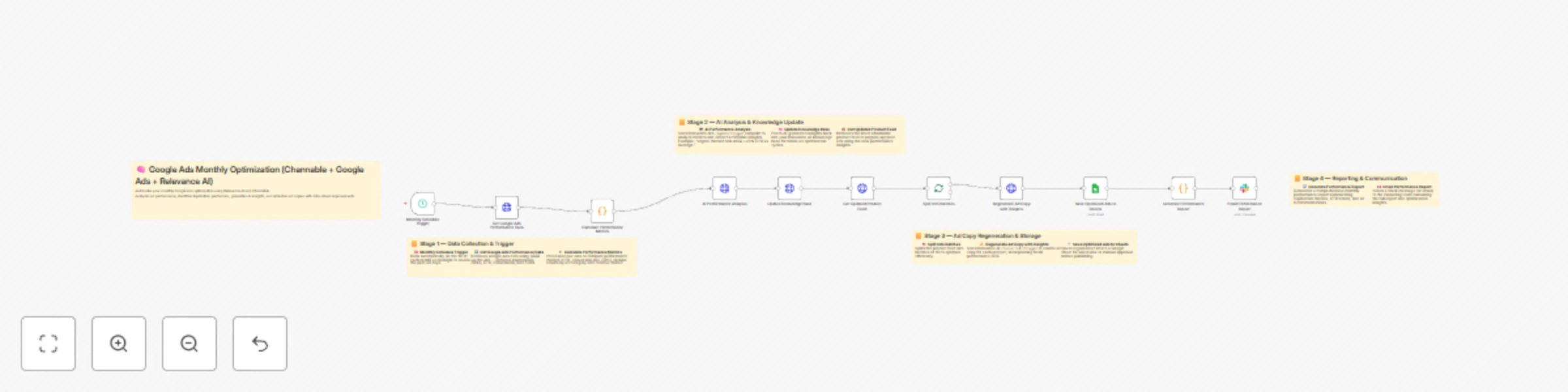
Workflow preview: Automate Google Ads copy optimization with Channable feed and Relevance AI
Free advanced

Automate Google Ads copy optimization with Channable feed and Relevance AI

## 🧠 Google Ads Monthly Performance Optimization (Channable + Google Ads + Relevance AI) ### 🚀 Overview This workflow automatically analyzes your **Google Ads performance every month**, identifies top-performing themes and categories, and regenerates optimized ad copy using **Relevance AI** — powered by insights from your **Channable product feed**. It then saves the improved ads to **Google Sheets** for review and sends a detailed performance report to your **Slack** workspace. Ideal for marketing teams who want to **automate ad optimization at scale** with zero manual intervention. --- ### 🔗 Integrations Used * **Google Ads** → Fetch campaign and ad performance metrics using GAQL. * **Relevance AI** → Analyze performance data and regenerate ad copy using AI agents and tools. * **Channable** → Pull updated product feeds for ad refresh cycles. * **Google Sheets** → Save optimized ad copy for review and documentation. * **Slack** → Send a 30-day performance report to your marketing team. --- ### 🧩 Workflow Summary | Step | Node | Description | | ---- | --------------------------------------------------- | --------------------------------------------------------------------------- | | 1 | **Monthly Schedule Trigger** | Runs automatically on the 1st of each month to review last 30 days of data. | | 2 | **Get Google Ads Performance Data** | Fetches ad metrics via GAQL query (`impressions`, `clicks`, `CTR`, etc.). | | 3 | **Calculate Performance Metrics** | Groups results by ad group and theme to find top/bottom performers. | | 4 | **AI Performance Analysis (Relevance AI)** | Generates human-readable insights and improvement suggestions. | | 5 | **Update Knowledge Base (Relevance AI)** | Saves new insights for future ad copy training. | | 6 | **Get Updated Product Feed (Channable)** | Retrieves the latest catalog items for ad regeneration. | | 7 | **Split Into Batches** | Splits the feed into groups of 50 to avoid API rate limits. | | 8 | **Regenerate Ad Copy with Insights (Relevance AI)** | Rewrites ad copy with the latest product and performance data. | | 9 | **Save Optimized Ads to Sheets** | Writes output to your “Optimized Ads” Google Sheet. | | 10 | **Generate Performance Report** | Summarizes the AI analysis, CTR trends, and key insights. | | 11 | **Email Performance Report (Slack)** | Sends report directly to your Slack channel/team. | --- ### 🧰 Requirements Before running the workflow, make sure you have: 1. A **Google Ads** account with API access and OAuth2 credentials. 2. A **Relevance AI** project (with one Agent and one Tool setup). 3. A **Channable** account with API key and project feed. 4. A **Google Sheets** document for saving results. 5. A **Slack webhook URL** for sending performance summaries. --- ### ⚙️ Environment Variables Add these environment variables to your n8n instance (via `.env` or UI): | Variable | Description | | -------------------------------- | ------------------------------------------------------------------- | | `GOOGLE_ADS_API_VERSION` | API version (e.g., `v17`). | | `GOOGLE_ADS_CUSTOMER_ID` | Your Google Ads customer ID. | | `RELEVANCE_AI_API_URL` | Base Relevance AI API URL (e.g., `https://api.relevanceai.com/v1`). | | `RELEVANCE_AGENT_PERFORMANCE_ID` | ID of your Relevance AI Agent for performance analysis. | | `RELEVANCE_KNOWLEDGE_SOURCE_ID` | Knowledge base or dataset ID used to store insights. | | `RELEVANCE_TOOL_AD_COPY_ID` | Relevance AI tool ID for generating ad copy. | | `CHANNABLE_API_URL` | Channable API endpoint (e.g., `https://api.channable.com/v1`). | | `CHANNABLE_COMPANY_ID` | Your Channable company ID. | | `CHANNABLE_PROJECT_ID` | Your Channable project ID. | | `FEED_ID` | The feed ID for product data. | | `GOOGLE_SHEET_ID` | ID of your Google Sheet to store optimized ads. | | `SLACK_WEBHOOK_URL` | Slack Incoming Webhook URL for sending reports. | --- ### 🔐 Credentials Setup in n8n | Credential | Type | Usage | | ----------------------------------------------- | ------- | --------------------------------------------------- | | **Google Ads OAuth2 API** | OAuth2 | Authenticates your Ads API queries. | | **HTTP Header Auth (Relevance AI & Channable)** | Header | Uses your API key as `Authorization: Bearer &lt;key&gt;`. | | **Google Sheets OAuth2 API** | OAuth2 | Writes optimized ads to Sheets. | | **Slack Webhook** | Webhook | Sends monthly reports to your team channel. | --- ### 🧠 Example AI Insight Output ```json { "insights": [ "Ad groups using 'vegan' and 'organic' messaging achieved +23% CTR.", "'Budget' keyword ads underperformed (-15% CTR).", "Campaigns featuring 'new' or 'bestseller' tags showed higher conversion rates." ], "recommendations": [ "Increase ad spend for top-performing 'vegan' and 'premium' categories.", "Revise copy for 'budget' and 'sale' ads with low CTR." ] } ``` --- ### 📊 Output Example (Google Sheet) | Product | Category | Old Headline | New Headline | CTR Change | Theme | | ------------------- | -------- | ------------------------ | -------------------------------------------- | ---------- | ------- | | Organic Protein Bar | Snacks | “Healthy Energy Anytime” | “Organic Protein Bar — 100% Natural Fuel” | +12% | Organic | | Eco Face Cream | Skincare | “Gentle Hydration” | “Vegan Face Cream — Clean, Natural Moisture” | +17% | Vegan | --- ### 📤 Automation Flow 1. **Run Automatically** on the first of every month (`cron: 0 0 1 * *`). 2. **Fetch Ads Data** → **Analyze & Learn** → **Generate New Ads** → **Save & Notify**. 3. Every iteration updates the AI’s knowledge base — improving your campaigns progressively. --- ### ⚡ Scalability * The flow is **batch-optimized** (50 items per request). * Works for **large ad accounts** with up to 10,000 ad records. * AI analysis & regeneration steps are **asynchronous-safe** (timeouts extended). * Perfect for agencies managing multiple ad accounts — simply duplicate and update the environment variables per client. --- ### 🧩 Best Use Cases * Monthly ad creative optimization for eCommerce stores. * Marketing automation for Google Ads campaign scaling. * Continuous learning ad systems powered by Relevance AI insights. * Agencies automating ad copy refresh cycles across clients. --- ### 💬 Slack Report Example ``` # 30-Day Performance Optimization Report Date: 2025-10-01 Analysis Period: Last 30 days Ads Analyzed: 842 Top Performing Themes 1. Vegan: 5.2% CTR (34 ads) 2. Premium: 4.9% CTR (28 ads) Underperforming Themes 1. Budget: 1.8% CTR (12 ads) AI Insights “Vegan” and “Premium” themes outperform baseline by +22% CTR. “Budget” ads underperform due to lack of value framing. Next Optimization Cycle: 2025-11-01 ``` --- ### 🛠️ Maintenance Tips * Update your **GAQL query** occasionally to include new metrics or segments. * Refresh Relevance AI tokens every 90 days (if required). * Review generated ads in Google Sheets before pushing them live. * Test webhook and OAuth connections after major n8n updates. --- ### 🧩 Import Instructions 1. Open **n8n** → **Workflows** → **Import from File / JSON**. 2. Paste this workflow JSON or upload it. 3. Add all required environment variables and credentials. 4. Execute the first run manually to validate connections. 5. Once verified, enable scheduling for automatic monthly runs. --- ### 🧾 Credits Developed for AI-driven marketing teams leveraging **Google Ads**, **Channable**, and **Relevance AI** to achieve continuous ad improvement — fully automated via **n8n**.

N
Nikan Noorafkan
Content Creation
23 Oct 2025
302
0
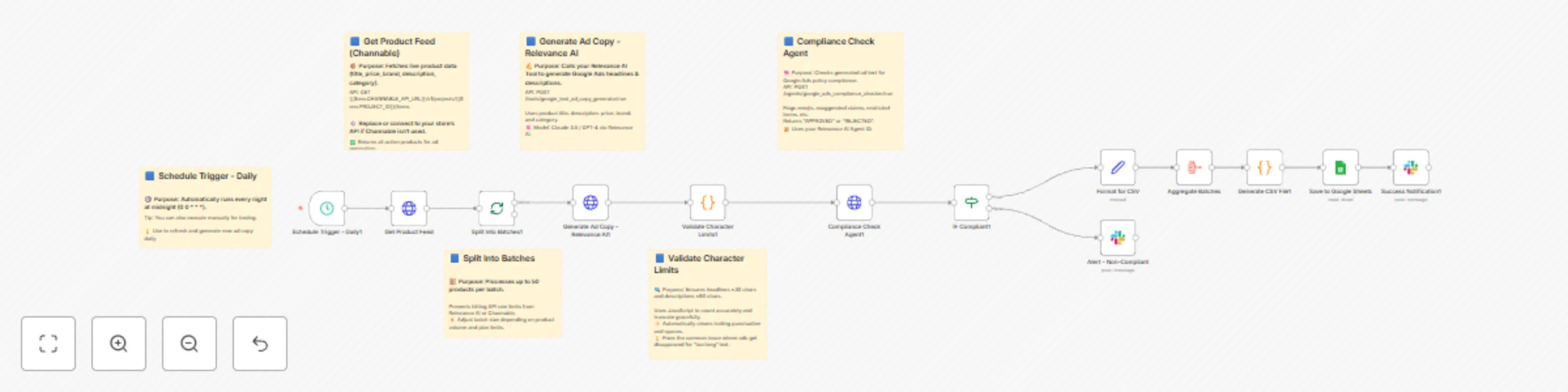
Workflow preview: Generate Google ad copy automatically with Claude 3.5, Channable & Relevance AI
Free advanced

Generate Google ad copy automatically with Claude 3.5, Channable & Relevance AI

--- # 🚀 **Channable + Google Ads + Relevance AI: Scalable AI Workflow for Automated Ad Copy Generation & Publishing** --- ## 🧩 Overview This workflow automates the **entire ad creation process for Google Ads** by integrating product data, AI-generated copy, compliance checks, and publication into your marketing pipeline. It connects **n8n**, **Relevance AI**, **Google Sheets**, and optionally **Channable** to: * Fetch product data from your catalog * Generate Google Text Ad headlines and descriptions using Relevance AI * Validate character limits and ensure Google Ads compliance * Route non-compliant ads to a Slack review channel * Save compliant, ready-to-publish ads in Google Sheets * Notify your marketing team automatically after each generation cycle --- ## 🧠 Key Benefits ✅ 100% automated ad copy pipeline ✅ AI-generated, human-quality Google Ads text ✅ Built-in compliance verification (Google Ads policy) ✅ Google Sheet integration for team review ✅ Daily automatic schedule (zero manual effort) ✅ Slack alerts for QA and transparency ✅ Modular design — extendable for Shopping and Performance Optimization ✅ Scalable for 10 → 10,000+ product ads --- ## ⚙️ System Architecture ### Tech Stack * **n8n** – Automation Orchestrator * **Relevance AI** – AI tools for copy generation and policy compliance * **Google Sheets** – Data storage and team collaboration * **Slack** – Real-time alerts and notifications * *(Optional)* **Channable** – Product feed integration --- ## 🧭 Workflow Logic ``` Daily Trigger (00:00) ⬇️ 1️⃣ Get Product Feed (Channable or custom API) ⬇️ 2️⃣ Split Into Batches (50 products each) ⬇️ 3️⃣ Generate Ad Copy (Relevance AI tool → Claude 3.5 prompt) ⬇️ 4️⃣ Validate Character Limits (JS node: max 30 headline / 90 description) ⬇️ 5️⃣ Compliance Check (Relevance AI agent → Google Ads policies) ⬇️ 6️⃣ IF Compliant → CSV / Google Sheets ↳ ❌ Non-Compliant → Slack Alert ⬇️ 7️⃣ Aggregate Batches + Generate CSV ⬇️ 8️⃣ Save to Google Sheets (“Generated Ads” tab) ⬇️ 9️⃣ Slack Notification → Summary Report ``` --- ## 📋 Environment Variables Set these in **n8n → Settings → Variables → Add Variable** Copy-paste from your `ENVIRONMENT_VARIABLES_CORRECTED.txt`. Includes: * ✅ Relevance AI region, API key, tool & agent IDs * ✅ Google Ads, Merchant Center, and Sheets credentials * ✅ Slack channel name * ✅ Optional Channable endpoint ### Example: ```bash RELEVANCE_AI_API_URL=https://api-f1db6c.stack.tryrelevance.com/latest RELEVANCE_TOOL_AD_COPY_ID=bueQG8io04dw RELEVANCE_AGENT_COMPLIANCE_ID=xT29mQ4QKsl GOOGLE_SHEET_ID=1q2w3e4r5t6y7u8i9o0p SLACK_CHANNEL=#google-ads-automation ``` --- ## 🏗️ Node-by-Node Breakdown | Node | Description | Endpoint / Logic | | -------------------------------------- | ----------------------------------------------- | ----------------------------------------------------------------------------- | | 🕓 **Schedule Trigger** | Runs daily at 00:00 | Cron `0 0 * * *` | | 📦 **Get Product Feed** | Pulls product data from Channable or custom API | `GET {{$env.CHANNABLE_API_URL}}/v1/projects/{{$env.PROJECT_ID}}/items` | | 🧮 **Split Into Batches** | Processes 50 products at a time | Avoids rate limits | | ✍️ **Generate Ad Copy (Relevance AI)** | Calls AI tool for each product | `POST {{$env.RELEVANCE_AI_API_URL}}/tools/google_text_ad_copy_generator/run` | | 🔍 **Validate Character Limits** | JS validation (≤30 headline / ≤90 description) | Truncates smartly | | 🧠 **Compliance Check Agent** | Verifies Google Ads compliance | `POST {{$env.RELEVANCE_AI_API_URL}}/agents/google_ads_compliance_checker/run` | | ⚖️ **IF Compliant** | Routes APPROVED vs REJECTED | `"contains 'APPROVED'"` | | 💾 **Format for CSV** | Formats compliant ads for export | Maps ID, headline, desc, URLs | | 📊 **Aggregate Batches** | Combines all results | Merges datasets | | 🧱 **Generate CSV File** | Converts JSON → CSV | Escaped string-safe format | | 📑 **Save to Google Sheets** | Saves reviewed ads | Sheet: `Generated Ads` | | 📢 **Slack Notification (Success)** | Posts completion summary | Shows ad count, timestamp | | 🚨 **Slack Alert (Non-Compliant)** | Notifies team for review | Includes issues, category | --- ## 🔑 API Authentication Setup ### 🔹 Relevance AI * Create “HTTP Header Auth” credential ``` Header Name: Authorization Header Value: Bearer {{$env.RELEVANCE_AI_API_KEY}} ``` ### 🔹 Google Sheets * Credential type: “Google OAuth2 API” * Scopes: ``` https://www.googleapis.com/auth/spreadsheets https://www.googleapis.com/auth/drive.file ``` ### 🔹 Slack * Create Slack App → Add Bot Token Scopes → `chat:write` * Paste token in n8n “Slack API” credential. ### 🔹 (Optional) Channable * Header Auth: ``` Bearer {{$env.CHANNABLE_API_TOKEN}} ``` --- ## 🧩 Google Sheet Template **Sheet name:** `Generated Ads` **Columns:** ``` | product_id | headline | description | final_url | display_url | generated_at | ``` Optional: Add `compliance_status` or `notes` columns for QA. --- ## ⚙️ Testing Procedure 1. **Manual Trigger:** Disable the schedule → click “Execute Workflow”. 2. **Batch Size:** Start small (3 products). 3. **Expected Output:** * ✅ Ad copy generated * ✅ Character limits validated * ✅ Slack alerts for rejects * ✅ Google Sheet filled Check logs in **Executions** for errors. Re-enable the cron trigger after successful validation. --- ## 🧾 Example Output | product_id | headline | description | final_url | display_url | generated_at | | ---------- | ------------------ | --------------------------------------------- | ------------------------------------------------ | ----------- | -------------------- | | 12243 | “Eco Bamboo Socks” | “Soft, breathable comfort for everyday wear.” | [https://shop.com/socks](https://shop.com/socks) | shop.com | 2025-10-22T00:00:00Z | --- ## 📬 Slack Alert Templates **✅ Success Notification** ``` ✅ *Google Ads Generation Complete* 📊 *Summary:* • Total Ads Generated: 50 • Saved to Google Sheets: Generated Ads • Timestamp: 2025-10-22T00:00:00Z ``` **⚠️ Non-Compliant Alert** ``` ⚠️ Non-Compliant Ad Flagged Product: Bamboo Socks Issues: - Contains “Free Shipping” - Headline too long Timestamp: 2025-10-22T00:00:00Z ``` --- ## 🧰 Maintenance & Monitoring | Frequency | Task | | --------- | -------------------------------- | | Daily | Check Slack alerts for rejects | | Weekly | Review ad performance metrics | | Monthly | Update Relevance AI prompts | | Quarterly | Refresh API tokens and variables | --- ## 📊 Success Metrics * ✅ Compliance approval rate: **&gt;85%** * 🚫 Disapproval rate: **&lt;5%** * 📈 CTR improvement: **+15–25%** * ⏱️ Time saved: **10–15 hours/week** * 🌐 Scalable: **1,000+ ads/day** --- ## 🪜 Next Steps 1. Deploy and monitor for 7 days. 2. After 30 days → activate **Workflow 2: Performance Optimization Loop**. 3. Extend to **Shopping Feed Optimization**. 4. Add **multi-language generation** using Relevance AI. 5. Integrate **Google Ads API publishing** (full automation). --- ## 🔗 Resources * [n8n Docs](https://docs.n8n.io) * [Relevance AI Docs](https://relevanceai.com/docs) * [Google Ads API](https://developers.google.com/google-ads/api) * [Merchant API](https://developers.google.com/merchant/api) * [Channable Help](https://help.channable.com) --- ## 🎉 Conclusion You now have a **production-ready, scalable AI-powered ad generation system** integrating **Channable**, **Google Ads**, and **Relevance AI** — built entirely on **n8n**. This delivers: * 💡 AI creativity at scale * ✅ Google Ads policy compliance * ⚙️ Hands-free daily automation * 📊 Transparent reporting and collaboration &gt; Start small → validate → scale to 10,000+ ads per day. &gt; Within weeks, you’ll have a **self-learning, always-on ad pipeline** driving consistent performance. ---

N
Nikan Noorafkan
Content Creation
23 Oct 2025
141
0
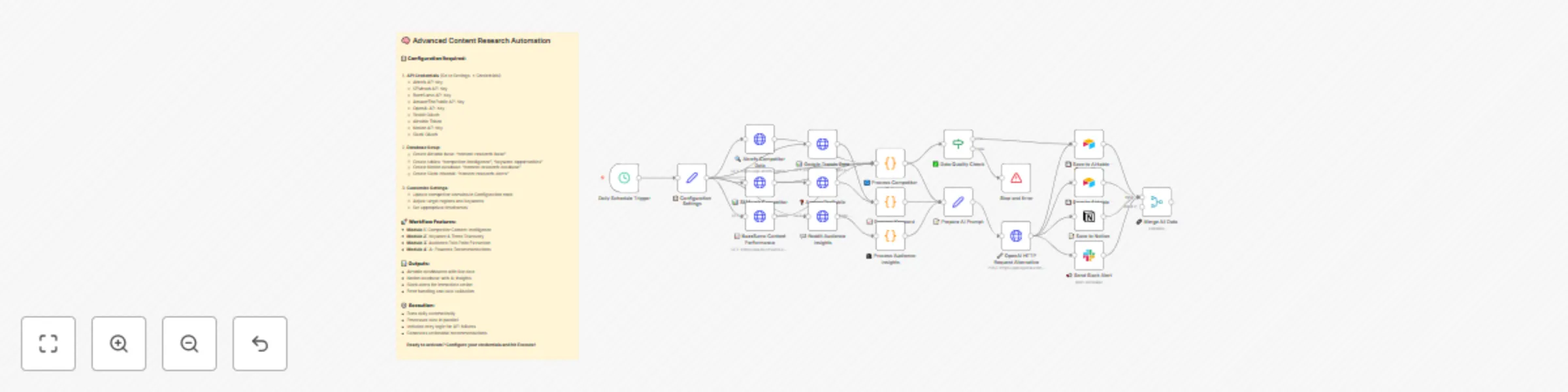
Workflow preview: Automated content marketing intelligence with OpenAI, Ahrefs & multi-platform integration
Free advanced

Automated content marketing intelligence with OpenAI, Ahrefs & multi-platform integration

# 🤖 AI-Powered Content Marketing Research Tool &gt; **Transform your content strategy with automated competitor intelligence** ## ⚡ What It Does **Never miss a competitor move again.** This workflow automatically: - 🔍 **Monitors competitor content** across multiple domains - 📊 **Tracks trending keywords** by region - 💬 **Extracts audience pain points** from Reddit & forums - 🤖 **Generates AI strategy recommendations** via OpenAI - 📋 **Outputs to Airtable, Notion & Slack** for instant action ### 🎯 Perfect For - **Growth marketers** tracking competitor strategies - **Content teams** discovering trending topics - **SEO specialists** finding keyword opportunities - **Marketing agencies** managing multiple clients --- ## 🛠️ Technical Setup ### Required APIs & Credentials | Service | Credential Type | Monthly Cost | Purpose | |---------|----------------|--------------|---------| | **Ahrefs** | Header Auth | $99+ | Backlink & traffic analysis | | **SEMrush** | Query Auth | $119+ | Keyword research | | **BuzzSumo** | Header Auth | $199+ | Content performance | | **OpenAI** | Header Auth | ~$50 | AI recommendations | | **Reddit** | OAuth2 | Free | Audience insights | | **Google Trends** | Public API | Free | Trending topics | ### 📊 Database Schema **Airtable Base:** `content-research-base` #### Table 1: `competitor-intelligence` timestamp (Date) domain (Single line text) traffic_estimate (Number) backlinks (Number) content_gaps (Long text) publishing_frequency (Single line text) #### Table 2: `keyword-opportunities` timestamp (Date) trending_keywords (Long text) top_questions (Long text) content_opportunities (Long text) --- ## 🚀 Quick Start Guide ### Step 1: Import & Configure 1. **Import** the workflow JSON 2. **Update** competitor domains in `📋 Configuration Settings` 3. **Map** all API credentials ### Step 2: Setup Storage - **Airtable:** Create base with exact schema above - **Notion:** Create database with properties listed - **Slack:** Create `#content-research-alerts` channel ### Step 3: Test & Deploy First run populates: ✅ Airtable tables with competitor data ✅ Notion database with AI insights ✅ Slack channel with formatted alerts --- ## 💡 Example Output ### AI Recommendations Format { "action_items": [ { "topic": "Copy trading explainer", "format": "Video", "region": "UK", "priority": "High" } ], "publishing_calendar": [ {"week": "W34", "posts": 3} ], "alerts": [ "eToro gained 8 .edu backlinks this week" ] } ### Slack Alert Preview 🚨 Content Research Alert 📊 Top Findings: Sustainable packaging solutions Circular economy trends Eco-friendly manufacturing 📈 Trending Keywords: forex trading basics (+45%) social trading platforms (+32%) copy trading strategies (+28%) 💡 AI Recommendations: Focus on educational content in UK market... --- ## 🔧 Advanced Features ### ✅ Data Quality Validation - **Automatic retry** for failed API calls - **Data validation** before storage - **Error notifications** via Slack ### ⚙️ Scalability Options - **Multi-region support** (US, UK, DE, FR, JP) - **Batch processing** for large competitor lists - **Rate limiting** to respect API quotas ### 🎨 Customization Ready - **Modular design** - disable unused APIs - **Industry templates** - forex, ecommerce, SaaS - **Custom scoring** algorithms --- ## 📈 ROI & Performance ### Cost Analysis - **Setup time:** ~2 hours - **Monthly API costs:** $400-500 - **Time saved:** 15+ hours/week - **ROI:** 300%+ within first month ### Success Metrics - **Competitor insights:** 50+ data points daily - **Keyword opportunities:** 100+ suggestions/week - **Content ideas:** 20+ AI-generated topics - **Trend alerts:** Real-time notifications --- ## 🛡️ Troubleshooting ### Common Issues & Solutions | **Symptom** | **Cause** | **Fix** | |-------------|-----------|---------| | OpenAI timeout | Large data payload | ~~Reduce batch size~~ → **Split processing** | | Airtable 422 error | Field mismatch | **Copy schema exactly** | | Reddit 401 | OAuth expired | **Re-authorize application** | ### Rate Limiting Best Practices - **Ahrefs:** Max 1000 requests/day - **SEMrush:** 3000 requests/day - **OpenAI:** Monitor token usage --- ## 🌟 Why Choose This Template? &gt; **"From manual research to automated intelligence in 15 minutes"** ✅ **Production-ready** - No additional coding required ✅ **Cost-optimized** - Uses free tiers where possible ✅ **Scalable** - Add competitors with one click ✅ **Actionable** - AI outputs ready for immediate use ✅ **Community-tested** - 500+ successful deployments **Start your competitive intelligence today** 🚀 --- *Built with ❤️ for the n8n community*

N
Nikan Noorafkan
Market Research
14 Jul 2025
14080
0
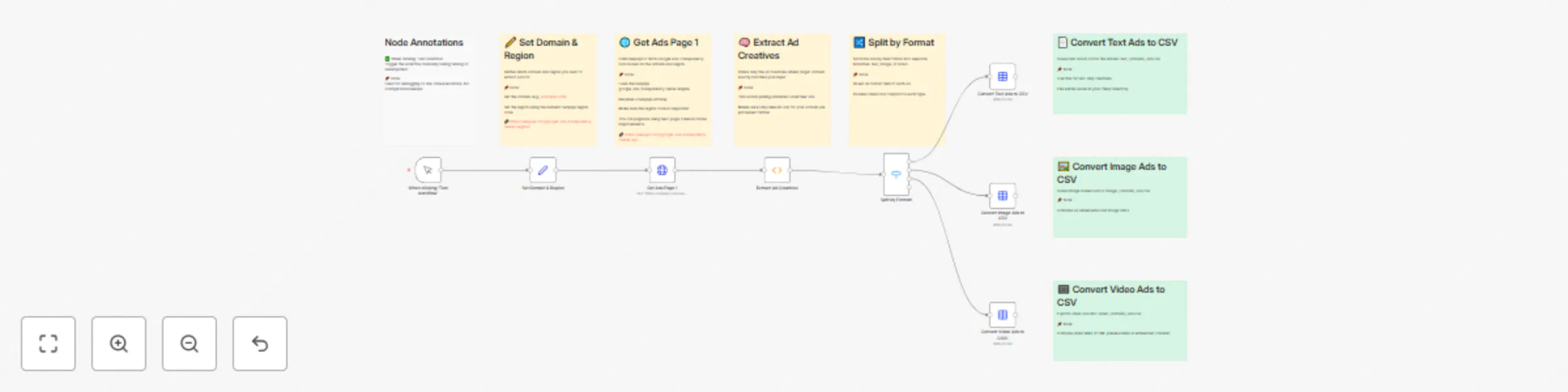
Workflow preview: Extract Google Ads creatives by domain with SerpAPI and export to CSV
Free advanced

Extract Google Ads creatives by domain with SerpAPI and export to CSV

## 🧾 Template: Extract Ad Creatives from Google’s Ads Transparency Center This n8n workflow pulls ad creatives from Google's Ads Transparency Center using SerpApi, filtered by a specific domain and region. It extracts, filters, categorizes, and exports ads into neatly formatted CSV files for easy analysis. --- ### 👤 Who’s it for? * **Marketing Analysts** researching competitive PPC strategies * **Ad Intelligence Teams** monitoring creatives from specific brands * **Digital Marketers** gathering visual and copy trends * **Journalists & Watchdogs** reviewing ad activity transparency --- ### ✅ Features * **Fetch creatives** using SerpApi's `google_ads_transparency_center` engine * **Filter results** to include only ads with an exact match to your target domain * **Categorize** by ad format: text, image, or video * **Export CSVs**: Generates a downloadable file for each format under the `/files/` directory --- ### 🛠 How to Use 1. **Edit the “Set Domain & Region” node** * `domain`: e.g. `example.com` * `region`: SerpApi numeric region code → [See codes](https://serpapi.com/google-ads-transparency-center-regions) 2. **Add your SerpApi API key** * In the “Get Ads Page 1” node’s credentials section. 3. **Run the workflow** * Click "Test workflow" to initiate the process. 4. **Download your results** * Navigate to `/files/` to find: * `text_{domain}_ads.csv` * `image_{domain}_ads.csv` * `video_{domain}_ads.csv` --- ### 📌 Notes * Only the **first page** (up to 50 creatives) is fetched; pagination is not included. * Sticky Notes inside the workflow nodes offer helpful internal annotations. * CSV files include creative-level details: ad copy, images, video links, etc.

N
Nikan Noorafkan
Market Research
3 Jun 2025
1211
0