Generate fact-checked research reports with Llama AI and Web search

Workflow preview

Workflow preview
100%
Generate fact-checked research reports with Llama AI and Web search preview
Open on n8n.io

Important notice

This workflow is provided as-is. Please review and test before using in production.

1. Workflow Overview

Who’s it for This template is designed for creators, researchers, freelance writers, founders, and automation professionals who want a reliable way to generate structured, citation backed research ...

Best for

  • Content Creation automation workflows
  • AI RAG automation workflows
  • advanced n8n builders looking for reusable templates

Tools used

n8n-nodes-base.formtrigger, n8n-nodes-base.code, n8n-nodes-base.httprequest, n8n-nodes-base.merge, n8n-nodes-base.respondtowebhook, @n8n/n8n-nodes-langchain.lmchatgroq, @n8n/n8n-nodes-langchain.chainllm, n8n-nodes-base.stickynote

Source and attribution

This workflow is cataloged by N8N Workflows and links back to its original n8n.io source page by Muhammad Shaheer Awan.

Original n8n.io source

1.1 Workflow description

Title
Generate fact-checked research reports with Llama AI and Web search
Workflow name
Generate fact-checked research reports with Llama AI and Web search

Who’s it for

This template is designed for creators, researchers, freelance writers, founders, and automation professionals who want a reliable way to generate structured, citation-backed research content without doing manual data collection. Anyone creating blog posts, reports, briefs, or research summaries will benefit from this system.

What it does

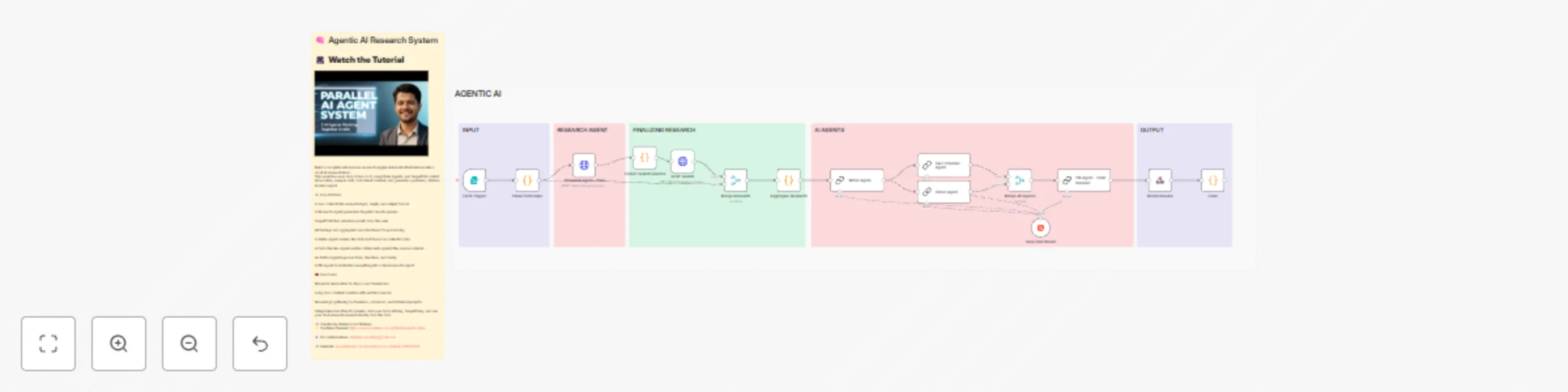
This workflow turns a simple form submission into a complete research pipeline. It accepts a topic, determines what needs to be researched, gathers information from the web, writes content, fact-checks it against the collected sources, edits the draft for clarity, and compiles a final report. It behaves like a small agentic research team inside n8n.

How it works

  • A form collects the research topic, depth, and desired output format.

  • A research agent generates focused search queries.

  • SERP API retrieves real-time results for each query.

  • The workflow aggregates and structures all findings.

  • A writing agent creates the first draft based on the data.

  • A fact-checking agent verifies statements against the sources.

  • An editor agent improves tone, flow, and structure.

  • A final review agent produces the completed research document with citations.

  • This workflow includes annotated sticky notes to explain each step and guide configuration.

Requirements

  • Groq API key for running the Llama 3.3 model.
  • SERP API key for performing web searches.
  • An n8n instance (cloud or self-hosted).
  • No additional dependencies are required.

How to set up

  • Add your Groq and SERP API credentials using n8n’s credential manager.
  • Update the form fields if you want custom depth or output formats.
  • Follow the sticky notes for detailed configuration.
  • Run the workflow and submit a topic through the form to generate your first research report.

How to customize

  • Replace the writer agent with a different model if you prefer a specific writing style.
  • Adjust the number of search queries or SERP results for deeper research.
  • Add additional steps such as PDF generation, sending outputs to Notion, or publishing to WordPress.
  • Modify the form to suit industry-specific content needs.

1.2 Logical Blocks

This catalog entry is organized from the workflow JSON. The node-level section below shows the executable blocks available for review before importing the template.

2. Block-by-Block Analysis

Block 1 - Form Trigger

Type / Role
n8n-nodes-base.formTrigger - formTrigger
Config choices
Version 2

Block 2 - Parse Form Input

Type / Role
n8n-nodes-base.code - code
Config choices
Version 2

Block 3 - Research Agent - Plan

Type / Role
n8n-nodes-base.httpRequest - httpRequest
Config choices
Version 4.1

Block 4 - Extract Search Queries

Type / Role
n8n-nodes-base.code - code
Config choices
Version 2

Block 5 - SERP Search

Type / Role
n8n-nodes-base.httpRequest - httpRequest
Config choices
Version 4.1

Block 6 - Merge Research

Type / Role
n8n-nodes-base.merge - merge
Config choices
Version 2.1

Block 7 - Aggregate Research

Type / Role
n8n-nodes-base.code - code
Config choices
Version 2

Block 8 - Merge All Agents

Type / Role
n8n-nodes-base.merge - merge
Config choices
Version 2.1

Block 9 - Return Results

Type / Role
n8n-nodes-base.respondToWebhook - respondToWebhook
Config choices
Version 1.1

Block 10 - Groq Chat Model

Type / Role
@n8n/n8n-nodes-langchain.lmChatGroq - lmChatGroq
Config choices
Version 1

Block 11 - Fact-Checker Agent

Type / Role
@n8n/n8n-nodes-langchain.chainLlm - chainLlm
Config choices
Version 1.6

Block 12 - Editor Agent

Type / Role
@n8n/n8n-nodes-langchain.chainLlm - chainLlm
Config choices
Version 1.6

Block 13 - PM Agent - Final Review1

Type / Role
@n8n/n8n-nodes-langchain.chainLlm - chainLlm
Config choices
Version 1.6

Block 14 - Code

Type / Role
n8n-nodes-base.code - code
Config choices
Version 2

Block 15 - Writer Agent

Type / Role
@n8n/n8n-nodes-langchain.chainLlm - chainLlm
Config choices
Version 1.6

Block 16 - Sticky Note

Type / Role
n8n-nodes-base.stickyNote - stickyNote
Config choices
Version 1

Block 17 - Sticky Note1

Type / Role
n8n-nodes-base.stickyNote - stickyNote
Config choices
Version 1

Block 18 - Sticky Note2

Type / Role
n8n-nodes-base.stickyNote - stickyNote
Config choices
Version 1

Block 19 - Sticky Note3

Type / Role
n8n-nodes-base.stickyNote - stickyNote
Config choices
Version 1

Block 20 - Sticky Note4

Type / Role
n8n-nodes-base.stickyNote - stickyNote
Config choices
Version 1

Block 21 - Sticky Note5

Type / Role
n8n-nodes-base.stickyNote - stickyNote
Config choices
Version 1

Block 22 - Sticky Note6

Type / Role
n8n-nodes-base.stickyNote - stickyNote
Config choices
Version 1

3. Summary Table

Workflow Generate fact-checked research reports with Llama AI and Web search
Complexity advanced
Nodes 22
Categories Content Creation, AI RAG
Author Muhammad Shaheer Awan
Published 21 Nov 2025

4. Reproducing the Workflow from Scratch

  1. 1. Download the workflow JSON

    Use the JSON export at /data/workflows/11116/11116.json as the source template for this automation.

  2. 2. Import the template into n8n

    Open n8n, import the downloaded JSON, and review each node before activating the workflow.

  3. 3. Configure credentials and variables

    Replace placeholder credentials, API keys, webhook URLs, account IDs, and environment-specific values with your own settings.

  4. 4. Test with sample data

    Run the workflow manually or in a staging workspace, inspect node output, and confirm downstream systems receive the expected data.

  5. 5. Activate and monitor

    Enable the workflow only after testing, then monitor executions, errors, and rate limits during the first production runs.

5. General Notes & Resources

Review imported nodes carefully before activation. This catalog entry is intended to help you inspect the workflow structure, understand required services, and find related templates faster.

Node names, credentials, schedules, webhook paths, and external service limits may need adjustment for your workspace.

Frequently asked questions

What does Generate fact-checked research reports with Llama AI and Web search do?

Who’s it for This template is designed for creators, researchers, freelance writers, founders, and automation professionals who want a reliable way to generate structured, citation backed research ...

What do I need before importing this workflow?

Review the workflow JSON, configure any required credentials in n8n, and test the automation in a safe workspace before using it in production.

Can I customize this workflow?

Yes. Use the block-by-block analysis and the downloadable JSON to inspect each node, then adjust credentials, prompts, schedules, filters, or destinations for your Content Creation, AI RAG use case.