Generate custom icons with OpenAI GPT image & Google Drive auto-storage

Workflow preview

Workflow preview
100%
Generate custom icons with OpenAI GPT image & Google Drive auto-storage preview
Open on n8n.io

Important notice

This workflow is provided as-is. Please review and test before using in production.

1. Workflow Overview

Workflow Description: Turn a simple text idea into production ready icons in seconds. With this workflow, you input a subject (e.g., “Copy”, “Banana”, “Slack Mute”), select a style (Flat, 3D, Carto...

Best for

  • Content Creation automation workflows
  • Multimodal AI automation workflows
  • intermediate n8n builders looking for reusable templates

Tools used

n8n-nodes-base.formtrigger, n8n-nodes-base.form, @n8n/n8n-nodes-langchain.openai, n8n-nodes-base.googledrive, n8n-nodes-base.stickynote, @n8n/n8n-nodes-langchain.lmchatopenai, @n8n/n8n-nodes-langchain.chainllm

Source and attribution

This workflow is cataloged by N8N Workflows and links back to its original n8n.io source page by Arkadiusz.

Original n8n.io source

1.1 Workflow description

Title
Generate custom icons with OpenAI GPT image & Google Drive auto-storage
Workflow name
Generate custom icons with OpenAI GPT image & Google Drive auto-storage

Workflow Description:

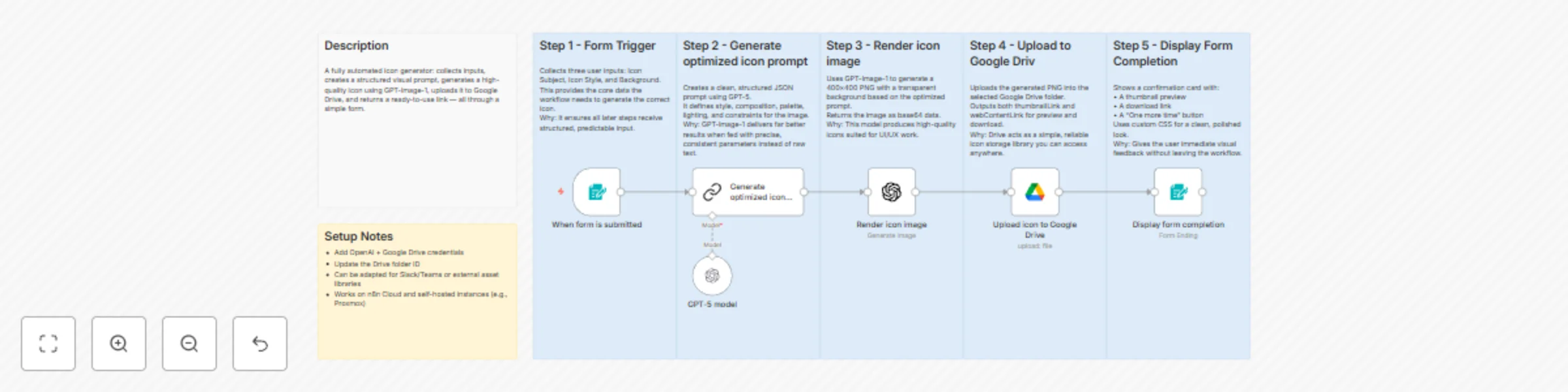
Turn a simple text idea into production-ready icons in seconds. With this workflow, you input a subject (e.g., “Copy”, “Banana”, “Slack Mute”), select a style (Flat, 3D, Cartoon, etc.), and off it goes.

Here’s what happens:

  1. A form trigger collects your icon subject, style and optional background.
  2. The workflow uses an LLM to construct an optimised prompt.
  3. An image-generation model (OpenAI image API) renders a transparent-background, 400×400 px PNG icon.
  4. The icon is automatically uploaded to Google Drive, and both a download link and thumbnail are generated.
  5. A styled completion card displays the result and gives you a “One More Time” option.

Perfect for designers, developers, no-code creators, UI builders and even home-automation geeks (yes, you can integrate it with Home Assistant or Stream Deck!). It saves you the manual icon-hunt grind and gives consistent visual output across style variants.

🔧 Setup Requirements:

  • n8n instance (self-hosted or cloud)
  • OpenAI API access (image generation enabled)
  • Google Drive credentials (write access to a folder)
  • (Optional) Modify to integrate Slack, Teams or other file-storage destinations

✅ Highlights & Benefits:

  • Fully automated prompt creation → consistent icon quality
  • Transparent background PNGs size-ready for UI use
  • Saves icons to Drive + gives immediate link/thumbnail
  • Minimal setup, high value for creative/automation workflows
  • Easily extendable (add extra sizes, style presets, share via chat/bot)

⚠️ Notes & Best-Practices:

  • Check your OpenAI image quota and costs - image generation may incur usage.
  • Confirm Google Drive folder permissions to avoid upload failures.
  • If you wish a different resolution or format (e.g., SVG), clone the image node and adjust parameters.

1.2 Logical Blocks

This catalog entry is organized from the workflow JSON. The node-level section below shows the executable blocks available for review before importing the template.

2. Block-by-Block Analysis

Block 1 - When form is submitted

Type / Role
n8n-nodes-base.formTrigger - formTrigger
Config choices
Version 2.3

Block 2 - Display form completion

Type / Role
n8n-nodes-base.form - form
Config choices
Version 2.3

Block 3 - Render icon image

Type / Role
@n8n/n8n-nodes-langchain.openAi - openAi
Config choices
Version 1.8

Block 4 - Upload icon to Google Drive

Type / Role
n8n-nodes-base.googleDrive - googleDrive
Config choices
Version 3

Block 5 - Sticky Note

Type / Role
n8n-nodes-base.stickyNote - stickyNote
Config choices
Version 1

Block 6 - Sticky Note1

Type / Role
n8n-nodes-base.stickyNote - stickyNote
Config choices
Version 1

Block 7 - Sticky Note2

Type / Role
n8n-nodes-base.stickyNote - stickyNote
Config choices
Version 1

Block 8 - Sticky Note3

Type / Role
n8n-nodes-base.stickyNote - stickyNote
Config choices
Version 1

Block 9 - Sticky Note4

Type / Role
n8n-nodes-base.stickyNote - stickyNote
Config choices
Version 1

Block 10 - Sticky Note5

Type / Role
n8n-nodes-base.stickyNote - stickyNote
Config choices
Version 1

Block 11 - Sticky Note6

Type / Role
n8n-nodes-base.stickyNote - stickyNote
Config choices
Version 1

Block 12 - GPT-5 model

Type / Role
@n8n/n8n-nodes-langchain.lmChatOpenAi - lmChatOpenAi
Config choices
Version 1.2

Block 13 - Generate optimized icon prompt

Type / Role
@n8n/n8n-nodes-langchain.chainLlm - chainLlm
Config choices
Version 1.7

3. Summary Table

Workflow Generate custom icons with OpenAI GPT image & Google Drive auto-storage
Complexity intermediate
Nodes 13
Categories Content Creation, Multimodal AI
Author Arkadiusz
Published 13 Nov 2025

4. Reproducing the Workflow from Scratch

  1. 1. Download the workflow JSON

    Use the JSON export at /data/workflows/10785/10785.json as the source template for this automation.

  2. 2. Import the template into n8n

    Open n8n, import the downloaded JSON, and review each node before activating the workflow.

  3. 3. Configure credentials and variables

    Replace placeholder credentials, API keys, webhook URLs, account IDs, and environment-specific values with your own settings.

  4. 4. Test with sample data

    Run the workflow manually or in a staging workspace, inspect node output, and confirm downstream systems receive the expected data.

  5. 5. Activate and monitor

    Enable the workflow only after testing, then monitor executions, errors, and rate limits during the first production runs.

5. General Notes & Resources

Review imported nodes carefully before activation. This catalog entry is intended to help you inspect the workflow structure, understand required services, and find related templates faster.

Node names, credentials, schedules, webhook paths, and external service limits may need adjustment for your workspace.

Frequently asked questions

What does Generate custom icons with OpenAI GPT image & Google Drive auto-storage do?

Workflow Description: Turn a simple text idea into production ready icons in seconds. With this workflow, you input a subject (e.g., “Copy”, “Banana”, “Slack Mute”), select a style (Flat, 3D, Carto...

What do I need before importing this workflow?

Review the workflow JSON, configure any required credentials in n8n, and test the automation in a safe workspace before using it in production.

Can I customize this workflow?

Yes. Use the block-by-block analysis and the downloadable JSON to inspect each node, then adjust credentials, prompts, schedules, filters, or destinations for your Content Creation, Multimodal AI use case.