Block 1 - Run Every Day at 12 PM
- Type / Role
- n8n-nodes-base.scheduleTrigger - scheduleTrigger
- Config choices
- Version 1.2


 Early Deal
This workflow is provided as-is. Please review and test before using in production.
Who is this for? This workflow is perfect for social media managers, content creators, digital marketers, and copywriters who want to save time and stay relevant by automatically generating fres...
n8n-nodes-base.scheduletrigger, n8n-nodes-base.googlesheets, n8n-nodes-base.httprequest, n8n-nodes-base.set, n8n-nodes-base.splitout, @n8n/n8n-nodes-langchain.openai, n8n-nodes-base.stickynote
This workflow is cataloged by N8N Workflows and links back to its original n8n.io source page by Yang.
Original n8n.io sourceThis workflow is perfect for social media managers, content creators, digital marketers, and copywriters who want to save time and stay relevant by automatically generating fresh caption ideas based on trending search behavior.
Manually coming up with engaging social media content is time-consuming and often hit-or-miss. This workflow leverages Google autocomplete to identify what users are searching for, then uses AI to convert those suggestions into short, engaging captions for use on platforms like Instagram, LinkedIn, or Twitter.
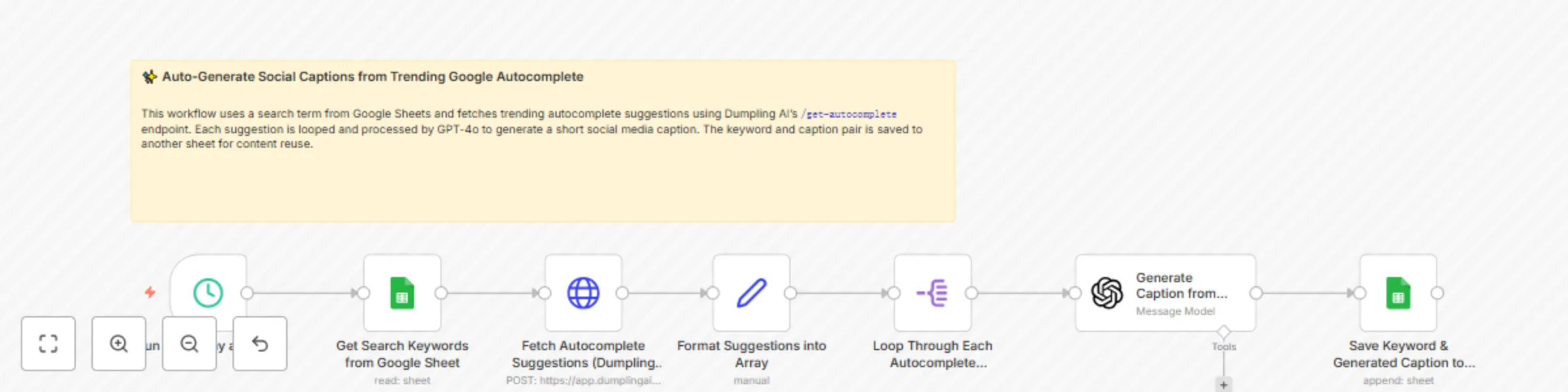
This automation runs daily at noon and transforms trending search topics into ready-to-use captions:
Run Every Day at 12 PM
A schedule trigger that activates the workflow once per day.
Get Search Keywords from Google Sheet
Pulls a list of base search phrases from a Google Sheet which serve as the starting point for getting trending autocomplete terms.
Fetch Autocomplete Suggestions (Dumpling AI)
Calls Dumpling AI’s get-autocomplete endpoint using the base phrase to return Google autocomplete suggestions.
API Reference →
Format Suggestions into Array
Formats the list of returned suggestions into an array format that can be looped through.
Loop Through Each Autocomplete Suggestion
Splits the array into individual suggestions to process each one separately.
Generate Caption from Suggestion (GPT-4o)
Sends each suggestion to GPT-4o with a detailed system prompt to create a short, human-sounding, engaging caption under 280 characters.
Save Keyword & Generated Caption to Google Sheet
Saves both the original search suggestion and the generated caption to another tab in Google Sheets for content scheduling or review.
This workflow combines real-time search trend data with the power of AI to keep your social media feed fresh, relevant, and consistent — all without lifting a finger.
This catalog entry is organized from the workflow JSON. The node-level section below shows the executable blocks available for review before importing the template.
| Workflow | Generate captions from autocomplete ideas using Dumpling AI + GPT-4o |
|---|---|
| Complexity | intermediate |
| Nodes | 8 |
| Categories | Content Creation, Multimodal AI |
| Author | Yang |
| Published | 03 Jun 2025 |
Use the JSON export at /data/workflows/4633/4633.json as the source template for this automation.
Open n8n, import the downloaded JSON, and review each node before activating the workflow.
Replace placeholder credentials, API keys, webhook URLs, account IDs, and environment-specific values with your own settings.
Run the workflow manually or in a staging workspace, inspect node output, and confirm downstream systems receive the expected data.
Enable the workflow only after testing, then monitor executions, errors, and rate limits during the first production runs.
Review imported nodes carefully before activation. This catalog entry is intended to help you inspect the workflow structure, understand required services, and find related templates faster.
Node names, credentials, schedules, webhook paths, and external service limits may need adjustment for your workspace.
Who is this for? This workflow is perfect for social media managers, content creators, digital marketers, and copywriters who want to save time and stay relevant by automatically generating fres...
Review the workflow JSON, configure any required credentials in n8n, and test the automation in a safe workspace before using it in production.
Yes. Use the block-by-block analysis and the downloadable JSON to inspect each node, then adjust credentials, prompts, schedules, filters, or destinations for your Content Creation, Multimodal AI use case.