Block 1 - Sticky Note3
- Type / Role
- n8n-nodes-base.stickyNote - stickyNote
- Config choices
- Version 1


 Early Deal
This workflow is provided as-is. Please review and test before using in production.
Context Hey! I'm Samir, a Supply Chain Data Scientist from Paris who spent six years in China studying and working while struggling to learn Mandarin. ![I want to study Man...
n8n-nodes-base.stickynote, n8n-nodes-base.googletranslate, @n8n/n8n-nodes-langchain.agent, @n8n/n8n-nodes-langchain.lmchatopenai, @n8n/n8n-nodes-langchain.outputparserstructured, n8n-nodes-base.merge, n8n-nodes-base.googlesheetstrigger, n8n-nodes-base.noop
This workflow is cataloged by N8N Workflows and links back to its original n8n.io source page by Samir Saci.
Original n8n.io sourceHey! I'm Samir, a Supply Chain Data Scientist from Paris who spent six years in China studying and working while struggling to learn Mandarin.
I know the challenges of mastering a complex language like Chinese and my greatest support was flash cards. Therefore, I designed this workflow to support fellow Mandarin learners by automating flashcard creation using n8n, so they can focus more on learning and less on manual data entry.
📬 For business inquiries, you can add me on Here
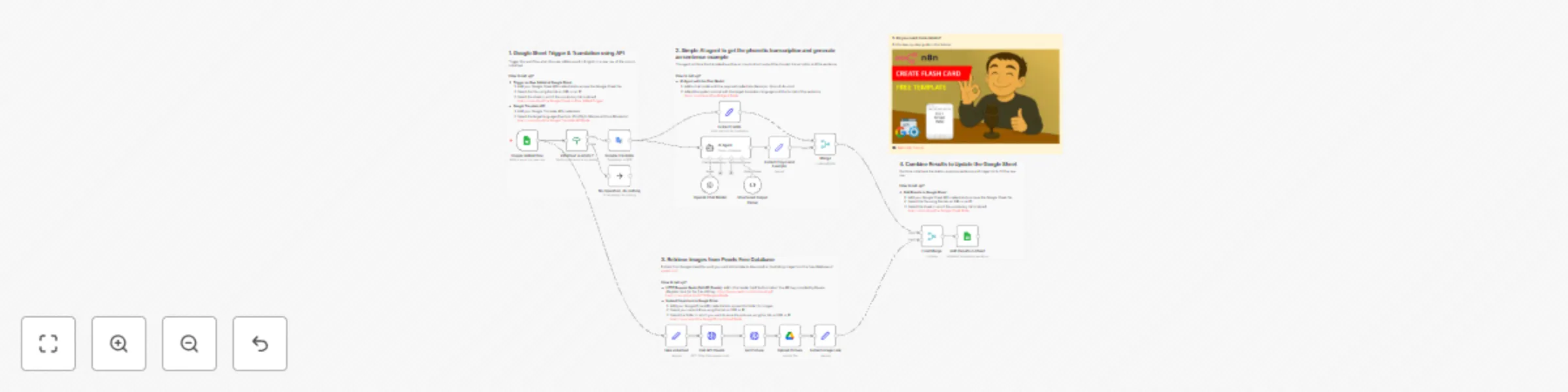
This workflow template is designed for language learners and educators who want to automate the creation of flashcards for Mandarin (or any other language) using Google Translate API, an AI agent for phonetic transcription and generating an illustrative sentence and a free image retrieval API.
If you use the open-source application Anki, this workflow will help you automatically generate personalized study materials.
Let us imagine you want to learn how to say the word Contract in Mandarin.
The workflow will automatically
All these fields are automatically recorded in a Google Sheet, making it easy to import into Anki and generate flashcards instantly
This workflow can be used with the free tier plans of the services used. It does not require any advanced programming skills.
Follow the sticky notes to set up the parameters inside each node and get ready to pump your learning skills.
I have detailed the steps in a short tutorial 👇
This workflow has been created with N8N 1.82.1 Submitted: March 17th, 2025
This catalog entry is organized from the workflow JSON. The node-level section below shows the executable blocks available for review before importing the template.
| Workflow | 🉑 Generate Anki flash cards for language learning with Google Translate and GPT |
|---|---|
| Complexity | advanced |
| Nodes | 22 |
| Categories | Content Creation, Multimodal AI |
| Author | Samir Saci |
| Published | 17 Mar 2025 |
Use the JSON export at /data/workflows/3195/3195.json as the source template for this automation.
Open n8n, import the downloaded JSON, and review each node before activating the workflow.
Replace placeholder credentials, API keys, webhook URLs, account IDs, and environment-specific values with your own settings.
Run the workflow manually or in a staging workspace, inspect node output, and confirm downstream systems receive the expected data.
Enable the workflow only after testing, then monitor executions, errors, and rate limits during the first production runs.
Review imported nodes carefully before activation. This catalog entry is intended to help you inspect the workflow structure, understand required services, and find related templates faster.
Node names, credentials, schedules, webhook paths, and external service limits may need adjustment for your workspace.
Context Hey! I'm Samir, a Supply Chain Data Scientist from Paris who spent six years in China studying and working while struggling to learn Mandarin. ![I want to study Man...
Review the workflow JSON, configure any required credentials in n8n, and test the automation in a safe workspace before using it in production.
Yes. Use the block-by-block analysis and the downloadable JSON to inspect each node, then adjust credentials, prompts, schedules, filters, or destinations for your Content Creation, Multimodal AI use case.