Block 1 - Manual Trigger
- Type / Role
- n8n-nodes-base.manualTrigger - manualTrigger
- Config choices
- Version 1


 Early Deal
This workflow is provided as-is. Please review and test before using in production.
How it works This intelligent workflow allows you to generate new tweets that closely mimic the unique style of any public Twitter user. It's perfect for content creators, marketers, or anyone want...
n8n-nodes-base.manualtrigger, n8n-nodes-base.set, n8n-nodes-base.twitter, n8n-nodes-base.function, n8n-nodes-base.openai
This workflow is cataloged by N8N Workflows and links back to its original n8n.io source page by Piotr Sobolewski.
Original n8n.io sourceHow it works
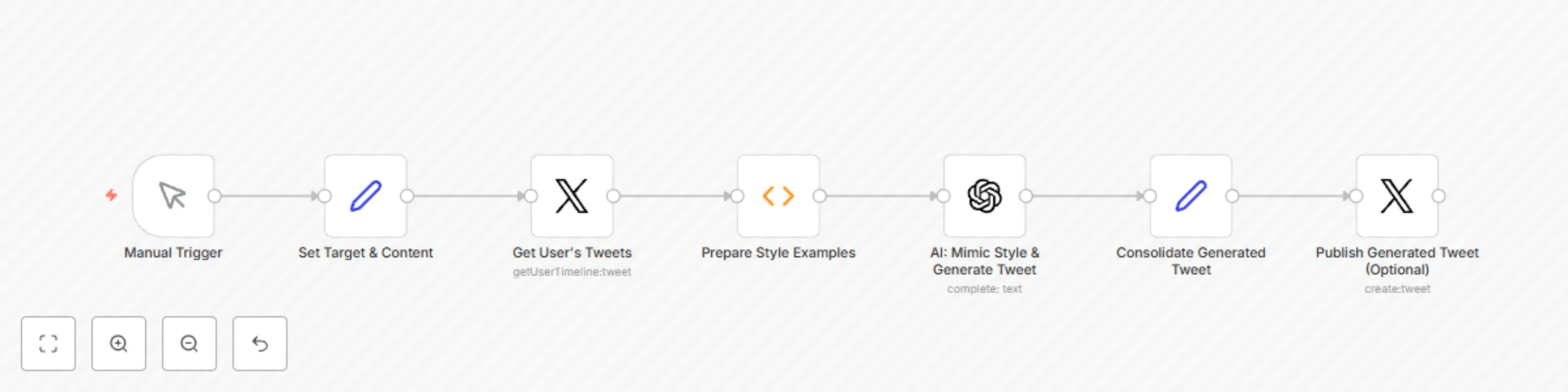
This intelligent workflow allows you to generate new tweets that closely mimic the unique style of any public Twitter user. It's perfect for content creators, marketers, or anyone wanting to create engaging content with a specific brand voice or personal flair. It automatically:
Fetches recent tweets from a specified Twitter handle to understand their distinctive writing style.
Analyzes the stylistic patterns (tone, vocabulary, common phrases, emoji use, brevity, etc.) of these tweets using advanced AI.
Generates new tweet content on your desired topic, reapplying the learned style.
Provides the AI-generated tweet for your review, ready to be copied or directly published.
Unleash your content's potential by speaking in a voice that resonates, even if it's not your own!
Set up steps
Setting up this sophisticated workflow takes around 20-30 minutes, as it involves Twitter API integration and advanced AI prompting. You'll need to:
Authenticate your Twitter account (required to fetch tweets).
Obtain API keys for your preferred AI service (e.g., OpenAI, Google AI).
Provide the Twitter handle of the user whose style you want to copy.
Input the new content/topic you want to generate a tweet about.
All detailed setup instructions and specific configuration guidance are provided within the workflow itself using sticky notes.
This catalog entry is organized from the workflow JSON. The node-level section below shows the executable blocks available for review before importing the template.
| Workflow | Generate AI Tweets Mimicking Any Twitter User's Style with OpenAI |
|---|---|
| Complexity | intermediate |
| Nodes | 7 |
| Categories | Content Creation, Multimodal AI |
| Author | Piotr Sobolewski |
| Published | 29 Jul 2025 |
Use the JSON export at /data/workflows/6665/6665.json as the source template for this automation.
Open n8n, import the downloaded JSON, and review each node before activating the workflow.
Replace placeholder credentials, API keys, webhook URLs, account IDs, and environment-specific values with your own settings.
Run the workflow manually or in a staging workspace, inspect node output, and confirm downstream systems receive the expected data.
Enable the workflow only after testing, then monitor executions, errors, and rate limits during the first production runs.
Review imported nodes carefully before activation. This catalog entry is intended to help you inspect the workflow structure, understand required services, and find related templates faster.
Node names, credentials, schedules, webhook paths, and external service limits may need adjustment for your workspace.
How it works This intelligent workflow allows you to generate new tweets that closely mimic the unique style of any public Twitter user. It's perfect for content creators, marketers, or anyone want...
Review the workflow JSON, configure any required credentials in n8n, and test the automation in a safe workspace before using it in production.
Yes. Use the block-by-block analysis and the downloadable JSON to inspect each node, then adjust credentials, prompts, schedules, filters, or destinations for your Content Creation, Multimodal AI use case.