Generate AI search–driven FAQ insights for SEO with SE Ranking and OpenAI GPT-4.1-mini

Workflow preview

Workflow preview
100%
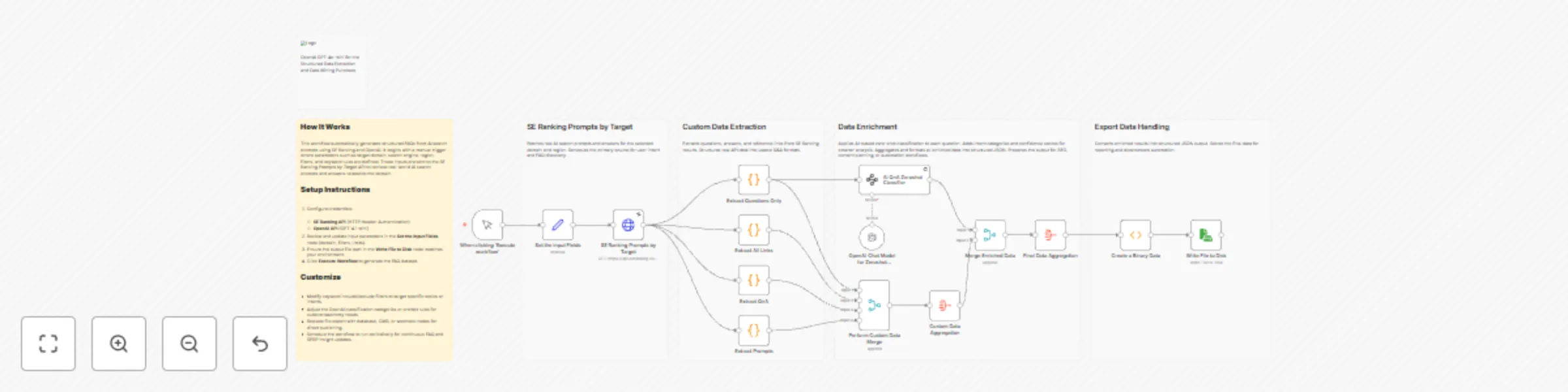
Generate AI search–driven FAQ insights for SEO with SE Ranking and OpenAI GPT-4.1-mini preview
Open on n8n.io

Important notice

This workflow is provided as-is. Please review and test before using in production.

1. Workflow Overview

This workflow automates the discovery and structuring of FAQs from real AI search behavior using SE Ranking and OpenAI. It fetches domain specific AI search prompts and answers, then extracts relev...

Best for

  • Market Research automation workflows
  • AI Summarization automation workflows
  • advanced n8n builders looking for reusable templates

Tools used

n8n-nodes-base.stickynote, n8n-nodes-base.manualtrigger, n8n-nodes-base.set, n8n-nodes-base.httprequest, n8n-nodes-base.code, @n8n/n8n-nodes-langchain.informationextractor, n8n-nodes-base.aggregate, n8n-nodes-base.merge

Source and attribution

This workflow is cataloged by N8N Workflows and links back to its original n8n.io source page by Ranjan Dailata.

Original n8n.io source

1.1 Workflow description

Title
Generate AI search–driven FAQ insights for SEO with SE Ranking and OpenAI GPT-4.1-mini
Workflow name
Generate AI search–driven FAQ insights for SEO with SE Ranking and OpenAI GPT-4.1-mini

This workflow automates the discovery and structuring of FAQs from real AI search behavior using SE Ranking and OpenAI. It fetches domain-specific AI search prompts and answers, then extracts relevant questions, responses, and source links. Each question is enriched with AI-based intent classification and confidence scoring, and the final output is aggregated into a structured JSON format ready for SEO analysis, content planning, documentation, or knowledge base generation.

Who this is for

This workflow is designed for:

  • SEO professionals and content strategists building FAQ-driven content
  • Growth and digital marketing teams optimizing for AI Search and SERP intent
  • Content writers and editors looking for data-backed FAQ ideas
  • SEO automation engineers using n8n for research workflows
  • Agencies producing scalable FAQ and topical authority content

What problem this workflow is solving

Modern SEO increasingly depends on AI search prompts, user intent, and FAQ coverage, but manually:

  • Discovering real AI search questions
  • Grouping questions by intent
  • Identifying content gaps
  • Structuring FAQs for SEO

is slow, repetitive, and inconsistent.

This workflow solves that by automatically extracting, classifying, and structuring AI-driven FAQ intelligence directly from SE Ranking’s AI Search data.

What this workflow does

This workflow automates end-to-end FAQ intelligence generation:

  • Fetches real AI search prompts for a target domain using SE Ranking

  • Extracts:

    • Questions
    • Answers
    • Reference links
  • Applies zero-shot AI classification using OpenAI GPT-4.1-mini

  • Assigns:

    • Intent category (HOW_TO, DEFINITION, PRICING, etc.)
    • Confidence score
  • Aggregates all data into a structured FAQ dataset

  • Exports the final result as structured JSON for SEO, publishing, or automation

Setup

If you are new to SE Ranking, please signup on seranking.com

Prerequisites

  • n8n (Self-Hosted or Cloud)
  • SE Ranking API access
  • OpenAI API key (GPT-4.1-mini)

Configuration Steps

  1. Configure Credentials
  • SE Ranking using HTTP Header Authentication. Please make sure to set the header authentication as below. The value should contain a Token followed by a space with the SE Ranking API Key.

  • Add OpenAI API credentials
  1. Update Input Parameters In the Set the Input Fields node:

    • Target domain
    • Search engine type (AI mode)
    • Region/source
    • Include / exclude keyword filters
    • Result limits and sorting
  2. Verify Output Destination

    • Confirm the file path in the Write File to Disk node
    • Or replace it with DB, CMS, or webhook output
  3. Execute Workflow

    • Click Execute Workflow
    • Structured FAQ intelligence is generated automatically

How to customize this workflow

You can easily adapt this workflow to your needs:

  • Change Intent Taxonomy Update categories in the AI zero-shot classifier schema

  • Refine SEO Focus Modify keyword include/exclude rules for niche targeting

  • Adjust Confidence Thresholds Filter low-confidence questions before export

  • Swap Output Destination Replace file export with:

    • CMS publishing
    • Notion
    • Google Sheets
    • Vector DB for RAG
  • Automate Execution

    • Add a Cron node for weekly or monthly FAQ updates

Summary

This n8n workflow transforms AI search prompts into structured, intent-classified FAQ intelligence using SE Ranking and OpenAI GPT-4.1-mini.

It enables teams to build high-impact SEO FAQs, content hubs, and AI-ready knowledge bases automatically, consistently, and at scale.

1.2 Logical Blocks

This catalog entry is organized from the workflow JSON. The node-level section below shows the executable blocks available for review before importing the template.

2. Block-by-Block Analysis

Block 1 - Sticky Note4

Type / Role
n8n-nodes-base.stickyNote - stickyNote
Config choices
Version 1

Block 2 - When clicking ‘Execute workflow’

Type / Role
n8n-nodes-base.manualTrigger - manualTrigger
Config choices
Version 1

Block 3 - Set the Input Fields

Type / Role
n8n-nodes-base.set - set
Config choices
Version 3.4

Block 4 - Sticky Note2

Type / Role
n8n-nodes-base.stickyNote - stickyNote
Config choices
Version 1

Block 5 - SE Ranking Prompts by Target

Type / Role
n8n-nodes-base.httpRequest - httpRequest
Config choices
Version 4.3

Block 6 - Extract All Links

Type / Role
n8n-nodes-base.code - code
Config choices
Version 2

Block 7 - Extract QnA

Type / Role
n8n-nodes-base.code - code
Config choices
Version 2

Block 8 - AI QnA Zeroshot Classifier

Type / Role
@n8n/n8n-nodes-langchain.informationExtractor - informationExtractor
Config choices
Version 1.2

Block 9 - Extract Questions Only

Type / Role
n8n-nodes-base.code - code
Config choices
Version 2

Block 10 - Sticky Note

Type / Role
n8n-nodes-base.stickyNote - stickyNote
Config choices
Version 1

Block 11 - Sticky Note1

Type / Role
n8n-nodes-base.stickyNote - stickyNote
Config choices
Version 1

Block 12 - Extract Prompts

Type / Role
n8n-nodes-base.code - code
Config choices
Version 2

Block 13 - Final Data Aggregation

Type / Role
n8n-nodes-base.aggregate - aggregate
Config choices
Version 1

Block 14 - Custom Data Aggregation

Type / Role
n8n-nodes-base.aggregate - aggregate
Config choices
Version 1

Block 15 - Perform Custom Data Merge

Type / Role
n8n-nodes-base.merge - merge
Config choices
Version 3.2

Block 16 - OpenAI Chat Model for Zeroshot Classifier

Type / Role
@n8n/n8n-nodes-langchain.lmChatOpenAi - lmChatOpenAi
Config choices
Version 1.3

Block 17 - Write File to Disk

Type / Role
n8n-nodes-base.readWriteFile - readWriteFile
Config choices
Version 1

Block 18 - Create a Binary Data

Type / Role
n8n-nodes-base.function - function
Config choices
Version 1

Block 19 - Sticky Note3

Type / Role
n8n-nodes-base.stickyNote - stickyNote
Config choices
Version 1

Block 20 - Merge Enriched Data

Type / Role
n8n-nodes-base.merge - merge
Config choices
Version 3.2

Block 21 - Sticky Note5

Type / Role
n8n-nodes-base.stickyNote - stickyNote
Config choices
Version 1

3. Summary Table

Workflow Generate AI search–driven FAQ insights for SEO with SE Ranking and OpenAI GPT-4.1-mini
Complexity advanced
Nodes 21
Categories Market Research, AI Summarization
Author Ranjan Dailata
Published 04 Jan 2026

4. Reproducing the Workflow from Scratch

  1. 1. Download the workflow JSON

    Use the JSON export at /data/workflows/12441/12441.json as the source template for this automation.

  2. 2. Import the template into n8n

    Open n8n, import the downloaded JSON, and review each node before activating the workflow.

  3. 3. Configure credentials and variables

    Replace placeholder credentials, API keys, webhook URLs, account IDs, and environment-specific values with your own settings.

  4. 4. Test with sample data

    Run the workflow manually or in a staging workspace, inspect node output, and confirm downstream systems receive the expected data.

  5. 5. Activate and monitor

    Enable the workflow only after testing, then monitor executions, errors, and rate limits during the first production runs.

5. General Notes & Resources

Review imported nodes carefully before activation. This catalog entry is intended to help you inspect the workflow structure, understand required services, and find related templates faster.

Node names, credentials, schedules, webhook paths, and external service limits may need adjustment for your workspace.

Frequently asked questions

What does Generate AI search–driven FAQ insights for SEO with SE Ranking and OpenAI GPT-4.1-mini do?

This workflow automates the discovery and structuring of FAQs from real AI search behavior using SE Ranking and OpenAI. It fetches domain specific AI search prompts and answers, then extracts relev...

What do I need before importing this workflow?

Review the workflow JSON, configure any required credentials in n8n, and test the automation in a safe workspace before using it in production.

Can I customize this workflow?

Yes. Use the block-by-block analysis and the downloadable JSON to inspect each node, then adjust credentials, prompts, schedules, filters, or destinations for your Market Research, AI Summarization use case.