Generate AI sales proposals from transcripts using Azure OpenAI, PandaDoc & Slack approval

Workflow preview

Workflow preview
100%
Generate AI sales proposals from transcripts using Azure OpenAI, PandaDoc & Slack approval preview
Open on n8n.io

Important notice

This workflow is provided as-is. Please review and test before using in production.

1. Workflow Overview

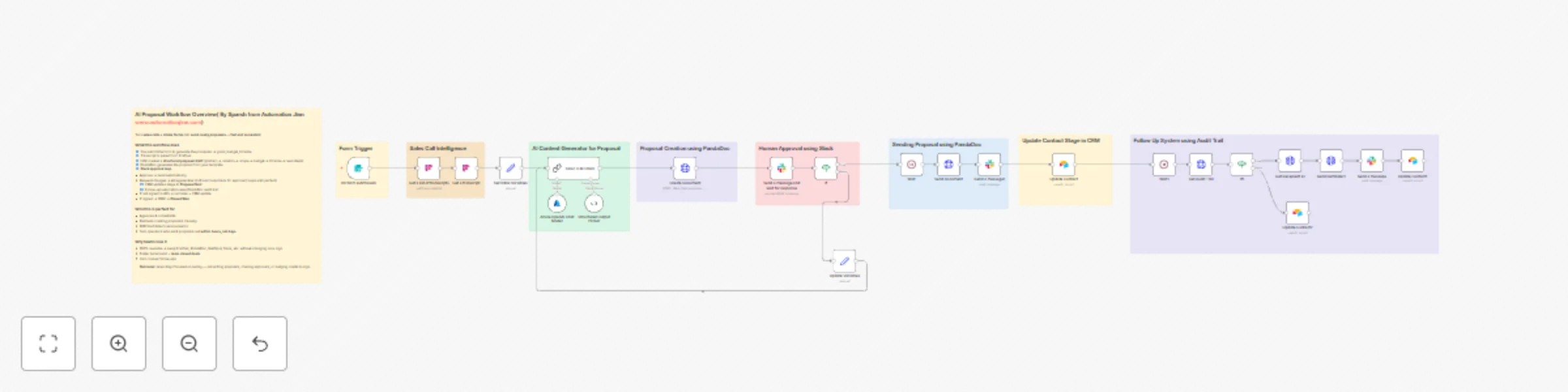
This workflow turns your sales calls + intake form into a polished, send ready proposal. It pulls the latest call transcript from Fireflies , generates structured proposal content with Azure OpenAI...

Best for

  • CRM automation workflows
  • Multimodal AI automation workflows
  • advanced n8n builders looking for reusable templates

Tools used

n8n-nodes-base.formtrigger, @n8n/n8n-nodes-langchain.chainllm, @n8n/n8n-nodes-langchain.lmchatazureopenai, @n8n/n8n-nodes-langchain.outputparserstructured, n8n-nodes-base.httprequest, n8n-nodes-base.if, n8n-nodes-base.wait, n8n-nodes-base.stickynote

Source and attribution

This workflow is cataloged by N8N Workflows and links back to its original n8n.io source page by Sparsh From Automation Jinn.

Original n8n.io source

1.1 Workflow description

Title
Generate AI sales proposals from transcripts using Azure OpenAI, PandaDoc & Slack approval
Workflow name
Generate AI sales proposals from transcripts using Azure OpenAI, PandaDoc & Slack approval

AI Proposal Workflow Overview

This workflow turns your sales calls + intake form into a polished, send-ready proposal.
It pulls the latest call transcript from Fireflies, generates structured proposal content with Azure OpenAI, builds a proposal in PandaDoc, routes it for Slack approval, and then handles sending, CRM stage updates (Airtable/HubSpot), and automated follow-ups using the PandaDoc audit trail.

This workflow is modular. You can replace each major tool:

  • Fireflies → Gong, Fathom, Wingman, Avoma (any transcript provider)
  • PandaDoc → DocuSign, Qwilr, Proposify, Google Docs API
  • Slack Approval → Gmail Approval, MS Teams Approval, Notion DB Approvals
  • Airtable CRM → HubSpot, Pipedrive, Salesforce, Zoho, Monday Sales CRM
  • Intake Form → Typeform, Tally, Jotform, HubSpot forms
  • Azure OpenAI → OpenAI, Anthropic Claude, Mistral, or any LLM connected through an API

The core logic stays the same — you only swap the nodes.


Who It’s For

  • Agencies & consultants who send similar proposals after every call
  • B2B SaaS / tech teams that want proposals going out within hours
  • Solo operators who want AI to handle most of the draft but keep final control
  • Teams already working out of Slack, wanting approval flows there

How It Works

1. Form Trigger (Client Proposal Intake)

Client fills a form with:

  • Name, email, website
  • Industry / business context
  • Problem, solution idea, scope
  • Budget, timeline, deliverables

2. Sales Call Intelligence (Fireflies or Gong)

  • Workflow searches transcripts using the client email
  • Fetches the relevant transcript + summary

3. AI Proposal Generator (Azure OpenAI or any LLM)

  • Sets initial variables (draftText, lastFeedback)
  • Sends transcript + form data into LLM
  • Returns structured JSON:
    • introduction
    • client_problem
    • proposed_solution
    • scope_of_work
    • deliverables
    • timeline_breakdown
    • investment
    • next_steps

4. Proposal Creation (PandaDoc, DocuSign, etc.)

  • Creates the proposal document from a template
  • Fills tokens with AI-generated content
  • Inserts pricing table using Budget

5. Slack Approval Loop

  • Slack message is sent to reviewer with:
    • Approve button
    • Request Changes button
    • Optional comment thread for feedback
  • If Approved:
    • Proposal is sent automatically via PandaDoc/DocuSign
    • Slack message to notify proposal has been sent
  • If Changes Requested:
    • Feedback + draft are stored
    • Passed back into the LLM to regenerate
    • New document is created and the Slack approval request is sent again
  • This loop continues until approval happens

6. CRM Update (Airtable / HubSpot)

  • After proposal is sent, Stage → Proposal Sent

7. Follow-Up System (PandaDoc Audit Trail)

After a 48-hour wait:

  • Audit trail is fetched
  • If document is not yet signed:
    • Reminder is sent
    • Stage → Reminder Sent
    • Slack message to notify a reminder has been sent
  • If signed:
    • Stage → Document Signed

Ideal use cases

  • Sales teams creating tailored proposals at scale
  • Agencies responding quickly to inbound RFPs
  • Freelancers producing polished proposals in minutes
  • RevOps teams standardizing proposal formats
  • SaaS companies automating repetitive proposal creation

Requirements

  • n8n (self-hosted or cloud)
  • Transcript provider (Fireflies, Gong, Fathom, etc.)
  • LLM API (Azure OpenAI, OpenAI, Claude, etc.)
  • Proposal tool (PandaDoc, DocuSign, Qwilr)
  • Slack API app for approval flow
  • CRM (Airtable, HubSpot, Pipedrive)
  • Intake form

You can now integrate this into your lead workflow and let AI + automation handle proposal drafting, Slack approvals, sending, CRM updates, and follow-ups.

1.2 Logical Blocks

This catalog entry is organized from the workflow JSON. The node-level section below shows the executable blocks available for review before importing the template.

2. Block-by-Block Analysis

Block 1 - On form submission

Type / Role
n8n-nodes-base.formTrigger - formTrigger
Config choices
Version 2.2

Block 2 - Basic LLM Chain

Type / Role
@n8n/n8n-nodes-langchain.chainLlm - chainLlm
Config choices
Version 1.7

Block 3 - Azure OpenAI Chat Model

Type / Role
@n8n/n8n-nodes-langchain.lmChatAzureOpenAi - lmChatAzureOpenAi
Config choices
Version 1

Block 4 - Structured Output Parser

Type / Role
@n8n/n8n-nodes-langchain.outputParserStructured - outputParserStructured
Config choices
Version 1.2

Block 5 - Create Document

Type / Role
n8n-nodes-base.httpRequest - httpRequest
Config choices
Version 4.2

Block 6 - If

Type / Role
n8n-nodes-base.if - if
Config choices
Version 2.2

Block 7 - Send Document

Type / Role
n8n-nodes-base.httpRequest - httpRequest
Config choices
Version 4.2

Block 8 - Wait

Type / Role
n8n-nodes-base.wait - wait
Config choices
Version 1.1

Block 9 - Sticky Note

Type / Role
n8n-nodes-base.stickyNote - stickyNote
Config choices
Version 1

Block 10 - Sticky Note1

Type / Role
n8n-nodes-base.stickyNote - stickyNote
Config choices
Version 1

Block 11 - Sticky Note2

Type / Role
n8n-nodes-base.stickyNote - stickyNote
Config choices
Version 1

Block 12 - Sticky Note3

Type / Role
n8n-nodes-base.stickyNote - stickyNote
Config choices
Version 1

Block 13 - Sticky Note4

Type / Role
n8n-nodes-base.stickyNote - stickyNote
Config choices
Version 1

Block 14 - Set Initial Variables

Type / Role
n8n-nodes-base.set - set
Config choices
Version 3.4

Block 15 - Update Variables

Type / Role
n8n-nodes-base.set - set
Config choices
Version 3.4

Block 16 - Sticky Note5

Type / Role
n8n-nodes-base.stickyNote - stickyNote
Config choices
Version 1

Block 17 - Update Contact

Type / Role
n8n-nodes-base.airtable - airtable
Config choices
Version 2.1

Block 18 - Get a list of transcripts

Type / Role
@firefliesai/n8n-nodes-fireflies.fireflies - fireflies
Config choices
Version 1

Block 19 - Get a transcript

Type / Role
@firefliesai/n8n-nodes-fireflies.fireflies - fireflies
Config choices
Version 1

Block 20 - Sticky Note6

Type / Role
n8n-nodes-base.stickyNote - stickyNote
Config choices
Version 1

Block 21 - If1

Type / Role
n8n-nodes-base.if - if
Config choices
Version 2.2

Block 22 - Sticky Note7

Type / Role
n8n-nodes-base.stickyNote - stickyNote
Config choices
Version 1

Block 23 - Get Audit Trail

Type / Role
n8n-nodes-base.httpRequest - httpRequest
Config choices
Version 4.2

Block 24 - Update Contact1

Type / Role
n8n-nodes-base.airtable - airtable
Config choices
Version 2.1

Showing the first 24 of 32 workflow blocks. Download the JSON for the full node graph.

3. Summary Table

Workflow Generate AI sales proposals from transcripts using Azure OpenAI, PandaDoc & Slack approval
Complexity advanced
Nodes 32
Categories CRM, Multimodal AI
Author Sparsh From Automation Jinn
Published 21 Nov 2025

4. Reproducing the Workflow from Scratch

  1. 1. Download the workflow JSON

    Use the JSON export at /data/workflows/11123/11123.json as the source template for this automation.

  2. 2. Import the template into n8n

    Open n8n, import the downloaded JSON, and review each node before activating the workflow.

  3. 3. Configure credentials and variables

    Replace placeholder credentials, API keys, webhook URLs, account IDs, and environment-specific values with your own settings.

  4. 4. Test with sample data

    Run the workflow manually or in a staging workspace, inspect node output, and confirm downstream systems receive the expected data.

  5. 5. Activate and monitor

    Enable the workflow only after testing, then monitor executions, errors, and rate limits during the first production runs.

5. General Notes & Resources

Review imported nodes carefully before activation. This catalog entry is intended to help you inspect the workflow structure, understand required services, and find related templates faster.

Node names, credentials, schedules, webhook paths, and external service limits may need adjustment for your workspace.

Frequently asked questions

What does Generate AI sales proposals from transcripts using Azure OpenAI, PandaDoc & Slack approval do?

This workflow turns your sales calls + intake form into a polished, send ready proposal. It pulls the latest call transcript from Fireflies , generates structured proposal content with Azure OpenAI...

What do I need before importing this workflow?

Review the workflow JSON, configure any required credentials in n8n, and test the automation in a safe workspace before using it in production.

Can I customize this workflow?

Yes. Use the block-by-block analysis and the downloadable JSON to inspect each node, then adjust credentials, prompts, schedules, filters, or destinations for your CRM, Multimodal AI use case.