Block 1 - When chat message received
- Type / Role
- @n8n/n8n-nodes-langchain.chatTrigger - chatTrigger
- Config choices
- Version 1.1


 Early Deal
This workflow is provided as-is. Please review and test before using in production.
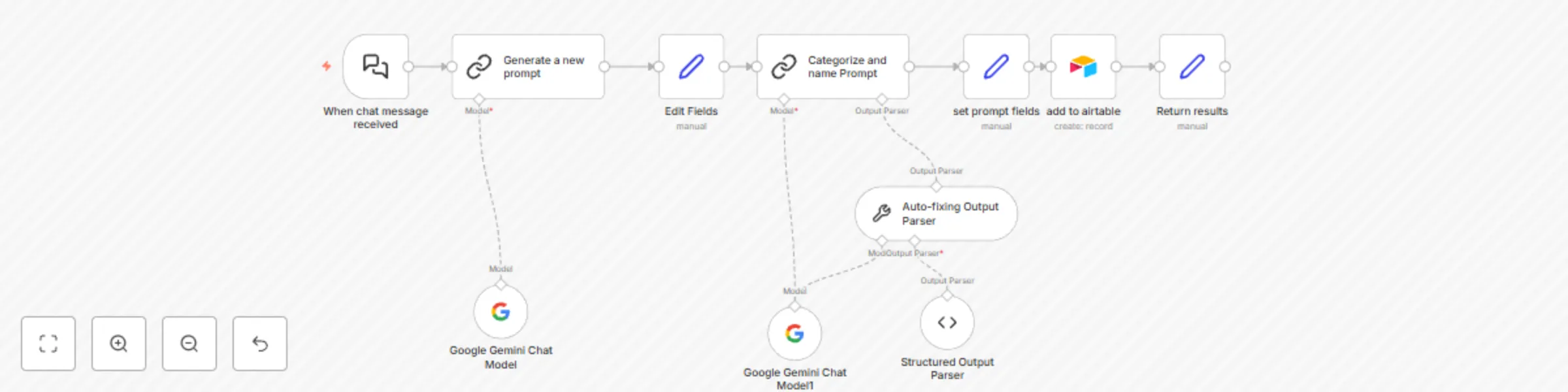
This workflow is designed to generate prompts for AI agents and store them in Airtable. It starts by receiving a chat message, processes it to create a structured prompt, categorizes the prompt, an...
@n8n/n8n-nodes-langchain.chattrigger, @n8n/n8n-nodes-langchain.lmchatgooglegemini, @n8n/n8n-nodes-langchain.outputparserautofixing, @n8n/n8n-nodes-langchain.outputparserstructured, n8n-nodes-base.set, @n8n/n8n-nodes-langchain.chainllm, n8n-nodes-base.airtable
This workflow is cataloged by N8N Workflows and links back to its original n8n.io source page by Zacharia Kimotho.
Original n8n.io sourceThis workflow is designed to generate prompts for AI agents and store them in Airtable.
It starts by receiving a chat message, processes it to create a structured prompt, categorizes the prompt, and finally stores it in Airtable.
This workflow is particularly useful in scenarios where you want to automate the generation and management of AI agent prompts.
Here are some examples:
Rapid Prototyping of AI Agents:
Quickly generate and test different prompts for AI agents in various applications.
Industries/Professionals:
Software Development: Developers building AI-powered applications.
Marketing: Marketers automating content creation and social media management.
Customer Service: Customer service managers implementing AI-driven chatbots.
Education: Educators creating AI-based learning tools.
Practical Value:
Time Savings: Automates the prompt generation process, saving significant time and effort.
Improved Prompt Quality: Leverages Google Gemini and structured prompt engineering principles to generate more effective prompts.
Centralized Prompt Management: Stores prompts in Airtable for easy access, organization, and reuse.
Monitoring Execution:
Check the execution log in n8n to see the data flowing through each node and identify any errors.
Checking for Successful Completion:
Verify that a new record is created in your Airtable base with the generated prompt, name, and category.
Confirm that the "Return results" node sends back confirmation of the prompt in the chat interface.
Troubleshooting Tips:
Error: 400: Bad Request in the Google Gemini nodes:
Cause: Invalid API key or insufficient permissions.
Solution: Double-check your Google Gemini API key and ensure that the API is enabled for your project.
Error: Airtable node fails to create a record:
Cause: Invalid Airtable credentials, incorrect Base ID or Table ID, or mismatched column names.
Solution: Verify your Airtable API key, Base ID, Table ID, and column names. Ensure that the data types in n8n match the data types in your Airtable columns.
Follow me on Linkedin for more
This catalog entry is organized from the workflow JSON. The node-level section below shows the executable blocks available for review before importing the template.
| Workflow | Generate AI prompts with Google Gemini and store them in Airtable |
|---|---|
| Complexity | intermediate |
| Nodes | 11 |
| Categories | Engineering, Multimodal AI |
| Author | Zacharia Kimotho |
| Published | 27 Feb 2025 |
Use the JSON export at /data/workflows/3027/3027.json as the source template for this automation.
Open n8n, import the downloaded JSON, and review each node before activating the workflow.
Replace placeholder credentials, API keys, webhook URLs, account IDs, and environment-specific values with your own settings.
Run the workflow manually or in a staging workspace, inspect node output, and confirm downstream systems receive the expected data.
Enable the workflow only after testing, then monitor executions, errors, and rate limits during the first production runs.
Review imported nodes carefully before activation. This catalog entry is intended to help you inspect the workflow structure, understand required services, and find related templates faster.
Node names, credentials, schedules, webhook paths, and external service limits may need adjustment for your workspace.
This workflow is designed to generate prompts for AI agents and store them in Airtable. It starts by receiving a chat message, processes it to create a structured prompt, categorizes the prompt, an...
Review the workflow JSON, configure any required credentials in n8n, and test the automation in a safe workspace before using it in production.
Yes. Use the block-by-block analysis and the downloadable JSON to inspect each node, then adjust credentials, prompts, schedules, filters, or destinations for your Engineering, Multimodal AI use case.