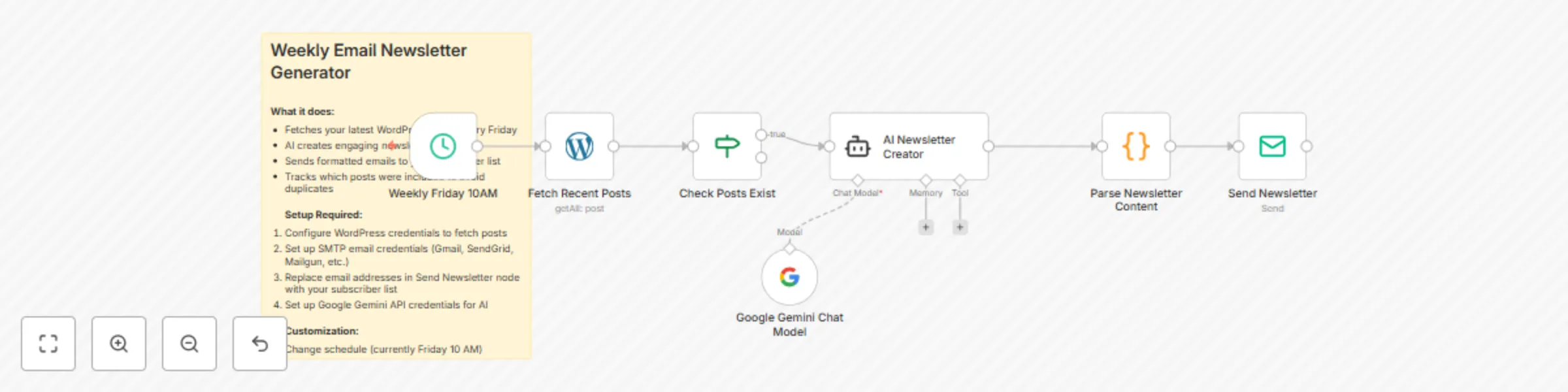
Generate AI-powered weekly email newsletters from WordPress with Gemini

Workflow preview

Workflow preview
100%
Generate AI-powered weekly email newsletters from WordPress with Gemini preview
Open on n8n.io

Important notice

This workflow is provided as-is. Please review and test before using in production.

1. Workflow Overview

WordPress Weekly Newsletter Generator Overview: This automation automatically converts your latest WordPress posts into beautifully formatted email newsletters using AI, then sends them to your sub...

Best for

  • Social Media automation workflows
  • Multimodal AI automation workflows
  • intermediate n8n builders looking for reusable templates

Tools used

n8n-nodes-base.stickynote, n8n-nodes-base.scheduletrigger, n8n-nodes-base.wordpress, n8n-nodes-base.if, @n8n/n8n-nodes-langchain.agent, n8n-nodes-base.code, n8n-nodes-base.emailsend, @n8n/n8n-nodes-langchain.lmchatgooglegemini

Source and attribution

This workflow is cataloged by N8N Workflows and links back to its original n8n.io source page by David Olusola.

Original n8n.io source

1.1 Workflow description

Title
Generate AI-powered weekly email newsletters from WordPress with Gemini
Workflow name
Generate AI-powered weekly email newsletters from WordPress with Gemini

WordPress Weekly Newsletter Generator

Overview: This automation automatically converts your latest WordPress posts into beautifully formatted email newsletters using AI, then sends them to your subscriber list every Friday.

What it does:

  • Fetches your latest WordPress posts from the past week every Friday at 10 AM
  • Filters posts to ensure there's content to include
  • AI creates an engaging newsletter with compelling subject line and HTML content
  • Parses the AI response to extract subject and content
  • Sends formatted HTML email newsletter to your subscriber list

Setup Required:

  1. WordPress Connection

    • Configure WordPress credentials in the "Fetch Recent Posts" node
    • Enter your WordPress site URL, username, and password/app password
  2. Email SMTP Setup

    • Set up SMTP credentials (Gmail, SendGrid, Mailgun, etc.) in the "Send Newsletter" node
    • Replace [email protected] with your actual sender email
    • Replace subscriber emails in "To Email" field with your actual subscriber list
    • Configure reply-to address for professional appearance
  3. AI Configuration

    • Set up Google Gemini API credentials
    • Connect the Gemini model to the "AI Newsletter Creator" node
  4. Customization Options

    • Newsletter Schedule: Modify schedule trigger (default: Friday 10 AM)
    • Post Count: Adjust number of posts to include (default: 5 from past week)
    • Content Style: Modify AI system message for different newsletter tones
    • Email Design: Customize HTML template and styling in AI prompt
  5. Testing

    • Run workflow manually to test all connections
    • Send test newsletter to yourself first
    • Verify HTML formatting appears correctly in email clients

Features:

  • Automatic weekly scheduling
  • AI-generated compelling subject lines
  • HTML email formatting with proper structure
  • Post filtering to avoid empty newsletters
  • Professional email headers and reply-to setup
  • Batch processing of multiple recent posts

Customization:

  • Change newsletter frequency (daily, bi-weekly, monthly)
  • Adjust AI prompts for different writing styles
  • Modify email template design
  • Add custom intro/outro messages
  • Include featured images from posts

Need Help? For n8n coaching or one-on-one consultation

1.2 Logical Blocks

This catalog entry is organized from the workflow JSON. The node-level section below shows the executable blocks available for review before importing the template.

2. Block-by-Block Analysis

Block 1 - Sticky Note

Type / Role
n8n-nodes-base.stickyNote - stickyNote
Config choices
Version 1

Block 2 - Weekly Friday 10AM

Type / Role
n8n-nodes-base.scheduleTrigger - scheduleTrigger
Config choices
Version 1.2

Block 3 - Fetch Recent Posts

Type / Role
n8n-nodes-base.wordpress - wordpress
Config choices
Version 1

Block 4 - Check Posts Exist

Type / Role
n8n-nodes-base.if - if
Config choices
Version 2

Block 5 - AI Newsletter Creator

Type / Role
@n8n/n8n-nodes-langchain.agent - agent
Config choices
Version 2.2

Block 6 - Parse Newsletter Content

Type / Role
n8n-nodes-base.code - code
Config choices
Version 2

Block 7 - Send Newsletter

Type / Role
n8n-nodes-base.emailSend - emailSend
Config choices
Version 2

Block 8 - Google Gemini Chat Model

Type / Role
@n8n/n8n-nodes-langchain.lmChatGoogleGemini - lmChatGoogleGemini
Config choices
Version 1

3. Summary Table

Workflow Generate AI-powered weekly email newsletters from WordPress with Gemini
Complexity intermediate
Nodes 8
Categories Social Media, Multimodal AI
Author David Olusola
Published 14 Aug 2025

4. Reproducing the Workflow from Scratch

  1. 1. Download the workflow JSON

    Use the JSON export at /data/workflows/7396/7396.json as the source template for this automation.

  2. 2. Import the template into n8n

    Open n8n, import the downloaded JSON, and review each node before activating the workflow.

  3. 3. Configure credentials and variables

    Replace placeholder credentials, API keys, webhook URLs, account IDs, and environment-specific values with your own settings.

  4. 4. Test with sample data

    Run the workflow manually or in a staging workspace, inspect node output, and confirm downstream systems receive the expected data.

  5. 5. Activate and monitor

    Enable the workflow only after testing, then monitor executions, errors, and rate limits during the first production runs.

5. General Notes & Resources

Review imported nodes carefully before activation. This catalog entry is intended to help you inspect the workflow structure, understand required services, and find related templates faster.

Node names, credentials, schedules, webhook paths, and external service limits may need adjustment for your workspace.

Frequently asked questions

What does Generate AI-powered weekly email newsletters from WordPress with Gemini do?

WordPress Weekly Newsletter Generator Overview: This automation automatically converts your latest WordPress posts into beautifully formatted email newsletters using AI, then sends them to your sub...

What do I need before importing this workflow?

Review the workflow JSON, configure any required credentials in n8n, and test the automation in a safe workspace before using it in production.

Can I customize this workflow?

Yes. Use the block-by-block analysis and the downloadable JSON to inspect each node, then adjust credentials, prompts, schedules, filters, or destinations for your Social Media, Multimodal AI use case.