Block 1 - LinkedIn Post Agent
- Type / Role
- @n8n/n8n-nodes-langchain.agent - agent
- Config choices
- Version 1.9


 Early Deal
This workflow is provided as-is. Please review and test before using in production.
This automation flow is designed to generate professional, research backed LinkedIn posts based on a user submitted topic and audience, enhance it with a visually aligned image prompt, and then aut...
@n8n/n8n-nodes-langchain.agent, n8n-nodes-base.formtrigger, n8n-nodes-base.stickynote, n8n-nodes-base.manualtrigger, n8n-nodes-base.converttofile, n8n-nodes-base.httprequest, @n8n/n8n-nodes-langchain.toolhttprequest, @n8n/n8n-nodes-langchain.lmchatollama
This workflow is cataloged by N8N Workflows and links back to its original n8n.io source page by Aashit Sharma.
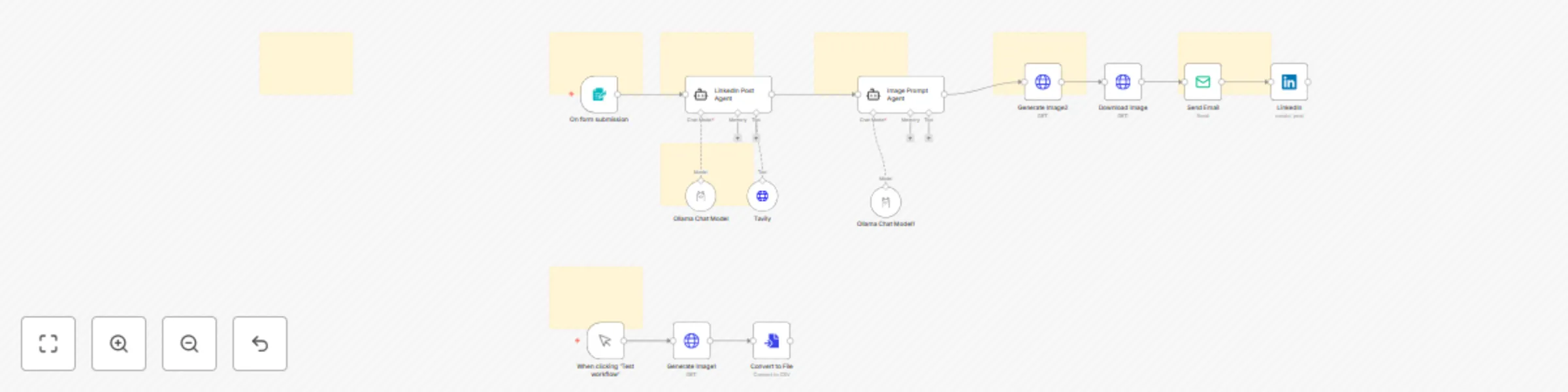
Original n8n.io sourceThis automation flow is designed to generate professional, research-backed LinkedIn posts based on a user-submitted topic and audience, enhance it with a visually aligned image prompt, and then automatically send the post and image via Gmail and/or publish it to LinkedIn. ⚙️ How It Works (Step-by-Step):
📝 Form Submission (Input Trigger)
A user fills out a form with:
 Email

 Topic of the Post

 Target Audience
This form submission acts as the entry point of the workflow (Form Trigger node).
🤖 LinkedIn Post Generation Agent
An AI agent is triggered that:
 Uses Tavily API to fetch real-time web search content related to the topic.

 Processes the topic and audience data using an Ollama Chat Model.

 Generates a well-structured LinkedIn post that includes:

     Hook

     Educational insight

     Professional tone

     Source citations

     Hashtags and call to action
🎨 Image Prompt Agent
The generated post is passed to a second agent that:
 Extracts the core message.

 Converts it into a graphic prompt using a different Ollama LLM.

 The prompt is written to be used by an image-generation model like DALL·E or Gemma/GPT-based image tools.
🖼️ Image Generation
The image prompt is passed to a local image generation endpoint (localhost:8098) or OpenAI (api.openai.com) to generate a visual asset.
The base64 image is converted into a file.
📩 Email Dispatch
The post text and the generated image are then sent to the user’s email address via the Gmail node.
The email includes:
 The full LinkedIn post

 The auto-generated image as an attachment
🔗 LinkedIn Publishing (Optional)
If OAuth is enabled, the post can also be published directly to LinkedIn using the LinkedIn node.
🛠️ Tools Used:
n8n: Orchestration platform

OpenRouter & Ollama: Local/hosted LLMs for post and prompt generation

Tavily API: Real-time web search

OpenAI or Local Endpoint: Image generation from text

SMTP (Gmail): For sending emails

LinkedIn API: For automated posting
📦 Key Features:
End-to-end automation from form to email/post

Uses real-time research for accuracy

Creative visual generation with professional branding intent

Works locally or with cloud APIs

Modular: Can switch tools or endpoints (OpenAI ↔ Localhost, Ollama ↔ OpenRouter)
🚀 Ideal Use Cases:
Marketing teams needing fast content turnaround

Personal branding assistants

Founders, freelancers, and executives sharing thought leadership

University or organization-wide communication systems
This catalog entry is organized from the workflow JSON. The node-level section below shows the executable blocks available for review before importing the template.
| Workflow | Generate AI-powered LinkedIn posts with Ollama, image creation, and Gmail delivery |
|---|---|
| Complexity | advanced |
| Nodes | 21 |
| Categories | Content Creation, Multimodal AI |
| Author | Aashit Sharma |
| Published | 05 Jun 2025 |
Use the JSON export at /data/workflows/4674/4674.json as the source template for this automation.
Open n8n, import the downloaded JSON, and review each node before activating the workflow.
Replace placeholder credentials, API keys, webhook URLs, account IDs, and environment-specific values with your own settings.
Run the workflow manually or in a staging workspace, inspect node output, and confirm downstream systems receive the expected data.
Enable the workflow only after testing, then monitor executions, errors, and rate limits during the first production runs.
Review imported nodes carefully before activation. This catalog entry is intended to help you inspect the workflow structure, understand required services, and find related templates faster.
Node names, credentials, schedules, webhook paths, and external service limits may need adjustment for your workspace.
This automation flow is designed to generate professional, research backed LinkedIn posts based on a user submitted topic and audience, enhance it with a visually aligned image prompt, and then aut...
Review the workflow JSON, configure any required credentials in n8n, and test the automation in a safe workspace before using it in production.
Yes. Use the block-by-block analysis and the downloadable JSON to inspect each node, then adjust credentials, prompts, schedules, filters, or destinations for your Content Creation, Multimodal AI use case.