Generate AEO snippets from Google PAA with SerpApi and Gemini

Workflow preview

Workflow preview
100%
Generate AEO snippets from Google PAA with SerpApi and Gemini preview
Open on n8n.io

1. Workflow Overview

This n8n template automates the identification & optimisation of Answer Engine Optimisation (AEO) opportunities by extracting Google "People Also Ask" (PAA) data to generate high authority response...

Best for

  • Market Research automation workflows
  • AI Summarization automation workflows
  • intermediate n8n builders looking for reusable templates

Tools used

n8n-nodes-serpapi.serpapi, n8n-nodes-base.splitout, @n8n/n8n-nodes-langchain.googlegemini, n8n-nodes-base.googlesheets, n8n-nodes-base.stickynote, n8n-nodes-base.formtrigger

Source and attribution

This workflow is cataloged by N8N Workflows and links back to its original n8n.io source page by Nithish R..

Original n8n.io source

1.1 Workflow description

Title
Generate AEO snippets from Google PAA with SerpApi and Gemini
Workflow name
Generate AEO snippets from Google PAA with SerpApi and Gemini

This n8n template automates the identification & optimisation of Answer Engine Optimisation (AEO) opportunities by extracting Google "People Also Ask" (PAA) data to generate high-authority response snippets.

As search engines shift toward AI-generated overviews and answer engines like Perplexity, appearing in the "Citation" or "Snippet" layer is critical for maintaining organic visibility. This workflow identifies the exact questions users are asking and drafts structured answers designed to win featured snippets.

How it works

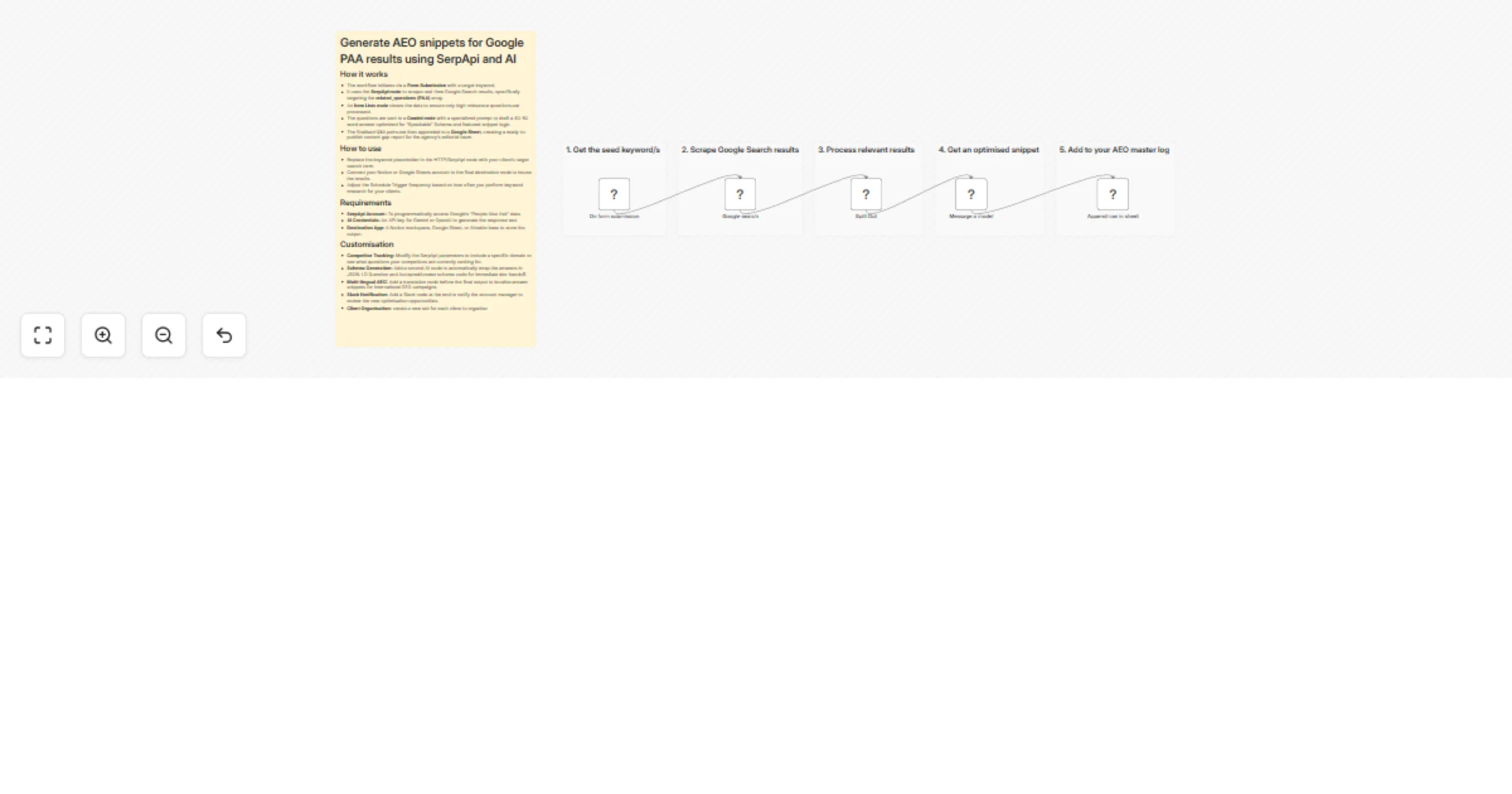
  • The workflow initiates via a Form Submission with a target keyword.
  • It uses the SerpApi node to scrape real-time Google Search results, specifically targeting the related_questions (PAA) array.
  • An Item Lists node cleans the data to ensure only high-relevance questions are processed.
  • The questions are sent to a Gemini node with a specialized prompt to draft a 40-50 word answer optimized for "Speakable" Schema and featured snippet logic.
  • The finalised Q&A pairs are then appended to a Google Sheet, creating a ready-to-publish content gap report for the agency's editorial team.

How to use

  • Replace the keyword placeholder in the HTTP/SerpApi node with your client’s target search term.
  • Connect your Notion or Google Sheets account to the final destination node to house the results.
  • Adjust the Schedule Trigger frequency based on how often you perform keyword research for your clients.

Requirements

  • SerpApi Account: To programmatically access Google’s "People Also Ask" data.
  • AI Credentials: An API key for Gemini or OpenAI to generate the response text.
  • Destination App: A Notion workspace, Google Sheet, or Airtable base to store the output.

Customising this workflow

  • Competitor Tracking: Modify the SerpApi parameters to include a specific domain to see what questions your competitors are currently ranking for.
  • Schema Generation: Add a second AI node to automatically wrap the answers in JSON-LD Question and AcceptedAnswer schema code for immediate dev-handoff.
  • Multi-lingual AEO: Add a translation node before the final output to localise answer snippets for international SEO campaigns.
  • Slack Notification: Add a Slack node at the end to notify the account manager to review the new optimisation opportunities.
  • AEO Master Log: Maintain a database to store all Q&A pairs for each client.

1.2 Logical Blocks

This catalog entry is organized from the workflow JSON. The node-level section below shows the executable blocks available for review before importing the template.

2. Block-by-Block Analysis

Block 1 - Google search

Type / Role
n8n-nodes-serpapi.serpApi - serpApi
Config choices
Version 1

Block 2 - Split Out

Type / Role
n8n-nodes-base.splitOut - splitOut
Config choices
Version 1

Block 3 - Message a model

Type / Role
@n8n/n8n-nodes-langchain.googleGemini - googleGemini
Config choices
Version 1.1

Block 4 - Append row in sheet

Type / Role
n8n-nodes-base.googleSheets - googleSheets
Config choices
Version 4.7

Block 5 - Sticky Note

Type / Role
n8n-nodes-base.stickyNote - stickyNote
Config choices
Version 1

Block 6 - On form submission

Type / Role
n8n-nodes-base.formTrigger - formTrigger
Config choices
Version 2.5

Block 7 - Sticky Note1

Type / Role
n8n-nodes-base.stickyNote - stickyNote
Config choices
Version 1

Block 8 - Sticky Note2

Type / Role
n8n-nodes-base.stickyNote - stickyNote
Config choices
Version 1

Block 9 - Sticky Note3

Type / Role
n8n-nodes-base.stickyNote - stickyNote
Config choices
Version 1

Block 10 - Sticky Note4

Type / Role
n8n-nodes-base.stickyNote - stickyNote
Config choices
Version 1

Block 11 - Sticky Note5

Type / Role
n8n-nodes-base.stickyNote - stickyNote
Config choices
Version 1

3. Summary Table

Workflow Generate AEO snippets from Google PAA with SerpApi and Gemini
Complexity intermediate
Nodes 11
Categories Market Research, AI Summarization
Author Nithish R.
Published 04 Mar 2026

4. Reproducing the Workflow from Scratch

  1. 1. Download the workflow JSON

    Use the JSON export at /data/workflows/13867/13867.json as the source template for this automation.

  2. 2. Import the template into n8n

    Open n8n, import the downloaded JSON, and review each node before activating the workflow.

  3. 3. Configure credentials and variables

    Replace placeholder credentials, API keys, webhook URLs, account IDs, and environment-specific values with your own settings.

  4. 4. Test with sample data

    Run the workflow manually or in a staging workspace, inspect node output, and confirm downstream systems receive the expected data.

  5. 5. Activate and monitor

    Enable the workflow only after testing, then monitor executions, errors, and rate limits during the first production runs.

5. General Notes & Resources

Review imported nodes carefully before activation. This catalog entry is intended to help you inspect the workflow structure, understand required services, and find related templates faster.

Node names, credentials, schedules, webhook paths, and external service limits may need adjustment for your workspace.

Frequently asked questions

What does Generate AEO snippets from Google PAA with SerpApi and Gemini do?

This n8n template automates the identification & optimisation of Answer Engine Optimisation (AEO) opportunities by extracting Google "People Also Ask" (PAA) data to generate high authority response...

What do I need before importing this workflow?

Review the workflow JSON, configure any required credentials in n8n, and test the automation in a safe workspace before using it in production.

Can I customize this workflow?

Yes. Use the block-by-block analysis and the downloadable JSON to inspect each node, then adjust credentials, prompts, schedules, filters, or destinations for your Market Research, AI Summarization use case.