Generate ad image variations using GPT-4, Dumpling AI & Google Drive

Workflow preview

Workflow preview
100%
Generate ad image variations using GPT-4, Dumpling AI & Google Drive preview
Open on n8n.io

Important notice

This workflow is provided as-is. Please review and test before using in production.

1. Workflow Overview

What this workflow does This workflow takes a reference ad image and brand website, then uses GPT 4, LangChain, and Dumpling AI to generate 10 high quality image variations for ad testing. These...

Best for

  • Content Creation automation workflows
  • Multimodal AI automation workflows
  • intermediate n8n builders looking for reusable templates

Tools used

n8n-nodes-base.formtrigger, n8n-nodes-base.googledrive, @n8n/n8n-nodes-langchain.openai, @n8n/n8n-nodes-langchain.agent, @n8n/n8n-nodes-langchain.outputparserstructured, n8n-nodes-base.splitout, n8n-nodes-base.splitinbatches, n8n-nodes-base.httprequest

Source and attribution

This workflow is cataloged by N8N Workflows and links back to its original n8n.io source page by Yang.

Original n8n.io source

1.1 Workflow description

Title
Generate ad image variations using GPT-4, Dumpling AI & Google Drive
Workflow name
Generate ad image variations using GPT-4, Dumpling AI & Google Drive

đź§ľ What this workflow does

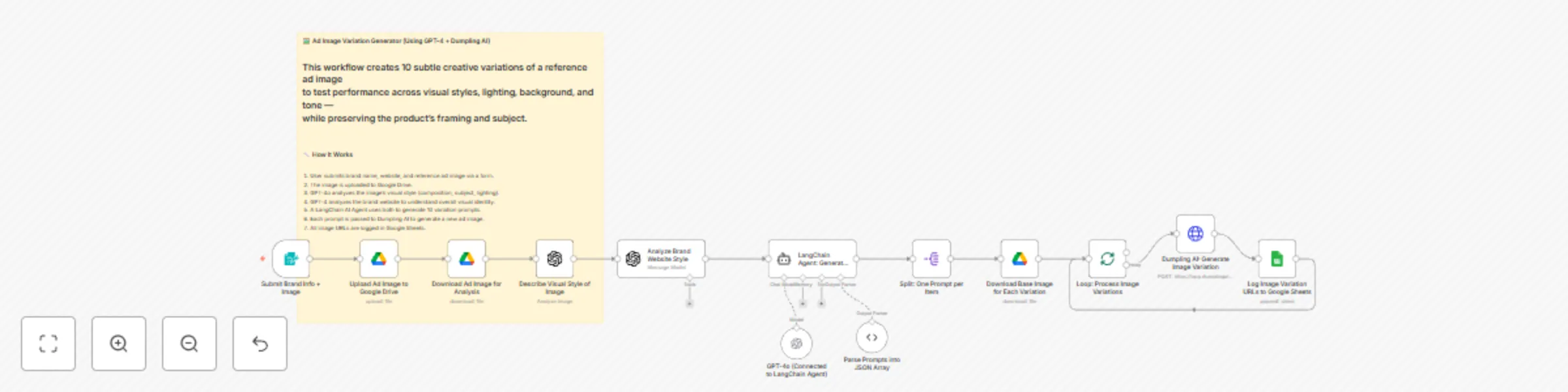
This workflow takes a reference ad image and brand website, then uses GPT-4, LangChain, and Dumpling AI to generate 10 high-quality image variations for ad testing. These image variations are visually consistent but subtly different in background, mood, lighting, and tone — perfect for performance testing on platforms like Meta Ads or TikTok.


👤 Who is this for

  • DTC marketers and brand designers testing ad creatives
  • Creative teams automating visual experimentation
  • Content agencies using AI for fast ad mockups
  • Performance marketers running multivariate testing

⚙️ How to set up

âś… Requirements

You’ll need the following tools set up in n8n:

  • Google Drive (OAuth2 credential)
  • Google Sheets (OAuth2 credential)
  • OpenAI API (for GPT-4 or GPT-4o)
  • Dumpling AI API (via HTTP header authentication)

🛠️ Steps to configure

  1. Google Sheet Setup

    • Create a sheet with one column: Image URL
    • Update the Sheet ID and tab name in the final Google Sheets node.
  2. Drive Setup

    • Create a folder in Google Drive for storing the reference image.
    • Replace the folderId in the “Upload Ad Image to Google Drive” node.
  3. Dumpling AI API Key

    • Use n8n’s credential manager (HTTP Header Auth) — do not hardcode the key.
  4. OpenAI API Key

    • Required for both image description and LangChain agent prompt generation.
  5. Form Inputs Required

    • Brand Name
    • Brand Website
    • Ad Image (upload field)

đź§  How it works

  1. A user submits the brand name, website, and a reference ad image through a form.
  2. The image is uploaded to Google Drive.
  3. GPT-4o describes the image’s visual style (e.g., mood, lighting, composition).
  4. GPT-4 analyzes the brand’s website to define its visual aesthetic.
  5. A LangChain agent uses both analyses to create 10 tightly scoped variation prompts.
  6. Dumpling AI generates a new image for each prompt using its “FLUX.1-pro” model.
  7. Each new image’s link is logged into Google Sheets.

🛠️ How to customize

  • đź§Ş Change prompt logic to experiment with different variations (e.g., theme, season).
  • 🎨 Switch image model in Dumpling AI to one that supports your desired style.
  • đź”— Log additional metadata (prompt, timestamp) to Google Sheets.
  • 📤 Connect output images to Airtable, Notion, or a review tool like Figma.
  • 🎯 Modify GPT system message to reflect a different tone or brand strategy.

This workflow gives creative teams and marketers an instant, AI-powered ad image testing system — built on real brand visuals, not generic stock content.

1.2 Logical Blocks

This catalog entry is organized from the workflow JSON. The node-level section below shows the executable blocks available for review before importing the template.

2. Block-by-Block Analysis

Block 1 - Submit Brand Info + Image

Type / Role
n8n-nodes-base.formTrigger - formTrigger
Config choices
Version 2.2

Block 2 - Upload Ad Image to Google Drive

Type / Role
n8n-nodes-base.googleDrive - googleDrive
Config choices
Version 3

Block 3 - Download Ad Image for Analysis

Type / Role
n8n-nodes-base.googleDrive - googleDrive
Config choices
Version 3

Block 4 - Describe Visual Style of Image

Type / Role
@n8n/n8n-nodes-langchain.openAi - openAi
Config choices
Version 1.8

Block 5 - Analyze Brand Website Style

Type / Role
@n8n/n8n-nodes-langchain.openAi - openAi
Config choices
Version 1.8

Block 6 - LangChain Agent: Generate Variation Prompts

Type / Role
@n8n/n8n-nodes-langchain.agent - agent
Config choices
Version 1.7

Block 7 - Parse Prompts into JSON Array

Type / Role
@n8n/n8n-nodes-langchain.outputParserStructured - outputParserStructured
Config choices
Version 1.2

Block 8 - Split: One Prompt per Item

Type / Role
n8n-nodes-base.splitOut - splitOut
Config choices
Version 1

Block 9 - Download Base Image for Each Variation

Type / Role
n8n-nodes-base.googleDrive - googleDrive
Config choices
Version 3

Block 10 - Loop: Process Image Variations

Type / Role
n8n-nodes-base.splitInBatches - splitInBatches
Config choices
Version 3

Block 11 - Dumpling AI: Generate Image Variation

Type / Role
n8n-nodes-base.httpRequest - httpRequest
Config choices
Version 4.2

Block 12 - Log Image Variation URLs to Google Sheets

Type / Role
n8n-nodes-base.googleSheets - googleSheets
Config choices
Version 4.6

Block 13 - GPT-4o (Connected to LangChain Agent)

Type / Role
@n8n/n8n-nodes-langchain.lmChatOpenAi - lmChatOpenAi
Config choices
Version 1.2

Block 14 - Sticky Note

Type / Role
n8n-nodes-base.stickyNote - stickyNote
Config choices
Version 1

3. Summary Table

Workflow Generate ad image variations using GPT-4, Dumpling AI & Google Drive
Complexity intermediate
Nodes 14
Categories Content Creation, Multimodal AI
Author Yang
Published 08 Jul 2025

4. Reproducing the Workflow from Scratch

  1. 1. Download the workflow JSON

    Use the JSON export at /data/workflows/5799/5799.json as the source template for this automation.

  2. 2. Import the template into n8n

    Open n8n, import the downloaded JSON, and review each node before activating the workflow.

  3. 3. Configure credentials and variables

    Replace placeholder credentials, API keys, webhook URLs, account IDs, and environment-specific values with your own settings.

  4. 4. Test with sample data

    Run the workflow manually or in a staging workspace, inspect node output, and confirm downstream systems receive the expected data.

  5. 5. Activate and monitor

    Enable the workflow only after testing, then monitor executions, errors, and rate limits during the first production runs.

5. General Notes & Resources

Review imported nodes carefully before activation. This catalog entry is intended to help you inspect the workflow structure, understand required services, and find related templates faster.

Node names, credentials, schedules, webhook paths, and external service limits may need adjustment for your workspace.

Frequently asked questions

What does Generate ad image variations using GPT-4, Dumpling AI & Google Drive do?

What this workflow does This workflow takes a reference ad image and brand website, then uses GPT 4, LangChain, and Dumpling AI to generate 10 high quality image variations for ad testing. These...

What do I need before importing this workflow?

Review the workflow JSON, configure any required credentials in n8n, and test the automation in a safe workspace before using it in production.

Can I customize this workflow?

Yes. Use the block-by-block analysis and the downloadable JSON to inspect each node, then adjust credentials, prompts, schedules, filters, or destinations for your Content Creation, Multimodal AI use case.