Block 1 - Google Calendar Trigger
- Type / Role
- n8n-nodes-base.googleCalendarTrigger - googleCalendarTrigger
- Config choices
- Version 1


 Early Deal
This workflow is provided as-is. Please review and test before using in production.
Generate 7 Day Event Plans with Google Calendar, GPT 3.5 and Notion Automate Your Event Planning: From Calendar Entry to Done For You Checklist Stop scrambling before birthdays, anniversaries, o...
n8n-nodes-base.googlecalendartrigger, n8n-nodes-base.hubgpt, n8n-nodes-base.notion, n8n-nodes-base.itemlists, n8n-nodes-base.emailsend
This workflow is cataloged by N8N Workflows and links back to its original n8n.io source page by Shelly-Ann Davy.
Original n8n.io sourceStop scrambling before birthdays, anniversaries, or family gatherings. This workflow turns a simple Google Calendar event into a 7-day prep plan — complete with shopping lists, tasks, and reminders — all auto-sent to Notion and your inbox.
Perfect for:
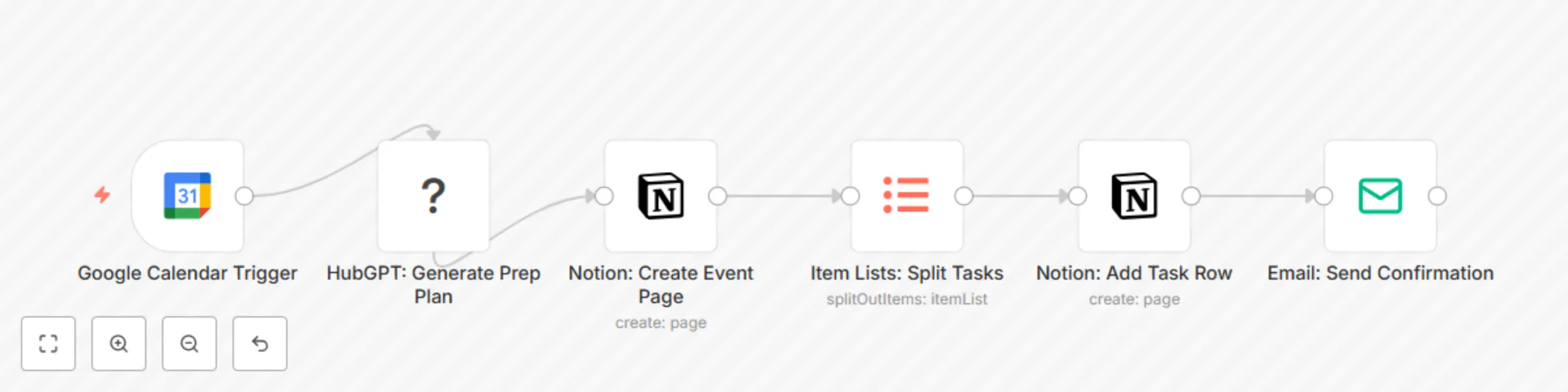
The workflow:
No spreadsheets. No mental load. Just set the date — and let AI handle the rest.
> 🔁 Key Detail: After the Notion page is created, the workflow uses an Item Lists node to split the AI-generated task array into individual items. Each task is then processed in a loop and appended to the Notion database as a separate row — ensuring clean, actionable checklists.
Before using this workflow, ensure you have:
| Service | Purpose | Free Tier? |
|---|---|---|
| n8n | Orchestrate automation | Yes |
| Google Calendar | Trigger on new events | Yes |
| Notion | Store prep checklist | Yes |
| OpenAI | AI planning logic (GPT-3.5) | Yes (limited free tier) |
| SMTP Email | Send confirmation email | Yes (via Gmail or similar) |
🔐 Store all API keys securely in n8n’s Credentials section.
Your event must include:
💡 Tip: Use a specific keyword in the title (e.g., “🎂”) to trigger only special events.
Create a Notion database with these columns:
| Column Name | Type | Example |
|---|---|---|
Name |
Title | "Emma’s Birthday Prep" |
Task |
Text | "Buy cake" |
Due Date |
Date | 2025-09-10 |
Status |
Status | To Do, In Progress, Done |
Event Date |
Date | 2025-09-12 |
Notes |
Text | "Vanilla with rainbow sprinkles" |
📌 Share your Notion workspace with your n8n integration (via integration token).
🔐 Never hardcode keys — use n8n’s credential system.
In the HubGPT: Generate Prep Plan node:
You're planning "{{ $json['summary'] }}" on {{ $json['start'] }}.
Generate a 7-day prep plan with 5–7 tasks (e.g., shopping, invites, setup).
Include:
- 3 days before: Send invites
- 2 days before: Buy supplies
- 1 day before: Decorate
Return as a JSON array with 'task' and 'dueDate'.
This catalog entry is organized from the workflow JSON. The node-level section below shows the executable blocks available for review before importing the template.
| Workflow | Generate 7-day event plans with Google Calendar, GPT-3.5 and Notion |
|---|---|
| Complexity | intermediate |
| Nodes | 6 |
| Categories | Personal Productivity, AI Chatbot |
| Author | Shelly-Ann Davy |
| Published | 06 Sept 2025 |
Use the JSON export at /data/workflows/8325/8325.json as the source template for this automation.
Open n8n, import the downloaded JSON, and review each node before activating the workflow.
Replace placeholder credentials, API keys, webhook URLs, account IDs, and environment-specific values with your own settings.
Run the workflow manually or in a staging workspace, inspect node output, and confirm downstream systems receive the expected data.
Enable the workflow only after testing, then monitor executions, errors, and rate limits during the first production runs.
Review imported nodes carefully before activation. This catalog entry is intended to help you inspect the workflow structure, understand required services, and find related templates faster.
Node names, credentials, schedules, webhook paths, and external service limits may need adjustment for your workspace.
Generate 7 Day Event Plans with Google Calendar, GPT 3.5 and Notion Automate Your Event Planning: From Calendar Entry to Done For You Checklist Stop scrambling before birthdays, anniversaries, o...
Review the workflow JSON, configure any required credentials in n8n, and test the automation in a safe workspace before using it in production.
Yes. Use the block-by-block analysis and the downloadable JSON to inspect each node, then adjust credentials, prompts, schedules, filters, or destinations for your Personal Productivity, AI Chatbot use case.