Block 1 - Switch
- Type / Role
- n8n-nodes-base.switch - switch
- Config choices
- Version 3.4


 Early Deal
This workflow is provided as-is. Please review and test before using in production.
Description Ask any question and get five different answers instantly. Each answer is written for a different audience—from kids to business executives. Your Telegram bot delivers all five explanat...
n8n-nodes-base.switch, @n8n/n8n-nodes-langchain.lmchatopenai, n8n-nodes-base.stickynote, n8n-nodes-base.telegramtrigger, n8n-nodes-base.set, n8n-nodes-base.code, @n8n/n8n-nodes-langchain.agent, n8n-nodes-base.merge
This workflow is cataloged by N8N Workflows and links back to its original n8n.io source page by Sridevi Edupuganti.
Original n8n.io sourceAsk any question and get five different answers instantly. Each answer is written for a different audience—from kids to business executives. Your Telegram bot delivers all five explanations in under 10 seconds and saves them to Google Docs automatically. Perfect for teachers, writers, and anyone who needs to explain things to different people.
• Educators creating multi-grade
curriculum content
• Content creators generating material for diverse audiences
• Technical writers producing documentation at different expertise levels
• Parents explaining complex topics to children
• Anyone who needs to explain things to different people.
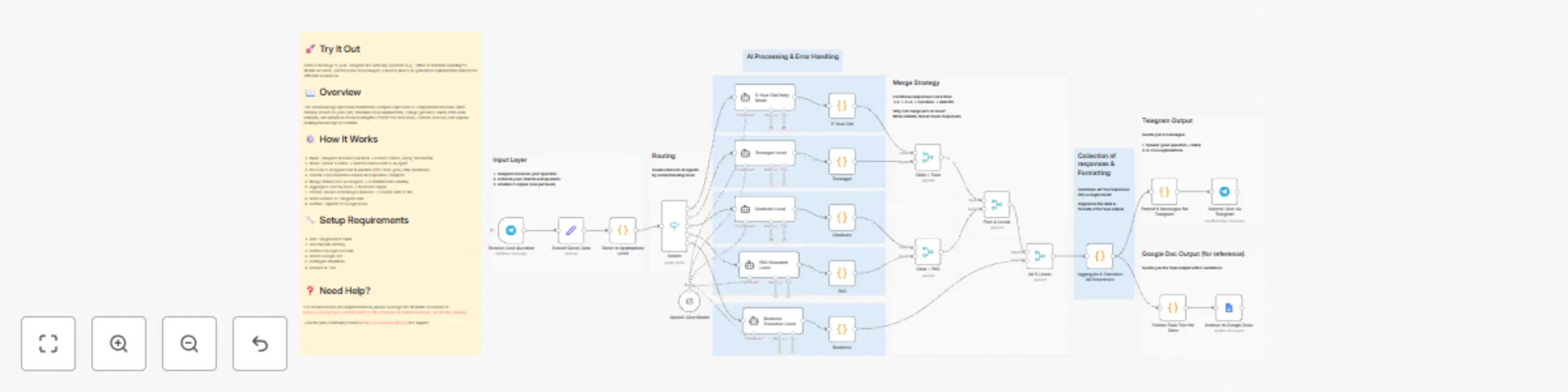
• Transforms any question into five distinct explanations: kid-friendly stories (5-year-olds), relatable content (teenagers), professional explanations (graduates), academic analysis (PhD researchers), and strategic insights (business executives) • Five AI agents process simultaneously for 3-8 second response times • Delivers six formatted Telegram messages (header + five explanations) • Automatically archives complete conversations to Google Docs • Uses binary tree merge architecture for reliable data handling
• Create Telegram bot via @BotFather and add token to n8n credentials • Obtain OpenAI API key and add to n8n credentials • Connect Google account to grant Docs access • Create blank Google Doc and paste URL in workflow's Google Docs node • Activate workflow and test with any question
• Telegram Bot API token (free) • OpenAI API key (pay-per-use • Google account with Docs access (free) • n8n instance (cloud or self-hosted)
• Modify AI prompts in 'Create 5 Items' node for different tones and styles • Adjust character limits in formatting nodes to control message length • Change output destinations from Telegram to Slack, email, or other platforms • Switch AI providers from OpenAI to alternatives • Add additional comprehension levels by duplicating AI agent nodes
For detailed notes and implementation, please leverage the README document at: https://drive.google.com/file/d/19Fx-FoihL70qpOi4CnEwQ6Sud2dbUnE_/view?usp=sharing
Join the Discord (https://discord.com/invite/XPKeKXeB7d) or Join the n8n community forum (https://community.n8n.io/) for support
This catalog entry is organized from the workflow JSON. The node-level section below shows the executable blocks available for review before importing the template.
Showing the first 24 of 41 workflow blocks. Download the JSON for the full node graph.
| Workflow | Generate 5-level AI explanations for different audiences from Telegram to Google Docs with GPT-4.1-mini |
|---|---|
| Complexity | advanced |
| Nodes | 41 |
| Categories | Content Creation, AI Summarization |
| Author | Sridevi Edupuganti |
| Published | 30 Dec 2025 |
Use the JSON export at /data/workflows/12299/12299.json as the source template for this automation.
Open n8n, import the downloaded JSON, and review each node before activating the workflow.
Replace placeholder credentials, API keys, webhook URLs, account IDs, and environment-specific values with your own settings.
Run the workflow manually or in a staging workspace, inspect node output, and confirm downstream systems receive the expected data.
Enable the workflow only after testing, then monitor executions, errors, and rate limits during the first production runs.
Review imported nodes carefully before activation. This catalog entry is intended to help you inspect the workflow structure, understand required services, and find related templates faster.
Node names, credentials, schedules, webhook paths, and external service limits may need adjustment for your workspace.
Description Ask any question and get five different answers instantly. Each answer is written for a different audience—from kids to business executives. Your Telegram bot delivers all five explanat...
Review the workflow JSON, configure any required credentials in n8n, and test the automation in a safe workspace before using it in production.
Yes. Use the block-by-block analysis and the downloadable JSON to inspect each node, then adjust credentials, prompts, schedules, filters, or destinations for your Content Creation, AI Summarization use case.