Block 1 - When clicking ‘Test workflow’
- Type / Role
- n8n-nodes-base.manualTrigger - manualTrigger
- Config choices
- Version 1


 Early Deal
This workflow is provided as-is. Please review and test before using in production.
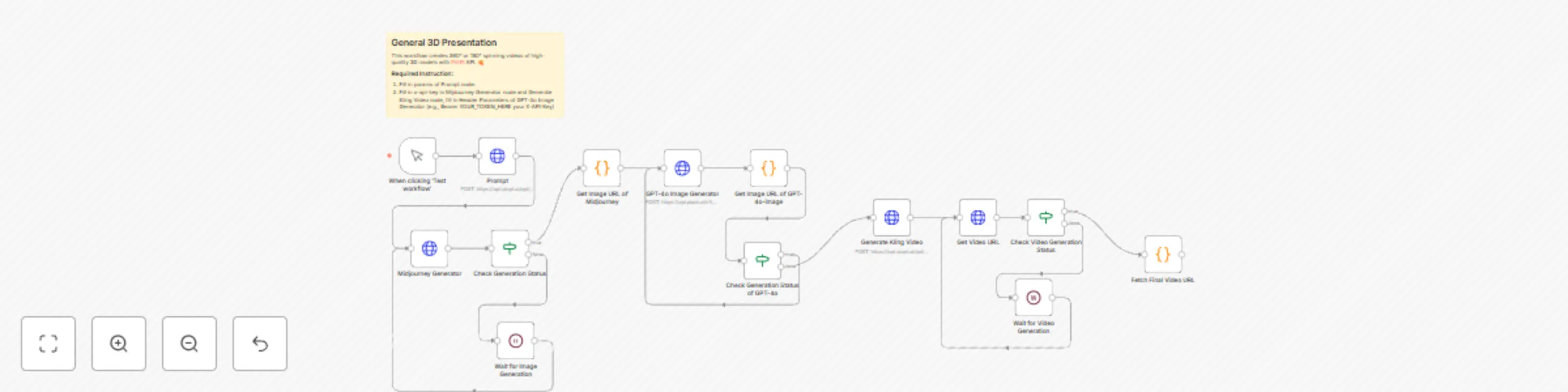
Who is this template for? This workflow creates 360° or 180° spinning videos of high quality 3D models with PiAPI API. Good for: Designers : Generate inspiration into 3D designs...
n8n-nodes-base.manualtrigger, n8n-nodes-base.httprequest, n8n-nodes-base.wait, n8n-nodes-base.if, n8n-nodes-base.code, n8n-nodes-base.stickynote
This workflow is cataloged by N8N Workflows and links back to its original n8n.io source page by PiAPI.
Original n8n.io sourceThis workflow creates 360° or 180° spinning videos of high-quality 3D models with PiAPI API.
Good for:
To use this workflow, usually we need four steps:
The prompt node concludes the main features of creations. An example for users' reference is listed as follow:
A blind box character design, in the chibi style, a super cute little girl wearing a white long-sleeved dress and pearl earrings with her head bowed in a prayer pose, facing upwards, wearing an oversized off-white dress with large round pearls on the shoulders, minimalist simple dress with Ruffles, against a beige background, a full-body shot in a three-quarter profile view, with a black, blue, and gray color scheme, soft lighting, 3D rendering, clay material, high detail, in the Pixar style. Clean white skin, brown renaissance braided bun. --ar 1:1 --niji 6
An Example for your reference.
This catalog entry is organized from the workflow JSON. The node-level section below shows the executable blocks available for review before importing the template.
| Workflow | General 3D presentation workflow with Midjourney, GPT-4o-image and Kling APIs |
|---|---|
| Complexity | advanced |
| Nodes | 15 |
| Categories | Content Creation, Multimodal AI |
| Author | PiAPI |
| Published | 21 Apr 2025 |
Use the JSON export at /data/workflows/3625/3625.json as the source template for this automation.
Open n8n, import the downloaded JSON, and review each node before activating the workflow.
Replace placeholder credentials, API keys, webhook URLs, account IDs, and environment-specific values with your own settings.
Run the workflow manually or in a staging workspace, inspect node output, and confirm downstream systems receive the expected data.
Enable the workflow only after testing, then monitor executions, errors, and rate limits during the first production runs.
Review imported nodes carefully before activation. This catalog entry is intended to help you inspect the workflow structure, understand required services, and find related templates faster.
Node names, credentials, schedules, webhook paths, and external service limits may need adjustment for your workspace.
Who is this template for? This workflow creates 360° or 180° spinning videos of high quality 3D models with PiAPI API. Good for: Designers : Generate inspiration into 3D designs...
Review the workflow JSON, configure any required credentials in n8n, and test the automation in a safe workspace before using it in production.
Yes. Use the block-by-block analysis and the downloadable JSON to inspect each node, then adjust credentials, prompts, schedules, filters, or destinations for your Content Creation, Multimodal AI use case.