Block 1 - Schedule Trigger
- Type / Role
- n8n-nodes-base.scheduleTrigger - scheduleTrigger
- Config choices
- Version 1.2


 Early Deal
This workflow is provided as-is. Please review and test before using in production.
Who’s it for This template is ideal for busy professionals, students, or anyone with a dynamic schedule who wants to optimize their brief periods of free time. If you frequently find yourself with ...
n8n-nodes-base.scheduletrigger, n8n-nodes-base.set, n8n-nodes-base.googlecalendar, n8n-nodes-base.httprequest, n8n-nodes-base.code, n8n-nodes-base.if, n8n-nodes-base.googlesheets, n8n-nodes-base.slack
This workflow is cataloged by N8N Workflows and links back to its original n8n.io source page by Yoshino Haruki.
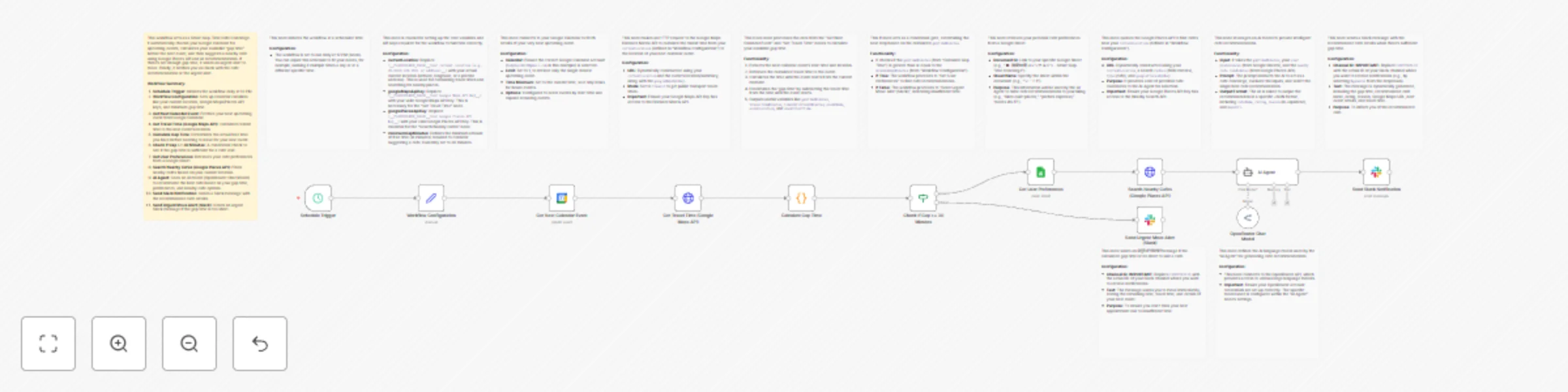
Original n8n.io sourceWho’s it for This template is ideal for busy professionals, students, or anyone with a dynamic schedule who wants to optimize their brief periods of free time. If you frequently find yourself with unexpected gaps between meetings and wish for intelligent, personalized suggestions on where to grab a coffee or get some work done, this workflow is for you. How it works / What it does The workflow begins by checking your Google Calendar for your next event at a scheduled time. It then calculates the travel time from your current location to your next event's venue using Google Maps. This allows it to determine your actual "gap time" – the usable free time before you need to start moving. If you have a sufficient gap (e.g., 30 minutes or more), the workflow fetches your preferred cafe criteria from a Google Sheet and searches for nearby cafes using Google Places. An AI agent then processes this information, along with your available gap time, to recommend the best cafe suited to your needs. This recommendation, complete with ratings and a Google Maps link, is sent directly to your Slack channel. Conversely, if the gap time is too short to comfortably visit a cafe, the workflow sends an urgent Slack alert, reminding you to prepare for your next appointment and providing essential details. How to set up Import the Workflow: Import this workflow into your n8n instance. Configure API Keys: In the "Workflow Configuration" node, replace the placeholders for googleMapsApiKey and googlePlacesApiKey with your actual API keys. Ensure these keys have access to the Google Maps Distance Matrix API and Google Places API (Nearby Search). Also, update currentLocation with your default or most frequent starting location (latitude/longitude or address). Google Calendar Credentials: Authenticate the "Get Next Calendar Event" node with your Google Calendar account. Select the calendar you wish to monitor. Google Sheets Credentials: Authenticate the "Get User Preferences" node with your Google Sheets account. Create a Google Sheet to store your cafe preferences (e.g., "Likes quiet places", "Prefers espresso", "Needs Wi-Fi"). Update the "Document ID" and "Sheet Name" in this node to point to your preference sheet. OpenRouter Credentials: Authenticate the "OpenRouter Chat Model" with your OpenRouter API key. Slack Credentials: Authenticate both "Send Slack Notification" and "Send Urgent Move Alert (Slack)" nodes with your Slack account. In both Slack nodes, update the channelId to your desired Slack channel where you want to receive notifications (e.g., #general, or a specific DM channel). Activate the Workflow: Once all configurations are complete, activate the workflow. Requirements An n8n instance (self-hosted or cloud). Google Account with Google Calendar and Google Sheets. Google Cloud Project with activated Google Maps Platform APIs (Distance Matrix API, Places API) and corresponding API Keys. An OpenRouter API Key. A Slack Workspace and API Token (or Webhook URL). How to customize the workflow Scheduling: Adjust the "Schedule Trigger" node to run at different intervals or specific times that best suit your daily routine. Minimum Gap Time: Modify the minimumGapMinutes variable in the "Workflow Configuration" node to set a different threshold for cafe recommendations. Cafe Search Radius: In the "Search Nearby Cafes (Google Places API)" node, you can change the radius parameter to search for cafes within a larger or smaller area. User Preferences: Expand your Google Sheet with more detailed preferences to give the AI agent better context for recommendations (e.g., "vegan options," "good for meetings," "strong coffee"). AI Prompt: Refine the prompt in the "AI Agent" node to guide the AI towards specific types of recommendations or output formats. Slack Message Customization: Edit the text fields in the Slack nodes to personalize the notification messages.
This catalog entry is organized from the workflow JSON. The node-level section below shows the executable blocks available for review before importing the template.
Showing the first 24 of 25 workflow blocks. Download the JSON for the full node graph.
| Workflow | Gap-time cafe finder with OpenRouter AI, Google Calendar, Maps & Slack alerts |
|---|---|
| Complexity | advanced |
| Nodes | 25 |
| Categories | Personal Productivity, AI Chatbot |
| Author | Yoshino Haruki |
| Published | 20 Nov 2025 |
Use the JSON export at /data/workflows/11034/11034.json as the source template for this automation.
Open n8n, import the downloaded JSON, and review each node before activating the workflow.
Replace placeholder credentials, API keys, webhook URLs, account IDs, and environment-specific values with your own settings.
Run the workflow manually or in a staging workspace, inspect node output, and confirm downstream systems receive the expected data.
Enable the workflow only after testing, then monitor executions, errors, and rate limits during the first production runs.
Review imported nodes carefully before activation. This catalog entry is intended to help you inspect the workflow structure, understand required services, and find related templates faster.
Node names, credentials, schedules, webhook paths, and external service limits may need adjustment for your workspace.
Who’s it for This template is ideal for busy professionals, students, or anyone with a dynamic schedule who wants to optimize their brief periods of free time. If you frequently find yourself with ...
Review the workflow JSON, configure any required credentials in n8n, and test the automation in a safe workspace before using it in production.
Yes. Use the block-by-block analysis and the downloadable JSON to inspect each node, then adjust credentials, prompts, schedules, filters, or destinations for your Personal Productivity, AI Chatbot use case.