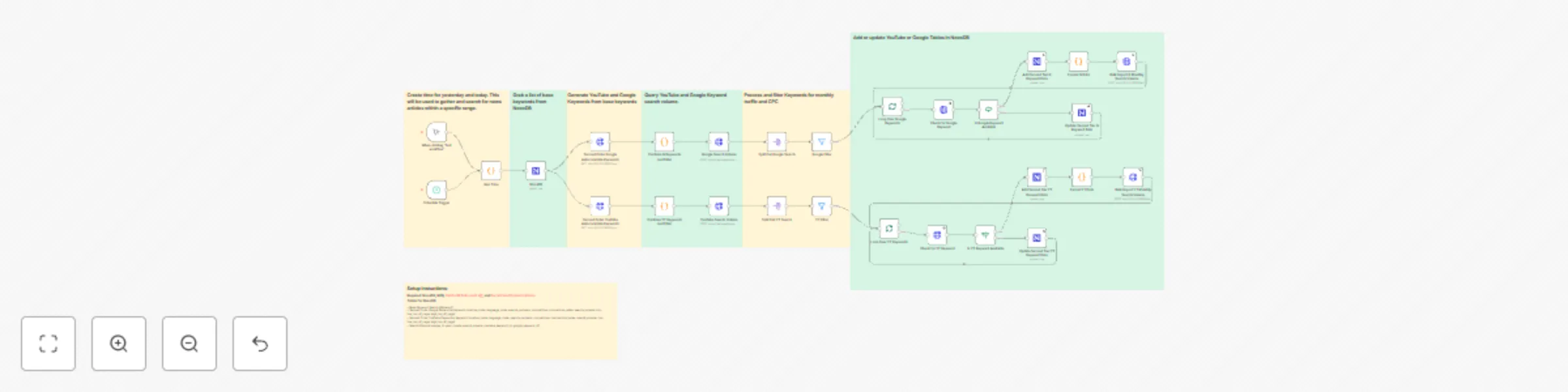
Find top keywords for Youtube and Google and store them in NocoDB

Workflow preview

Workflow preview
100%
Find top keywords for Youtube and Google and store them in NocoDB preview
Open on n8n.io

Important notice

This workflow is provided as-is. Please review and test before using in production.

1. Workflow Overview

Template Description WDF Top Keywords : This workflow is designed to streamline keyword research by automating the process of generating, filtering, and analyzing Google and YouTube keyword data. E...

Best for

  • Market Research automation workflows
  • advanced n8n builders looking for reusable templates

Tools used

n8n-nodes-base.manualtrigger, n8n-nodes-base.scheduletrigger, n8n-nodes-base.code, n8n-nodes-base.stickynote, n8n-nodes-base.nocodb, n8n-nodes-base.httprequest, n8n-nodes-base.splitout, n8n-nodes-base.filter

Source and attribution

This workflow is cataloged by N8N Workflows and links back to its original n8n.io source page by Shannon Atkinson.

Original n8n.io source

1.1 Workflow description

Title
Find top keywords for Youtube and Google and store them in NocoDB
Workflow name
Find top keywords for Youtube and Google and store them in NocoDB

Template Description
WDF Top Keywords: This workflow is designed to streamline keyword research by automating the process of generating, filtering, and analyzing Google and YouTube keyword data. Ensure compliance with local regulations and API terms of service when using this workflow.


📌 Purpose
The WDF Top Keywords workflow automates collecting, processing, and managing keyword data for both Google and YouTube platforms. Leveraging multiple data sources and APIs ensures an efficient and scalable approach to identifying high-impact keywords for SEO, content creation, and marketing campaigns.

Key Features

  • Automates the generation of keyword suggestions using autocomplete APIs.
  • Integrates with NocoDB to store and manage keyword data.
  • Filters keywords based on monthly search volume and cost-per-click (CPC).
  • Supports bulk import of keyword data into structured databases.
  • Outputs both Google and YouTube keyword insights, enabling informed decision-making.

🎯 Target Audience
This workflow is ideal for:

  • Digital marketers aiming to optimize ad campaigns with data-driven insights.
  • SEO specialists looking to identify high-potential keywords efficiently.
  • Content creators seeking trending and relevant topics for their platforms.
  • Agencies managing keyword research for multiple clients.

⚙️ How It Works

  1. Trigger: The workflow runs on-demand or at scheduled intervals.
  2. Keyword Generation:
    • Retrieves base keywords from NocoDB.
    • Generates autocomplete suggestions for Google and YouTube.
  3. Data Processing:
    • Filters and formats keyword data based on specific criteria (e.g., search volume, CPC).
    • Consolidates results for efficient storage and analysis.
  4. Storage and Output:
    • Saves data into structured NocoDB tables for tracking and reuse.
    • Bulk imports monthly search volume statistics for detailed analysis.

🛠️ Key APIs and Tools Used

  • NocoDB: Stores and organizes base and processed keyword data.
  • DataForSEO API: Provides search volume and keyword performance metrics.
  • Google Autocomplete API: Suggests relevant Google search terms.
  • YouTube Autocomplete API: Suggests trending YouTube keywords.
  • Social Flood Docker Instance: Serves as the local integration hub.

Setup Instructions

  1. Required Tools:
  2. Create the following NocoDB tables:
    • Base Keyword Search
    • Second Order Google Keywords
    • Second Order YouTube Keywords
    • Search Volume

This template empowers users to handle complex keyword research tasks effortlessly, saving time and providing actionable insights. Share this template to enhance your workflow efficiency!

1.2 Logical Blocks

This catalog entry is organized from the workflow JSON. The node-level section below shows the executable blocks available for review before importing the template.

2. Block-by-Block Analysis

Block 1 - When clicking ‘Test workflow’

Type / Role
n8n-nodes-base.manualTrigger - manualTrigger
Config choices
Version 1

Block 2 - Schedule Trigger

Type / Role
n8n-nodes-base.scheduleTrigger - scheduleTrigger
Config choices
Version 1.2

Block 3 - Gen Time

Type / Role
n8n-nodes-base.code - code
Config choices
Version 2

Block 4 - Sticky Note

Type / Role
n8n-nodes-base.stickyNote - stickyNote
Config choices
Version 1

Block 5 - Sticky Note1

Type / Role
n8n-nodes-base.stickyNote - stickyNote
Config choices
Version 1

Block 6 - Sticky Note2

Type / Role
n8n-nodes-base.stickyNote - stickyNote
Config choices
Version 1

Block 7 - NocoDB

Type / Role
n8n-nodes-base.nocoDb - nocoDb
Config choices
Version 3

Block 8 - Second Order Google Autocomplete Keywords

Type / Role
n8n-nodes-base.httpRequest - httpRequest
Config choices
Version 4.2

Block 9 - Google Search Volume

Type / Role
n8n-nodes-base.httpRequest - httpRequest
Config choices
Version 4.2

Block 10 - Sticky Note3

Type / Role
n8n-nodes-base.stickyNote - stickyNote
Config choices
Version 1

Block 11 - Split Out Google Search

Type / Role
n8n-nodes-base.splitOut - splitOut
Config choices
Version 1

Block 12 - YouTube Search Volume

Type / Role
n8n-nodes-base.httpRequest - httpRequest
Config choices
Version 4.2

Block 13 - Second Order YouTube Autocomplete Keywords

Type / Role
n8n-nodes-base.httpRequest - httpRequest
Config choices
Version 4.2

Block 14 - Split Out YT Search

Type / Role
n8n-nodes-base.splitOut - splitOut
Config choices
Version 1

Block 15 - Google Filter

Type / Role
n8n-nodes-base.filter - filter
Config choices
Version 2.2

Block 16 - YT Filter

Type / Role
n8n-nodes-base.filter - filter
Config choices
Version 2.2

Block 17 - Add Second Tier YT Keyword Data

Type / Role
n8n-nodes-base.nocoDb - nocoDb
Config choices
Version 3

Block 18 - Add Second Tier G Keyword Data

Type / Role
n8n-nodes-base.nocoDb - nocoDb
Config choices
Version 3

Block 19 - Format G Data

Type / Role
n8n-nodes-base.code - code
Config choices
Version 2

Block 20 - Format YT Data

Type / Role
n8n-nodes-base.code - code
Config choices
Version 2

Block 21 - Bulk Import G Monthly Search Volume

Type / Role
n8n-nodes-base.httpRequest - httpRequest
Config choices
Version 4.2

Block 22 - Bulk Import YT Monthly Search Volume

Type / Role
n8n-nodes-base.httpRequest - httpRequest
Config choices
Version 4.2

Block 23 - Sticky Note4

Type / Role
n8n-nodes-base.stickyNote - stickyNote
Config choices
Version 1

Block 24 - Is Google Keyword Available

Type / Role
n8n-nodes-base.if - if
Config choices
Version 2.2

Showing the first 24 of 35 workflow blocks. Download the JSON for the full node graph.

3. Summary Table

Workflow Find top keywords for Youtube and Google and store them in NocoDB
Complexity advanced
Nodes 35
Categories Market Research
Author Shannon Atkinson
Published 12 Feb 2025

4. Reproducing the Workflow from Scratch

  1. 1. Download the workflow JSON

    Use the JSON export at /data/workflows/2884/2884.json as the source template for this automation.

  2. 2. Import the template into n8n

    Open n8n, import the downloaded JSON, and review each node before activating the workflow.

  3. 3. Configure credentials and variables

    Replace placeholder credentials, API keys, webhook URLs, account IDs, and environment-specific values with your own settings.

  4. 4. Test with sample data

    Run the workflow manually or in a staging workspace, inspect node output, and confirm downstream systems receive the expected data.

  5. 5. Activate and monitor

    Enable the workflow only after testing, then monitor executions, errors, and rate limits during the first production runs.

5. General Notes & Resources

Review imported nodes carefully before activation. This catalog entry is intended to help you inspect the workflow structure, understand required services, and find related templates faster.

Node names, credentials, schedules, webhook paths, and external service limits may need adjustment for your workspace.

Frequently asked questions

What does Find top keywords for Youtube and Google and store them in NocoDB do?

Template Description WDF Top Keywords : This workflow is designed to streamline keyword research by automating the process of generating, filtering, and analyzing Google and YouTube keyword data. E...

What do I need before importing this workflow?

Review the workflow JSON, configure any required credentials in n8n, and test the automation in a safe workspace before using it in production.

Can I customize this workflow?

Yes. Use the block-by-block analysis and the downloadable JSON to inspect each node, then adjust credentials, prompts, schedules, filters, or destinations for your Market Research use case.