Block 1 - Sticky Note
- Type / Role
- n8n-nodes-base.stickyNote - stickyNote
- Config choices
- Version 1


 Early Deal
This workflow is provided as-is. Please review and test before using in production.
Who's it for This workflow is for community builders, marketers, consultants, coaches, and thought leaders who want to grow their presence in Skool communities through strategic, value driven engag...
n8n-nodes-base.stickynote, @n8n/n8n-nodes-langchain.lmchatopenai, @n8n/n8n-nodes-langchain.outputparserstructured, n8n-nodes-base.airtable, n8n-nodes-base.set, n8n-nodes-base.httprequest, @n8n/n8n-nodes-langchain.chainllm, n8n-nodes-base.filter
This workflow is cataloged by N8N Workflows and links back to its original n8n.io source page by Alexandra Spalato.
Original n8n.io sourceThis workflow is for community builders, marketers, consultants, coaches, and thought leaders who want to grow their presence in Skool communities through strategic, value-driven engagement. It's especially useful for professionals who want to:
Many professionals struggle to consistently engage meaningfully in online communities due to:
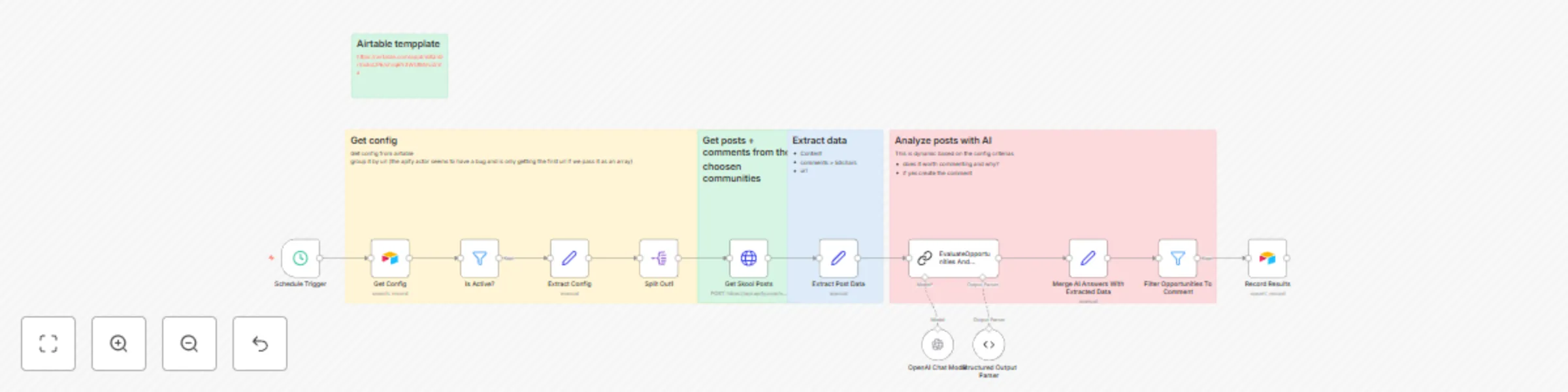
This workflow solves these problems by automatically monitoring your target Skool communities, using AI to identify posts where your expertise could add genuine value, generating thoughtful contextual comment suggestions, and organizing opportunities for efficient manual review and engagement.
Runs daily at 7 PM to scan your configured Skool communities for new posts and discussions from the last 24 hours.
Uses Apify Skool Scraper to collect:
Leverages OpenAI GPT-4.1 to:
All opportunities are saved to Airtable where you can:
Create an Airtable base with two tables:
Config Table (config):
Name (Single line text): Your configuration nameSkool URLs (Long text): Comma-separated list of Skool community URLscookies (Long text): Your Skool session cookies for authenticated accessDomain of Activity (Single line text): Your area of expertise (e.g., "AI automation", "Digital marketing")Tools Used (Single line text): Your preferred tools to recommend (e.g., "n8n", "Zapier")active (Checkbox): Whether this configuration is currently activeResults Table (Table 1):
title (Single line text): Post title/authorurl (URL): Direct link to the postreason (Long text): AI's reasoning for the opportunitytrigger (Long text): Specific sentence that triggered the opportunitysuggested answer (Long text): AI-generated comment suggestionconfig (Link to another record): Reference to the config useddate (Date): When the opportunity was foundSelect (Single select): Status tracking (not commented/commented)To access private Skool communities, you'll need to:
cookies field in your Airtable configEdit the EvaluateOpportunities And Generate Comments node to:
Update the Schedule Trigger to:
Modify the Apify scraper settings to:
Insert filter nodes to:
Add nodes after Record Results to:
{
  "opportunity": true,
  "reason": "The user is struggling with manual social media management tasks that could be automated using n8n workflows.",
  "trigger_sentence": "I'm spending 3+ hours daily just scheduling posts and responding to comments across all my social accounts.",
  "suggested_comment": "That sounds exhausting! Have you considered setting up automation workflows? Tools like n8n can handle the scheduling and even help with response suggestions, potentially saving you 80% of that time. The initial setup takes a day but pays dividends long-term."
}
Airtable record example

Title: "Sarah Johnson - Social Media Burnout"
URL: https://www.skool.com/community/post/123456
Reason: "User expressing pain point with manual social media management - perfect fit for automation solutions"
Trigger: "I'm spending 3+ hours daily just scheduling posts..."
Suggested Answer: "That sounds exhausting! Have you considered setting up automation workflows?..."
Config: [Your Config Name]
Date: 2024-12-09 19:00:00
Status: "not commented"
This catalog entry is organized from the workflow JSON. The node-level section below shows the executable blocks available for review before importing the template.
| Workflow | Find engagement opportunities from Skool communities using Apify & GPT-4.1 |
|---|---|
| Complexity | advanced |
| Nodes | 18 |
| Categories | Social Media, AI Summarization |
| Author | Alexandra Spalato |
| Published | 29 Jul 2025 |
Use the JSON export at /data/workflows/6617/6617.json as the source template for this automation.
Open n8n, import the downloaded JSON, and review each node before activating the workflow.
Replace placeholder credentials, API keys, webhook URLs, account IDs, and environment-specific values with your own settings.
Run the workflow manually or in a staging workspace, inspect node output, and confirm downstream systems receive the expected data.
Enable the workflow only after testing, then monitor executions, errors, and rate limits during the first production runs.
Review imported nodes carefully before activation. This catalog entry is intended to help you inspect the workflow structure, understand required services, and find related templates faster.
Node names, credentials, schedules, webhook paths, and external service limits may need adjustment for your workspace.
Who's it for This workflow is for community builders, marketers, consultants, coaches, and thought leaders who want to grow their presence in Skool communities through strategic, value driven engag...
Review the workflow JSON, configure any required credentials in n8n, and test the automation in a safe workspace before using it in production.
Yes. Use the block-by-block analysis and the downloadable JSON to inspect each node, then adjust credentials, prompts, schedules, filters, or destinations for your Social Media, AI Summarization use case.