Geopolitics Breaking News Alert System
Workflow Name: Geopolitics Breaking News Alert System
Author: Devjothi Dutta
Category: Productivity, News & Media, AI/Machine Learning
Complexity: Medium
Setup Time: 45-60 minutes
📖 Description
An intelligent geopolitical monitoring system that filters 200+ daily news articles down to only the critical breaking news that matters to you. This workflow uses smart keyword filtering and AI-powered scoring to eliminate noise, reduce AI costs, and deliver only high-priority geopolitical alerts to Telegram.
The Problem: Traditional news monitoring is overwhelming - hundreds of articles per hour, 95% irrelevant to your region of interest, no urgency prioritization, and critical breaking news gets buried in noise.
The Solution: This workflow combines dual-layer filtering (primary + secondary keywords) with AI scoring to distinguish actual breaking news from general news coverage. By filtering first and scoring second, you reduce AI API costs by 80-90% while ensuring you never miss critical geopolitical developments. Switch between monitoring India, China, Middle East, Russia-Ukraine, or any region by simply changing a configuration file.
Perfect for government analysts, corporate security teams, investment research firms, news organizations, or anyone who needs to stay informed about geopolitical developments without information overload.
👥 Who's it for
For Government & Defense Analysts:
- Monitor specific regions for military actions, diplomatic developments, and security threats
- Filter by mission-critical keywords to eliminate irrelevant news
- AI scoring identifies genuine breaking news vs routine coverage
- Reduce analyst workload by 90% through intelligent automation
For Corporate Security & Risk Teams:
- Track geopolitical risks affecting global supply chains and operations
- Custom keyword filters for industry-specific concerns (e.g., "semiconductor", "tariff", "sanctions")
- Real-time alerts for events impacting business continuity
- Cost-efficient monitoring with minimal AI API usage
For Investment Research Firms:
- Monitor emerging market geopolitical risks affecting portfolio companies
- AI scoring differentiates market-moving events from background noise
- Configurable alert thresholds based on investment strategy (conservative vs aggressive)
- Track multiple regions simultaneously with different configs
For News Organizations & Journalists:
- Monitor breaking geopolitical developments for editorial coverage
- Filter by urgency to prioritize assignment desk resources
- Aggregate multiple international news sources in one place
- Extend alerts to newsroom Slack channels or email
✨ Key Features
- 🎯 Smart Dual-Layer Filtering - Primary keywords ensure regional relevance, secondary keywords filter by event type (military, diplomatic, economic)
- 🤖 AI-Powered Urgency Scoring - GPT-4o-mini scores articles 1-10 based on geopolitical urgency, distinguishing breaking news from routine coverage
- 💰 Cost-Efficient Design - Filter first, score second approach reduces AI API calls by 80-90% (only ~5 articles analyzed out of 200)
- 🌍 Multi-Region Support - Monitor India, China, Middle East, Russia-Ukraine, or any region by switching config files
- 📰 Multi-Source RSS Aggregation - Combines 6 international news sources (NYT, BBC, Al Jazeera, SCMP, regional feeds)
- 🔄 Duplicate Detection - Persistent storage prevents re-analyzing same articles across multiple executions
- 📊 Consolidated Alerts - Single Telegram message with all breaking news, grouped by urgency score
- ⏰ Flexible Scheduling - Configure trigger interval per your needs (15min for active conflicts, 3hr for routine monitoring)
- 💾 Config-Driven Architecture - All filters, keywords, and scoring rules in Google Drive JSON file
- 🔒 Production Ready - Tested end-to-end with real-world India and China configurations
- 📈 Scalable Design - Run multiple regional configs in parallel, extend to Slack/WhatsApp/Email delivery
🛠️ Requirements
Required Services:
- n8n (version 1.0+) - Workflow automation platform
- Free tier: n8n cloud or self-hosted Docker
- Required feature: Data Tables (for duplicate tracking)
- OpenAI API (GPT-4o-mini) - AI scoring engine
- Cost: ~$0.10/day for 30min intervals
- Free tier: $5 credit for new accounts
- Telegram Bot - Alert delivery
- Free: Create via @BotFather on Telegram
- Get chat ID via @userinfobot
- Google Drive - Config file storage
- Free: Any Google account
- Used for publicly shared JSON config files
Required Credentials:
- OpenAI API Key - Get from platform.openai.com (GPT-4o-mini access)
- Telegram Bot Token - Create bot via @BotFather, get token
- n8n Data Table - Built-in n8n feature (no external credential)
Optional:
- Slack Webhook URL (for extending alerts to Slack)
- SMTP credentials (for email alerts)
- Twilio account (for WhatsApp/SMS alerts)
📦 What's Included
This workflow package includes:
🚀 Quick Start
Full setup takes 45-60 minutes. For detailed step-by-step instructions, see SETUP_GUIDE.md
Overview
- Create n8n Data Table (
analyzed_articles with 2 columns)
- Upload config to Google Drive (choose region, share publicly, get file ID)
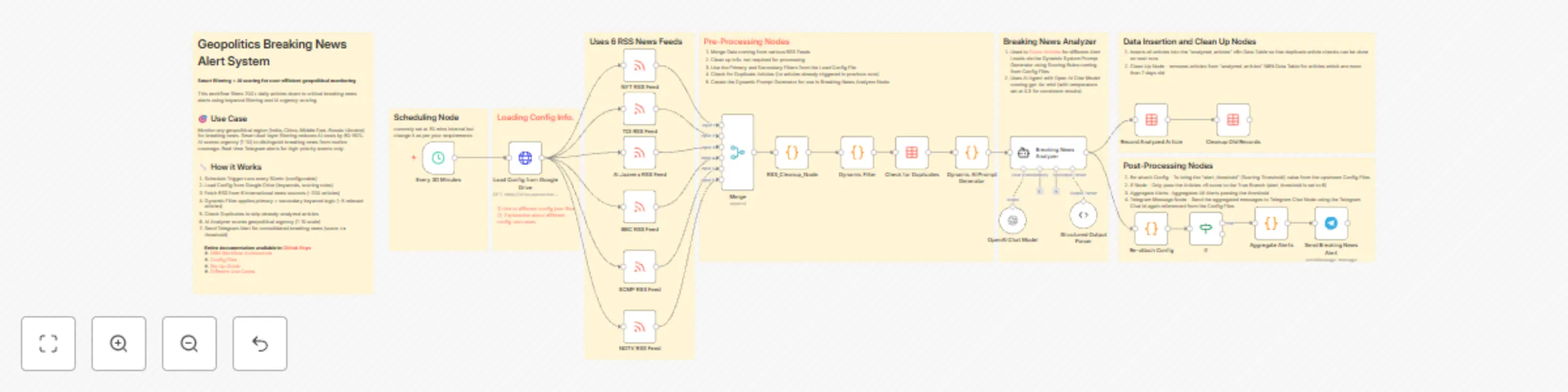
- Import workflow (22 nodes ready to configure)
- Configure nodes:
- Update Google Drive config URL with your file ID
- Update 6 RSS Feed URLs for your region
- Link 3 Data Table nodes to
analyzed_articles table
- Add credentials (OpenAI API, Telegram Bot)
- Set schedule (15min-daily based on monitoring needs)
- Test workflow (verify filtering, scoring, alerts work)
- Activate (workflow runs automatically on schedule)
Quick Start Result:
- ✅ 200+ articles processed → 5-7 filtered → 3-5 scored → 1-3 alerts sent
- ✅ Telegram receives consolidated breaking news message
- ✅ Workflow runs every 30min (or your chosen interval)
- ✅ Total monthly cost: $3-5 (OpenAI API only)
Need help? See detailed SETUP_GUIDE.md for complete instructions with screenshots and troubleshooting.
📊 Workflow Stats
- Nodes: 22
- Complexity: Medium
- Execution Time: ~30-60 seconds per run
- Monthly Cost: $3-5 (OpenAI API usage only)
- Maintenance: Minimal (update RSS feeds if sources change)
- Scalability: Handles 200+ articles per execution, easily scales to 10+ RSS feeds
🎨 Customization Options
- Add more regions: Create new config JSON files for North Korea, Taiwan, Africa, Latin America, etc.
- Multi-channel alerts: Extend to Slack, WhatsApp, Email, Discord, Microsoft Teams, SMS
- Severity-based routing: Send critical alerts (score 9-10) via SMS, others to Telegram
- Custom scoring models: Switch between GPT-4o-mini, GPT-4o, Claude based on config
- Exclude keywords: Add "exclude_keywords" array to filter out sports, entertainment, weather
- Alert digest mode: Aggregate alerts into daily/weekly summary emails instead of real-time
- Dashboard integration: Connect to Grafana or Metabase for visual trend analysis
- Webhook triggers: Use workflow output to trigger other n8n workflows or external systems
- Custom RSS feeds: Add industry-specific or regional news sources
- Adjust alert threshold: Change from score >= 6 to higher/lower based on notification preferences
🔧 How it Works
- Schedule Trigger (Configurable):
- Workflow runs at your configured interval (15min, 30min, 1hr, 3hr, daily, etc.)
- Trigger frequency depends on use case: active conflicts need more frequent monitoring
- Config Loading:
- HTTP Request node fetches JSON config from Google Drive
- Config contains: keywords, scoring rules, AI role, alert threshold, Telegram chat ID
- RSS Aggregation:
- 6 RSS Feed nodes fetch articles from international news sources
- Merge node combines all feeds (~200 articles per execution)
- RSS Cleanup node strips HTML and normalizes to 5 fields (60-75% size reduction)
- Smart Filtering (Cost Optimization Layer 1):
- Dynamic Filter checks PRIMARY keywords (geographic/entity: "india", "modi", "delhi")
- Also checks SECONDARY keywords (event type: "military", "conflict", "trade deal")
- Both conditions required: Article must mention at least one primary AND one secondary
- Result: 200 articles reduced to ~5-7 relevant articles (95% reduction)
- Why this matters: Eliminates noise BEFORE expensive AI scoring
- Duplicate Detection (Cost Optimization Layer 2):
- Queries Data Table for previously analyzed article links
- Filters out articles already scored in last 7 days
- Result: ~5-7 filtered articles reduced to ~3-5 new articles
- Why this matters: Prevents redundant AI API calls (saves 80% on repeat articles)
- Dynamic AI Prompt Generation:
- Code node builds system prompt from config.ai_role and config.scoring_criteria
- Instructs AI: "You are a geopolitical analyst for [REGION]. Score articles 1-10..."
- Includes scoring rubric: 9-10 = Military Action, 7-8 = Trade/Economic, etc.
- AI Urgency Scoring (Breaking News Detection):
- Breaking News Analyzer (GPT-4o-mini) evaluates geopolitical urgency
- Scores 1-10: Distinguishes genuine breaking news from routine coverage
- Returns: score, category, reasoning, should_alert (true/false based on threshold)
- Cost: ~$0.002 per article (only ~3-5 articles scored per execution)
- Alert Decision:
- IF node checks: should_alert === true (score >= config.alert_threshold)
- Only high-priority alerts proceed to Telegram
- Articles below threshold are logged but not sent
- Alert Aggregation:
- Consolidates multiple breaking news alerts into single Telegram message
- Groups by urgency score with color-coded emojis (🔴 9-10, 🟠 7-8, 🟡 6-7)
- Includes: score, category, title, link for each alert
- Telegram Delivery:
- Sends consolidated alert to configured Telegram chat
- Uses HTML formatting for bold text and clickable links
- Chat ID dynamically loaded from config (different regions → different chats)
💡 Pro Tips
- Start with Higher Threshold: Begin with alert_threshold = 7 to avoid alert fatigue, lower to 6 after tuning keywords
- Regional RSS Matters: Use region-specific news sources for better coverage (e.g., Times of India for India, not just BBC/NYT)
- Test Keywords First: Run workflow manually with "Test Workflow" to verify keyword filtering before activating schedule
- Monitor AI Costs: Check OpenAI usage dashboard after first week to confirm ~$0.10/day cost estimate
- Tune Secondary Keywords: Add domain-specific terms to secondary keywords (e.g., "semiconductor" for tech supply chain monitoring)
- Use Separate Configs for Critical Regions: Clone workflow for high-priority regions instead of switching configs manually
- Schedule Based on Time Zones: Align execution intervals with business hours in monitored region (e.g., 9AM-6PM IST for India)
- Clear Duplicates for Testing: Manually clear analyzed_articles Data Table when testing new configs for fresh results
- Backup Working Configs: Export and version control config files before making major keyword changes
- Consider Alert Fatigue: Score 9-10 events are rare (0-1 per day), score 6-8 events are common (2-5 per day) - set threshold accordingly
🔗 Related Workflows
- Multi-Region Geopolitics Dashboard - Combine multiple regional configs into single monitoring dashboard
- Geopolitical Risk Scoring for Portfolios - Integrate with stock portfolio data to assess investment risk
- Automated Geopolitical Intelligence Reports - Generate daily/weekly PDF reports from breaking news data
- Conflict Escalation Tracker - Track score trends over time to detect escalating tensions
- Supply Chain Risk Alerting - Focus on trade/sanctions news affecting global supply chains
📧 Support & Feedback
For questions, issues, or feature requests:
📄 License
MIT License - Free to use, modify, and distribute
⭐ If you find this workflow useful, please share your feedback and star the workflow!


 Early Deal