Block 1 - When clicking ‘Test workflow’
- Type / Role
- n8n-nodes-base.manualTrigger - manualTrigger
- Config choices
- Version 1


 Early Deal
This workflow is provided as-is. Please review and test before using in production.
Who Is This For? This workflow is designed for AI engineers, automation specialists, and content creators who need a scalable system to dynamically manage prompts stored in GitHub. It eliminates ma...
n8n-nodes-base.manualtrigger, n8n-nodes-base.github, n8n-nodes-base.extractfromfile, n8n-nodes-base.set, n8n-nodes-base.code, n8n-nodes-base.if, n8n-nodes-base.stopanderror, @n8n/n8n-nodes-langchain.agent
This workflow is cataloged by N8N Workflows and links back to its original n8n.io source page by RealSimple Solutions.
Original n8n.io sourceThis workflow is designed for AI engineers, automation specialists, and content creators who need a scalable system to dynamically manage prompts stored in GitHub. It eliminates manual updates, enforces required variable checks, and ensures that AI interactions always receive fully processed prompts.
Manually managing AI prompts can be inefficient and error-prone. This workflow:
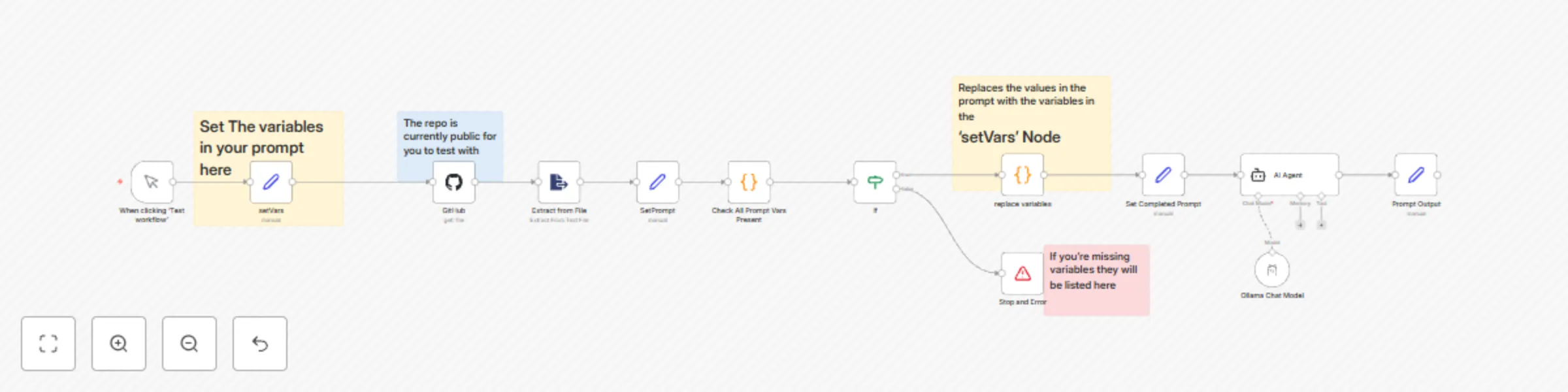
✅ Fetches dynamic prompts from GitHub
✅ Auto-populates placeholders with values from the setVars node
✅ Ensures all required variables are present before execution
✅ Processes the formatted prompt through an AI agent
This workflow consists of three key branches, ensuring smooth prompt retrieval, variable validation, and AI processing.
📌 Note:
The prompt must contain n8n expression format variables (e.g., {{ $json.company }}) so they can be dynamically replaced.
{{ $json.variableName }}).setVars node:setVars.📌 Example of a properly formatted GitHub prompt:
Hello {{ $json.company }}, your product {{ $json.features }} launches on {{ $json.launch_date }}.
This ensures seamless replacement when processed in n8n.
📌 Optional: Modify this to use OpenAI, Claude, or other AI models.
If a required variable is missing, the workflow stops execution and provides an error message:
⚠️ Missing Required Variables: ["launch_date"]
This ensures no incomplete prompts are sent to AI agents.
Hello {{ $json.company }}, your product {{ $json.features }} launches on {{ $json.launch_date }}.
setVars Node{
"company": "PropTechPro",
"features": "AI-powered Property Management",
"launch_date": "March 15, 2025"
}
Hello PropTechPro, your product AI-powered Property Management launches on March 15, 2025.
launch_date)⚠️ Missing Required Variables: ["launch_date"]
💡 Need CRM or Database Integration?
setVars node to an Airtable, Google Sheets, or HubSpot API to pull variables dynamically.💡 Want to Modify the AI Model?
✅ No Manual Updates Required – Fetches prompts dynamically from GitHub.
✅ Prevents Broken Prompts – Ensures required variables exist before execution.
✅ Works for Any Use Case – Handles AI chat prompts, marketing messages, and chatbot scripts.
✅ Compatible with All n8n Deployments – Works on Cloud, Self-Hosted, and Desktop versions.
This catalog entry is organized from the workflow JSON. The node-level section below shows the executable blocks available for review before importing the template.
| Workflow | Fetch dynamic prompts from GitHub and auto-populate n8n expressions in prompt |
|---|---|
| Complexity | advanced |
| Nodes | 17 |
| Categories | Engineering, Multimodal AI |
| Author | RealSimple Solutions |
| Published | 12 Feb 2025 |
Use the JSON export at /data/workflows/2893/2893.json as the source template for this automation.
Open n8n, import the downloaded JSON, and review each node before activating the workflow.
Replace placeholder credentials, API keys, webhook URLs, account IDs, and environment-specific values with your own settings.
Run the workflow manually or in a staging workspace, inspect node output, and confirm downstream systems receive the expected data.
Enable the workflow only after testing, then monitor executions, errors, and rate limits during the first production runs.
Review imported nodes carefully before activation. This catalog entry is intended to help you inspect the workflow structure, understand required services, and find related templates faster.
Node names, credentials, schedules, webhook paths, and external service limits may need adjustment for your workspace.
Who Is This For? This workflow is designed for AI engineers, automation specialists, and content creators who need a scalable system to dynamically manage prompts stored in GitHub. It eliminates ma...
Review the workflow JSON, configure any required credentials in n8n, and test the automation in a safe workspace before using it in production.
Yes. Use the block-by-block analysis and the downloadable JSON to inspect each node, then adjust credentials, prompts, schedules, filters, or destinations for your Engineering, Multimodal AI use case.