Block 1 - AI Agent
- Type / Role
- @n8n/n8n-nodes-langchain.agent - agent
- Config choices
- Version 2.1


 Early Deal
This workflow is provided as-is. Please review and test before using in production.
Problem Solved Eliminates the slow, inconsistent, and error prone process of manually replying to Facebook comments by automating it with AI, ensuring fast, accurate, and on brand customer engag...
@n8n/n8n-nodes-langchain.agent, @n8n/n8n-nodes-langchain.lmchatgooglegemini, n8n-nodes-base.scheduletrigger, n8n-nodes-base.merge, n8n-nodes-base.notion, n8n-nodes-base.httprequest, n8n-nodes-base.code, n8n-nodes-base.if
This workflow is cataloged by N8N Workflows and links back to its original n8n.io source page by Abdullah Alshiekh.
Original n8n.io sourceEliminates the slow, inconsistent, and error-prone process of manually replying to Facebook comments by automating it with AI, ensuring fast, accurate, and on-brand customer engagement 24/7.
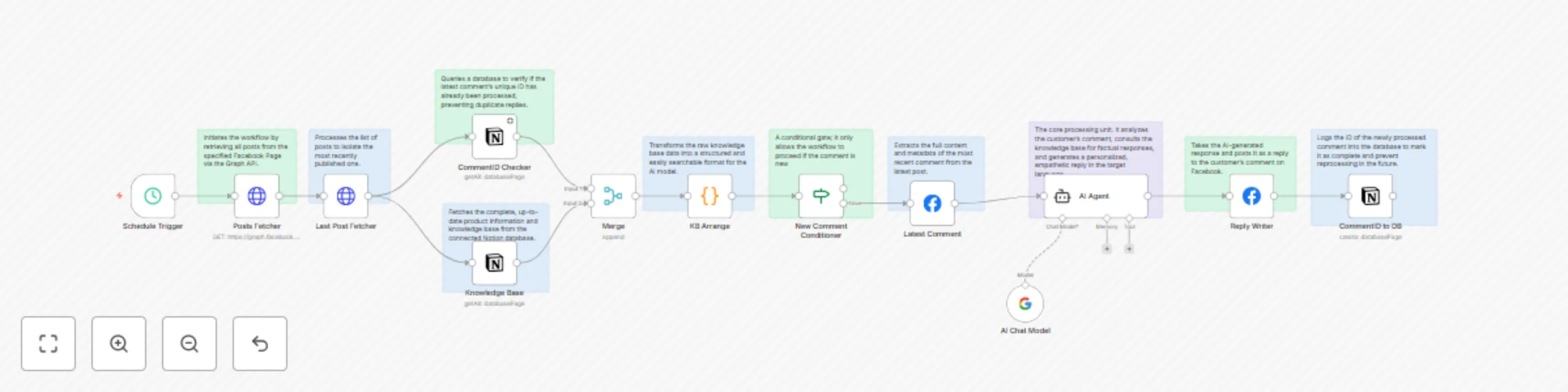
This workflow automatically monitors your latest Facebook post for new comments. For each new comment, an AI agent instantly generates a friendly, personalized reply in Egyptian Arabic, using your Notion knowledge base to ensure all product info is accurate. It prevents spam by never replying to the same comment twice.
Simple Flow: New Comment → Duplicate Check → AI Analysis → Post Reply → Log Action.
24/7 Instant Replies: Engage customers immediately, anytime.
Perfect Brand Voice: Consistent, empathetic, natural Egyptian Arabic tone in every reply.
Always Accurate: Pulls facts directly from your knowledge base; never invents details.
No Duplicate Replies: Robust checks ensure each comment gets only one response.
Huge Time Saver: Frees your team from constantly monitoring comments.
Facebook API Integration (Read & Reply)
Notion Database Integration (Knowledge Base & Logging)
AI Response Generation (Google Gemini)
Duplicate Comment Prevention
Automated Workflow Logic
Facebook Access Token with pages_read_engagement and pages_manage_posts permissions.
Two Notion Databases: One for your product knowledge, one to log processed comments.
Google Gemini API Key for AI.
n8n Credentials for Facebook, Notion, and Gemini.
Tone & Style: Edit the prompt in the Generate Customer Reply node.
Product Info: Add fields to your Notion Knowledge Base database.
Escalation: Add a step to flag angry comments for a human agent.
E-commerce: Answering product questions on promo posts.
Healthcare: Providing accurate drug info with compassion.
Local Businesses: Replying to queries about hours/menu items.
Any Business that wants fast, professional customer engagement on social media.
Need help? Connect on LinkedIn
This catalog entry is organized from the workflow JSON. The node-level section below shows the executable blocks available for review before importing the template.
| Workflow | Facebook comment AI moderator with Notion & Gemini |
|---|---|
| Complexity | advanced |
| Nodes | 23 |
| Categories | AI Chatbot, Multimodal AI |
| Author | Abdullah Alshiekh |
| Published | 20 Aug 2025 |
Use the JSON export at /data/workflows/7660/7660.json as the source template for this automation.
Open n8n, import the downloaded JSON, and review each node before activating the workflow.
Replace placeholder credentials, API keys, webhook URLs, account IDs, and environment-specific values with your own settings.
Run the workflow manually or in a staging workspace, inspect node output, and confirm downstream systems receive the expected data.
Enable the workflow only after testing, then monitor executions, errors, and rate limits during the first production runs.
Review imported nodes carefully before activation. This catalog entry is intended to help you inspect the workflow structure, understand required services, and find related templates faster.
Node names, credentials, schedules, webhook paths, and external service limits may need adjustment for your workspace.
Problem Solved Eliminates the slow, inconsistent, and error prone process of manually replying to Facebook comments by automating it with AI, ensuring fast, accurate, and on brand customer engag...
Review the workflow JSON, configure any required credentials in n8n, and test the automation in a safe workspace before using it in production.
Yes. Use the block-by-block analysis and the downloadable JSON to inspect each node, then adjust credentials, prompts, schedules, filters, or destinations for your AI Chatbot, Multimodal AI use case.