Block 1 - When clicking ‘Execute workflow’
- Type / Role
- n8n-nodes-base.manualTrigger - manualTrigger
- Config choices
- Version 1


 Early Deal
This workflow is provided as-is. Please review and test before using in production.
Description This workflow automates the process of scraping the latest discussions from HackerNews, transforming raw threads into human readable content using Google Gemini, and exporting the final...
n8n-nodes-base.manualtrigger, n8n-nodes-base.hackernews, n8n-nodes-base.splitinbatches, @n8n/n8n-nodes-langchain.lmchatgooglegemini, n8n-nodes-base.googledocs, n8n-nodes-base.set, n8n-nodes-base.stickynote, @n8n/n8n-nodes-langchain.chainllm
This workflow is cataloged by N8N Workflows and links back to its original n8n.io source page by Ranjan Dailata.
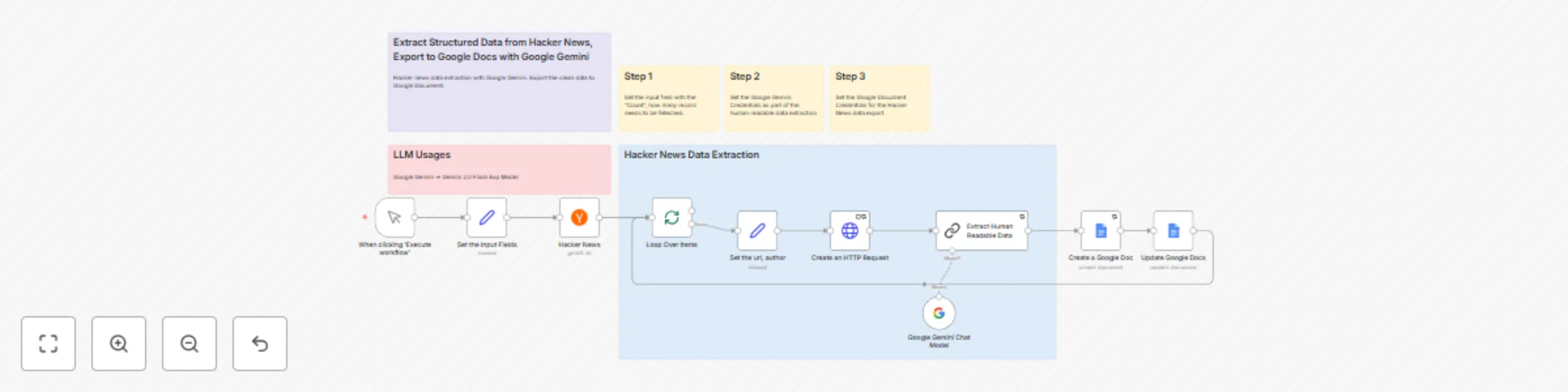
Original n8n.io sourceThis workflow automates the process of scraping the latest discussions from HackerNews, transforming raw threads into human readable content using Google Gemini, and exporting the final content into a well-formatted Google Doc.
This n8n workflow is responsible for extracting trending posts from the HackerNews API. It loops through each item, performs HTTP data extraction, utilizes Google Gemini to generate human-readable insights, and then exports the enriched content into Google Docs for distribution, archiving, or content creation.
Tech Newsletter Writers: Automate the collection and summarization of trending HackerNews posts for inclusion in weekly or daily newsletters.
Content Creators & Bloggers: Quickly generate structured summaries and insights from HackerNews threads to use as inspiration or supporting content for blog posts, videos, or social media.
Startup Founders & Product Builders: Monitor HackerNews for discussions relevant to your niche or competitors, and keep a pulse on the community’s opinions.
Investors & Analysts: Surface early signals from the tech ecosystem by identifying what’s trending and how the community is reacting.
Researchers & Students: Analyze popular discussions and emerging trends in technology, programming, and startups—enriched with AI-generated insights.
Digital Agencies & Consultants: Offer HackerNews monitoring and insight reports as a value-added service to clients interested in the tech space.
n8n: The core automation engine that manages the trigger, transformation, and export.
HackerNews API: Provides access to trending or new HN posts.
Google Gemini: Enriches HackerNews content with structured insights and human-like summaries.
Google Docs: Automatically creates and updates a document with the enriched content, ready for sharing or publishing.
Import the Workflow: Download the .json file and import it into your n8n instance.
Set Up HackerNews Source: Choose whether to use the HN API (via HTTP Request node) or RSS Feed node.
Configure Gemini API: Add your Google Gemini API key and design the prompt to extract pros/cons, key themes, or insights.
Set Up Google Docs Integration: Connect your Google account and configure the Google Docs node to create/update a document.
Test and Deploy: Run a test job to ensure data flows correctly and outputs are formatted as expected.
Tech Newsletter Authors: Generate ready-to-use summaries of trending HackerNews threads.
Startup Founders: Stay informed on key discussions, product launches, and community feedback.
Investors & Analysts: Spot early trends, technical insights, and startup momentum directly from HN.
Researchers: Track community reactions to new technologies or frameworks.
Content Creators: Use the enriched data to spark blog posts, YouTube scripts, or LinkedIn updates.
Email: [email protected]
LinkedIn: https://www.linkedin.com/in/ranjan-dailata/
Get Bright Data: Bright Data (Supports free workflows with a small commission)
#n8n #automation #hackernews #contentcuration #aiwriting #geminiapi #googlegemini #techtrends #newsletterautomation #googleworkspace #rssautomation #nocode #structureddata #webscraping #contentautomation #hninsights #aiworkflow #googleintegration #webmonitoring #hnnews #aiassistant #gdocs #automationtools #gptlike #geminiwriter
This catalog entry is organized from the workflow JSON. The node-level section below shows the executable blocks available for review before importing the template.
| Workflow | Extract & transform HackerNews data to Google Docs using Gemini 2.0 flash |
|---|---|
| Complexity | advanced |
| Nodes | 16 |
| Categories | Market Research, AI Summarization |
| Author | Ranjan Dailata |
| Published | 04 Jul 2025 |
Use the JSON export at /data/workflows/5677/5677.json as the source template for this automation.
Open n8n, import the downloaded JSON, and review each node before activating the workflow.
Replace placeholder credentials, API keys, webhook URLs, account IDs, and environment-specific values with your own settings.
Run the workflow manually or in a staging workspace, inspect node output, and confirm downstream systems receive the expected data.
Enable the workflow only after testing, then monitor executions, errors, and rate limits during the first production runs.
Review imported nodes carefully before activation. This catalog entry is intended to help you inspect the workflow structure, understand required services, and find related templates faster.
Node names, credentials, schedules, webhook paths, and external service limits may need adjustment for your workspace.
Description This workflow automates the process of scraping the latest discussions from HackerNews, transforming raw threads into human readable content using Google Gemini, and exporting the final...
Review the workflow JSON, configure any required credentials in n8n, and test the automation in a safe workspace before using it in production.
Yes. Use the block-by-block analysis and the downloadable JSON to inspect each node, then adjust credentials, prompts, schedules, filters, or destinations for your Market Research, AI Summarization use case.