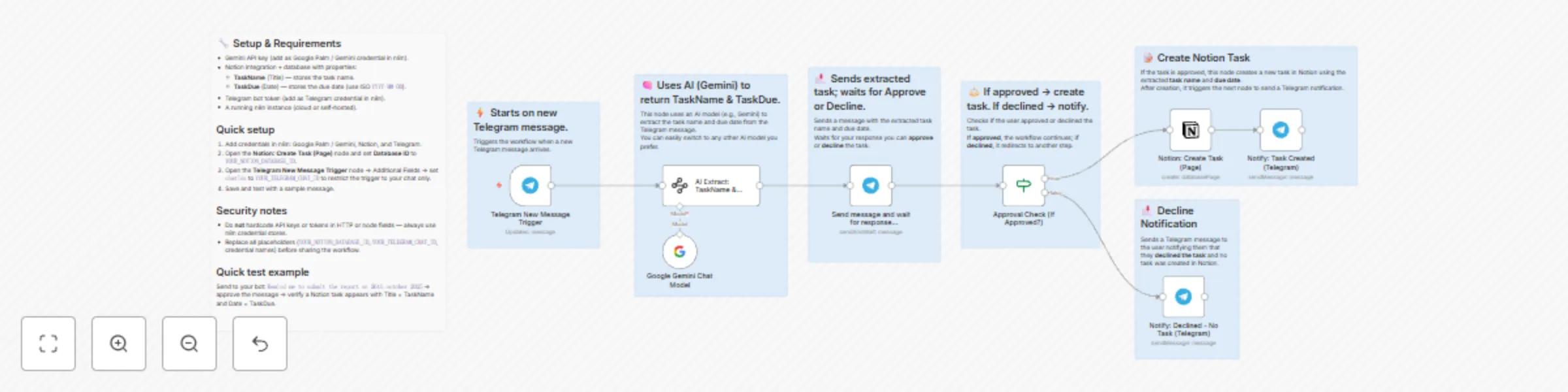
Extract tasks from Telegram messages to Notion using Gemini AI and Approvals

Workflow preview

Workflow preview
100%
Extract tasks from Telegram messages to Notion using Gemini AI and Approvals preview
Open on n8n.io

Important notice

This workflow is provided as-is. Please review and test before using in production.

1. Workflow Overview

Quick Summary This workflow connects Telegram , Google Gemini AI , and Notion to make task creation effortless. Whenever you send a message to your Telegram bot, Gemini AI reads your message, under...

Best for

  • Personal Productivity automation workflows
  • AI Chatbot automation workflows
  • advanced n8n builders looking for reusable templates

Tools used

@n8n/n8n-nodes-langchain.lmchatgooglegemini, n8n-nodes-base.stickynote, n8n-nodes-base.telegramtrigger, @n8n/n8n-nodes-langchain.informationextractor, n8n-nodes-base.telegram, n8n-nodes-base.if, n8n-nodes-base.notion

Source and attribution

This workflow is cataloged by N8N Workflows and links back to its original n8n.io source page by Abhiman.

Original n8n.io source

1.1 Workflow description

Title
Extract tasks from Telegram messages to Notion using Gemini AI and Approvals
Workflow name
Extract tasks from Telegram messages to Notion using Gemini AI and Approvals

Quick Summary

This workflow connects Telegram, Google Gemini AI, and Notion to make task creation effortless.

Whenever you send a message to your Telegram bot, Gemini AI reads your message, understands what task you meant, and automatically creates it in your Notion database - complete with the task name and due date.

If you approve, the task is added to Notion and you’ll get a confirmation in Telegram.
If you decline, it simply replies that ❌ no task was created.

Perfect for anyone who wants to capture ideas or to-dos directly from Telegram without opening Notion every time.


Detailed Use Cases

  1. Quick task capture from Telegram

    • Send a message like “Buy milk 25 May” to your Telegram bot.
    • The AI extracts the task name and date, asks you to approve, and creates a Notion task once approved.
  2. Turn reminders into Notion tasks

    • Message: “Pay rent next Monday” → Approve → Task added to Notion with the correct due date.
    • Perfect for quickly saving reminders while on the go.

Tip: For best results, include clear dates in your messages like 25 May or May 25, 2025 so the AI can extract them accurately.


Prerequisites / Requirements

Before using this workflow, make sure you have the following ready:

  1. Telegram Bot Setup

    • Go to @BotFather on Telegram.
    • Create a new bot using the /newbot command.
    • Copy the Bot Token — you’ll need it to connect in the Telegram Trigger and Telegram nodes in n8n.
  2. Google Gemini API Key

    • Sign up for a free Google AI Studio account.
    • Create an API key and connect it in your n8n credentials under Google Gemini.
    • This workflow uses the models/gemini-2.5-flash-lite model, which works perfectly on the free tier.
  3. Notion Database Setup

    • Create a Notion database for storing tasks.
    • It must have:
      • A Title property — set this as the Task Name (type: Title / text).
      • A Date property — set this as the Due Date (type: Date).
    • Copy your Notion database ID and connect your Notion API credentials in n8n.
  4. Optional Security Note

    • In the Telegram Trigger node, restrict the chatId to your own Telegram user ID if this workflow is for personal use.

Customization Guide

You can easily extend this workflow to capture more details from your Telegram messages using the AI Extract node.
Here are a few simple ways to customize it:

  1. Add more extracted fields

    • In the AI Extract: TaskName & TaskDue node, open the Attributes section.
    • Add new fields like:
      • Priority → text (e.g., High, Medium, Low)
      • Duration → number or text (e.g., 30 mins, 1 hour)
      • Notes → text (optional extra info)
    • The Gemini model will automatically try to extract these from your message.
  2. Example messages you can send

    • “Finish report by Friday — high priority, 2 hours.”
    • “Workout tomorrow evening — medium priority.”
  3. Map extra fields to Notion

    • In the Notion: Create Task (Page) node, scroll to the Properties section.
    • Add matching Notion properties for each new field (e.g., Priority, Duration).
    • Map the AI outputs (like output.Priority) to their respective fields.
  4. Send confirmation with extra data

    • In the Send and Wait for Response (Approve/Decline) node, include the new extracted details in the Telegram message before approval.
    • Example confirmation message:
      Task: {{ $json.output.TaskName }}
      Due: {{ $json.output.TaskDue }}
      Priority: {{ $json.output.Priority }}
      Duration: {{ $json.output.Duration }}
      

By doing this, you can build a smarter task capture system that includes priority, time estimation, and other useful details, all directly from your Telegram chat.

1.2 Logical Blocks

This catalog entry is organized from the workflow JSON. The node-level section below shows the executable blocks available for review before importing the template.

2. Block-by-Block Analysis

Block 1 - Google Gemini Chat Model

Type / Role
@n8n/n8n-nodes-langchain.lmChatGoogleGemini - lmChatGoogleGemini
Config choices
Version 1

Block 2 - Sticky Note

Type / Role
n8n-nodes-base.stickyNote - stickyNote
Config choices
Version 1

Block 3 - Sticky Note1

Type / Role
n8n-nodes-base.stickyNote - stickyNote
Config choices
Version 1

Block 4 - Sticky Note2

Type / Role
n8n-nodes-base.stickyNote - stickyNote
Config choices
Version 1

Block 5 - Sticky Note3

Type / Role
n8n-nodes-base.stickyNote - stickyNote
Config choices
Version 1

Block 6 - Sticky Note4

Type / Role
n8n-nodes-base.stickyNote - stickyNote
Config choices
Version 1

Block 7 - Sticky Note5

Type / Role
n8n-nodes-base.stickyNote - stickyNote
Config choices
Version 1

Block 8 - Telegram New Message Trigger

Type / Role
n8n-nodes-base.telegramTrigger - telegramTrigger
Config choices
Version 1.2

Block 9 - AI Extract: TaskName & TaskDue

Type / Role
@n8n/n8n-nodes-langchain.informationExtractor - informationExtractor
Config choices
Version 1.2

Block 10 - Send message and wait for response (Approve/Decline)

Type / Role
n8n-nodes-base.telegram - telegram
Config choices
Version 1.2

Block 11 - Approval Check (If Approved?)

Type / Role
n8n-nodes-base.if - if
Config choices
Version 2.2

Block 12 - Notion: Create Task (Page)

Type / Role
n8n-nodes-base.notion - notion
Config choices
Version 2.2

Block 13 - Notify: Task Created (Telegram)

Type / Role
n8n-nodes-base.telegram - telegram
Config choices
Version 1.2

Block 14 - Notify: Declined - No Task (Telegram)

Type / Role
n8n-nodes-base.telegram - telegram
Config choices
Version 1.2

Block 15 - Sticky Note6

Type / Role
n8n-nodes-base.stickyNote - stickyNote
Config choices
Version 1

3. Summary Table

Workflow Extract tasks from Telegram messages to Notion using Gemini AI and Approvals
Complexity advanced
Nodes 15
Categories Personal Productivity, AI Chatbot
Author Abhiman
Published 05 Oct 2025

4. Reproducing the Workflow from Scratch

  1. 1. Download the workflow JSON

    Use the JSON export at /data/workflows/9271/9271.json as the source template for this automation.

  2. 2. Import the template into n8n

    Open n8n, import the downloaded JSON, and review each node before activating the workflow.

  3. 3. Configure credentials and variables

    Replace placeholder credentials, API keys, webhook URLs, account IDs, and environment-specific values with your own settings.

  4. 4. Test with sample data

    Run the workflow manually or in a staging workspace, inspect node output, and confirm downstream systems receive the expected data.

  5. 5. Activate and monitor

    Enable the workflow only after testing, then monitor executions, errors, and rate limits during the first production runs.

5. General Notes & Resources

Review imported nodes carefully before activation. This catalog entry is intended to help you inspect the workflow structure, understand required services, and find related templates faster.

Node names, credentials, schedules, webhook paths, and external service limits may need adjustment for your workspace.

Frequently asked questions

What does Extract tasks from Telegram messages to Notion using Gemini AI and Approvals do?

Quick Summary This workflow connects Telegram , Google Gemini AI , and Notion to make task creation effortless. Whenever you send a message to your Telegram bot, Gemini AI reads your message, under...

What do I need before importing this workflow?

Review the workflow JSON, configure any required credentials in n8n, and test the automation in a safe workspace before using it in production.

Can I customize this workflow?

Yes. Use the block-by-block analysis and the downloadable JSON to inspect each node, then adjust credentials, prompts, schedules, filters, or destinations for your Personal Productivity, AI Chatbot use case.