A

Abhiman

3
Workflows

Workflows by Abhiman
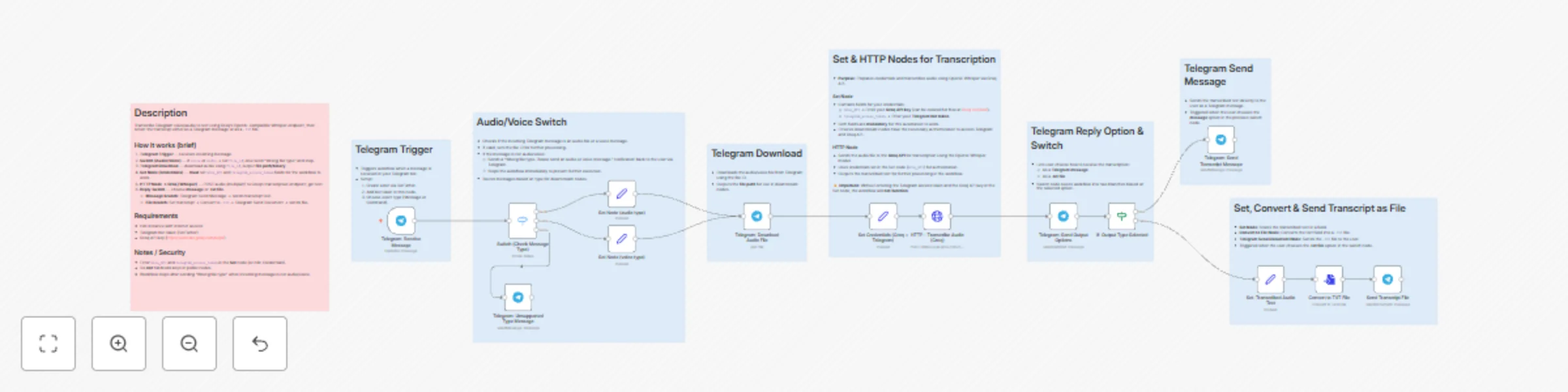
Workflow preview: Audio transcription with Telegram and Groq Whisper
Free advanced

Audio transcription with Telegram and Groq Whisper

## Short description Transcribe Telegram voice/audio messages to text using Groq’s OpenAI-compatible Whisper endpoint. Replies are delivered either as a Telegram message or as a downloadable `.txt` file, plug-and-play for n8n with minimal setup. ## Who’s it for / Uses - Educators, podcasters, interviewers, and support teams who need quick voice → text conversions. - Automating meeting notes, voice feedback, voicemail transcription, or speech logging. - Useful when you want transcripts pushed to chat or saved as files for archiving. ## How it works (overview) 1. **Telegram Trigger** — workflow starts on incoming message. 2. **Switch (Audio/Voice)** — detects `voice` or `audio`. If neither, replies “Wrong file type” and stops. 3. **Telegram Download** — downloads the audio using the `file_id`, outputs file path/binary. 4. **Set Node (credentials + options)** — stores `Groq_API` and `Telegram_access_token` (required) and `transcript_output_format` (`message` or `file`). 5. **HTTP Request → Groq (Whisper)** — uploads audio (multipart/form-data) to Groq’s transcription endpoint and receives text. 6. **Reply Switch** — routes to either: - **Message branch:** send transcribed text as a Telegram message. - **File branch:** convert transcript to `.txt` and send as a document. ## Requirements - n8n instance (cloud or self-hosted) with internet access - Telegram bot token (create via BotFather) - Groq API key (create at https://console.groq.com/keys) - Basic n8n nodes: Telegram Trigger, Switch, Telegram Download, Set, HTTP Request, Convert to File, Telegram Send Message/Document ## Important setup & notes - **Mandatory:** Add `Groq_API` and `Telegram_access_token` in the **Set** node (or use n8n Credentials). The workflow will fail without them. - **Do not hardcode** keys in HTTP node fields that will be exported/shared. Use Set fields or n8n Credentials. - Include **sticky notes** explaining each node (yellow note with full description recommended). Sticky notes should show setup steps and required fields. - Before publishing: remove personal IDs and secrets, test with sample voice messages, and verify Groq response schema to map the transcript field correctly. ## Security & best practices - Use n8n Credentials or environment variables in production. - Rotate API keys if they become exposed. - Keep the Set node private when sharing templates; instruct users to replace keys with their own.

A
Abhiman
Document Extraction
22 Oct 2025
602
0
Workflow preview: Extract & approve tasks from Telegram to Notion with Gemini AI & voice support
Free advanced

Extract & approve tasks from Telegram to Notion with Gemini AI & voice support

This workflow automatically converts Telegram text or voice messages into Notion tasks by using AI to extract the task name and due date, allowing users to approve or decline tasks directly in Telegram before they are created. It is designed for students managing assignments, professionals tracking tasks from messaging apps, productivity enthusiasts looking to automate task entry, and teams using Notion for organized task management. --- ## Detailed Use Case This template turns casual Telegram messages and voice notes into confirmed Notion tasks by handling transcription, AI extraction, validation, and user approval. Typical scenarios include: - **Students:** Record or type assignment details after class → transcribe, extract title + due date → confirm → save to Notion. - **Managers:** Capture meeting action items in chat → extract tasks and deadlines → verify with one tap → add to project database. - **Freelancers:** Log client requests by voice → confirm parsed due date → create a tracked task in Notion. - **Productivity users / teams:** Quickly funnel ad-hoc requests from Telegram into a single Notion workspace without manual copy/paste. Key benefits: automated transcription, structured extraction (TaskName + TaskDue), quick user approval in Telegram, and reliable Notion mapping for immediate tracking. --- ## Prerequisites for this Workflow - **n8n instance** - Active and publicly reachable for webhook triggers. - **Telegram bot** - Create via **BotFather**, copy **Bot Token**, and get **chat ID**. - **Transcription API** - I use **Google Gemini Free Tier**, but you can use **Groq, OpenAI**, or any other provider. - Add your API key / credentials in n8n. - **Notion integration & database** - Integration token added to n8n. - Database structure must include: - **Title** (Title property) → Task Name - **Date** (Date property) → Task Due Date - Share the database with the integration and copy the **Database ID**. - **n8n node setup basics** - Telegram Trigger node for messages. - Telegram Get File node (**Download = true**) for voice notes. - Transcription node connected to your chosen provider. - AI Extractor node to get `TaskName` and `TaskDue`. - Notion node with mapped properties (TaskName → Title, TaskDue → Date). --- For any doubts or questions, contact: `[email protected]` or connect on LinkedIn: `https://www.linkedin.com/in/abhimangs/`

A
Abhiman
Project Management
9 Oct 2025
430
0
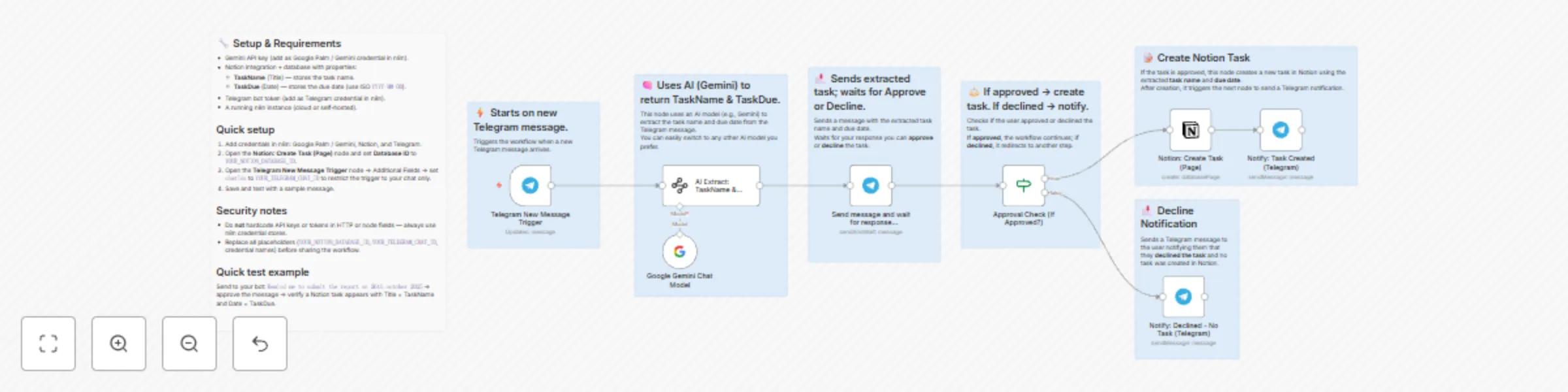
Workflow preview: Extract tasks from Telegram messages to Notion using Gemini AI and Approvals
Free advanced

Extract tasks from Telegram messages to Notion using Gemini AI and Approvals

## Quick Summary This workflow connects **Telegram**, **Google Gemini AI**, and **Notion** to make task creation effortless. Whenever you send a message to your Telegram bot, Gemini AI reads your message, understands what task you meant, and automatically creates it in your Notion database - complete with the **task name** and **due date**. If you **approve**, the task is added to Notion and you’ll get a confirmation in Telegram. If you **decline**, it simply replies that ❌ no task was created. Perfect for anyone who wants to capture ideas or to-dos directly from Telegram without opening Notion every time. --- ## Detailed Use Cases 1. **Quick task capture from Telegram** - Send a message like “Buy milk 25 May” to your Telegram bot. - The AI extracts the task name and date, asks you to approve, and creates a Notion task once approved. 2. **Turn reminders into Notion tasks** - Message: “Pay rent next Monday” → Approve → Task added to Notion with the correct due date. - Perfect for quickly saving reminders while on the go. **Tip:** For best results, include clear dates in your messages like `25 May` or `May 25, 2025` so the AI can extract them accurately. --- ## Prerequisites / Requirements Before using this workflow, make sure you have the following ready: 1. **Telegram Bot Setup** - Go to [@BotFather](https://t.me/BotFather) on Telegram. - Create a new bot using the `/newbot` command. - Copy the **Bot Token** — you’ll need it to connect in the **Telegram Trigger** and **Telegram** nodes in n8n. 2. **Google Gemini API Key** - Sign up for a free Google AI Studio account. - Create an API key and connect it in your n8n credentials under **Google Gemini**. - This workflow uses the `models/gemini-2.5-flash-lite` model, which works perfectly on the free tier. 3. **Notion Database Setup** - Create a Notion database for storing tasks. - It must have: - A **Title** property — set this as the *Task Name* (type: `Title` / text). - A **Date** property — set this as the *Due Date* (type: `Date`). - Copy your Notion database ID and connect your **Notion API credentials** in n8n. 4. **Optional Security Note** - In the Telegram Trigger node, restrict the `chatId` to your own Telegram user ID if this workflow is for personal use. --- ## Customization Guide You can easily extend this workflow to capture more details from your Telegram messages using the AI Extract node. Here are a few simple ways to customize it: 1. **Add more extracted fields** - In the **AI Extract: TaskName & TaskDue** node, open the **Attributes** section. - Add new fields like: - **Priority** → text (e.g., High, Medium, Low) - **Duration** → number or text (e.g., 30 mins, 1 hour) - **Notes** → text (optional extra info) - The Gemini model will automatically try to extract these from your message. 2. **Example messages you can send** - “Finish report by Friday — high priority, 2 hours.” - “Workout tomorrow evening — medium priority.” 3. **Map extra fields to Notion** - In the **Notion: Create Task (Page)** node, scroll to the **Properties** section. - Add matching Notion properties for each new field (e.g., Priority, Duration). - Map the AI outputs (like `output.Priority`) to their respective fields. 4. **Send confirmation with extra data** - In the **Send and Wait for Response (Approve/Decline)** node, include the new extracted details in the Telegram message before approval. - Example confirmation message: ``` Task: {{ $json.output.TaskName }} Due: {{ $json.output.TaskDue }} Priority: {{ $json.output.Priority }} Duration: {{ $json.output.Duration }} ``` By doing this, you can build a smarter task capture system that includes priority, time estimation, and other useful details, all directly from your Telegram chat.

A
Abhiman
Personal Productivity
5 Oct 2025
235
0