Block 1 - When clicking ‘Test workflow’
- Type / Role
- n8n-nodes-base.manualTrigger - manualTrigger
- Config choices
- Version 1
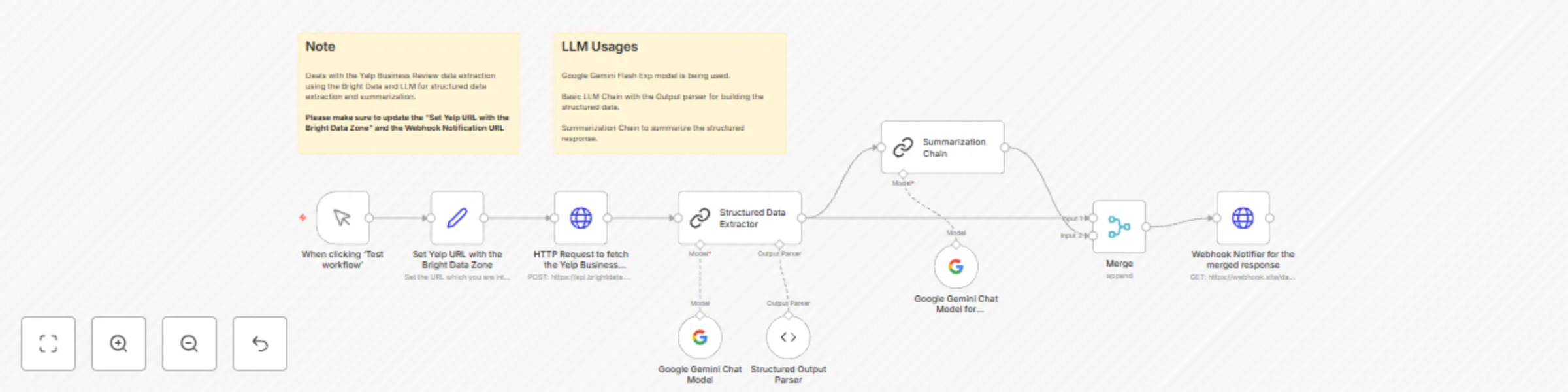


 Early Deal
This workflow is provided as-is. Please review and test before using in production.
Who this is for? Extract & Summarize Yelp Business Review is an automated workflow that extracts the Yelp business reviews using Bright Data Web Unlocker, process and formats the raw data, summariz...
n8n-nodes-base.manualtrigger, n8n-nodes-base.stickynote, n8n-nodes-base.set, n8n-nodes-base.httprequest, @n8n/n8n-nodes-langchain.lmchatgooglegemini, @n8n/n8n-nodes-langchain.outputparserstructured, @n8n/n8n-nodes-langchain.chainsummarization, n8n-nodes-base.merge
This workflow is cataloged by N8N Workflows and links back to its original n8n.io source page by Ranjan Dailata.
Original n8n.io sourceExtract & Summarize Yelp Business Review is an automated workflow that extracts the Yelp business reviews using Bright Data Web Unlocker, process and formats the raw data, summarizes using the Google Gemini's LLM, and forward the concise summary with the review respose to a specified webhook endpoint.
This workflow is tailored for:
Local SEO Specialists who need structured insights from Yelp reviews to optimize listings.
Business Owners wanting quick summaries of what customers love or complain about.
Reputation Managers who monitor brand sentiment and identify customer pain points.
Data Analysts & Researchers extracting Yelp review patterns at scale.
AI Product Builders needing clean Yelp review data as input for their LLMs or recommender systems.
Yelp reviews are rich in customer sentiment but messy to work with manually. This workflow solves:
The pain of scraping Yelp review content manually.
The challenge of building the structured data with the summary.
The need for structured outputs suitable for analysis, reports, or AI input.
This automated pipeline does the following:
Bright Data Integration: Queries Yelp and scrapes business listing data using Bright Data's Web Unlocker.
Structured Data Formatting: Formats the Yelp review data to a structured response in JSON format.
Google Gemini Summarization: Sends the cleaned reviews to Google Gemini to:
Output Delivery: Returns the structured response with the concise summary over the webhook endpoint.
This workflow is built to be flexible - whether you’re a market researcher, entrepreneur, or data analyst. Here's how you can adapt it to fit your specific use case:
Target Specific Business Categories Update the Yelp Business Review input to scrape different businesses like gyms, salons etc.
Limit Reviews Add filters by description, location, page range to get the top reviews.
Tweak the Data Extraction Node Update the Structured Data Extractor node Output Parser for building the JSON response with the appropriate fields or attributes.
Tweak the Summarization Prompt Modify the Gemini prompt to generate a comprehensive summary.
Send Output to Other Destinations Replace the Webhook URL to forward output to:
This catalog entry is organized from the workflow JSON. The node-level section below shows the executable blocks available for review before importing the template.
| Workflow | Extract & summarize Yelp business review with Bright Data and Google Gemini |
|---|---|
| Complexity | intermediate |
| Nodes | 12 |
| Categories | Market Research, AI Summarization |
| Author | Ranjan Dailata |
| Published | 24 Apr 2025 |
Use the JSON export at /data/workflows/3682/3682.json as the source template for this automation.
Open n8n, import the downloaded JSON, and review each node before activating the workflow.
Replace placeholder credentials, API keys, webhook URLs, account IDs, and environment-specific values with your own settings.
Run the workflow manually or in a staging workspace, inspect node output, and confirm downstream systems receive the expected data.
Enable the workflow only after testing, then monitor executions, errors, and rate limits during the first production runs.
Review imported nodes carefully before activation. This catalog entry is intended to help you inspect the workflow structure, understand required services, and find related templates faster.
Node names, credentials, schedules, webhook paths, and external service limits may need adjustment for your workspace.
Who this is for? Extract & Summarize Yelp Business Review is an automated workflow that extracts the Yelp business reviews using Bright Data Web Unlocker, process and formats the raw data, summariz...
Review the workflow JSON, configure any required credentials in n8n, and test the automation in a safe workspace before using it in production.
Yes. Use the block-by-block analysis and the downloadable JSON to inspect each node, then adjust credentials, prompts, schedules, filters, or destinations for your Market Research, AI Summarization use case.