Block 1 - When clicking ‘Test workflow’
- Type / Role
- n8n-nodes-base.manualTrigger - manualTrigger
- Config choices
- Version 1


 Early Deal
This workflow is provided as-is. Please review and test before using in production.
Notice Community nodes can only be installed on self hosted instances of n8n. Who this ...
n8n-nodes-base.manualtrigger, n8n-nodes-mcp.mcpclient, n8n-nodes-base.set, n8n-nodes-base.stickynote, n8n-nodes-base.splitout, n8n-nodes-base.splitinbatches, n8n-nodes-base.wait, @n8n/n8n-nodes-langchain.chainsummarization
This workflow is cataloged by N8N Workflows and links back to its original n8n.io source page by Ranjan Dailata.
Original n8n.io sourceCommunity nodes can only be installed on self-hosted instances of n8n.
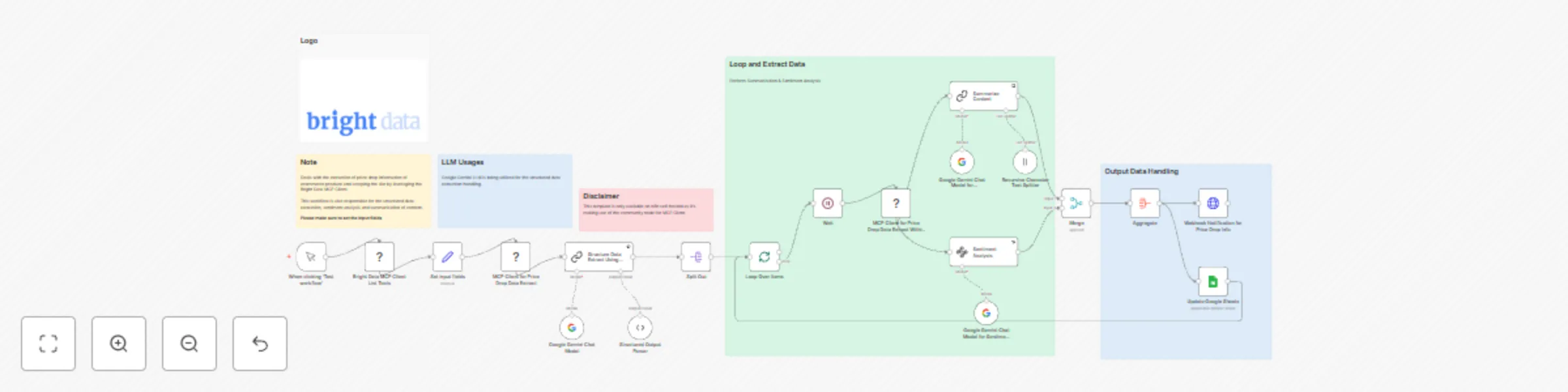
This n8n-powered automation uses Bright Data's MCP Client to extract real-time data from a price drop site listing the amazon products, including price changes and related product details.
The extracted data is enriched with structured data transformation, content summarization, and sentiment analysis using Google Gemini LLM.
The Amazon Price Drop Intelligence Engine is designed for:
Ecommerce Analysts who need timely updates on competitor pricing trends
Brand Managers seeking to understand consumer sentiment around pricing
Data Scientists building pricing models or enrichment pipelines
Affiliate Marketers looking to optimize campaigns based on dynamic pricing
AI Developers automating product intelligence pipelines
This workflow solves several key pain points:
Reliable Scraping: Uses Bright Data MCP, a managed crawling platform that handles proxies, captchas, and site structure changes automatically.
Insight Generation: Transforms unstructured HTML into structured data and then into human-readable summaries using Google Gemini LLM.
Sentiment Context: Goes beyond raw pricing data to reveal how customers feel about the price change, helping businesses and researchers measure consumer reaction.
Automated Reporting: Aggregates and stores data for easy access and downstream automation (e.g., dashboards, notifications, pricing models).
Scrape price drop site with Bright Data MCP
The workflow begins by scraping targeted price drop site for Amazon listings using Bright Data's Model Context Protocol (MCP).
You can configure this to target:
Structured Data Extraction
Once the HTML content is retrieved, Google Gemini is employed to:
Summarization & Sentiment Analysis
The extracted data is passed through an LLM chain to:
Generate a concise summary of the product and its recent price movement
Perform sentiment analysis on user reviews and public perception
Store the Results
Save to disk for archiving or bulk processing
Updated in a Google Sheet, making it instantly shareable with your team or integrated into a BI dashboard
Make sure to copy the Bright Data API_TOKEN within the Environments textbox above as API_TOKEN=<your-token>
Target different platforms: Switch Amazon for Walmart, eBay, or any ecommerce source using Bright Data’s flexible scraping infrastructure.
Enrich with more LLM tasks: Add brand tone analysis, category classification, or competitive benchmarking using Gemini prompts.
Visualize output: Pipe the Google Sheet to Looker Studio, Tableau, or Power BI.
Notification integrations: Add Slack, Discord, or email notifications for price drop alerts.
This catalog entry is organized from the workflow JSON. The node-level section below shows the executable blocks available for review before importing the template.
Showing the first 24 of 26 workflow blocks. Download the JSON for the full node graph.
| Workflow | Extract, summarize & analyze Amazon price drops with Bright Data & Google Gemini |
|---|---|
| Complexity | advanced |
| Nodes | 26 |
| Categories | Market Research, AI Summarization |
| Author | Ranjan Dailata |
| Published | 02 Jun 2025 |
Use the JSON export at /data/workflows/4611/4611.json as the source template for this automation.
Open n8n, import the downloaded JSON, and review each node before activating the workflow.
Replace placeholder credentials, API keys, webhook URLs, account IDs, and environment-specific values with your own settings.
Run the workflow manually or in a staging workspace, inspect node output, and confirm downstream systems receive the expected data.
Enable the workflow only after testing, then monitor executions, errors, and rate limits during the first production runs.
Review imported nodes carefully before activation. This catalog entry is intended to help you inspect the workflow structure, understand required services, and find related templates faster.
Node names, credentials, schedules, webhook paths, and external service limits may need adjustment for your workspace.
Notice Community nodes can only be installed on self hosted instances of n8n. Who this ...
Review the workflow JSON, configure any required credentials in n8n, and test the automation in a safe workspace before using it in production.
Yes. Use the block-by-block analysis and the downloadable JSON to inspect each node, then adjust credentials, prompts, schedules, filters, or destinations for your Market Research, AI Summarization use case.