Extract meeting tasks from Google Docs to GoHighLevel CRM with GPT-4

Workflow preview

Workflow preview
100%
Extract meeting tasks from Google Docs to GoHighLevel CRM with GPT-4 preview
Open on n8n.io

Important notice

This workflow is provided as-is. Please review and test before using in production.

1. Workflow Overview

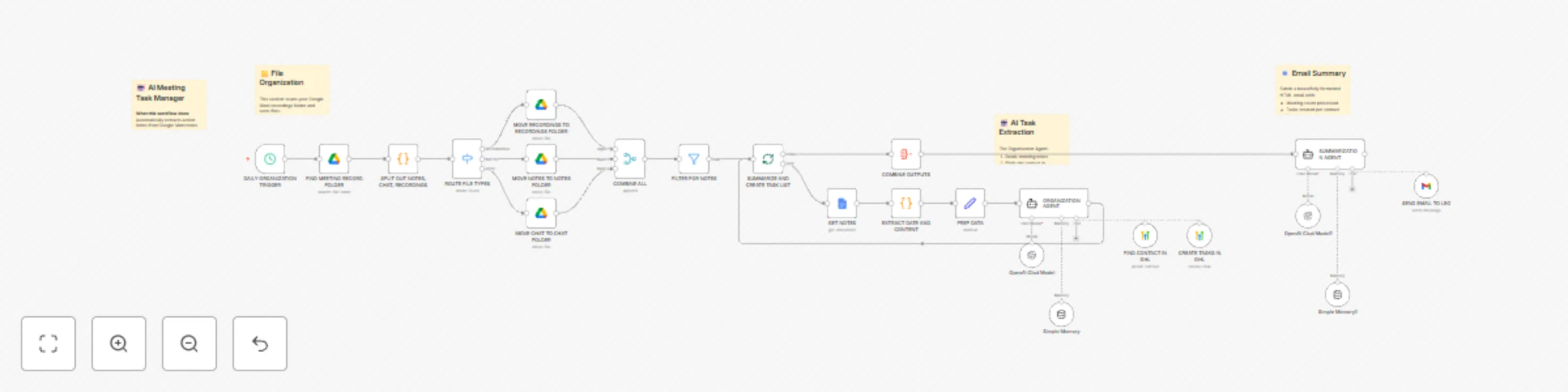
AI Meeting Task Manager Google Meet to GoHighLevel CRM TEMPLATE DESCRIPTION Transform your meeting follow ups from chaos to clarity! This workflow automates the entire post meeting workflow by s...

Best for

  • CRM automation workflows
  • AI Summarization automation workflows
  • advanced n8n builders looking for reusable templates

Tools used

n8n-nodes-base.scheduletrigger, n8n-nodes-base.googledrive, n8n-nodes-base.code, n8n-nodes-base.switch, n8n-nodes-base.merge, n8n-nodes-base.splitinbatches, n8n-nodes-base.googledocs, n8n-nodes-base.filter

Source and attribution

This workflow is cataloged by N8N Workflows and links back to its original n8n.io source page by Leo Lara.

Original n8n.io source

1.1 Workflow description

Title
Extract meeting tasks from Google Docs to GoHighLevel CRM with GPT-4
Workflow name
Extract meeting tasks from Google Docs to GoHighLevel CRM with GPT-4

AI Meeting Task Manager - Google Meet to GoHighLevel CRM


๐Ÿ“‹ TEMPLATE DESCRIPTION

Transform your meeting follow-ups from chaos to clarity!

This workflow automates the entire post-meeting workflow by scanning Google Meet recordings folders, extracting action items from AI-generated meeting notes, and creating tasks directly in your GoHighLevel CRM.

๐ŸŽฏ Who is this for?

  • Sales teams using GoHighLevel CRM
  • Agency owners managing multiple client meetings
  • Anyone who uses Google Meet with Gemini note-taking
  • Professionals drowning in meeting follow-ups

โœจ What it does:

  1. Daily File Organization

    • Scans your Google Meet recordings folder
    • Automatically sorts recordings, notes, and chat logs into organized subfolders
    • Keeps your Drive clean and searchable
  2. AI-Powered Task Extraction

    • Reads Google Docs meeting notes (generated by Gemini)
    • Identifies action items assigned to you
    • Intelligently determines due dates from context (defaults to 3 business days)
  3. CRM Integration

    • Searches for meeting participants in GoHighLevel
    • Creates properly formatted tasks with full context
    • Links tasks to the correct contact record
  4. Beautiful Email Summaries

    • Sends a professionally designed HTML email
    • Shows tasks created per contact
    • Includes due dates and status updates

๐Ÿ”ง Technologies Used:

  • Google Drive API (file management)
  • Google Docs API (content extraction)
  • GoHighLevel API (contact search + task creation)
  • OpenAI GPT-4 (task extraction intelligence)
  • Gmail API (email delivery)

โš™๏ธ Setup Requirements:

  • Google Cloud OAuth credentials (Drive, Docs, Gmail)
  • GoHighLevel OAuth credentials
  • OpenAI API key
  • Create 4 Google Drive folders (source + 3 destination folders)

๐Ÿ“– Setup Instructions:

  1. Create Google Drive Folders:

    • Source folder: Where Google Meet saves recordings
    • Recordings folder: For video files
    • Notes folder: For Gemini notes
    • Chat folder: For meeting chat logs
  2. Configure Credentials:

    • Connect Google Drive OAuth
    • Connect Google Docs OAuth
    • Connect GoHighLevel OAuth
    • Connect Gmail OAuth
    • Add OpenAI API key
  3. Update Folder URLs:

    • Replace placeholder URLs in Google Drive nodes with your folder URLs
  4. Customize:

    • Set your email address in the Gmail tool
    • Set your GoHighLevel user ID for task assignment
    • Adjust the schedule trigger timing as needed

๐Ÿ’ก Pro Tips:

  • Works best with Google Meet's Gemini note-taking feature
  • Customize the AI prompts to match your task naming conventions
  • The HTML email template is fully customizable

1.2 Logical Blocks

This catalog entry is organized from the workflow JSON. The node-level section below shows the executable blocks available for review before importing the template.

2. Block-by-Block Analysis

Block 1 - DAILY ORGANIZATION TRIGGER

Type / Role
n8n-nodes-base.scheduleTrigger - scheduleTrigger
Config choices
Version 1.3

Block 2 - FIND MEETING RECORD FOLDER

Type / Role
n8n-nodes-base.googleDrive - googleDrive
Config choices
Version 3

Block 3 - SPLIT OUT NOTES, CHAT, RECORDINGS

Type / Role
n8n-nodes-base.code - code
Config choices
Version 2

Block 4 - ROUTE FILE TYPES

Type / Role
n8n-nodes-base.switch - switch
Config choices
Version 3.3

Block 5 - MOVE RECORDINGS TO RECORDINGS FOLDER

Type / Role
n8n-nodes-base.googleDrive - googleDrive
Config choices
Version 3

Block 6 - MOVE NOTES TO NOTES FOLDER

Type / Role
n8n-nodes-base.googleDrive - googleDrive
Config choices
Version 3

Block 7 - MOVE CHAT TO CHAT FOLDER

Type / Role
n8n-nodes-base.googleDrive - googleDrive
Config choices
Version 3

Block 8 - COMBINE ALL

Type / Role
n8n-nodes-base.merge - merge
Config choices
Version 3.2

Block 9 - SUMMARIZE AND CREATE TASK LIST

Type / Role
n8n-nodes-base.splitInBatches - splitInBatches
Config choices
Version 3

Block 10 - GET NOTES

Type / Role
n8n-nodes-base.googleDocs - googleDocs
Config choices
Version 2

Block 11 - FILTER FOR NOTES

Type / Role
n8n-nodes-base.filter - filter
Config choices
Version 2.2

Block 12 - PREP DATA

Type / Role
n8n-nodes-base.set - set
Config choices
Version 3.4

Block 13 - ORGANIZATION AGENT

Type / Role
@n8n/n8n-nodes-langchain.agent - agent
Config choices
Version 3

Block 14 - OpenAI Chat Model

Type / Role
@n8n/n8n-nodes-langchain.lmChatOpenAi - lmChatOpenAi
Config choices
Version 1.3

Block 15 - Simple Memory

Type / Role
@n8n/n8n-nodes-langchain.memoryBufferWindow - memoryBufferWindow
Config choices
Version 1.3

Block 16 - FIND CONTACT IN GHL

Type / Role
n8n-nodes-base.highLevelTool - highLevelTool
Config choices
Version 2

Block 17 - CREATE TASKS IN GHL

Type / Role
n8n-nodes-base.highLevelTool - highLevelTool
Config choices
Version 2

Block 18 - COMBINE OUTPUTS

Type / Role
n8n-nodes-base.aggregate - aggregate
Config choices
Version 1

Block 19 - SUMMARIZATION AGENT

Type / Role
@n8n/n8n-nodes-langchain.agent - agent
Config choices
Version 3

Block 20 - Simple Memory1

Type / Role
@n8n/n8n-nodes-langchain.memoryBufferWindow - memoryBufferWindow
Config choices
Version 1.3

Block 21 - SEND EMAIL TO LEO

Type / Role
n8n-nodes-base.gmailTool - gmailTool
Config choices
Version 2.1

Block 22 - OpenAI Chat Model1

Type / Role
@n8n/n8n-nodes-langchain.lmChatOpenAi - lmChatOpenAi
Config choices
Version 1.3

Block 23 - EXTRACT DATE AND CONTENT

Type / Role
n8n-nodes-base.code - code
Config choices
Version 2

Block 24 - ๐Ÿ“‹ Main Documentation

Type / Role
n8n-nodes-base.stickyNote - stickyNote
Config choices
Version 1

Showing the first 24 of 27 workflow blocks. Download the JSON for the full node graph.

3. Summary Table

Workflow Extract meeting tasks from Google Docs to GoHighLevel CRM with GPT-4
Complexity advanced
Nodes 27
Categories CRM, AI Summarization
Author Leo Lara
Published 05 Dec 2025

4. Reproducing the Workflow from Scratch

  1. 1. Download the workflow JSON

    Use the JSON export at /data/workflows/11535/11535.json as the source template for this automation.

  2. 2. Import the template into n8n

    Open n8n, import the downloaded JSON, and review each node before activating the workflow.

  3. 3. Configure credentials and variables

    Replace placeholder credentials, API keys, webhook URLs, account IDs, and environment-specific values with your own settings.

  4. 4. Test with sample data

    Run the workflow manually or in a staging workspace, inspect node output, and confirm downstream systems receive the expected data.

  5. 5. Activate and monitor

    Enable the workflow only after testing, then monitor executions, errors, and rate limits during the first production runs.

5. General Notes & Resources

Review imported nodes carefully before activation. This catalog entry is intended to help you inspect the workflow structure, understand required services, and find related templates faster.

Node names, credentials, schedules, webhook paths, and external service limits may need adjustment for your workspace.

Frequently asked questions

What does Extract meeting tasks from Google Docs to GoHighLevel CRM with GPT-4 do?

AI Meeting Task Manager Google Meet to GoHighLevel CRM TEMPLATE DESCRIPTION Transform your meeting follow ups from chaos to clarity! This workflow automates the entire post meeting workflow by s...

What do I need before importing this workflow?

Review the workflow JSON, configure any required credentials in n8n, and test the automation in a safe workspace before using it in production.

Can I customize this workflow?

Yes. Use the block-by-block analysis and the downloadable JSON to inspect each node, then adjust credentials, prompts, schedules, filters, or destinations for your CRM, AI Summarization use case.