Extract meeting tasks from Google Docs to GoHighLevel CRM with GPT-4
## AI Meeting Task Manager - Google Meet to GoHighLevel CRM
---
## 📋 TEMPLATE DESCRIPTION
**Transform your meeting follow-ups from chaos to clarity!**
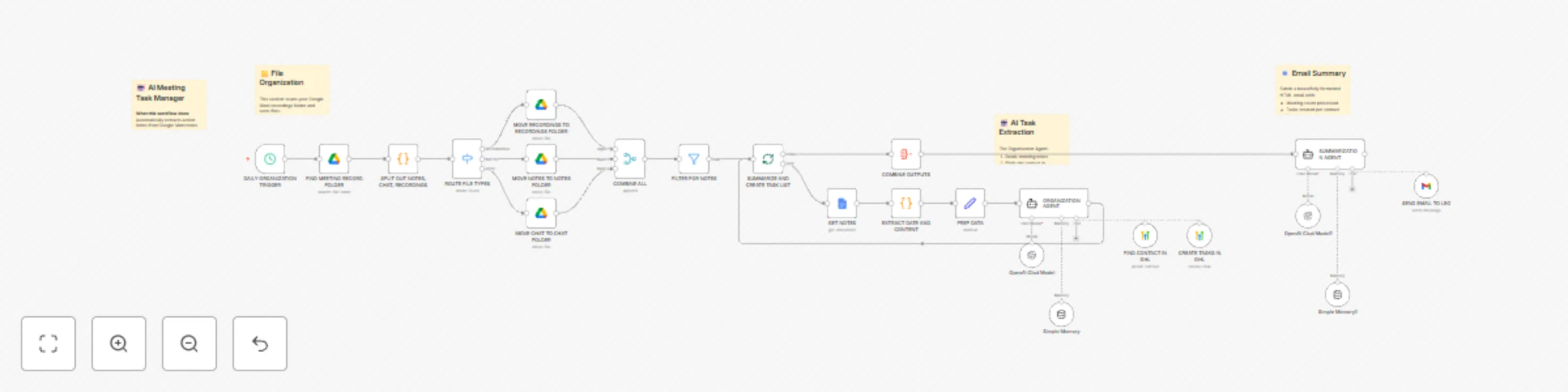
This workflow automates the entire post-meeting workflow by scanning Google Meet recordings folders, extracting action items from AI-generated meeting notes, and creating tasks directly in your GoHighLevel CRM.
**🎯 Who is this for?**
- Sales teams using GoHighLevel CRM
- Agency owners managing multiple client meetings
- Anyone who uses Google Meet with Gemini note-taking
- Professionals drowning in meeting follow-ups
**✨ What it does:**
1. **Daily File Organization**
- Scans your Google Meet recordings folder
- Automatically sorts recordings, notes, and chat logs into organized subfolders
- Keeps your Drive clean and searchable
2. **AI-Powered Task Extraction**
- Reads Google Docs meeting notes (generated by Gemini)
- Identifies action items assigned to you
- Intelligently determines due dates from context (defaults to 3 business days)
3. **CRM Integration**
- Searches for meeting participants in GoHighLevel
- Creates properly formatted tasks with full context
- Links tasks to the correct contact record
4. **Beautiful Email Summaries**
- Sends a professionally designed HTML email
- Shows tasks created per contact
- Includes due dates and status updates
**🔧 Technologies Used:**
- Google Drive API (file management)
- Google Docs API (content extraction)
- GoHighLevel API (contact search + task creation)
- OpenAI GPT-4 (task extraction intelligence)
- Gmail API (email delivery)
**⚙️ Setup Requirements:**
- Google Cloud OAuth credentials (Drive, Docs, Gmail)
- GoHighLevel OAuth credentials
- OpenAI API key
- Create 4 Google Drive folders (source + 3 destination folders)
**📖 Setup Instructions:**
1. **Create Google Drive Folders:**
- Source folder: Where Google Meet saves recordings
- Recordings folder: For video files
- Notes folder: For Gemini notes
- Chat folder: For meeting chat logs
2. **Configure Credentials:**
- Connect Google Drive OAuth
- Connect Google Docs OAuth
- Connect GoHighLevel OAuth
- Connect Gmail OAuth
- Add OpenAI API key
3. **Update Folder URLs:**
- Replace placeholder URLs in Google Drive nodes with your folder URLs
4. **Customize:**
- Set your email address in the Gmail tool
- Set your GoHighLevel user ID for task assignment
- Adjust the schedule trigger timing as needed
**💡 Pro Tips:**
- Works best with Google Meet's Gemini note-taking feature
- Customize the AI prompts to match your task naming conventions
- The HTML email template is fully customizable