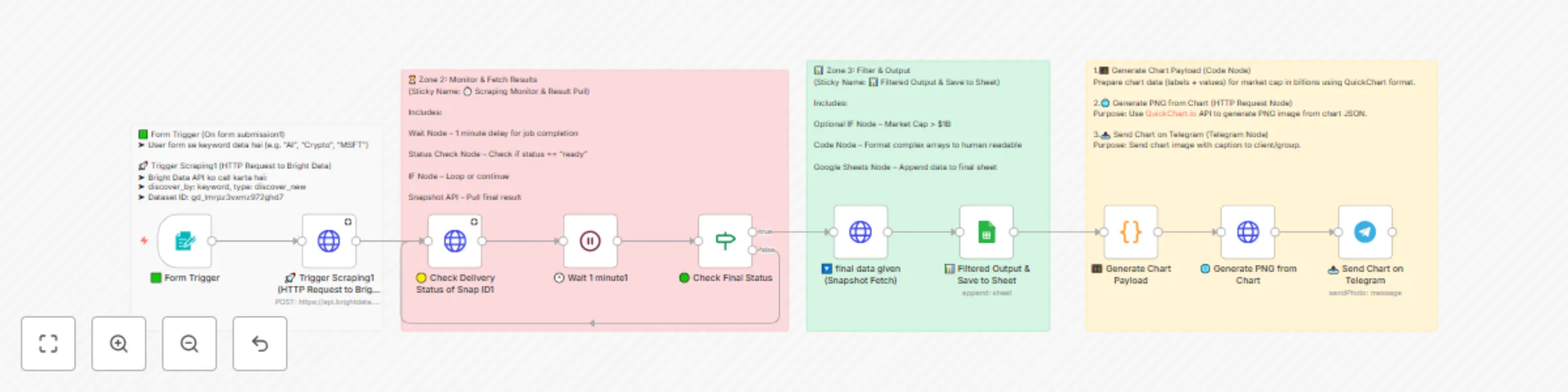
Extract market cap data from Yahoo Finance with Bright Data & visualize in Telegram

Workflow preview

Workflow preview
100%
Extract market cap data from Yahoo Finance with Bright Data & visualize in Telegram preview
Open on n8n.io

Important notice

This workflow is provided as-is. Please review and test before using in production.

1. Workflow Overview

Financial Insight Automation: Market Cap to Telegram via Bright Data Description An automated n8n workflow that scrapes financial data from Yahoo Finance using Bright Data, processes market cap ...

Best for

  • Crypto Trading automation workflows
  • intermediate n8n builders looking for reusable templates

Tools used

n8n-nodes-base.formtrigger, n8n-nodes-base.httprequest, n8n-nodes-base.stickynote, n8n-nodes-base.wait, n8n-nodes-base.if, n8n-nodes-base.googlesheets, n8n-nodes-base.code, n8n-nodes-base.telegram

Source and attribution

This workflow is cataloged by N8N Workflows and links back to its original n8n.io source page by Incrementors.

Original n8n.io source

1.1 Workflow description

Title
Extract market cap data from Yahoo Finance with Bright Data & visualize in Telegram
Workflow name
Extract market cap data from Yahoo Finance with Bright Data & visualize in Telegram

Financial Insight Automation: Market Cap to Telegram via Bright Data

๐Ÿ“Š Description

An automated n8n workflow that scrapes financial data from Yahoo Finance using Bright Data, processes market cap information, generates visual charts, and sends comprehensive financial insights directly to Telegram for instant notifications.


๐Ÿš€ How It Works

This workflow operates through a simple three-zone process:

1. Data Input & Trigger

User submits a keyword (e.g., "AI", "Crypto", "MSFT") through a form trigger that initiates the financial data collection process.

2. Data Scraping & Processing

Bright Data API discovers and scrapes comprehensive financial data from Yahoo Finance, including market cap, stock prices, company profiles, and financial metrics.

3. Visualization & Delivery

The system generates interactive market cap charts, saves data to Google Sheets for record-keeping, and sends visual insights to Telegram as PNG images.


โšก Setup Steps

> โฑ๏ธ Estimated Setup Time: 15-20 minutes

Prerequisites

  • Active n8n instance (self-hosted or cloud)
  • Bright Data account with Yahoo Finance dataset access
  • Google account for Sheets integration
  • Telegram bot token and chat ID

Step 1: Import the Workflow

  1. Copy the provided JSON workflow code
  2. In n8n: Go to Workflows โ†’ + Add workflow โ†’ Import from JSON
  3. Paste the JSON content and click Import

Step 2: Configure Bright Data Integration

Set up Bright Data Credentials:
  1. In n8n: Navigate to Credentials โ†’ + Add credential โ†’ HTTP Header Auth
  2. Add Authorization header with value: Bearer BRIGHT_DATA_API_KEY
  3. Replace BRIGHT_DATA_API_KEY with your actual API key
  4. Test the connection to ensure it works properly

> Note: The workflow uses dataset ID gd_lmrpz3vxmz972ghd7 for Yahoo Finance data. Ensure you have access to this dataset in your Bright Data dashboard.

Step 3: Set up Google Sheets Integration

Create a Google Sheet:
  • Go to Google Sheets and create a new spreadsheet
  • Name it "Financial Data Tracker" or similar
  • Copy the Sheet ID from the URL
Configure Google Sheets credentials:
  • In n8n: Credentials โ†’ + Add credential โ†’ Google Sheets OAuth2 API
  • Complete OAuth setup and test connection
Update the workflow:
  • Open the "๐Ÿ“Š Filtered Output & Save to Sheet" node
  • Replace YOUR_SHEET_ID with your actual Sheet ID
  • Select your Google Sheets credential

Step 4: Configure Telegram Bot

Set up Telegram Integration:
  1. Create a Telegram bot using @BotFather
  2. Get your bot token and chat ID
  3. In n8n: Credentials โ†’ + Add credential โ†’ Telegram API
  4. Enter your bot token
  5. Update the "๐Ÿ“ค Send Chart on Telegram" node with your chat ID
  6. Replace YOUR_TELEGRAM_CHAT_ID with your actual chat ID

Step 5: Test and Activate

Test the workflow:
  • Use the form trigger with a test keyword (e.g., "AAPL")
  • Monitor the execution in n8n
  • Verify data appears in Google Sheets
  • Check for chart delivery on Telegram
Activate the workflow:
  • Turn on the workflow using the toggle switch
  • The form trigger will be accessible via the provided webhook URL

๐Ÿ“‹ Key Features

  • ๐Ÿ” Keyword-Based Discovery: Search companies by keyword, ticker, or industry
  • ๐Ÿ’ฐ Comprehensive Financial Data: Market cap, stock prices, earnings, and company profiles
  • ๐Ÿ“Š Visual Charts: Automatic generation of market cap comparison charts
  • ๐Ÿ“ฑ Telegram Integration: Instant delivery of insights to your mobile device
  • ๐Ÿ’พ Data Storage: Automatic backup to Google Sheets for historical tracking
  • โšก Real-time Processing: Fast data retrieval and processing with Bright Data

๐Ÿ“Š Output Data Points

Field Description Example
Company Name Full company name "Apple Inc."
Stock Ticker Trading symbol "AAPL"
Market Cap Total market capitalization "$2.89T"
Current Price Latest stock price "$189.25"
Exchange Stock exchange "NASDAQ"
Sector Business sector "Technology"
PE Ratio Price to earnings ratio "28.45"
52 Week Range Annual high and low prices "$164.08 - $199.62"

๐Ÿ”ง Troubleshooting

Common Issues

Bright Data Connection Failed:
  • Verify your API key is correct and active
  • Check dataset permissions in Bright Data dashboard
  • Ensure you have sufficient credits
Google Sheets Permission Denied:
  • Re-authenticate Google Sheets OAuth
  • Verify sheet sharing settings
  • Check if the Sheet ID is correct
Telegram Not Receiving Messages:
  • Verify bot token and chat ID
  • Check if bot is added to the chat
  • Test Telegram credentials manually

Performance Tips

  • Use specific keywords for better data accuracy
  • Monitor Bright Data usage to control costs
  • Set up error handling for failed requests
  • Consider rate limiting for high-volume usage

๐ŸŽฏ Use Cases

  • Investment Research: Quick financial analysis of companies and sectors
  • Market Monitoring: Track market cap changes and stock performance
  • Competitive Analysis: Compare financial metrics across companies
  • Portfolio Management: Monitor holdings and potential investments
  • Financial Reporting: Generate automated financial insights for teams

๐Ÿ”— Additional Resources


For any questions or support, please contact:
[email protected]
or fill out this form: https://www.incrementors.com/contact-us/

1.2 Logical Blocks

This catalog entry is organized from the workflow JSON. The node-level section below shows the executable blocks available for review before importing the template.

2. Block-by-Block Analysis

Block 1 - ๐ŸŸฉ Form Trigger

Type / Role
n8n-nodes-base.formTrigger - formTrigger
Config choices
Version 2.2

Block 2 - ๐Ÿš€ Trigger Scraping1 (HTTP Request to Bright Data)

Type / Role
n8n-nodes-base.httpRequest - httpRequest
Config choices
Version 4.2

Block 3 - Sticky Note

Type / Role
n8n-nodes-base.stickyNote - stickyNote
Config choices
Version 1

Block 4 - ๐Ÿ• Wait 1 minute1

Type / Role
n8n-nodes-base.wait - wait
Config choices
Version 1.1

Block 5 - ๐ŸŸก Check Delivery Status of Snap ID1

Type / Role
n8n-nodes-base.httpRequest - httpRequest
Config choices
Version 4.2

Block 6 - ๐ŸŸข Check Final Status

Type / Role
n8n-nodes-base.if - if
Config choices
Version 2.2

Block 7 - ๐Ÿ”ฝ final data given (Snapshot Fetch)

Type / Role
n8n-nodes-base.httpRequest - httpRequest
Config choices
Version 4.2

Block 8 - Sticky Note1

Type / Role
n8n-nodes-base.stickyNote - stickyNote
Config choices
Version 1

Block 9 - ๐Ÿ“Š Filtered Output & Save to Sheet

Type / Role
n8n-nodes-base.googleSheets - googleSheets
Config choices
Version 4.6

Block 10 - Sticky Note2

Type / Role
n8n-nodes-base.stickyNote - stickyNote
Config choices
Version 1

Block 11 - ๐Ÿงฎ Generate Chart Payload

Type / Role
n8n-nodes-base.code - code
Config choices
Version 2

Block 12 - ๐ŸŒ Generate PNG from Chart

Type / Role
n8n-nodes-base.httpRequest - httpRequest
Config choices
Version 4.2

Block 13 - ๐Ÿ“ค Send Chart on Telegram

Type / Role
n8n-nodes-base.telegram - telegram
Config choices
Version 1.2

Block 14 - Sticky Note3

Type / Role
n8n-nodes-base.stickyNote - stickyNote
Config choices
Version 1

3. Summary Table

Workflow Extract market cap data from Yahoo Finance with Bright Data & visualize in Telegram
Complexity intermediate
Nodes 14
Categories Crypto Trading
Author Incrementors
Published 26 Jul 2025

4. Reproducing the Workflow from Scratch

  1. 1. Download the workflow JSON

    Use the JSON export at /data/workflows/6489/6489.json as the source template for this automation.

  2. 2. Import the template into n8n

    Open n8n, import the downloaded JSON, and review each node before activating the workflow.

  3. 3. Configure credentials and variables

    Replace placeholder credentials, API keys, webhook URLs, account IDs, and environment-specific values with your own settings.

  4. 4. Test with sample data

    Run the workflow manually or in a staging workspace, inspect node output, and confirm downstream systems receive the expected data.

  5. 5. Activate and monitor

    Enable the workflow only after testing, then monitor executions, errors, and rate limits during the first production runs.

5. General Notes & Resources

Review imported nodes carefully before activation. This catalog entry is intended to help you inspect the workflow structure, understand required services, and find related templates faster.

Node names, credentials, schedules, webhook paths, and external service limits may need adjustment for your workspace.

Frequently asked questions

What does Extract market cap data from Yahoo Finance with Bright Data & visualize in Telegram do?

Financial Insight Automation: Market Cap to Telegram via Bright Data Description An automated n8n workflow that scrapes financial data from Yahoo Finance using Bright Data, processes market cap ...

What do I need before importing this workflow?

Review the workflow JSON, configure any required credentials in n8n, and test the automation in a safe workspace before using it in production.

Can I customize this workflow?

Yes. Use the block-by-block analysis and the downloadable JSON to inspect each node, then adjust credentials, prompts, schedules, filters, or destinations for your Crypto Trading use case.