Block 1 - Format Summary Message
- Type / Role
- n8n-nodes-base.code - code
- Config choices
- Version 2


 Early Deal
This workflow is provided as-is. Please review and test before using in production.
Tesseract Money Mate Workflow Description Disclaimer : This template requires the community node, which is only available on self hosted n8n inst...
n8n-nodes-base.code, n8n-nodes-base.httprequest, n8n-nodes-base.telegramtrigger, n8n-nodes-base.stickynote, @n8n/n8n-nodes-langchain.chainllm, n8n-nodes-base.if, n8n-nodes-base.set, @n8n/n8n-nodes-langchain.outputparserstructured
This workflow is cataloged by N8N Workflows and links back to its original n8n.io source page by Khairul Muhtadin.
Original n8n.io source
Disclaimer: This template requires the n8n-nodes-tesseractjs community node, which is only available on self-hosted n8n instances. You’ll need a self-hosted n8n setup to use this workflow.
This workflow is designed for individuals, freelancers, or small business owners who want an easy way to track expenses using Telegram. It’s ideal for anyone looking to digitize receipts—whether from photos or text messages—using free tools, without needing advanced technical skills.
Manually entering receipt details into a spreadsheet or app is time-consuming and prone to mistakes. This workflow automates the process by extracting information from receipt images or text messages sent via Telegram, categorizing expenses, and sending back a clear, formatted summary. It saves time, reduces errors, and makes expense tracking effortless.
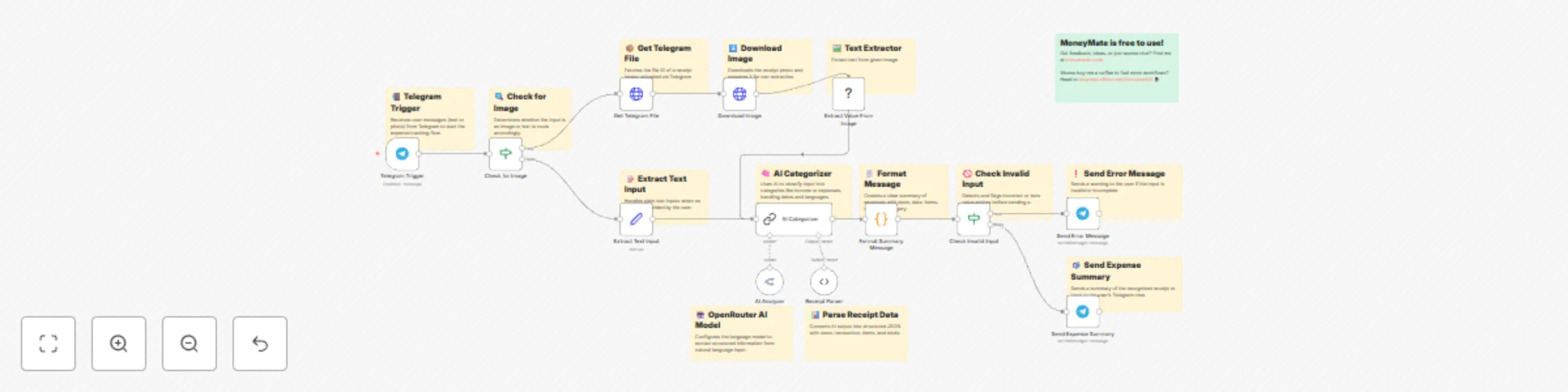
The workflow listens for messages sent to a Telegram bot, which can be either text descriptions of expenses or photos of receipts. If a photo is sent, Tesseract (an open-source text recognition tool) extracts the text. If text is sent, it’s processed directly. An AI model (LLaMA via OpenRouter) analyzes the input, categorizes it into expense types (e.g., Food & Beverages, Household, Transport), and creates a structured summary including store name, date, items, total, and category. The summary is then sent back to the user’s Telegram chat.
Follow these step-by-step instructions to set up the workflow. No advanced technical knowledge is required, but you’ll need a self-hosted n8n instance.
Set Up a Self-Hosted n8n Instance:
Install the Tesseract Community Node:
n8n-nodes-tesseractjs in the search bar.Create a Telegram Bot:
/start to BotFather, then /newbot to create your bot.23872837287:ExampleExampleExample). Copy this token.Set Up OpenRouter for AI Processing:
Import and Configure the Workflow:
Test the Workflow:
/start.Activate for Continuous Use:
To help the workflow process your data accurately, use clear and structured inputs. Below are examples of valid inputs:
Send a message to your Telegram bot like this:
Bought coffee at Starbucks, Jalan Sudirman, yesterday. Total Rp 50,000. 2 lattes, each Rp 25,000.
Expected Output:
hello [Your Name]

Ini Rekap Belanjamu
📋 Store: Starbucks
📍 Location: Jalan Sudirman
📅 Date: 2025-05-26
🛒 Items:
- Latte: Rp 25,000
- Latte: Rp 25,000
💸 Total: Rp 50,000
📌 Category: Food & Beverages
Upload a photo of a receipt to your Telegram bot. The receipt should contain:
Expected Output:
hello [Your Name]

Ini Rekap Belanjamu
📋 Store: Alfamart
📍 Location: Jl. Gatot Subroto, Jakarta
📅 Date: 2025-05-27 14:00
🛒 Items:
- Bread: Rp 15,000
- Milk: Rp 20,000
💸 Total: Rp 35,000
📌 Category: Household
Tips for Images:
This workflow is 100% free! It leverages:
Enjoy automating your expense tracking without any cost!
Made by: khmuhtadin Need a custom? contact me on LinkedIn or Web
This catalog entry is organized from the workflow JSON. The node-level section below shows the executable blocks available for review before importing the template.
Showing the first 24 of 27 workflow blocks. Download the JSON for the full node graph.
| Workflow | Extract Details from Receipts via Telegram with Tesseract and Llama |
|---|---|
| Complexity | advanced |
| Nodes | 27 |
| Categories | Invoice Processing, AI Summarization |
| Author | Khairul Muhtadin |
| Published | 24 May 2025 |
Use the JSON export at /data/workflows/4361/4361.json as the source template for this automation.
Open n8n, import the downloaded JSON, and review each node before activating the workflow.
Replace placeholder credentials, API keys, webhook URLs, account IDs, and environment-specific values with your own settings.
Run the workflow manually or in a staging workspace, inspect node output, and confirm downstream systems receive the expected data.
Enable the workflow only after testing, then monitor executions, errors, and rate limits during the first production runs.
Review imported nodes carefully before activation. This catalog entry is intended to help you inspect the workflow structure, understand required services, and find related templates faster.
Node names, credentials, schedules, webhook paths, and external service limits may need adjustment for your workspace.
Tesseract Money Mate Workflow Description Disclaimer : This template requires the community node, which is only available on self hosted n8n inst...
Review the workflow JSON, configure any required credentials in n8n, and test the automation in a safe workspace before using it in production.
Yes. Use the block-by-block analysis and the downloadable JSON to inspect each node, then adjust credentials, prompts, schedules, filters, or destinations for your Invoice Processing, AI Summarization use case.