Extract context from voice notes with OpenRouter AI & Milvus for RAG systems

Workflow preview

Workflow preview
100%
Extract context from voice notes with OpenRouter AI & Milvus for RAG systems preview
Open on n8n.io

Important notice

This workflow is provided as-is. Please review and test before using in production.

1. Workflow Overview

Voice Note Context Extraction Pipeline with AI Agent & Vector Storage This n8n template demonstrates how to automatically extract and store contextual information from voice notes using AI agents a...

Best for

  • Engineering automation workflows
  • Multimodal AI automation workflows
  • advanced n8n builders looking for reusable templates

Tools used

n8n-nodes-base.webhook, n8n-nodes-base.set, @n8n/n8n-nodes-langchain.agent, @n8n/n8n-nodes-langchain.outputparserstructured, @n8n/n8n-nodes-langchain.lmchatopenrouter, n8n-nodes-base.converttofile, @n8n/n8n-nodes-langchain.vectorstoremilvus, @n8n/n8n-nodes-langchain.documentdefaultdataloader

Source and attribution

This workflow is cataloged by N8N Workflows and links back to its original n8n.io source page by Daniel Rosehill.

Original n8n.io source

1.1 Workflow description

Title
Extract context from voice notes with OpenRouter AI & Milvus for RAG systems
Workflow name
Extract context from voice notes with OpenRouter AI & Milvus for RAG systems

Voice Note Context Extraction Pipeline with AI Agent & Vector Storage

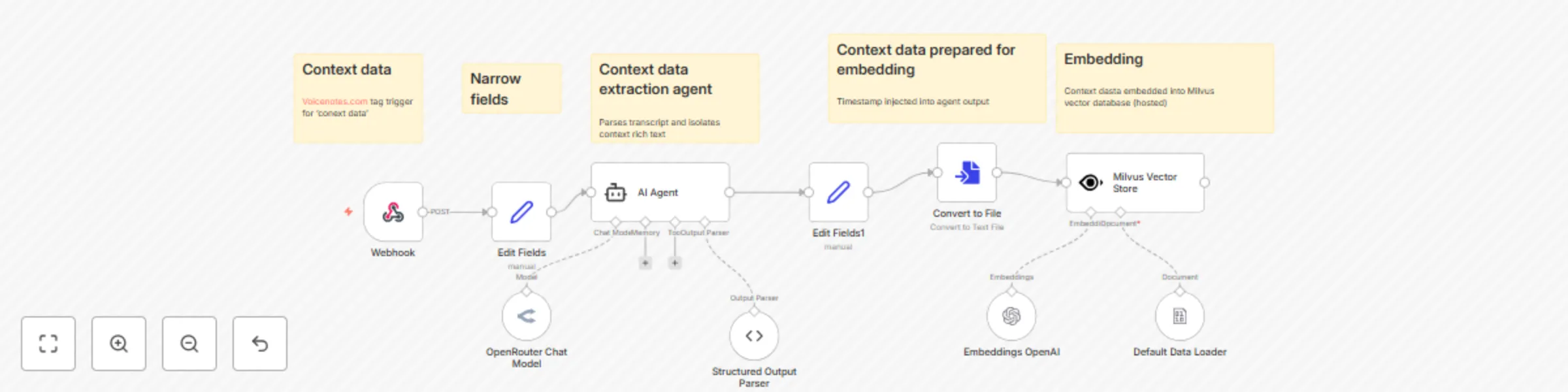
This n8n template demonstrates how to automatically extract and store contextual information from voice notes using AI agents and vector databases for future retrieval.

How it works

  • Webhook trigger receives voice note data including title, transcript, and timestamp from external services (example here: voicenotes.com)
  • Field extraction isolates the key data fields (title, transcript, timestamp) for processing
  • AI Context Agent processes the transcript to extract meaningful context while:
    • Correcting speech-to-text errors
    • Converting first-person references to third-person facts
    • Filtering out casual conversation and focusing on significant information
  • Output formatting structures the extracted context with timestamps for embedding
  • File conversion prepares the context data for vector storage
  • Vector embedding uses OpenAI embeddings to create searchable representations
  • Milvus storage stores the embedded context for future retrieval in RAG applications

How to use

  • Configure the webhook endpoint to receive data from your voice note service
  • Set up credentials for OpenRouter (LLM), OpenAI (embeddings), and Milvus (vector storage)
  • Customize the AI agent's system prompt to match your context extraction needs
  • The workflow automatically processes incoming voice notes and stores extracted context

Requirements

  • OpenRouter account for LLM access
  • OpenAI API key for embeddings
  • Milvus vector database (cloud or self-hosted)
  • Voice note service with webhook capabilities (e.g., Voicenotes.com)

Customizing this workflow

  • Modify the context extraction prompt to focus on specific types of information (preferences, facts, relationships)
  • Add filtering logic to process only voice notes with specific tags or keywords
  • Integrate with other storage systems like Pinecone, Weaviate, or local vector databases
  • Connect to RAG systems to use the stored context for enhanced AI conversations
  • Add notification nodes to confirm successful context extraction and storage

Use cases

  • Personal AI assistant that remembers your preferences and context from voice notes
  • Knowledge management system for capturing insights from recorded thoughts
  • Content creation pipeline that extracts key themes from voice recordings
  • Research assistant that builds context from interview transcripts or meeting notes

1.2 Logical Blocks

This catalog entry is organized from the workflow JSON. The node-level section below shows the executable blocks available for review before importing the template.

2. Block-by-Block Analysis

Block 1 - Webhook

Type / Role
n8n-nodes-base.webhook - webhook
Config choices
Version 2

Block 2 - Edit Fields

Type / Role
n8n-nodes-base.set - set
Config choices
Version 3.4

Block 3 - AI Agent

Type / Role
@n8n/n8n-nodes-langchain.agent - agent
Config choices
Version 2.1

Block 4 - Structured Output Parser

Type / Role
@n8n/n8n-nodes-langchain.outputParserStructured - outputParserStructured
Config choices
Version 1.3

Block 5 - OpenRouter Chat Model

Type / Role
@n8n/n8n-nodes-langchain.lmChatOpenRouter - lmChatOpenRouter
Config choices
Version 1

Block 6 - Edit Fields1

Type / Role
n8n-nodes-base.set - set
Config choices
Version 3.4

Block 7 - Convert to File

Type / Role
n8n-nodes-base.convertToFile - convertToFile
Config choices
Version 1.1

Block 8 - Milvus Vector Store

Type / Role
@n8n/n8n-nodes-langchain.vectorStoreMilvus - vectorStoreMilvus
Config choices
Version 1.3

Block 9 - Default Data Loader

Type / Role
@n8n/n8n-nodes-langchain.documentDefaultDataLoader - documentDefaultDataLoader
Config choices
Version 1.1

Block 10 - Embeddings OpenAI

Type / Role
@n8n/n8n-nodes-langchain.embeddingsOpenAi - embeddingsOpenAi
Config choices
Version 1.2

Block 11 - Sticky Note

Type / Role
n8n-nodes-base.stickyNote - stickyNote
Config choices
Version 1

Block 12 - Sticky Note1

Type / Role
n8n-nodes-base.stickyNote - stickyNote
Config choices
Version 1

Block 13 - Sticky Note2

Type / Role
n8n-nodes-base.stickyNote - stickyNote
Config choices
Version 1

Block 14 - Sticky Note3

Type / Role
n8n-nodes-base.stickyNote - stickyNote
Config choices
Version 1

Block 15 - Sticky Note4

Type / Role
n8n-nodes-base.stickyNote - stickyNote
Config choices
Version 1

3. Summary Table

Workflow Extract context from voice notes with OpenRouter AI & Milvus for RAG systems
Complexity advanced
Nodes 15
Categories Engineering, Multimodal AI
Author Daniel Rosehill
Published 15 Aug 2025

4. Reproducing the Workflow from Scratch

  1. 1. Download the workflow JSON

    Use the JSON export at /data/workflows/7430/7430.json as the source template for this automation.

  2. 2. Import the template into n8n

    Open n8n, import the downloaded JSON, and review each node before activating the workflow.

  3. 3. Configure credentials and variables

    Replace placeholder credentials, API keys, webhook URLs, account IDs, and environment-specific values with your own settings.

  4. 4. Test with sample data

    Run the workflow manually or in a staging workspace, inspect node output, and confirm downstream systems receive the expected data.

  5. 5. Activate and monitor

    Enable the workflow only after testing, then monitor executions, errors, and rate limits during the first production runs.

5. General Notes & Resources

Review imported nodes carefully before activation. This catalog entry is intended to help you inspect the workflow structure, understand required services, and find related templates faster.

Node names, credentials, schedules, webhook paths, and external service limits may need adjustment for your workspace.

Frequently asked questions

What does Extract context from voice notes with OpenRouter AI & Milvus for RAG systems do?

Voice Note Context Extraction Pipeline with AI Agent & Vector Storage This n8n template demonstrates how to automatically extract and store contextual information from voice notes using AI agents a...

What do I need before importing this workflow?

Review the workflow JSON, configure any required credentials in n8n, and test the automation in a safe workspace before using it in production.

Can I customize this workflow?

Yes. Use the block-by-block analysis and the downloadable JSON to inspect each node, then adjust credentials, prompts, schedules, filters, or destinations for your Engineering, Multimodal AI use case.