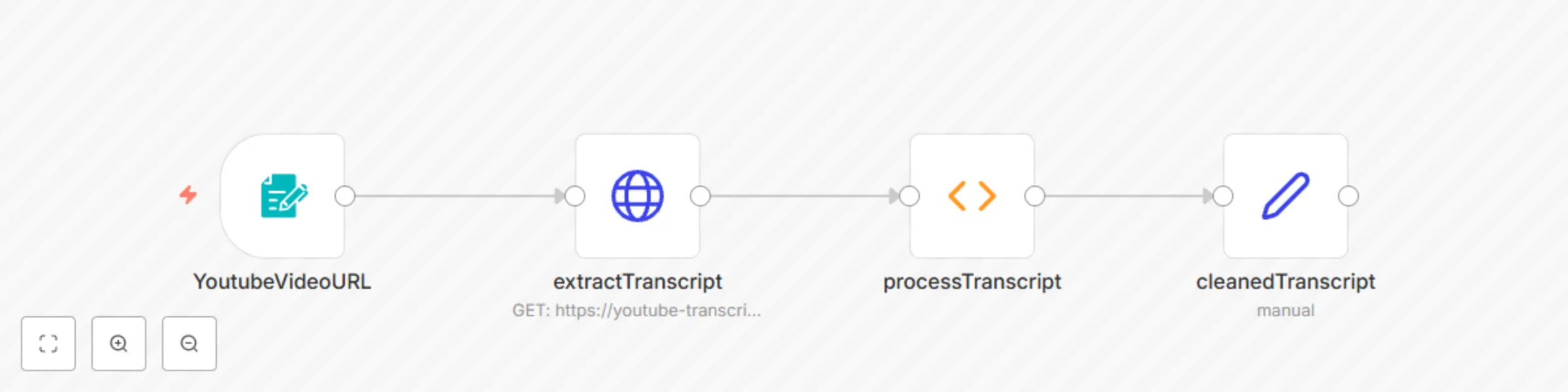
Extract and clean YouTube video transcripts with RapidAPI

Workflow preview

Workflow preview
100%
Extract and clean YouTube video transcripts with RapidAPI preview
Open on n8n.io

Important notice

This workflow is provided as-is. Please review and test before using in production.

1. Workflow Overview

Here is your refined template description with detailed step by step instructions, markdown formatting, and customization guidance. YouTube Transcript Extraction Workflow This n8n workflow extracts...

Best for

  • Content Creation automation workflows
  • beginner n8n builders looking for reusable templates

Tools used

n8n-nodes-base.formtrigger, n8n-nodes-base.set, n8n-nodes-base.function, n8n-nodes-base.httprequest

Source and attribution

This workflow is cataloged by N8N Workflows and links back to its original n8n.io source page by Joseph.

Original n8n.io source

1.1 Workflow description

Title
Extract and clean YouTube video transcripts with RapidAPI
Workflow name
Extract and clean YouTube video transcripts with RapidAPI

Here is your refined template description with detailed step-by-step instructions, markdown formatting, and customization guidance.


YouTube Transcript Extraction Workflow

This n8n workflow extracts and processes transcripts from YouTube videos using the YouTube Transcript API on RapidAPI. It allows users to retrieve subtitles from YouTube videos, clean them up, and return structured transcript data for further processing.

Table of Contents


Problem Statement & Target Audience

Who is this for?

This workflow is ideal for content creators, researchers, and developers who need to:

  • Extract subtitles from YouTube videos automatically.
  • Format and clean transcript data for readability.
  • Use transcripts for summarization, content repurposing, or language analysis.

Pre-conditions & API Requirements

API Required

n8n Setup Prerequisites

  • A running n8n instance (Installation Guide)
  • A RapidAPI account to access the YouTube Transcript API
  • An API key from RapidAPI to authenticate requests

Step-by-Step Workflow Explanation

1. Input YouTube Video URL (Trigger)

  • This step provides a simple input form where users enter a YouTube video URL.

2. HTTP Request Node (Retrieve Transcript Data)

  • Makes a POST request to the YouTube Transcript API via RapidAPI.
  • Passes the video URL received from the input form.
  • Uses an environment variable to store the API key securely.

3. Function Node (Process Transcript)

  • Receives the API response containing the raw transcript.
  • Processes and cleans the transcript:
    • Removes unwanted characters.
    • Formats text for readability.
  • Handles errors when no transcript is available.
  • Outputs both the raw and cleaned transcript for further use.

4. Set Field Node (Response Formatting)

  • Structures the processed transcript data into a user-friendly format.
  • Returns the final transcript data to the client.

Customization Guide

1. Modify Transcript Cleaning Rules

  • Update the Function Node to apply custom text processing, such as:
    • Removing timestamps.
    • Changing the output format (e.g., JSON, plain text).

2. Store Transcripts in a Database

  • Add a Database Node (e.g., MySQL, PostgreSQL, or Firebase) to save transcripts.

3. Generate Summaries from Transcripts

  • Integrate AI services (e.g., OpenAI, Google Gemini) to summarize transcripts.

4. Convert Transcripts into Speech

  • Use ElevenLabs API to generate an AI-powered voiceover from transcripts.

How to Set Up This Workflow

Step 1: Import the Workflow into n8n

  • Download or copy the workflow JSON file.
  • Import it into your n8n instance.

Step 2: Set Up the API Key

  • Sign up for the YouTube Transcript API.
  • Subscribe to the api.
  • Copy and paste your api key where the "your_api_key" is.

Step 3: Activate the Workflow

  • Start the workflow in n8n.
  • Enter a YouTube video URL in the input form.
  • The workflow will return a cleaned transcript.

This workflow ensures seamless YouTube transcript extraction and processing with minimal manual effort. 🚀

1.2 Logical Blocks

This catalog entry is organized from the workflow JSON. The node-level section below shows the executable blocks available for review before importing the template.

2. Block-by-Block Analysis

Block 1 - YoutubeVideoURL

Type / Role
n8n-nodes-base.formTrigger - formTrigger
Config choices
Version 2.2

Block 2 - cleanedTranscript

Type / Role
n8n-nodes-base.set - set
Config choices
Version 3.4

Block 3 - processTranscript

Type / Role
n8n-nodes-base.function - function
Config choices
Version 1

Block 4 - extractTranscript

Type / Role
n8n-nodes-base.httpRequest - httpRequest
Config choices
Version 3

3. Summary Table

Workflow Extract and clean YouTube video transcripts with RapidAPI
Complexity beginner
Nodes 4
Categories Content Creation
Author Joseph
Published 03 Apr 2025

4. Reproducing the Workflow from Scratch

  1. 1. Download the workflow JSON

    Use the JSON export at /data/workflows/3417/3417.json as the source template for this automation.

  2. 2. Import the template into n8n

    Open n8n, import the downloaded JSON, and review each node before activating the workflow.

  3. 3. Configure credentials and variables

    Replace placeholder credentials, API keys, webhook URLs, account IDs, and environment-specific values with your own settings.

  4. 4. Test with sample data

    Run the workflow manually or in a staging workspace, inspect node output, and confirm downstream systems receive the expected data.

  5. 5. Activate and monitor

    Enable the workflow only after testing, then monitor executions, errors, and rate limits during the first production runs.

5. General Notes & Resources

Review imported nodes carefully before activation. This catalog entry is intended to help you inspect the workflow structure, understand required services, and find related templates faster.

Node names, credentials, schedules, webhook paths, and external service limits may need adjustment for your workspace.

Frequently asked questions

What does Extract and clean YouTube video transcripts with RapidAPI do?

Here is your refined template description with detailed step by step instructions, markdown formatting, and customization guidance. YouTube Transcript Extraction Workflow This n8n workflow extracts...

What do I need before importing this workflow?

Review the workflow JSON, configure any required credentials in n8n, and test the automation in a safe workspace before using it in production.

Can I customize this workflow?

Yes. Use the block-by-block analysis and the downloadable JSON to inspect each node, then adjust credentials, prompts, schedules, filters, or destinations for your Content Creation use case.