Block 1 - Telegram Trigger
- Type / Role
- n8n-nodes-base.telegramTrigger - telegramTrigger
- Config choices
- Version 1.2


 Early Deal
This workflow is provided as-is. Please review and test before using in production.
What does this workflow do? This workflow exports the names of all Dialogflow intents from your agent, together with their priority levels , directly into a Google Sheets spreadsheet. It is trigger...
n8n-nodes-base.telegramtrigger, n8n-nodes-base.googlesheets, n8n-nodes-base.stickynote, n8n-nodes-base.if, n8n-nodes-base.telegram, n8n-nodes-base.httprequest, n8n-nodes-base.code
This workflow is cataloged by N8N Workflows and links back to its original n8n.io source page by Eddy Medina.
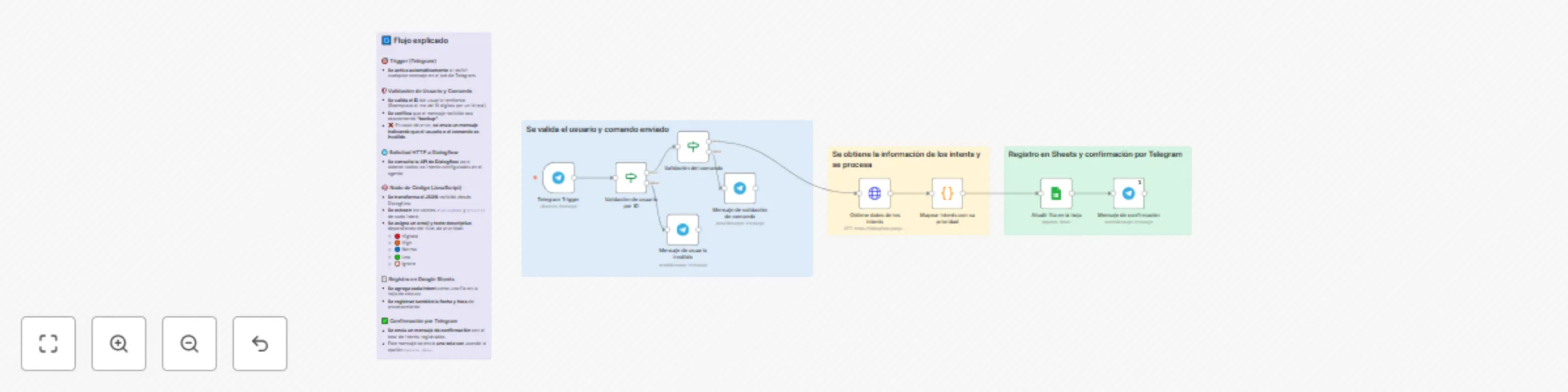
Original n8n.io sourceThis workflow exports the names of all Dialogflow intents from your agent, together with their priority levels, directly into a Google Sheets spreadsheet.
It is triggered via Telegram and includes visual indicators (emojis) for priority levels.
🔔 Activation:
Triggered when a validated user sends the keyword (e.g. "backup") via Telegram.
📥 Data Retrieval:
Fetches all intents of the specified Dialogflow agent using the Dialogflow API.
⚙️ Processing:
displayName and priority of each intent. 📑 Storage:
Appends each intent (name, priority number, emoji, and description), along with current date and time, to a Google Sheets document.
📩 Notification:
Sends a single confirmation message to the Telegram user once insertion is complete (using Execute Once).
Import the workflow: Upload the .json into your n8n instance.
Connect Telegram:
Add your Telegram bot credentials and configure the node Validación de usuario por ID with your Telegram ID.
Configure Dialogflow:
Authenticate using a Google Service Account API Credential.
Then, in the Obtiene datos de los intents node, replace the example project ID (TU_PROJECT_ID) with your actual Dialogflow agent's project ID.
Connect Google Sheets:
Authorize Google Sheets via OAuth2 and select your destination document/sheet in the node Añadir fila en la hoja.
Customize trigger keyword:
Adjust the command text (default "backup") if needed.
Activate workflow:
Ensure the webhook is correctly set up in Telegram before enabling the workflow.
🤖 Bot administrators who need quick backups of Dialogflow intent names.
🌐 Teams managing multilingual or multi-intent agents wanting priority oversight.
💻 Development teams needing an automated way to audit or version intent configurations regularly.
⚙️ Backup intents periodically to monitor changes over time.
📊 Visualize priority assignment in a spreadsheet for analysis or team discussion.
📖 Document conversational structure for onboarding or knowledge transfer.
This catalog entry is organized from the workflow JSON. The node-level section below shows the executable blocks available for review before importing the template.
| Workflow | Export Dialogflow intents with priority levels to Google Sheets via Telegram |
|---|---|
| Complexity | intermediate |
| Nodes | 13 |
| Categories | Document Extraction |
| Author | Eddy Medina |
| Published | 06 Aug 2025 |
Use the JSON export at /data/workflows/7073/7073.json as the source template for this automation.
Open n8n, import the downloaded JSON, and review each node before activating the workflow.
Replace placeholder credentials, API keys, webhook URLs, account IDs, and environment-specific values with your own settings.
Run the workflow manually or in a staging workspace, inspect node output, and confirm downstream systems receive the expected data.
Enable the workflow only after testing, then monitor executions, errors, and rate limits during the first production runs.
Review imported nodes carefully before activation. This catalog entry is intended to help you inspect the workflow structure, understand required services, and find related templates faster.
Node names, credentials, schedules, webhook paths, and external service limits may need adjustment for your workspace.
What does this workflow do? This workflow exports the names of all Dialogflow intents from your agent, together with their priority levels , directly into a Google Sheets spreadsheet. It is trigger...
Review the workflow JSON, configure any required credentials in n8n, and test the automation in a safe workspace before using it in production.
Yes. Use the block-by-block analysis and the downloadable JSON to inspect each node, then adjust credentials, prompts, schedules, filters, or destinations for your Document Extraction use case.