Block 1 - When clicking ‘Test workflow’
- Type / Role
- n8n-nodes-base.manualTrigger - manualTrigger
- Config choices
- Version 1


 Early Deal
This workflow is provided as-is. Please review and test before using in production.
n8n Workflow: Exponential Backoff for Google APIs Overview This n8n workflow implements an Exponential Backoff mechanism to handle retries when interacting with Google APIs. It ensures that failed ...
n8n-nodes-base.manualtrigger, n8n-nodes-base.code, n8n-nodes-base.stopanderror, n8n-nodes-base.splitinbatches, n8n-nodes-base.googlesheets, n8n-nodes-base.wait, n8n-nodes-base.if, n8n-nodes-base.stickynote
This workflow is cataloged by N8N Workflows and links back to its original n8n.io source page by Alex Kim.
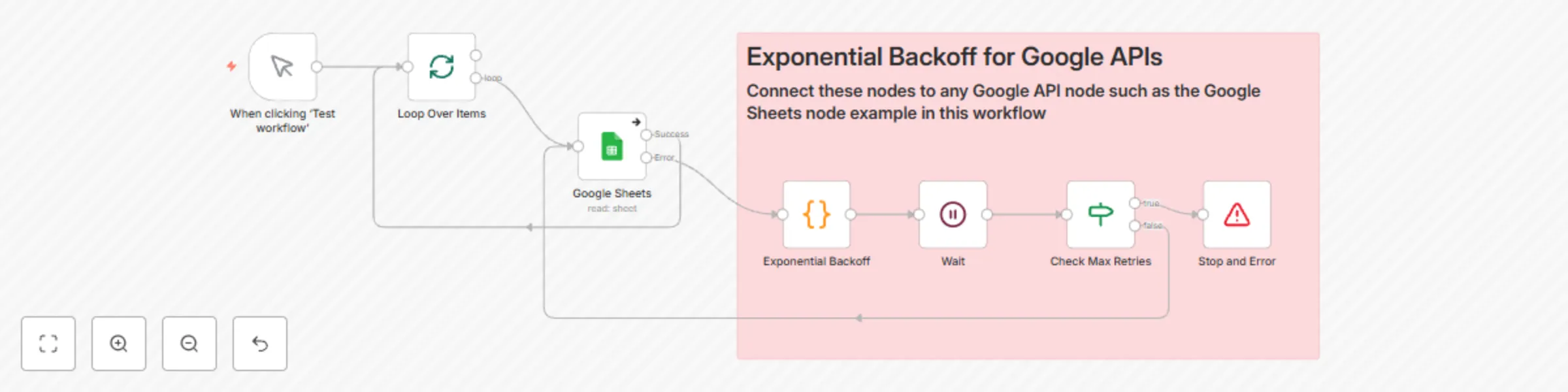
Original n8n.io sourceThis n8n workflow implements an Exponential Backoff mechanism to handle retries when interacting with Google APIs. It ensures that failed API requests are retried with increasing delays, up to a specified maximum retry count. This approach helps mitigate transient errors (e.g., rate limits or temporary network issues) while maintaining workflow efficiency.
Trigger (When clicking "Test Workflow"):
Loop Over Items:
Google API Node (Example: Update Sheet):
Exponential Backoff:
const retryCount = $json["retryCount"] || 0;
const maxRetries = 5;
const initialDelay = 1; // in seconds

if (retryCount < maxRetries) {
    const currentDelayInSeconds = initialDelay * Math.pow(2, retryCount);
    return {
        json: {
            retryCount: retryCount + 1,
            waitTimeInSeconds: currentDelayInSeconds,
            status: 'retrying',
        }
    };
} else {
    return {
        json: {
            error: 'Max retries exceeded',
            retryCount: retryCount,
            status: 'failed'
        }
    };
}
Wait:
waitTimeInSeconds value calculated in the Exponential Backoff node.After Time Interval{{ $json["waitTimeInSeconds"] }}SecondsCheck Max Retries:
Stop and Error:
Max Retries:
const maxRetries = 5).Initial Delay:
1 second.Google API Configuration:
Import the Workflow:
Configure Google API Node:
Test the Workflow:
Monitor Logs:
429 Too Many Requests).Jitter:
Retry Storms:
Error Handling Beyond Max Retries:
Retry Not Triggering:
retryCount variable is passed correctly between nodes.Incorrect Wait Time:
Wait node is referencing the correct field for waitTimeInSeconds.We are always looking to improve this workflow. If you have suggestions, improvements, or ideas for additional features, please feel free to share them. Your feedback helps us refine and enhance this solution!
This catalog entry is organized from the workflow JSON. The node-level section below shows the executable blocks available for review before importing the template.
| Workflow | Exponential backoff for Google APIs |
|---|---|
| Complexity | intermediate |
| Nodes | 8 |
| Categories | Engineering |
| Author | Alex Kim |
| Published | 18 Nov 2024 |
Use the JSON export at /data/workflows/2556/2556.json as the source template for this automation.
Open n8n, import the downloaded JSON, and review each node before activating the workflow.
Replace placeholder credentials, API keys, webhook URLs, account IDs, and environment-specific values with your own settings.
Run the workflow manually or in a staging workspace, inspect node output, and confirm downstream systems receive the expected data.
Enable the workflow only after testing, then monitor executions, errors, and rate limits during the first production runs.
Review imported nodes carefully before activation. This catalog entry is intended to help you inspect the workflow structure, understand required services, and find related templates faster.
Node names, credentials, schedules, webhook paths, and external service limits may need adjustment for your workspace.
n8n Workflow: Exponential Backoff for Google APIs Overview This n8n workflow implements an Exponential Backoff mechanism to handle retries when interacting with Google APIs. It ensures that failed ...
Review the workflow JSON, configure any required credentials in n8n, and test the automation in a safe workspace before using it in production.
Yes. Use the block-by-block analysis and the downloadable JSON to inspect each node, then adjust credentials, prompts, schedules, filters, or destinations for your Engineering use case.