Block 1 - Calculator
- Type / Role
- @n8n/n8n-nodes-langchain.toolCalculator - toolCalculator
- Config choices
- Version 1


 Early Deal
This workflow is provided as-is. Please review and test before using in production.
Who's it for This workflow is ideal for AI developers running multi agent systems in n8n who need to quantitatively evaluate tool usage behavior. If you're building autonomous agents and want to ve...
@n8n/n8n-nodes-langchain.toolcalculator, n8n-nodes-base.set, @n8n/n8n-nodes-langchain.chattrigger, n8n-nodes-base.noop, n8n-nodes-base.evaluationtrigger, n8n-nodes-base.evaluation, @n8n/n8n-nodes-langchain.agent, @n8n/n8n-nodes-langchain.toolworkflow
This workflow is cataloged by N8N Workflows and links back to its original n8n.io source page by Angel Menendez.
Original n8n.io sourceThis workflow is ideal for AI developers running multi-agent systems in n8n who need to quantitatively evaluate tool usage behavior. If you're building autonomous agents and want to verify their decisions against ground-truth expectations, this workflow gives you plug-and-play observability.
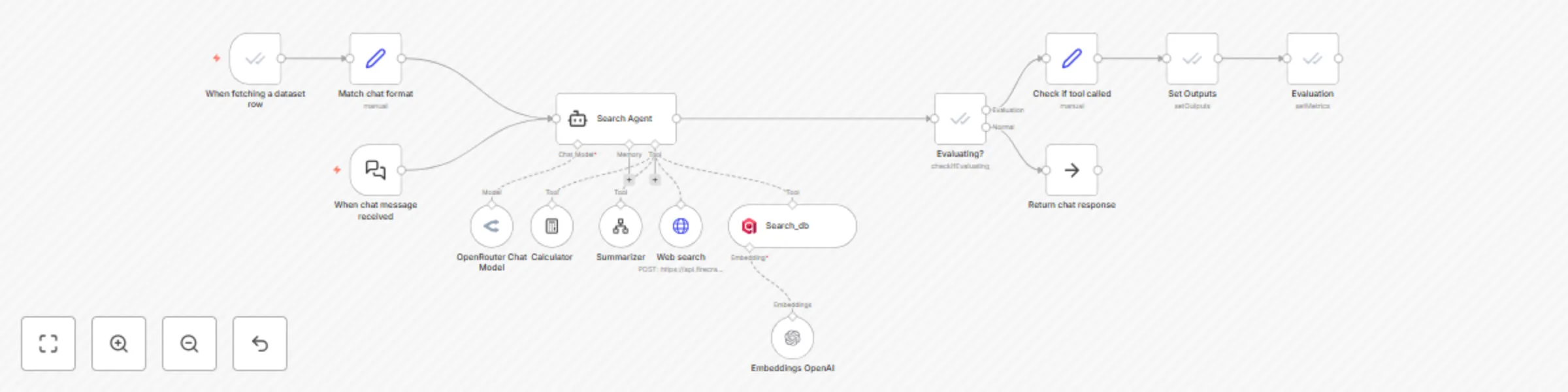
This template uses n8n's built-in Evaluation Trigger and Evaluation nodes to assess whether an AI agent correctly used all the expected tools. It supports:
Dataset-driven testing of agent behavior
Logging actual tools to compare them with the expected tools
Assigning performance metrics (tool_called = true/false)
Persisting output back to Google Sheets for further debugging
The workflow can be triggered by either the chat input or the dataset row evaluation. It routes through a multi-tool agent node powered by the best LLMs. The agent has access to tools such as web search, calculator, vector search, and summarizer tools. The workflow then aims to validate tool use decisions by extracting the intermediate steps from the agent (i.e., action + observation) and comparing the tools that were called with the expected tools. If the tools that were called during the workflow execution match, then it's a pass; otherwise, it's documented as a fail. The evaluation nodes take care of that process.
Connect your Google Sheets OAuth2 credential. Replace the document with your own test dataset.
Set your desired models and configure the different agent tools, such as the summarizer and vector store. The default vector store used is Qdrant, so the user must create this vector store with a few samples of queries + web search results.
Run from either the chat trigger or the evaluation trigger to test.
Google Sheets OAuth2 credential
OpenRouter / OpenAI credentials for AI agents and embeddings
Firecrawl and Qdrant credentials for web + vector search
Edit the Search Agent system message to define tool selection behavior
Add more metric columns in the Evaluation node for complex scoring
Add new tool nodes and link them to the agent block
Swap in your own summarizer
This catalog entry is organized from the workflow JSON. The node-level section below shows the executable blocks available for review before importing the template.
| Workflow | Evaluate tool usage accuracy in multi-agent AI workflows using evaluation nodes |
|---|---|
| Complexity | advanced |
| Nodes | 15 |
| Categories | Engineering, AI Summarization |
| Author | Angel Menendez |
| Published | 01 Jul 2025 |
Use the JSON export at /data/workflows/5523/5523.json as the source template for this automation.
Open n8n, import the downloaded JSON, and review each node before activating the workflow.
Replace placeholder credentials, API keys, webhook URLs, account IDs, and environment-specific values with your own settings.
Run the workflow manually or in a staging workspace, inspect node output, and confirm downstream systems receive the expected data.
Enable the workflow only after testing, then monitor executions, errors, and rate limits during the first production runs.
Review imported nodes carefully before activation. This catalog entry is intended to help you inspect the workflow structure, understand required services, and find related templates faster.
Node names, credentials, schedules, webhook paths, and external service limits may need adjustment for your workspace.
Who's it for This workflow is ideal for AI developers running multi agent systems in n8n who need to quantitatively evaluate tool usage behavior. If you're building autonomous agents and want to ve...
Review the workflow JSON, configure any required credentials in n8n, and test the automation in a safe workspace before using it in production.
Yes. Use the block-by-block analysis and the downloadable JSON to inspect each node, then adjust credentials, prompts, schedules, filters, or destinations for your Engineering, AI Summarization use case.