🌳 EU green legislation tracker with GPT-4o, Google Sheets and Tasks

Workflow preview

Workflow preview
100%
🌳 EU green legislation tracker with GPT-4o, Google Sheets and Tasks preview
Open on n8n.io

Important notice

This workflow is provided as-is. Please review and test before using in production.

1. Workflow Overview

Tags: EU Legislation, Sustainability, Automation, Web Scraping, OpenAI, Google Sheets, Policy Monitoring, Climate Context Hey! I’m Samir, a Supply Chain Engineer and Data S...

Best for

  • Document Extraction automation workflows
  • AI Summarization automation workflows
  • advanced n8n builders looking for reusable templates

Tools used

n8n-nodes-base.splitinbatches, n8n-nodes-base.merge, n8n-nodes-base.if, n8n-nodes-base.httprequest, n8n-nodes-base.stickynote, n8n-nodes-base.html, n8n-nodes-base.googletasks, n8n-nodes-base.manualtrigger

Source and attribution

This workflow is cataloged by N8N Workflows and links back to its original n8n.io source page by Samir Saci.

Original n8n.io source

1.1 Workflow description

Title
🌳 EU green legislation tracker with GPT-4o, Google Sheets and Tasks
Workflow name
🌳 EU green legislation tracker with GPT-4o, Google Sheets and Tasks

Tags: EU Legislation, Sustainability, Automation, Web Scraping, OpenAI, Google Sheets, Policy Monitoring, Climate

Context

Hey! I’m Samir, a Supply Chain Engineer and Data Scientist from Paris, and the founder of LogiGreen Consulting.

We use AI, automation, and data to support sustainable business practices for small, medium and large companies.

This workflow is part of our broader initiative to monitor and act on sustainability legislation in Europe.

> How do you know if new EU laws will impact your business's sustainability goals?

This n8n workflow automatically scrapes the EU Parliament’s legislative portal to find and flag procedures related to environmental sustainability.

📬 For business inquiries, feel free to connect with me on LinkedIn

Who is this template for?

This workflow is useful for:

  • Sustainability consultants monitoring legal frameworks
  • NGOs and researchers tracking environmental regulations
  • Companies aligning with CSRD or EU Green Deal objectives
  • Policy analysts looking for automation tools

What does it do?

This n8n workflow:

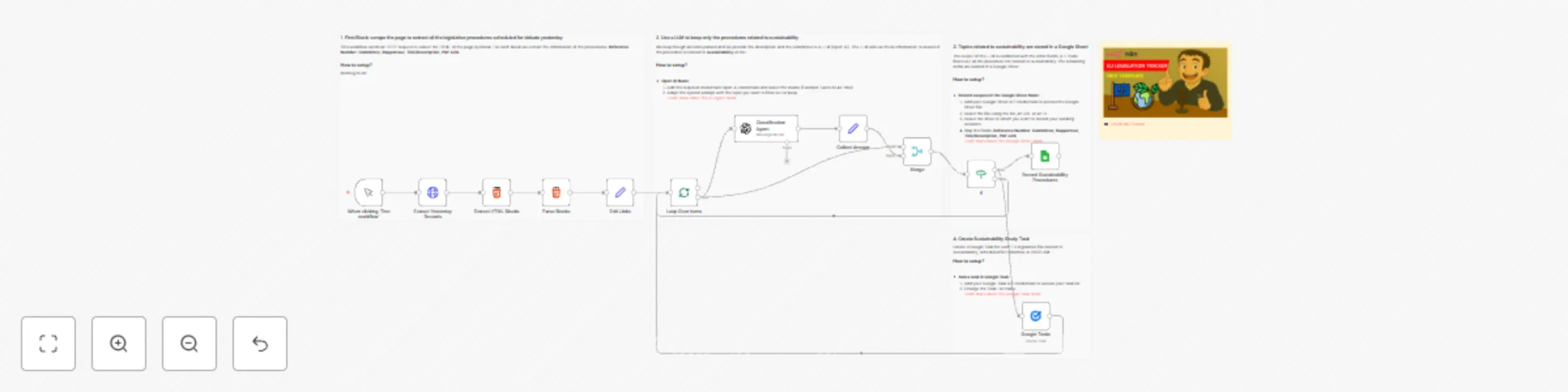
  1. 🌐 Scrapes the EU Parliament legislative portal for yesterday’s entries
  2. 🧠 Uses OpenAI to classify if each procedure is related to sustainability
  3. 🗂️ Filters out irrelevant items
  4. 📊 Saves the results in a Google Sheet
  5. ✅ Creates a Google Task for each relevant file to review the legislation

How it works

  1. Trigger manually or on schedule
  2. Scrape HTML blocks for scheduled debates
  3. Parse each procedure to extract Title, Committee, Rapporteur, PDF link
  4. Call GPT-4-turbo to check if the topic matches sustainability criteria
  5. Filter responses based on “yes” or “no”
  6. Store valid items into Google Sheets
  7. Generate tasks in Google Tasks

The AI only flags procedures that directly impact the environment, circular economy, or pollution control.

What do I need to get started?

You’ll need:

  • A Google Sheet connected to your n8n instance
  • An OpenAI account with GPT-4 access
  • A Google Task List

Follow the Guide!

Follow the sticky notes in the workflow or check my tutorial to configure each node and start using AI to monitor sustainability regulations in Europe.

🎥 Watch My Tutorial

Notes

  • AI filters are strict — you can customise the system prompt to match your needs
  • This is ideal for tracking legislative risk for climate regulations

This workflow was built using n8n version 1.85.4
Submitted: April 21, 2025

1.2 Logical Blocks

This catalog entry is organized from the workflow JSON. The node-level section below shows the executable blocks available for review before importing the template.

2. Block-by-Block Analysis

Block 1 - Loop Over Items

Type / Role
n8n-nodes-base.splitInBatches - splitInBatches
Config choices
Version 3

Block 2 - Merge

Type / Role
n8n-nodes-base.merge - merge
Config choices
Version 3

Block 3 - If

Type / Role
n8n-nodes-base.if - if
Config choices
Version 2.2

Block 4 - Extract Yesterday Records

Type / Role
n8n-nodes-base.httpRequest - httpRequest
Config choices
Version 4.2

Block 5 - Sticky Note1

Type / Role
n8n-nodes-base.stickyNote - stickyNote
Config choices
Version 1

Block 6 - Extract HTML Blocks

Type / Role
n8n-nodes-base.html - html
Config choices
Version 1.2

Block 7 - Parse Blocks

Type / Role
n8n-nodes-base.html - html
Config choices
Version 1.2

Block 8 - Sticky Note

Type / Role
n8n-nodes-base.stickyNote - stickyNote
Config choices
Version 1

Block 9 - Sticky Note2

Type / Role
n8n-nodes-base.stickyNote - stickyNote
Config choices
Version 1

Block 10 - Google Tasks

Type / Role
n8n-nodes-base.googleTasks - googleTasks
Config choices
Version 1

Block 11 - Sticky Note3

Type / Role
n8n-nodes-base.stickyNote - stickyNote
Config choices
Version 1

Block 12 - When clicking ‘Test workflow’

Type / Role
n8n-nodes-base.manualTrigger - manualTrigger
Config choices
Version 1

Block 13 - Classification Agent

Type / Role
@n8n/n8n-nodes-langchain.openAi - openAi
Config choices
Version 1.8

Block 14 - Collect Answer

Type / Role
n8n-nodes-base.set - set
Config choices
Version 3.4

Block 15 - Record Sustainability Procedures

Type / Role
n8n-nodes-base.googleSheets - googleSheets
Config choices
Version 4.5

Block 16 - Edit Links

Type / Role
n8n-nodes-base.set - set
Config choices
Version 3.4

Block 17 - Sticky Note4

Type / Role
n8n-nodes-base.stickyNote - stickyNote
Config choices
Version 1

3. Summary Table

Workflow 🌳 EU green legislation tracker with GPT-4o, Google Sheets and Tasks
Complexity advanced
Nodes 17
Categories Document Extraction, AI Summarization
Author Samir Saci
Published 21 Apr 2025

4. Reproducing the Workflow from Scratch

  1. 1. Download the workflow JSON

    Use the JSON export at /data/workflows/3644/3644.json as the source template for this automation.

  2. 2. Import the template into n8n

    Open n8n, import the downloaded JSON, and review each node before activating the workflow.

  3. 3. Configure credentials and variables

    Replace placeholder credentials, API keys, webhook URLs, account IDs, and environment-specific values with your own settings.

  4. 4. Test with sample data

    Run the workflow manually or in a staging workspace, inspect node output, and confirm downstream systems receive the expected data.

  5. 5. Activate and monitor

    Enable the workflow only after testing, then monitor executions, errors, and rate limits during the first production runs.

5. General Notes & Resources

Review imported nodes carefully before activation. This catalog entry is intended to help you inspect the workflow structure, understand required services, and find related templates faster.

Node names, credentials, schedules, webhook paths, and external service limits may need adjustment for your workspace.

Frequently asked questions

What does 🌳 EU green legislation tracker with GPT-4o, Google Sheets and Tasks do?

Tags: EU Legislation, Sustainability, Automation, Web Scraping, OpenAI, Google Sheets, Policy Monitoring, Climate Context Hey! I’m Samir, a Supply Chain Engineer and Data S...

What do I need before importing this workflow?

Review the workflow JSON, configure any required credentials in n8n, and test the automation in a safe workspace before using it in production.

Can I customize this workflow?

Yes. Use the block-by-block analysis and the downloadable JSON to inspect each node, then adjust credentials, prompts, schedules, filters, or destinations for your Document Extraction, AI Summarization use case.